
magento2
 magento2 copied to clipboard
 magento
Add modularity to product form tabs
Summary (*)
One of my client wants its product form page with left column as he it used to be with M1.
When he asked me that, I thought : "No problem, M2 is customizable, let's do this".
But simply change layout to admin-2columns-left and product_form layout does not work, because some of the tabs does not implement Magento\Ui\Component\Layout\Tabs\TabInterface
Those classes are :
Magento\Catalog\Block\Adminhtml\Product\Helper\Form\GalleryMagento\ConfigurableProduct\Block\Adminhtml\Product\Edit\Tab\Variations\Config\Matrix
But even when fixing this, we still get JS errors.
Example
adminhtml/layout/catalog_product_edit.xml :
<?xml version="1.0"?>
<!--
/**
 * Copyright © Magento, Inc. All rights reserved.
 * See COPYING.txt for license details.
 */
-->
<page xmlns:xsi="http://www.w3.org/2001/XMLSchema-instance" layout="admin-2columns-left" xsi:noNamespaceSchemaLocation="urn:magento:framework:View/Layout/etc/page_configuration.xsd">
</page>
adminhtml/ui_component/product_form.xml :
<?xml version="1.0" encoding="UTF-8"?>
<!--
/**
 * Copyright © Magento, Inc. All rights reserved.
 * See COPYING.txt for license details.
 */
-->
<form xmlns:xsi="http://www.w3.org/2001/XMLSchema-instance" xsi:noNamespaceSchemaLocation="urn:magento:module:Magento_Ui:etc/ui_configuration.xsd">
    <settings>
        <layout>
            <navContainerName>left</navContainerName>
            <type>tabs</type>
        </layout>
    </settings>
</form>
Result Invalid method Magento\Catalog\Block\Adminhtml\Product\Helper\Form\Gallery::canShowTab
Proposed solution
A quick approach is to fix those two classes by implementing the TabInterface. The best approach is to force the use of TabInterface when using tabs, whatever the layout we're using.
(And fix js errors when using 2-columns layout)
Please provide Severity assessment for the Issue as Reporter. This information will help during Confirmation and Issue triage processes.
- [ ] Severity: S0 - Affects critical data or functionality and leaves users with no workaround.
- [ ] Severity: S1 - Affects critical data or functionality and forces users to employ a workaround.
- [ ] Severity: S2 - Affects non-critical data or functionality and forces users to employ a workaround.
- [ ] Severity: S3 - Affects non-critical data or functionality and does not force users to employ a workaround.
- [X] Severity: S4 - Affects aesthetics, professional look and feel, “quality” or “usability”.

Hi @Nuranto. Thank you for your report. To speed up processing of this issue, make sure that you provided the following information:
- Summary of the issue
- Information on your environment
- Steps to reproduce
- Expected and actual results
Make sure that the issue is reproducible on the vanilla Magento instance following Steps to reproduce. To deploy vanilla Magento instance on our environment, Add a comment to the issue:
@magento give me 2.4-develop instance - upcoming 2.4.x release
For more details, review the Magento Contributor Assistant documentation.
Add a comment to assign the issue: @magento I am working on this
To learn more about issue processing workflow, refer to the Code Contributions.
- Join Magento Community Engineering Slack and ask your questions in #github channel.
:warning: According to the Magento Contribution requirements, all issues must go through the Community Contributions Triage process. Community Contributions Triage is a public meeting.
:clock10: You can find the schedule on the Magento Community Calendar page.
:telephone_receiver: The triage of issues happens in the queue order. If you want to speed up the delivery of your contribution, join the Community Contributions Triage session to discuss the appropriate ticket.
:pencil2: Feel free to post questions/proposals/feedback related to the Community Contributions Triage process to the corresponding Slack Channel
![m2-assistant[bot] avatar](https://avatars.githubusercontent.com/in/27048?v=4 "Published by a pub.dev verified publisher")
Hi @engcom-Delta. Thank you for working on this issue. In order to make sure that issue has enough information and ready for development, please read and check the following instruction: :point_down:
-
[ ] 1. Verify that issue has all the required information. (Preconditions, Steps to reproduce, Expected result, Actual result).
Details
If the issue has a valid description, the labelIssue: Format is validwill be added to the issue automatically. Please, edit issue description if needed, until labelIssue: Format is validappears. -
[ ] 2. Verify that issue has a meaningful description and provides enough information to reproduce the issue. If the report is valid, add
Issue: Clear Descriptionlabel to the issue by yourself. -
[ ] 3. Add
Component: XXXXXlabel(s) to the ticket, indicating the components it may be related to. -
[ ] 4. Verify that the issue is reproducible on
2.4-developbranchDetails
- Add the comment@magento give me 2.4-develop instanceto deploy test instance on Magento infrastructure.
- If the issue is reproducible on2.4-developbranch, please, add the labelReproduced on 2.4.x.
- If the issue is not reproducible, add your comment that issue is not reproducible and close the issue and stop verification process here! -
[ ] 5. Add label
Issue: Confirmedonce verification is complete. -
[ ] 6. Make sure that automatic system confirms that report has been added to the backlog.
:heavy_check_mark: Issue confirmed
Issue got reproduced in 2.4-develop branch.
Description:
When we try to change the product's layout in admin panel from the custom module,we are getting an Exception message.
Pre-requisite: 2.4-develop
Steps to reproduce: 1.Create a custom module
2.Change the catalog_product_edit.xml and product_form.xml files as mentioned in the main description.
3.Check the product's page in admin panel.
Expected result:
In admin panel product's layout should be appear as admin-2columns-left layout.
Actual result:
In products page we are getting an exception message.
Screenshots: 1.Create a custom module and change the catalog_product_edit.xml and product_form.xml files as mentioned in the main description. custommodule.zip
2.Check the product's page in admin panel.(open any product in edit mode)
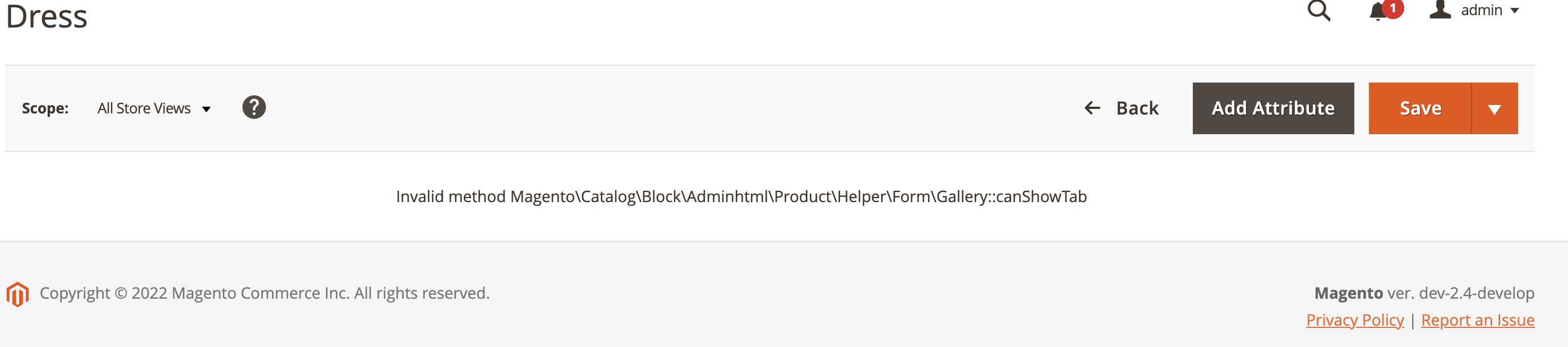
we are getting exception message.
Hence confirming the issue.
Thanks.

:white_check_mark: Jira issue https://jira.corp.adobe.com/browse/AC-6727 is successfully created for this GitHub issue.

:white_check_mark: Confirmed by @engcom-Delta. Thank you for verifying the issue.
Issue Available: @engcom-Delta, You will be automatically unassigned. Contributors/Maintainers can claim this issue to continue. To reclaim and continue work, reassign the ticket to yourself.