

 magento
"Can not resolve reCAPTCHA parameter" entries in exception.log for Google reCAPTCHA Admin Panel
Preconditions (*)
- Magento 2.4.3-p1
Steps to reproduce (*)
-
Go to Configuration > Security > Google reCAPTCHA Admin Panel
-
Add your Google API Website Key & Google API Secret Key to any reCAPTCHA below:
reCAPTCHA v2 ("I am not a robot") reCAPTCHA v2 Invisible reCAPTCHA v3 Invisible
- Select your reCAPTCHA version (with API keys above) for either below:
Enable for Login Enable for Forgot Password
-
Save config
-
Flush cache
Expected result (*)
- No entry in var/log/exception.log file
Actual result (*)
- Below entry every few seconds/minutes constantly with no traffic:
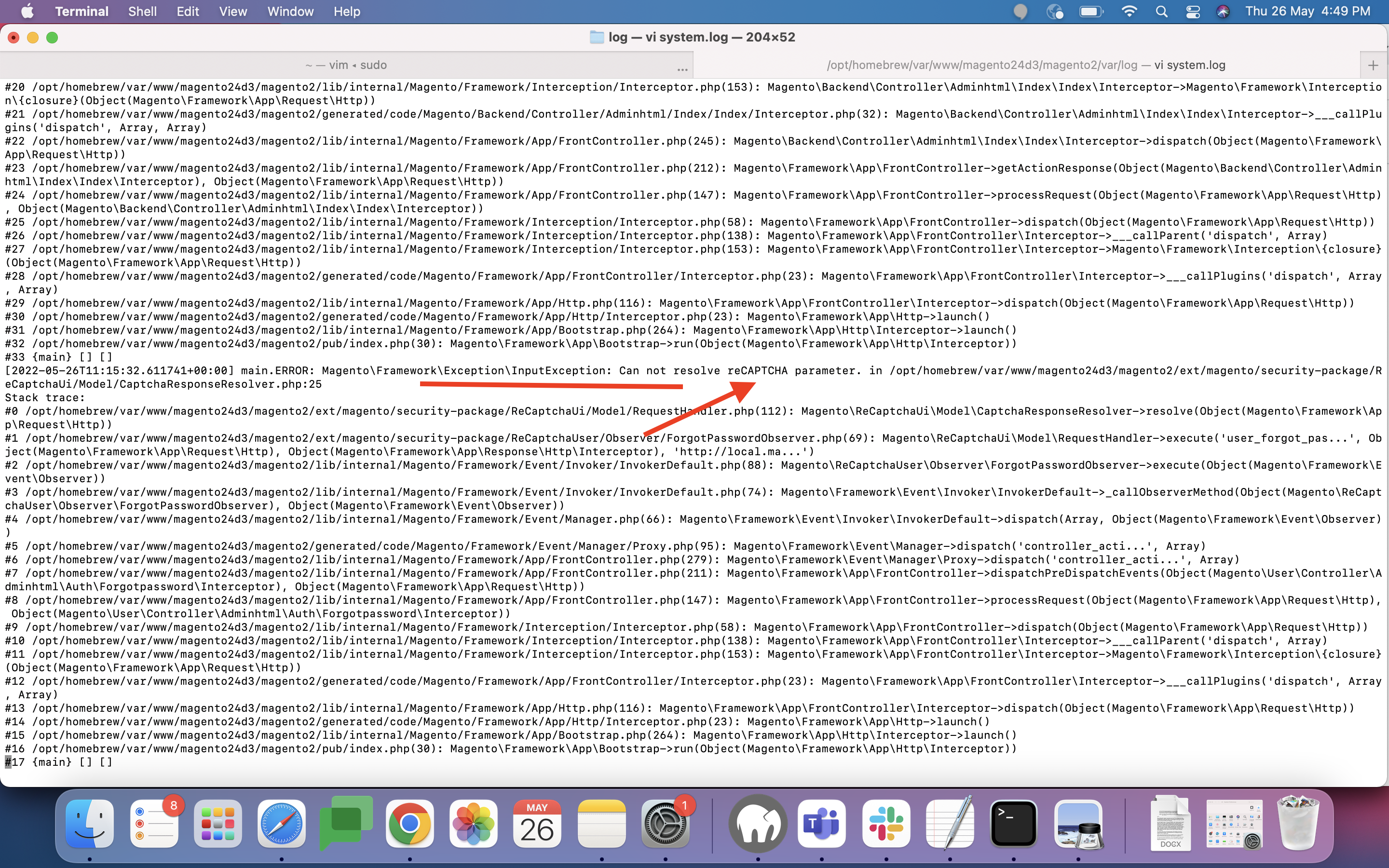
main.ERROR: Can not resolve reCAPTCHA parameter. {"exception":"[object] (Magento\Framework\Exception\InputException(code: 0): Can not resolve reCAPTCHA parameter. at /home/xxxxxxx/public_html/vendor/magento/module-re-captcha-ui/Model/CaptchaResponseResolver.php:25)"} []
- Getting around 12,000 entry lines every 24 hours in exception.log file which is getting huge in a short period of time.
- Keys have been triple checked to make sure correct, even created new ones with no change in behavior.
- reCAPTCHA for both Admin and Frontend seems to be working.
- Only known way to stop entries is disable both "Enable for Login" and "Enable for Forgot Password" for Admin Storefront.
- reCAPTCHA for Frontend storefront isn't experiencing this issue for us for all enabled areas.
Please provide Severity assessment for the Issue as Reporter. This information will help during Confirmation and Issue triage processes.
- [ ] Severity: S0 - Affects critical data or functionality and leaves users without workaround.
- [ ] Severity: S1 - Affects critical data or functionality and forces users to employ a workaround.
- [x] Severity: S2 - Affects non-critical data or functionality and forces users to employ a workaround.
- [ ] Severity: S3 - Affects non-critical data or functionality and does not force users to employ a workaround.
- [ ] Severity: S4 - Affects aesthetics, professional look and feel, “quality” or “usability”.

Hi @engcom-Hotel. Thank you for working on this issue. In order to make sure that issue has enough information and ready for development, please read and check the following instruction: :point_down:
-
[ ] 1. Verify that issue has all the required information. (Preconditions, Steps to reproduce, Expected result, Actual result).
Details
If the issue has a valid description, the labelIssue: Format is validwill be added to the issue automatically. Please, edit issue description if needed, until labelIssue: Format is validappears. -
[ ] 2. Verify that issue has a meaningful description and provides enough information to reproduce the issue. If the report is valid, add
Issue: Clear Descriptionlabel to the issue by yourself. -
[ ] 3. Add
Component: XXXXXlabel(s) to the ticket, indicating the components it may be related to. -
[ ] 4. Verify that the issue is reproducible on
2.4-developbranchDetails
- Add the comment@magento give me 2.4-develop instanceto deploy test instance on Magento infrastructure.
- If the issue is reproducible on2.4-developbranch, please, add the labelReproduced on 2.4.x.
- If the issue is not reproducible, add your comment that issue is not reproducible and close the issue and stop verification process here! -
[ ] 5. Add label
Issue: Confirmedonce verification is complete. -
[ ] 6. Make sure that automatic system confirms that report has been added to the backlog.
![m2-assistant[bot] avatar](https://avatars.githubusercontent.com/in/27048?v=4 "Published by a pub.dev verified publisher")
Same issue. Happens all the time.
[2022-01-17 14:31:45] main.ERROR: Can not resolve reCAPTCHA parameter. {"exception":"[object] (Magento\\Framework\\Exception\\InputException(code: 0): Can not resolve reCAPTCHA parameter. at /var/www/html/magento/vendor/magento/module-re-captcha-ui/Model/CaptchaResponseResolver.php:25)"} []

[2022-01-17 16:21:40] main.ERROR: Can not resolve reCAPTCHA parameter. {"exception":"[object] (Magento\\Framework\\Exception\\InputException(code: 0): Can not resolve reCAPTCHA parameter. at /var/www/html/magento/vendor/magento/module-re-captcha-ui/Model/CaptchaResponseResolver.php:25)"} []
Captcha works. The badge is loaded and visible. When I go to log in, I'll get an error message saying something went wrong. I'll have to log in 2-3 times and around the third time it'll let me in. No javascript console errors are present during this issue.

Captcha works. The badge is loaded and visible. When I go to log in, I'll get an error message saying something went wrong. I'll have to log in 2-3 times and around the third time it'll let me in. No javascript console errors are present during this issue.
Yes this happens as well, I forgot to mention that. Thank you!
Just wanted to note that we are getting the "Something went wrong with reCAPTCHA. Please contact the store owner." error on frontend too, not just on Admin. The 12,000+ daily log entries are happening with Admin module though.
We got the same issue, but after analyzing it - it looks like we're getting a lot of such messages because some bot(s) are trying to create a customer, and captcha validation fails for them. We weren't able to reproduce this issue ourselves.

We got the same issue, but after analyzing it - it looks like we're getting a lot of such messages because some bot(s) are trying to create a customer, and captcha validation fails for them. We weren't able to reproduce this issue ourselves.
Thanks for the info! How could we verify if that is the case for us as well?
@stevekem, we analyzed logs, the interval between requests from the same IP address was ~0-3 sec (usually people don't do requests so quickly), the requests were to /customer/account/create/, /customer/account/createpost/ and to /customer/account/create/<product_url_path>/.
The last case links are not available on the website, so that's some bot for sure.
@ihor-sviziev Ok gotcha! If it is the bots, just block them in robots? Did that resolve the issue for you?
@stevekem that looks like bots that are trying to hack or do something similar by creating a new customer
@ihor-sviziev In your case, did you block the bots in robots.txt to resolve the issue?
@stevekem yes, the requests starting with /customer/ are blocked by default and we're not removed that.
@ihor-sviziev Thank you, appreciate it! Will check our logs and see if that's the case for us as well.
Hi @engcom-Delta. Thank you for working on this issue. In order to make sure that issue has enough information and ready for development, please read and check the following instruction: :point_down:
-
[ ] 1. Verify that issue has all the required information. (Preconditions, Steps to reproduce, Expected result, Actual result).
Details
If the issue has a valid description, the labelIssue: Format is validwill be added to the issue automatically. Please, edit issue description if needed, until labelIssue: Format is validappears. -
[ ] 2. Verify that issue has a meaningful description and provides enough information to reproduce the issue. If the report is valid, add
Issue: Clear Descriptionlabel to the issue by yourself. -
[ ] 3. Add
Component: XXXXXlabel(s) to the ticket, indicating the components it may be related to. -
[ ] 4. Verify that the issue is reproducible on
2.4-developbranchDetails
- Add the comment@magento give me 2.4-develop instanceto deploy test instance on Magento infrastructure.
- If the issue is reproducible on2.4-developbranch, please, add the labelReproduced on 2.4.x.
- If the issue is not reproducible, add your comment that issue is not reproducible and close the issue and stop verification process here! -
[ ] 5. Add label
Issue: Confirmedonce verification is complete. -
[ ] 6. Make sure that automatic system confirms that report has been added to the backlog.
Hi @stevekem , Thank you for reporting the issue,We are unable to reproduce the issue on Magento 2.4 develop branch.Please review provided steps. Steps Followed:
1.Login to admin Panel 2.Go to Stores-->Configuration-->Security-->Google Recaptcha Admin Panel-->reCAPTCHA v2("I am not a robot) 3.Added Google API Website Key and Google API Secret Key to reCAPTCHA v2("I am not a robot) 4.Enabled for Login Enabled for Forgot Password 5.Saved the configuration 6.Flush Cache
Actual Results
1.No entry in var/log/exception.log file

Hence Adding the label "Needs Update"

We have noticed that this issue has not been updated for a period of more than 14 Days. Hence we assume that this issue is fixed now, so we are closing it. Please raise a fresh ticket or reopen this ticket if you need more assistance on this.
We are still facing this issue. In my case, a captcha is needed for the newsletter subscription form. Same error.
[2022-04-13 13:13:03] main.ERROR: Can not resolve reCAPTCHA parameter. {"exception":"[object] (Magento\\Framework\\Exception\\InputException(code: 0): Can not resolve reCAPTCHA parameter. at /home/xxxxxx/public_html/vendor/magento/module-re-captcha-ui/Model/CaptchaResponseResolver.php:25)"} []

@engcom-Delta @knoorani-ijona Same problem in Magento 2.4.4 in admin loggin page. it seems that the error is reproduced only in production mode
main.ERROR: Magento\Framework\Exception\InputException: Can not resolve reCAPTCHA parameter. in vendor/magento/module-re-captcha-ui/Model/CaptchaResponseResolver.php:25

In my case, there were two javascript errors that caused me to not be able to log in. These errors are due to the minification of the collapse.js and tab.js files in the lib/web/jquery/bootstrap/ path.
So the solution to this problem has been to exclude those files from the minification.
<?xml version="1.0"?>
<config xmlns:xsi="http://www.w3.org/2001/XMLSchema-instance" xsi:noNamespaceSchemaLocation="urn:magento:module:Magento_Store:etc/config.xsd">
    <default>
        <dev>
            <js>
                <minify_exclude>
                    <collapse>/jquery/bootstrap/collapse</collapse>
                    <tab>/jquery/bootstrap/tab</tab>
                </minify_exclude>
            </js>
        </dev>
    </default>
</config>
Hello, We got the same issue in magento version 2.4.3. lot of exception errors in log file. Also, I did try above all solution but didn't work any one. Any update on this issue.

@engcom-Delta @knoorani-ijona I am having the same problem in Magento 2.4.4. I'll have to log in 2-3 times before it allows me to log in. This issue is not occurring on frontend side.
Minification of the collapse.js and tab.js files in the lib/web/jquery/bootstrap/ path is not fixing the issue.

@engcom-Delta @knoorani-ijona I am having the same problem in Magento 2.4.4.
I'll have to log in 2-3 times before it allows me to log in. This issue is not occurring on frontend side.
Minification of the collapse.js and tab.js files in the lib/web/jquery/bootstrap/ path is not fixing the issue.
I have to disable recaptcha for admin login。I hope magento open this issue and review the problem。thanks
I'm having the same issue. On Friday I upgraded from Magento 2.4.3-p1 to 2.4.4 and today I'm unable to log in to the Backend/Admin. I had to disable Admin Login Recaptcha in the Database to be able to login again.
I have no idea what is going on and have to keep recaptcha disabled in the Admin login for now.
Stack trace is:
[2022-05-23T17:10:05.800157+00:00] main.ERROR: Magento\Framework\Exception\InputException: Can not resolve reCAPTCHA parameter. in /var/www/html/vendor/magento/module-re-captcha-ui/Model/CaptchaResponseResolver.php:25
Stack trace:
#0 /var/www/html/vendor/magento/module-re-captcha-user/Observer/LoginObserver.php(125): Magento\ReCaptchaUi\Model\CaptchaResponseResolver->resolve(Object(Magento\Framework\App\Request\Http))
#1 /var/www/html/vendor/magento/framework/Event/Invoker/InvokerDefault.php(88): Magento\ReCaptchaUser\Observer\LoginObserver->execute(Object(Magento\Framework\Event\Observer))
#2 /var/www/html/vendor/magento/framework/Event/Invoker/InvokerDefault.php(74): Magento\Framework\Event\Invoker\InvokerDefault->_callObserverMethod(Object(Magento\ReCaptchaUser\Observer\LoginObserver), Object(Magento\Framework\Event\Observer))
#3 /var/www/html/vendor/magento/framework/Event/Manager.php(66): Magento\Framework\Event\Invoker\InvokerDefault->dispatch(Array, Object(Magento\Framework\Event\Observer))
#4 /var/www/html/generated/code/Magento/Framework/Event/Manager/Proxy.php(95): Magento\Framework\Event\Manager->dispatch('admin_user_auth...', Array)
#5 /var/www/html/vendor/magento/module-user/Model/User.php(589): Magento\Framework\Event\Manager\Proxy->dispatch('admin_user_auth...', Array)
#6 /var/www/html/generated/code/Magento/User/Model/User/Interceptor.php(140): Magento\User\Model\User->authenticate('dsadsadasdds', 'asdasdsasdasd')
#7 /var/www/html/vendor/magento/module-user/Model/User.php(649): Magento\User\Model\User\Interceptor->authenticate('dsadasd', 'dsadasd')
#8 /var/www/html/generated/code/Magento/User/Model/User/Interceptor.php(158): Magento\User\Model\User->login('dsadasd', 'dsadasd')
#9 /var/www/html/vendor/magento/module-backend/Model/Auth.php(162): Magento\User\Model\User\Interceptor->login('dsadsadasdds', 'asdasdasdd')
#10 /var/www/html/vendor/magento/framework/Interception/Interceptor.php(58): Magento\Backend\Model\Auth->login('dsadasd', 'dsadasd')
#11 /var/www/html/vendor/magento/framework/Interception/Interceptor.php(138): Magento\Backend\Model\Auth\Interceptor->___callParent('login', Array)
#12 /var/www/html/vendor/magento/framework/Interception/Interceptor.php(153): Magento\Backend\Model\Auth\Interceptor->Magento\Framework\Interception\{closure}('sdfsdfdfdfsdf, 'fdsfdsdfsdfsdfsdfsdfsdfdfsfdfsd')
#13 /var/www/html/generated/code/Magento/Backend/Model/Auth/Interceptor.php(59): Magento\Backend\Model\Auth\Interceptor->___callPlugins('login', Array, Array)
#14 /var/www/html/vendor/magento/module-backend/App/Action/Plugin/Authentication.php(207): Magento\Backend\Model\Auth\Interceptor->login('dsadsadasdds', 'asdasdasdasd')
#15 /var/www/html/vendor/magento/module-backend/App/Action/Plugin/Authentication.php(159): Magento\Backend\App\Action\Plugin\Authentication->_performLogin(Object(Magento\Framework\App\Request\Http))
#16 /var/www/html/vendor/magento/module-backend/App/Action/Plugin/Authentication.php(127): Magento\Backend\App\Action\Plugin\Authentication->_processNotLoggedInUser(Object(Magento\Framework\App\Request\Http))
#17 /var/www/html/vendor/magento/framework/Interception/Interceptor.php(135): Magento\Backend\App\Action\Plugin\Authentication->aroundDispatch(Object(Magento\Backend\Controller\Adminhtml\Index\Index\Interceptor), Object(Closure), Object(Magento\Framework\App\Request\Http))
#18 /var/www/html/vendor/magento/framework/Interception/Interceptor.php(153): Magento\Backend\Controller\Adminhtml\Index\Index\Interceptor->Magento\Framework\Interception\{closure}(Object(Magento\Framework\App\Request\Http))
#19 /var/www/html/generated/code/Magento/Backend/Controller/Adminhtml/Index/Index/Interceptor.php(32): Magento\Backend\Controller\Adminhtml\Index\Index\Interceptor->___callPlugins('dispatch', Array, Array)
#20 /var/www/html/vendor/magento/framework/App/FrontController.php(245): Magento\Backend\Controller\Adminhtml\Index\Index\Interceptor->dispatch(Object(Magento\Framework\App\Request\Http))
#21 /var/www/html/vendor/magento/framework/App/FrontController.php(212): Magento\Framework\App\FrontController->getActionResponse(Object(Magento\Backend\Controller\Adminhtml\Index\Index\Interceptor), Object(Magento\Framework\App\Request\Http))
#22 /var/www/html/vendor/magento/framework/App/FrontController.php(147): Magento\Framework\App\FrontController->processRequest(Object(Magento\Framework\App\Request\Http), Object(Magento\Backend\Controller\Adminhtml\Index\Index\Interceptor))
#23 /var/www/html/vendor/magento/framework/Interception/Interceptor.php(58): Magento\Framework\App\FrontController->dispatch(Object(Magento\Framework\App\Request\Http))
#24 /var/www/html/vendor/magento/framework/Interception/Interceptor.php(138): Magento\Framework\App\FrontController\Interceptor->___callParent('dispatch', Array)
#25 /var/www/html/vendor/magento/framework/Interception/Interceptor.php(153): Magento\Framework\App\FrontController\Interceptor->Magento\Framework\Interception\{closure}(Object(Magento\Framework\App\Request\Http))
#26 /var/www/html/generated/code/Magento/Framework/App/FrontController/Interceptor.php(23): Magento\Framework\App\FrontController\Interceptor->___callPlugins('dispatch', Array, Array)
#27 /var/www/html/vendor/magento/framework/App/Http.php(116): Magento\Framework\App\FrontController\Interceptor->dispatch(Object(Magento\Framework\App\Request\Http))
#28 /var/www/html/generated/code/Magento/Framework/App/Http/Interceptor.php(23): Magento\Framework\App\Http->launch()
#29 /var/www/html/vendor/magento/framework/App/Bootstrap.php(264): Magento\Framework\App\Http\Interceptor->launch()
#30 /var/www/html/pub/index.php(30): Magento\Framework\App\Bootstrap->run(Object(Magento\Framework\App\Http\Interceptor))
#31 {main} [] []````

This is the offending file.
vendor/magento/module-re-captcha-user/view/adminhtml/templates/recaptcha.phtml
Essentially, this was coded in a way that the submit function binders were able to allow the submit wihtout waiting for the recaptcha code.
That then would submit the form without the recatpcha token, that causes the error above in the exception.log
I've re-coded this, so replace that file with this and it should work. This might need extra work to make sure the invisible captcha configuration works as expected.
<?php /** * Copyright © Magento, Inc. All rights reserved. * See COPYING.txt for license details. */ /** @var $block Magento\ReCaptchaUi\Block\ReCaptcha */ $config = $block->getCaptchaUiConfig(); $renderingOptions = $config['rendering'] ?? []; $isInvisible = !empty($config['invisible']); ?> <div class="admin__field <?= /* @noEscape */ $isInvisible ? 'field-invisible-recaptcha' : 'field-recaptcha' ?>"><div id="admin-recaptcha" class="admin-recaptcha-content<?= /* @noEscape */ !empty($renderingOptions['size']) ? ' size-' . $renderingOptions['size'] : '' ?>"></div></div><script>
    require([
        'jquery'
    ], function (
        $
    ) {
        const element = document.createElement('script');
        const scriptTag = document.getElementsByTagName('script')[0];

        element.async = true;
        element.src = 'https://www.google.com/recaptcha/api.js'
            + '?onload=globalOnRecaptchaOnLoadCallback&render=explicit';

        let isRecaptchaLoaded = false;
        let token = '';
        let maxRetryAttempts = 5;
        let attempts = 0;

        $('#login-form').submit(function (event) {
            if (!token) {
                event.preventDefault(event);
                event.stopImmediatePropagation();
                event.stopPropagation();

                let attemptRecaptcha = () => {
                    attempts++;
                    if (attempts > maxRetryAttempts){
                        console.error("Could not fetch invisible ReCaptcha token. Please refresh the page and try again.");
                        return;
                    }
                    if (!isRecaptchaLoaded) {
                        //wait until it is
                        setTimeout(() => {
                            attemptRecaptcha()
                        }, 1000);
                        return;
                    }
                    let widgetId = grecaptcha.render('admin-recaptcha', {
                        <?php foreach ($renderingOptions as $key => $value): ?> '<?= $block->escapeJs($key) ?>': '<?= $block->escapeJs($value) ?>',
                        <?php endforeach; ?> 'callback': function (_token) {
                            <?php if ($isInvisible): ?>
                            token = _token;
                            $('#login-form').unbind('submit');
                            $('#login-form').submit();
                            <?php endif; ?> }
                    });
                    grecaptcha.execute(widgetId)
                        .then( () => {
                            event.preventDefault(event);
                            event.stopImmediatePropagation();
                            event.stopPropagation();
                        }, (reason) => { })
                        .catch(err => { console.error(err); });
                }
                attemptRecaptcha();
            }
        });
        window.globalOnRecaptchaOnLoadCallback = function () {
            isRecaptchaLoaded = true;
        }
        scriptTag.parentNode.insertBefore(element, scriptTag);
    });</script>

Wow, thank you. Yeah, it works with that code now indeed.
The blue "protected by recaptcha" box now only appears briefly after submitting the form. It's not visible before. Is that part of the fix?
The "g-recaptcha-response" parameter is now correctly filled again and the exception is therefore not thrown anymore.
Just noticed I accidentally made the other post with an old account of mine.

Hey @C4rter . Try this instead.
<?php /** * Copyright © Magento, Inc. All rights reserved. * See COPYING.txt for license details. */ /** @var $block Magento\ReCaptchaUi\Block\ReCaptcha */ $config = $block->getCaptchaUiConfig(); $renderingOptions = $config['rendering'] ?? []; $isInvisible = !empty($config['invisible']); ?> <div class="admin__field <?= /* @noEscape */ $isInvisible ? 'field-invisible-recaptcha' : 'field-recaptcha' ?>"><div id="admin-recaptcha" class="admin-recaptcha-content<?= /* @noEscape */ !empty($renderingOptions['size']) ? ' size-' . $renderingOptions['size'] : '' ?>"></div></div><script>
    require([
        'jquery'
    ], function (
        $
    ) {
        const element = document.createElement('script');
        const scriptTag = document.getElementsByTagName('script')[0];

        element.async = true;
        element.src = 'https://www.google.com/recaptcha/api.js'
            + '?onload=globalOnRecaptchaOnLoadCallback&render=explicit';

        let isRecaptchaLoaded = false;
        let token = '';
        let maxRetryAttempts = 5;
        let attempts = 0;
        let widgetId = 0;
        <?php if ($isInvisible): ?>
        $('#login-form').submit(function (event) {
            if (!token) {
                event.preventDefault(event);
                event.stopImmediatePropagation();
                event.stopPropagation();

                let attemptRecaptcha = () => {
                    attempts++;
                    if (attempts > maxRetryAttempts){
                        console.error("Could not fetch invisible ReCaptcha token. Please refresh the page and try again.");
                        return;
                    }
                    if (!isRecaptchaLoaded) {

                        setTimeout(() => {
                            attemptRecaptcha()
                        }, 1000);
                        return;
                    }
                    grecaptcha.execute(widgetId)
                        .then( () => {
                            event.preventDefault(event);
                            event.stopImmediatePropagation();
                            event.stopPropagation();
                        }, (reason) => { })
                        .catch(err => { console.error(err); });
                }
                attemptRecaptcha();
            }
        });
        <?php endif; ?>
        window.globalOnRecaptchaOnLoadCallback = function () {

            widgetId = grecaptcha.render('admin-recaptcha', {
                <?php foreach ($renderingOptions as $key => $value): ?> '<?= $block->escapeJs($key) ?>': '<?= $block->escapeJs($value) ?>',
                <?php endforeach; ?> 'callback': function (_token) {
                    <?php if ($isInvisible): ?>
                    token = _token;
                    $('#login-form').unbind('submit');
                    $('#login-form').submit();
                    <?php endif; ?> }
            });
            isRecaptchaLoaded = true;
        }
        scriptTag.parentNode.insertBefore(element, scriptTag);
    });</script>
Excellent,
This last code completely fixed the re-captcha issue
Thank you very much
On Thu, May 26, 2022 at 3:42 PM tschirmer @.***> wrote:
Hey @C4rter https://github.com/C4rter . Try this instead.
getCaptchaUiConfig(); $renderingOptions = $config['rendering'] ?? []; $isInvisible = !empty($config['invisible']); ?>
Hi @stevekem , We have tried to reproduce on Magento 2.4 develop instance and issue is reproducible. Hence issue has been confirmed.
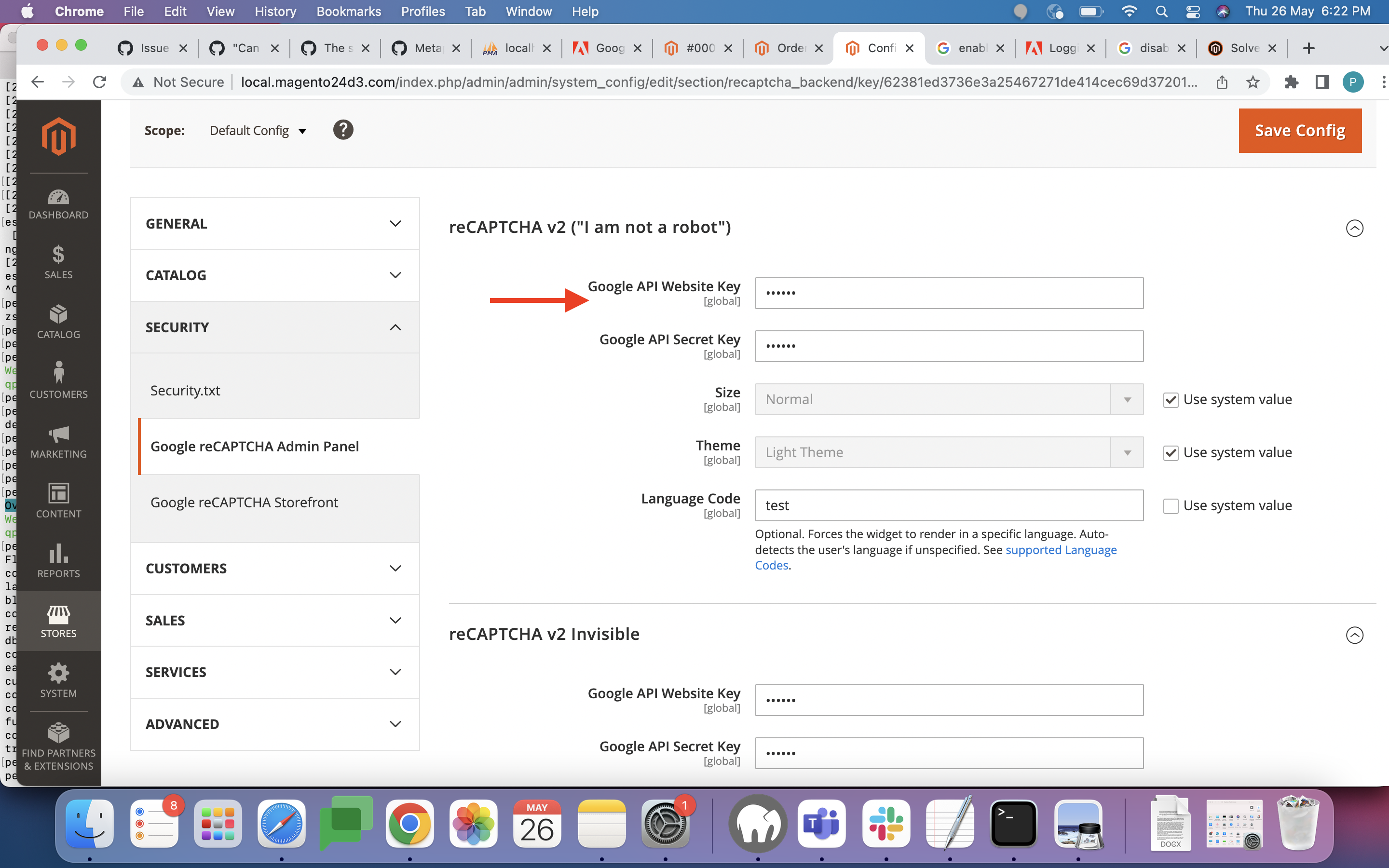
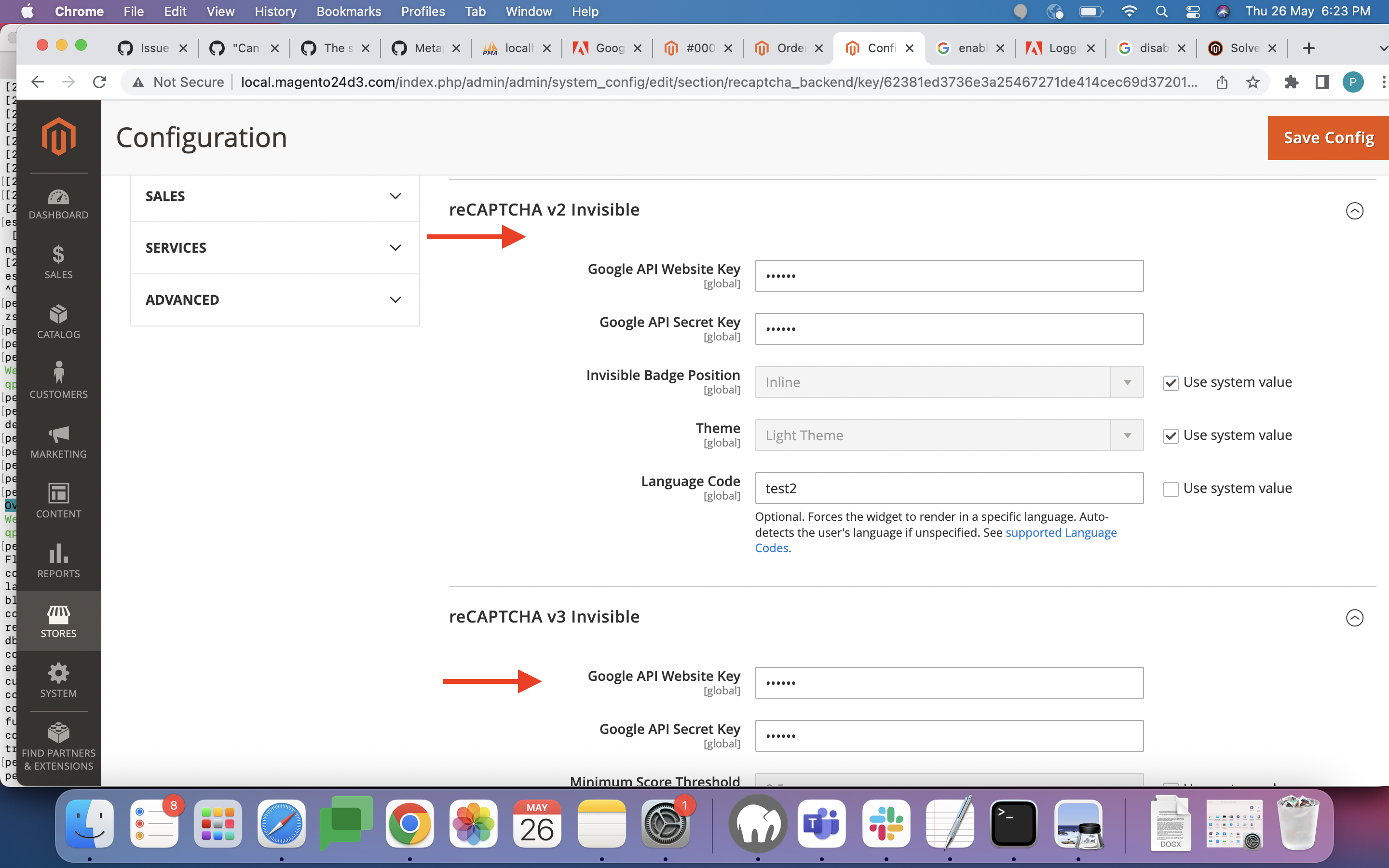
- Go to Configuration > Security > Google reCAPTCHA Admin Panel
- Add your Google API Website Key & Google API Secret Key to any reCAPTCHA below:
reCAPTCHA v2 ("I am not a robot") reCAPTCHA v2 Invisible reCAPTCHA v3 Invisible
-
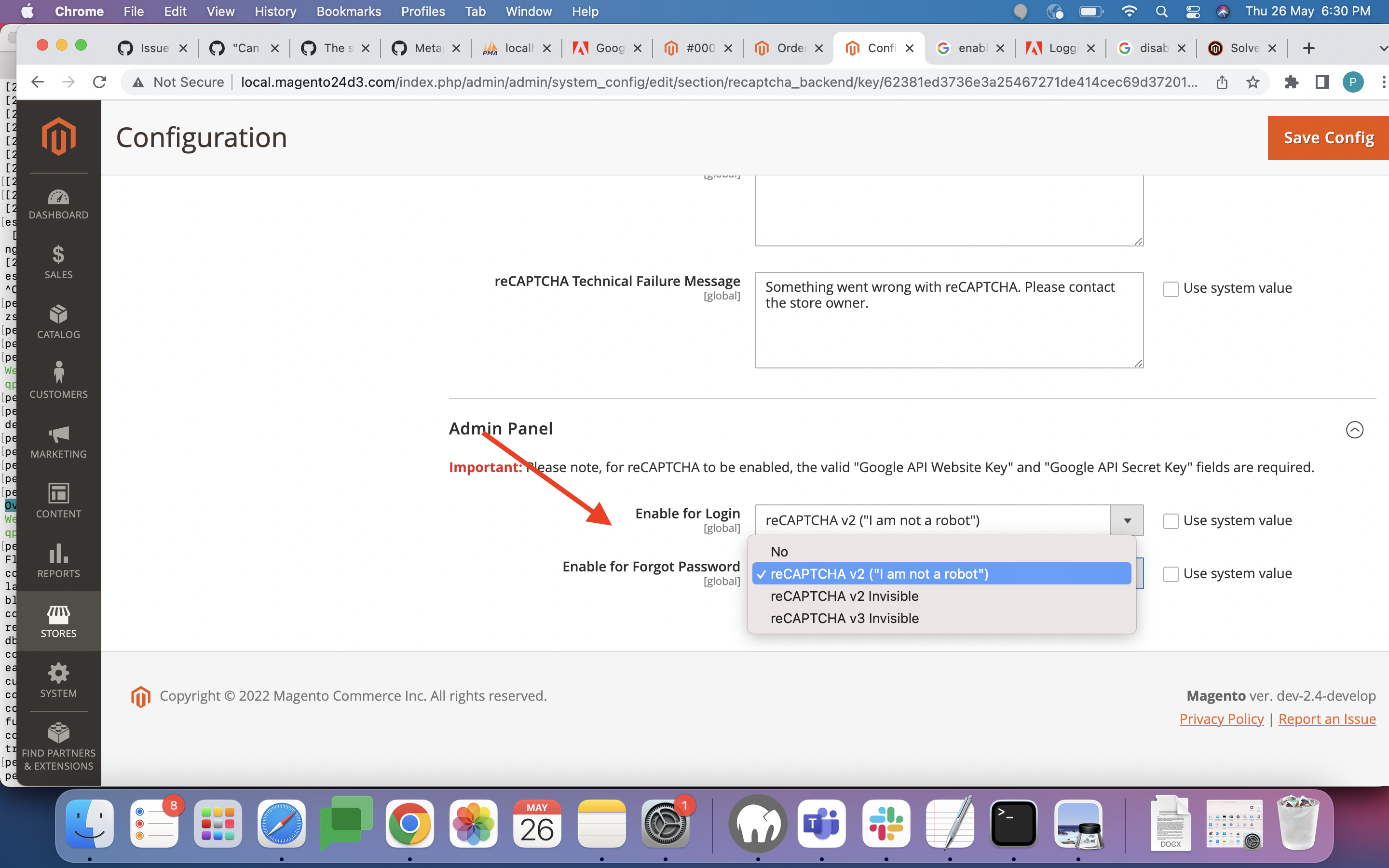
Select your reCAPTCHA version (with API keys above) for either below: Enable for Login Enable for Forgot Password
-
Save config
-
Flush cache
Logs info :
Thanks
:white_check_mark: Jira issue https://jira.corp.magento.com/browse/AC-3179 is successfully created for this GitHub issue.

:white_check_mark: Confirmed by @engcom-Delta. Thank you for verifying the issue.
Issue Available: @engcom-Delta, You will be automatically unassigned. Contributors/Maintainers can claim this issue to continue. To reclaim and continue work, reassign the ticket to yourself.
@tschirmer
Thank you again! That does it. The Recaptcha Box is visible and the login works.
I've created a composer patch with your changes, if anybody else needs to apply that fix during deployment with cweagans/composer-patches or something else:
diff --git a/view/adminhtml/templates/recaptcha.phtml b/view/adminhtml/templates/recaptcha.phtml
index 1f423e801087..0e4d79aac933 100644
--- a/view/adminhtml/templates/recaptcha.phtml
+++ b/view/adminhtml/templates/recaptcha.phtml
@@ -27,36 +27,56 @@
         element.src = 'https://www.google.com/recaptcha/api.js'
             + '?onload=globalOnRecaptchaOnLoadCallback&render=explicit';

-        window.globalOnRecaptchaOnLoadCallback = function () {
-            let token = '';
+        let isRecaptchaLoaded = false;
+        let token = '';
+        let maxRetryAttempts = 5;
+        let attempts = 0;
+        let widgetId = 0;
+        <?php if ($isInvisible): ?>
+        $('#login-form').submit(function (event) {
+            if (!token) {
+                event.preventDefault(event);
+                event.stopImmediatePropagation();
+                event.stopPropagation();

-            this.widgetId = grecaptcha.render('admin-recaptcha', {
-                <?php foreach ($renderingOptions as $key => $value): ?>
-                '<?= $block->escapeJs($key) ?>': '<?= $block->escapeJs($value) ?>',
-                <?php endforeach; ?>
-                'callback': function (token) { // jscs:ignore jsDoc
-                    <?php if ($isInvisible): ?>
-                    this.token = token;
-                    $('#login-form').submit();
-                    <?php endif; ?>
-                }.bind(this)
-            });
+                let attemptRecaptcha = () => {
+                    attempts++;
+                    if (attempts > maxRetryAttempts){
+                        console.error("Could not fetch invisible ReCaptcha token. Please refresh the page and try again.");
+                        return;
+                    }
+                    if (!isRecaptchaLoaded) {

-            <?php if ($isInvisible): ?>
-            $('#login-form').submit(function (event) {
-                if (!this.token) {
-                    grecaptcha.execute(this.widgetId).then(
-                        function() {
+                        setTimeout(() => {
+                            attemptRecaptcha()
+                        }, 1000);
+                        return;
+                    }
+                    grecaptcha.execute(widgetId)
+                        .then( () => {
                             event.preventDefault(event);
                             event.stopImmediatePropagation();
-                        }, function(reason) {
-                        });
+                            event.stopPropagation();
+                        }, (reason) => { })
+                        .catch(err => { console.error(err); });
                 }
-            }.bind(this));
-            <?php endif; ?>
-
-        }.bind(this);
+                attemptRecaptcha();
+            }
+        });
+        <?php endif; ?>
+        window.globalOnRecaptchaOnLoadCallback = function () {

+            widgetId = grecaptcha.render('admin-recaptcha', {
+                <?php foreach ($renderingOptions as $key => $value): ?> '<?= $block->escapeJs($key) ?>': '<?= $block->escapeJs($value) ?>',
+                <?php endforeach; ?> 'callback': function (_token) {
+                    <?php if ($isInvisible): ?>
+                    token = _token;
+                    $('#login-form').unbind('submit');
+                    $('#login-form').submit();
+                    <?php endif; ?> }
+            });
+            isRecaptchaLoaded = true;
+        }
         scriptTag.parentNode.insertBefore(element, scriptTag);
     });
 </script>