
bugtracker
 bugtracker copied to clipboard
 maemo-leste
Provide proper interface for upower battery data
Upower logs lots of valueable battery data. We should make that insightful to everyone.
GNOME Power Manager can do it, but it's slow, and doesn't generate particularly nice graphs: https://wizzup.org/leste-droid4-gnome-power-manager.png
But it should at least help with reading the upower database format.

The values are newline separated, and then tab separated per value on a line:
$ cat plot.py
import sys
import datetime

import matplotlib
import matplotlib.pyplot as plt


if __name__ == '__main__':
    f=open(sys.argv[1])
    ptype=sys.argv[2]

    datapts=f.read().split('\n')

    times = []
    values = []

    for datapt in datapts:
        vals = datapt.split('\t')
        if len(vals) != 3:
            continue
        time, val, state = vals
        time = int(time)
        dt = datetime.datetime.fromtimestamp(time)
        val = float(val)

        # Can decide to only plot state == 'charging' or state == 'discharging'
        times.append(dt) #times.append(time)
        values.append(val)

        #print(dt, val, state)

    plt.xlabel('time')
    if ptype == 'capacity':
        plt.ylabel('capacity')
    if ptype == 'rate':
        plt.ylabel('discharging rate')
    if ptype == 'time-to':
        plt.ylabel('time to full/empty')
    plt.plot(times, values)
    plt.show()
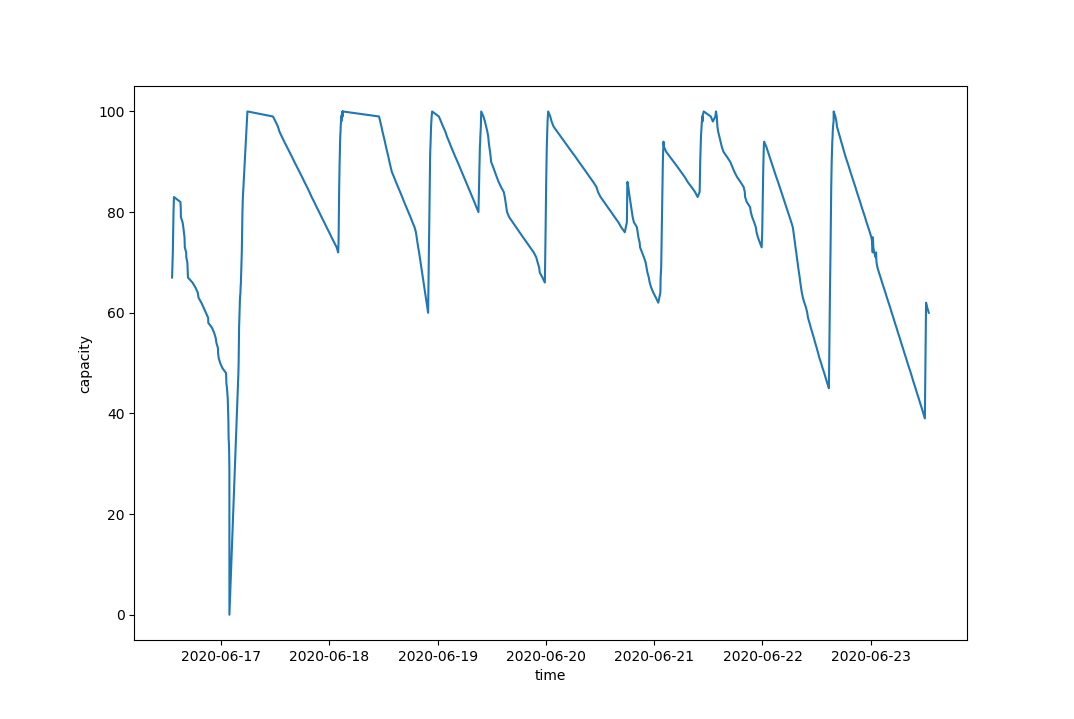
Maybe we can use this frontend (not the collecting backend, of course) http://maemo.org/downloads/product/Maemo5/battery-eye/
We might also want to change the max data age of upower, in src/up-history.c:
#define UP_HISTORY_FILE_HEADER      "PackageKit Profile"
#define UP_HISTORY_SAVE_INTERVAL    (10*60)     /* seconds */
#define UP_HISTORY_DEFAULT_MAX_DATA_AGE (7*24*60*60)    /* seconds */
/me wonders why upower doesn't provide a way to adjust those (max data age, etc.) in a config file instead.

For the record this is how to actually invoke the script for discharge rates:
python plot.py /var/lib/upower/history-rate-7.dat rate
If you limit by this for datapt in datapts[-200:]: then you have a much recent lecture and clear plot without deal with delta times etc, otherwise just skip those by comparing dt = datetime.datetime.fromtimestamp(time) to desired value.
Line val = float(val) no longer works (at least for me), so just replace the , by val = float(val.replace(",", ".")).
