
ExtensionUpdater
 ExtensionUpdater copied to clipboard
 madskristensen
Visual Studio extension for auto updating extensions
Visual Studio Auto Updater
Download the extension on the VS Gallery or get the nightly build
This extension allows you to specify which of your Visual Studio extensions you want to automatically update when a new version is released.
How it works
Every time Visual Studio opens, a background process checks for updates to the extensions you have specified for auto updating.
If it finds any, it will silently install them in the background, so that next time you open Visual Studio, you'll have the latest versions of your favorite extensions already installed.
You specify which extensions to auto update in a flyout menu located in the
Tools menu.
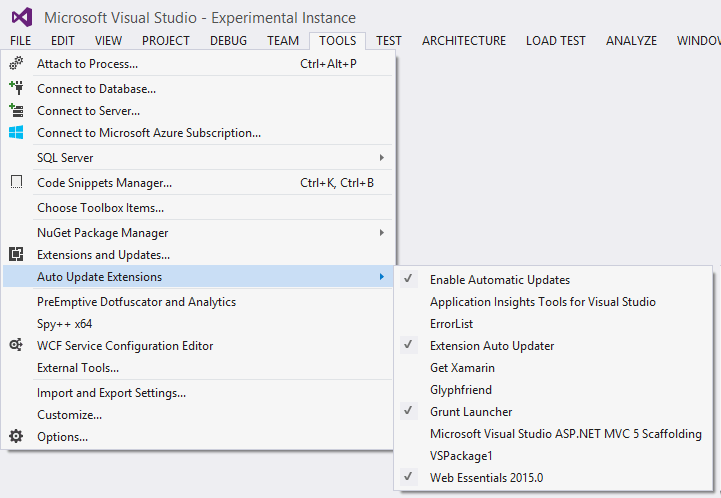
The first item in the menu is Enable Automatic Updates. That's the master switch for
this feature. If it is unchecked, no auto updating will take place for any extension.
Not all extensions are listed. Only the ones that can be auto updated, which excludes
- Extensions installed by MSIs.
- Extensions that require admin permissions to update.
- Extensions that are shipped as part of Visual Studio.
Some extensions are enabled for automatic updates by default. These extensions are typically smaller extensions that are safe to update. You can always turn off automatic updating of those extensions, but they have been classified as "safe" to update.
For instance, Web Essentials is not on the list because there are people that prefer earlier versions over the latest.
Extension writers
If you have written an extension and want to add it to the list of extensions that are automatically updated by default, then you can easily do that.
Just send a pull request with your extension's Product ID/guid to the list found here: PreEnabledExtensions.cs
Metadata
Owner
 madskristensen
Metadata
Visual Studio extension for auto updating extensions