
BundlerMinifier
 BundlerMinifier copied to clipboard
 madskristensen
Exception User canceled out of save dialog
Installed product versions
- Visual Studio: 2015 Enterprise
- This extension: 2.1.279
Description
Exception in output window
Steps to recreate
- Open Task Runner
- Right click from JavaScript in bundleconfig.json
- Bindings -> Check After Build
- to recreate
Current behavior
11/3/2016 1:24:57 PM: System.Runtime.InteropServices.COMException (0x8004000C): User canceled out of save dialog (Exception from HRESULT: 0x8004000C (OLE_E_PROMPTSAVECANCELLED))
   at EnvDTE.ProjectItems.AddFromFile(String FileName)
   at BundlerMinifierVsix.ProjectHelpers.AddNestedFile(String parentFile, String newFile, Boolean force) in C:\projects\bundlerminifier\src\BundlerMinifierVSIX\Helpers\ProjectHelpers.cs:line 138
Expected behavior
No exception

@totpero I'm unable to reproduce this with the latest version of the extension (v2.2.307). Have you tried using that version already?

Might this be related to this Issue #201 that I raised, the same function calls are involved.

Seen after using Visual Studio 2019 Community - creating a new Python project for Machine Learning using the cookie cutter for a classifier template. Microsoft Visual Studio User canceled out of save dialog (Exception from HRESULT: 0x8004000C (OLE_E_PROMPTSAVECANCELLED))

i am getting the same error when i try to create python project from existing source.

And me getting the same error when i try to create python project from existing source.

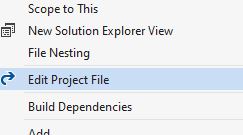
Please make sure your project file is not locked. You can check it by trying to edit the project file (.csproj file). If this file is locked, you cannot add the dependencies.
Tell the person who locked the file to check in or undo the project file and then try to add the dependency
