

 macvim-dev
Latest update not respecting background=light
I'm using the Dark theme in MacOS Mojave But, I prefer my editors to be light themed.
As of the latest update, MacVIM looks very bad when you define "set background=light"
See:
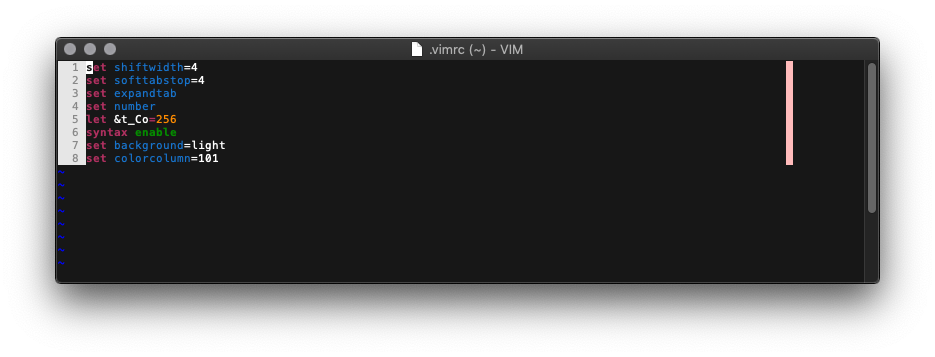

Hi, just to make sure you are using the default macvim colorscheme right?
The latest release switched to fully built in Mojave so the dark mode detection automatically kicks in (which sets a different set of MacTextColor/MacTextBackgroundColor/etc and sets background to "dark" by default). I probably should have mentioned that in the release notes.
The macvim colorscheme does seem to have a bug in that it assumes the system colorscheme to be in light mode which I need to fix.
For a temporary solution you can manually invoke this or put it in your vimrc (do it after loading the colorscheme if you are doing that):
hi Normal       gui=NONE guifg=Black guibg=White
hi Visual       guibg=#72F7FF
It actually seems like there's some issue with the default macvim colorscheme when you have using normal Mojave mode but setting background to "dark" too (the text selection colors are off). Probably need to fix that as well.

Yeah, I'm using the default macvim colorscheme
That temporary solution works by manually invoking it. Doesn't seem to be working from my .vimrc, but that's probably unrelated.
That screenshot is of my entire .vimrc file.
Sorry, I actually meant the gvimrc, not the vimrc. If you don't have one, you can make one at ~/.gvimrc and put those lines in.

Sorry for the delay. I have been a little held up and currently trying to finish snapshot 156 which only has bug fixes and I do plan on including this. I don't have a firm ETA yet.
How did you get the dark mode to work? I've tried everything I can think of and macvim always looks like this...


@9mm I don't recall. I think I just had my OS set to dark theme, and it just worked.