

 mRemoteNG
mremoteNG prompts for password and cannot open.
I have saved my connections in mremoteNG after a restart when I tired to open the application its asking for password
Expected Behavior
I am using the version 1.76 and when tired to open the application its asking for password. I tired to open the confCons.xml file and i see its NULL. I tried once renaming this file for one it worked but same issue is repeating again.
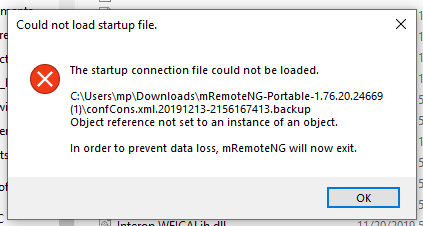
Context
I am unable to use the Connections I saved in the mremoteng If I reinstall I will loose my connections I tired to Import my connection file by using another MremoteNG but its showing me error.
Your Environment
I wanted to use this SSH the devices and hosts
- Version used:
- Operating System and version Windows 10 64 bit

I had the same issue and I have resolved it - I first located current XML files and renamed it '.OLD', then from the XML Backups - (I had several backups created for the day, which I found as odd) however, used the earliest XML Backup file of the day and renamed it removing everything from the end up to the .XML. Then I found and odd directory listed here: 'mRemoteNG.exe_Url_pjpxdehxpaaorqg2thmuhl11a34i3ave' with 2 sub-directories in it that had a 'User.Config' file - I deleted this entirely - Re-launched - It updated - and opened as it should -


I had the same issue and I have resolved it - I first located current XML files and renamed it '.OLD', then from the XML Backups - (I had several backups created for the day, which I found as odd) however, used the earliest XML Backup file of the day and renamed it removing everything from the end up to the .XML. Then I found and odd directory listed here: 'mRemoteNG.exe_Url_pjpxdehxpaaorqg2thmuhl11a34i3ave' with 2 sub-directories in it that had a 'User.Config' file - I deleted this entirely - Re-launched - It updated - and opened as it should -
This solution worked for me as well. Thank you!


I have the same issue but solution did not correct the issue. Why did this even happen in the first place?


I have the same issue but solution did not correct the issue. Why did this even happen in the first place?
This software is junk. Has happened to me twice now

I have the same issue but solution did not correct the issue. Why did this even happen in the first place?
This might be an issue when the configuration file is not saved correctly, eg. the app crashed or was killed...
And if the solution did not work, I guess you could move away all config files and try to start fresh. Then when it's working you can try to re-import the old xml config file.

I have the same issue but solution did not correct the issue. Why did this even happen in the first place?
This software is junk. Has happened to me twice now
It is not perfect, However, I did find that it's working very well for our team as this is our go to platform to access all our servers.


How is this still an issue after almost 3 years?
at least something stable, yep :D

I had the same issue and I have resolved it - I first located current XML files and renamed it '.OLD', then from the XML Backups - (I had several backups created for the day, which I found as odd) however, used the earliest XML Backup file of the day and renamed it removing everything from the end up to the .XML. Then I found and odd directory listed here: 'mRemoteNG.exe_Url_pjpxdehxpaaorqg2thmuhl11a34i3ave' with 2 sub-directories in it that had a 'User.Config' file - I deleted this entirely - Re-launched - It updated - and opened as it should -
Ddidn't work for me, still prompting for a password...
Version : Stable v1.76.20

I had the same issue and I have resolved it - I first located current XML files and renamed it '.OLD', then from the XML Backups - (I had several backups created for the day, which I found as odd) however, used the earliest XML Backup file of the day and renamed it removing everything from the end up to the .XML. Then I found and odd directory listed here: 'mRemoteNG.exe_Url_pjpxdehxpaaorqg2thmuhl11a34i3ave' with 2 sub-directories in it that had a 'User.Config' file - I deleted this entirely - Re-launched - It updated - and opened as it should -
Ddidn't work for me, still prompting for a password...
Version : Stable v1.76.20
Deleting the confCons.xml file located in C:\Users\<user_name>\AppData\Roaming\mRemoteNG fixed it 😄.
Deleting the
confCons.xmlfile located inC:\Users\<user_name>\AppData\Roaming\mRemoteNGfixed it 😄.
This was the key for me as well. Somehow both my user and con files got mangled. Deleting the user.config and restoring one of the confCon backups got me rolling again.
I imagine if you don't have a backup, deleting the confCons.xml will free you up but you'll not have the connections restored.

For security requirement we do not provide functionality to recover password, if its lost - its lost :)
Just had the same problem. I checked my most recent connections (confCons.xml) file and saw that there was nothing in it. I don't know what happened but I assume it got corrupted. I deleted the confCons.xml file and renamed one of the older backups to confCons.xml. That fixed the issue for me and I didn't lose my connections.
For me the confCons.xml file is located in AppData/Roaming/mRemoteNG
