

 ly4k
ly4k
Some questions about the reproduction of CVE-2022–26923 on Server 2008 R2
Hi @ly4k, I have read your article Certifried: Active Directory Domain Privilege Escalation (CVE-2022–26923) and am trying to reproduce the escalation on a Windows Server 2008 R2. I ran into some problems when trying to manually edit the dNSHostName attribute through ADSI Edit (logged in as a normal user with a print operator role so I can log on to the DC machine and access ADSI Editor). When editing the value as a normal user with Validated write to DNS host name I do not get the option to even change the value. I can only view it, even though the machine account I am trying to edit was created by me. Is there something I am missing? I was also wondering about the tool that is used to edit the values in your article (ex. https://miro.medium.com/max/640/1*oJtbPrAXc9QcugPWQ3F60Q.png). Is this some 3rd party editor or is it some default windows component? I have tried to create the value using Certipy on kali but I get the following error:
sudo certipy account create -u '[email protected]' -p 'XXXXXXX' -user 'POC-PC-test3' -dns 'pes.test.test'
Certipy v4.0.0 - by Oliver Lyak (ly4k)

[*] Creating new account:
    sAMAccountName                      : POC-PC-test3$
    unicodePwd                          : R1dBwfas9IKIWU6Z
    userAccountControl                  : 4096
    servicePrincipalName                : HOST/POC-PC-test3
                                          RestrictedKrbHost/POC-PC-test3
    dnsHostName                         : pes.test.test
[-] Received unknown error: (objectClassViolation) 00002014: UpdErr: DSID-031A1216, problem 6002 (OBJ_CLASS_VIOLATION), data 0
Thanks!!

Update: I found the tool used to edit the variables and it's the Active Directory Explorer from sysinternals. Still no luck in editing dNSHostName though :(
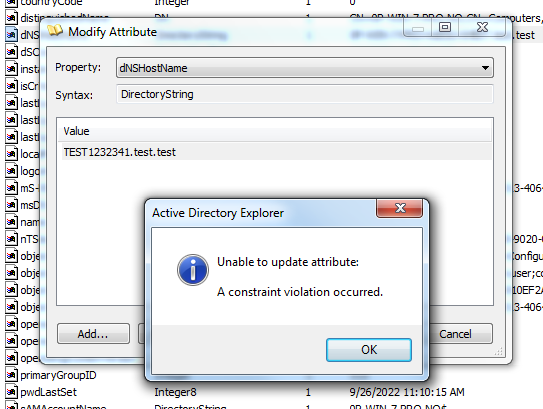
Hello. I hope you have read the blog post I've made on this CVE. The SPNs (servicePrincipalName) must not contain any entry with the DNS Host Name value. You can remove those and try again. I didn't get a direct constraint violation in this case, so it might be that the DNS Host Name is simply not valid, perhaps because the ending doesn't match that of the domain.
Best regards
