lvjr
lvjr
Horizontal lines cross the left side of table in right to left context (lualatex)
In this example I'm trying to test tblr tabular in an RTL context with babel (lualatex engine)
\documentclass{article}
\usepackage[bidi=basic,arabic,provide=*]{babel}
\usepackage{tabularray}

\begin{document}

\begin{tblr}{|c|}
\hline
one\\
\hline
\end{tblr}

\end{document}
The output appears fine, but if you take a great zoom the following defect can be seen ( horizontal lines cross the left side of the table )
Without babel (same issue)
\documentclass{article}

\usepackage{tabularray}

\textdir TRT
\begin{document}

\begin{tblr}{|c|}
\hline
one\\
\hline
\end{tblr}

\end{document}
shifted-hlines-in-tblr-tabular-in-rtl-context
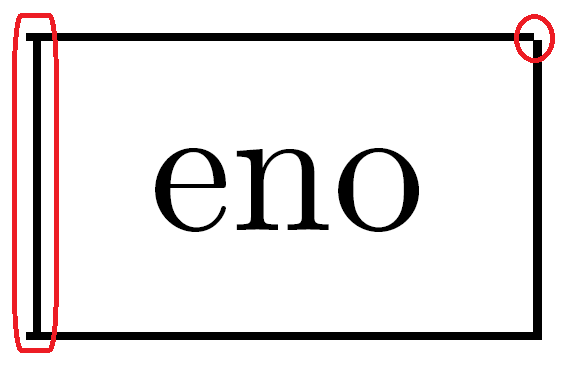

With double vrule the defect becomes greater
\documentclass{article}
\usepackage{tabularray}

\textdir TRT
\begin{document}

\begin{tblr}{|c||}
\hline
one \\
\hline
\end{tblr}

\end{document}

It is not that easy to understand well all of \pagedir, \bodydir, \pardir, \textdir, \linedir, \mathdir and \boxdir. But the following test shows that the problem is from hlines.
\documentclass{article}

\usepackage{showframe}
\renewcommand*\ShowFrameColor{\color{blue}}

\usepackage{tabularray}
\setlength\parindent{0pt}

\begin{document}

Hello

\begin{tblr}{|c|}
\hline
one\\
\hline
\end{tblr}

Hello

\begin{tblr}{|c||}
\hline
one \\
\hline
\end{tblr}

\textdir TRT

Hello

\begin{tblr}{|c|}
\hline
one\\
\hline
\end{tblr}

Hello

\begin{tblr}{|c||}
\hline
one \\
\hline
\end{tblr}

\end{document}
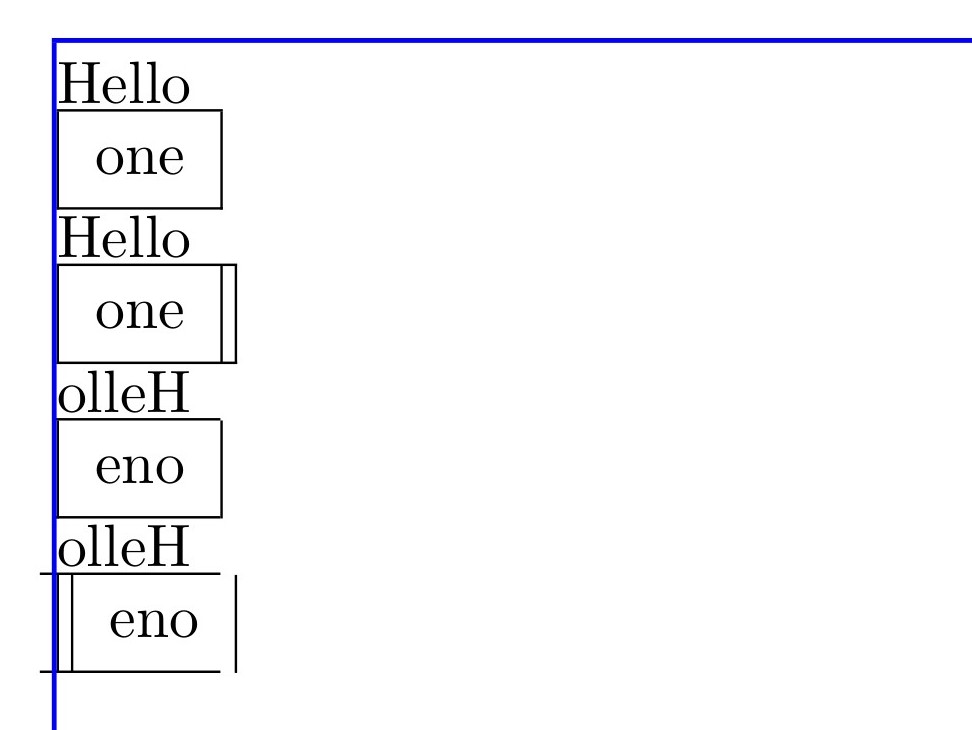
What matters here is just \textdir , to add tblr tabular in right to left context we have two options
-
First: we can insert tabular in left to right group with
\textdir TLTthen changing text direction for every cell withcells={cmd={\textdir TRT}}, in this cas order of columns is from left to right and this is not desirable -
Second: tabular is inserted in right to left context in this cas order of columns is fine and text inside cells is from right to left It just remains the problem of shifted hlines
\documentclass{article}

\usepackage{showframe}
\renewcommand*\ShowFrameColor{\color{blue}}

\usepackage{tabularray}
\setlength\parindent{0pt}

\begin{document}

\begin{tblr}{|c|c||}
\hline
one & two\\
\hline
\end{tblr}

\textdir TRT

{\textdir TLT
\begin{tblr}{colspec={|c|c||},cells={cmd={\textdir TRT}}}
    \hline
    one & two\\
    \hline
\end{tblr}}% columns are from left to right

\begin{tblr}{|c|c||}
    \hline
    one & two\\
    \hline
\end{tblr} % columns are from right to left

\end{document}
Here a typical example of what a table looks like in right to left context with babel package
\documentclass{article}

\usepackage{showframe}
\renewcommand*\ShowFrameColor{\color{blue}}

\usepackage{tabularray}
\setlength\parindent{0pt}

\usepackage[bidi=basic,arabic,provide=*,layout=tabular]{babel}

\begin{document}


\babeladjust{bidi.text=off}

\begin{tabular}{|c|c||}
\hline
one & two\\
\hline
\end{tabular}

\end{document}
Adding \mathdir TRT solves the problem. It is probably because tabularray uses math \vcenter to do vertically-centered alignment (it is the same in tabular).
\documentclass{article}

\usepackage{showframe}
\renewcommand*\ShowFrameColor{\color{blue}}

\usepackage{tabularray}
\setlength\parindent{0pt}

\begin{document}

Hello\par
\begin{tblr}{|c||c|||}
\hline
one & two \\
\hline
\end{tblr}

\textdir TRT \mathdir TRT

Hello\par
\begin{tblr}{|c||c|||}
\hline
one & two \\
\hline
\end{tblr}

\end{document}
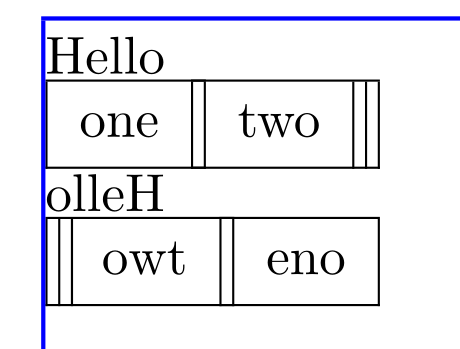
In right to left context math should be LTR so with your example we need to change math direction for every cell
The good news is that \textvcenter is coming to LaTeX kernel. See
https://github.com/latex3/latex2e/commit/ea018cae99698abaa4c0fb81be1f2886fcdab6b5
Hopefully in the near future we won't need the above fix any more.
Thank you very much for guidances and for the great package, waiting for the command \textvcenter to come out
I've added this code in the preamble to make modifications general without having to add them for each tblr environment
What do you think? is there a better way?
\documentclass{article}

\usepackage{showframe}
\renewcommand*\ShowFrameColor{\color{blue}}

\usepackage{tabularray}
\setlength\parindent{0pt}

\AddToHook{env/tblr/begin}{%
\ifnum\textdirection=0\else \mathdir TRT\fi
}

\SetTblrInner[tblr,longtblr]{cells={cmd={\mathdir TLT}}}

\begin{document}

Hello\par
\begin{tblr}{|c||c|||}
\hline
one & two \\
\hline
\end{tblr}

\textdir TRT

Hello\par
\begin{tblr}{|c||c|||}
\hline
one & two $ax+b$\\
\hline
\end{tblr}

$ax+b$

\end{document}
With seloumi's solution one need to hook every environment defined with \NewTblrEnviron. Note that with \SetTblrInner[tblr,longtblr]{cells={cmd={\mathdir TLT}}} cells that are wrapped with more than a couple of braces would not display math equations correctly. Here is an idea that worked for me (Tested on a few long documents with no errors, I used \cs_set_protected:Npn but this is an example on how these functions could be implemented to fix this):
\documentclass{article}
\usepackage{tabularray}

\ExplSyntaxOn
\makeatletter

% checking if luatex is running to see if we need to add the text direction test
\sys_if_engine_luatex:TF {
	\cs_set_protected:Npn \__tblr_environ_code:nnnn #1 #2 #3 #4
	{
		\int_compare:nNnT { \textdirection } = { 1 } { \mathdir TRT } % <<< new: text direction test
		\group_align_safe_begin:
		\int_gincr:N \g__tblr_table_count_int
		\tl_set:Nn \l__tblr_env_name_tl {#1}
		\mode_if_math:TF
		{ \bool_set_true:N \l__tblr_math_mode_bool }
		{ \bool_set_false:N \l__tblr_math_mode_bool }
		\__tblr_builder:nnn {#2} {#3} {#4}
		\group_align_safe_end:
	}
}
{
	\cs_set_protected:Npn \__tblr_environ_code:nnnn #1 #2 #3 #4
	{
		\group_align_safe_begin:
		\int_gincr:N \g__tblr_table_count_int
		\tl_set:Nn \l__tblr_env_name_tl {#1}
		\mode_if_math:TF
		{ \bool_set_true:N \l__tblr_math_mode_bool }
		{ \bool_set_false:N \l__tblr_math_mode_bool }
		\__tblr_builder:nnn {#2} {#3} {#4}
		\group_align_safe_end:
	}
}

\cs_set_protected:Npn \__tblr_split_one_line:nn #1 #2
{
	\seq_set_split:Nnn \l_tmpa_seq { & } { #2 }
	\int_set:Nn \c@rownum {#1}
	\int_zero:N \c@colnum
	\seq_map_inline:Nn \l_tmpa_seq
	{
		\tl_set:Nn \l_tmpa_tl { ##1 }
		\__tblr_remove_braces:N \l_tmpa_tl
		\__tblr_trim_par_space_tokens:N \l_tmpa_tl
		\int_incr:N \c@colnum
		\__tblr_extract_table_commands:N \l_tmpa_tl
		\__tblr_trim_par_space_tokens:N \l_tmpa_tl
		\bool_lazy_all:nT
			{ % <<< new: if luatex is running and math direction is right to left and cell text is not empty, add \mathdir TLT
				{ \sys_if_engine_luatex_p: }
				{ \int_compare_p:nNn { \mathdirection } = { 1 } }
				{ \bool_not_p:n { \tl_if_empty_p:N \l_tmpa_tl } }
			}
			{ \tl_put_left:Nn \l_tmpa_tl { \mathdir TLT } }
		\__tblr_spec_gput:neV { text } { [#1][\int_use:N \c@colnum] } \l_tmpa_tl
	}
	%% Decrease row count by 1 if the last row has only one empty cell text
	%% We need to do it here since the > or < column type may add text to cells
	\bool_lazy_all:nTF
	{
		{ \int_compare_p:nNn {#1} = {\c@rowcount} }
		{ \int_compare_p:nNn {\c@colnum} = {1} }
		{ \tl_if_empty_p:N \l_tmpa_tl }
	}
	{ \int_decr:N \c@rowcount }
	{
		\__tblr_prop_gput:nnx
		{row} { [#1] / cell-number } { \int_use:N \c@colnum }
		\int_compare:nT { \c@colnum > \c@colcount }
		{
			\int_set_eq:NN \c@colcount \c@colnum
		}
	}
}

\makeatother
\ExplSyntaxOff


\textdir TRT

\begin{document}
	\begin{tblr}{|c||}
		\hline
		one\\
		\hline
	\end{tblr}%
\end{document}
Though, the test in \__tblr_split_one_line:nn is probably not efficient. there
might be a better way to prepend \mathdir TLT to each non empty cell without
testing in each one if luatex is running (it might be better to check this
outside of the function, just as with \__tblr_environ_code:nnnn but I did
not want to write a longer code in this post) and what is the current math direction.
maybe defining \__tblr_split_one_line_RTL:nn that will be put in the stream if the tabular
is typset in a group with RTL math direction?

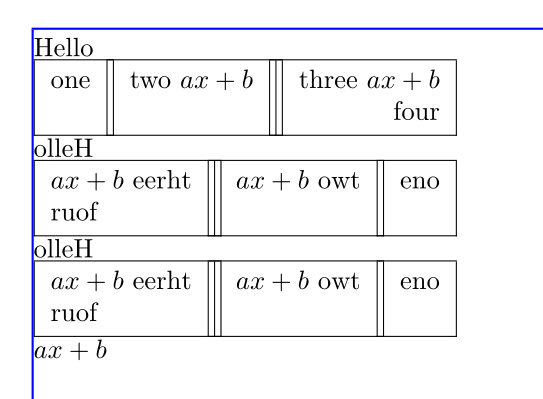
@seloumi @Udi-Fogiel: To solve multiline cell problem, you can use measure=vbox option from varwidth library.
\documentclass{article}

\usepackage{showframe}
\renewcommand*\ShowFrameColor{\color{blue}}

\usepackage{tabularray}
\UseTblrLibrary{varwidth}
\setlength\parindent{0pt}

\AddToHook{env/tblr/begin}{%
\ifnum\textdirection=0\else \mathdir TRT\fi
}

\SetTblrInner[tblr,talltblr]{
  cells={preto={\mathdir TLT}}, measure=vbox
}

\begin{document}

Hello\par
\begin{tblr}{|c||c|||r|}
\hline
one & two $ax+b$ & {three $ax+b$\\four} \\
\hline
\end{tblr}

\textdir TRT

Hello\par
\begin{tblr}{|c||c|||r|}
\hline
one & two $ax+b$ & {three $ax+b$\\four} \\
\hline
\end{tblr}

Hello\par
\begin{tblr}{|c||c|||r|}
\hline
one & two $ax+b$ & {{{three $ax+b$\\four}}} \\
\hline
\end{tblr}

$ax+b$

\end{document}