tabularray
 tabularray copied to clipboard
 lvjr
lvjr
Allow to evaluate all functions in the table body
Now that functional package has already had function \evalWhole for evaluating all functions defined with \prgNewFunction inside its argument (see https://github.com/lvjr/functional/issues/10), it is natural to add option evaluate=* in functional library, calling \evalWhole to evaluate all functions in the table body.
With \SetTblrOuter command, we can add option evaluate=* to the default settings of some tabularray environment, and use evaluate= to clear default evaluate setting later.

But by design \evalWhole doesn't evaluate functions hiding in the return values of other functions. This may be a problem if we are using \fileInput in some inputted files. Maybe we need another option and another \evalRecursive function.
Update: now \evalWhole evaluates functions recursively (https://github.com/lvjr/functional/commit/7b38e45afff156f2f6facfdb48f4489d39fbd82b).
It is more meaningful to use evaluate=all and evaluate=none (see https://github.com/lvjr/tabularray/wiki/KeyValue).
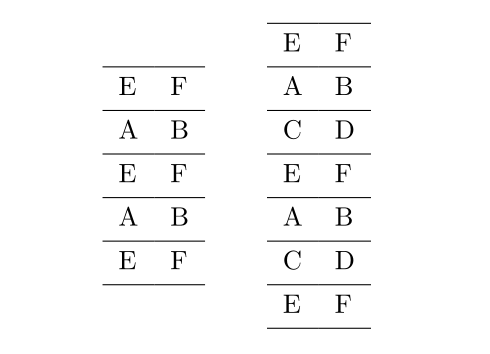
Now we can use evaluate=all with functional library:
\documentclass{article}

\usepackage{../../tabularray}
\UseTblrLibrary{functional}

\IgnoreSpacesOn
\prgNewFunction \myFunA {} {
  \prgReturn { A & B \\ }
}
\prgNewFunction \myFunB {} {
  \prgReturn { C & D \\ }
}
\IgnoreSpacesOff

\begin{document}

\begin{tblr}[evaluate=\myFunA]{hlines}
  E & F \\
  \myFunA
  E & F \\
  \myFunA
  E & F \\
\end{tblr}
\qquad
\begin{tblr}[evaluate=all]{hlines}
  E & F \\
  \myFunA
  \myFunB
  E & F \\
  \myFunA
  \myFunB
  E & F \\
\end{tblr}

\end{document}