
lv_gui_builder
 lv_gui_builder copied to clipboard
 lvgl
lvgl
Architecture design
In continue of https://github.com/littlevgl/lvgl/issues/601
So according to my current understanding, the concept is the following:
- Use the Python or Micropython binding of LittlevGL to dynamically create a GUI on a canvas (the Micropython binding is more complete right now)
- Via the binding instruct LittlevGL to create objects and modify their properties.
- The script - which generated the currently visible GUI - can be easily converted back to C and exported. Or the script can be exported as it is.
- For compatibility and platform independence the GUI builder can be in Python as well.
I expect that some extensions should be developed. For example one basic thing came to mind: when you click on the canvas to select an object to edit it, the object on that coordinate should be get and highlighted.

@AGlass0fMilk
We can have the GUI builder automatically disable components that a design does not use at time of generation.
As long as this feature is by default, and not mandatory, I'm fine with that. I just don't want the GUI builder to restrict functionality, i.e. the user should easily be able to adjust lv_conf.h and make changes to the generated C code.

@embeddedt
As long as this feature is by default, and not mandatory, I'm fine with that. I just don't want the GUI builder to restrict functionality, i.e. the user should easily be able to adjust
lv_conf.hand make changes to the generated C code.
Yes, I agree. It should be possible to manually modify the configuration and generated C code. One complication is: do these manual modifications need to propagate to the editor when a project is reopened? Can a project be imported from an exported code? If so, how? This may help argue the case for an intermediate (ie: XML) representation of the GUI.

One complication is: do these manual modifications need to propagate to the editor when a project is reopened?
If you are using micropython, it is easy to know the configuration that was set in lv_conf.h. For example, if you want to know if some object was enabled, just check if there is such class in lvgl module. Python introspection is handy in such situations.

I have worked with pytkinter and wxPython before and haven't been very impressed with either.
I asked a colleague for recommendations for a GUI library with a Python binding and he suggested pyGObject/Gtk. It has a graphical GUI builder (Glade). I haven't used it before but I'm going to play around with it a bit.
It is cross-platform as well.
Does anyone have a preference for the GUI library?
@AGlass0fMilk I think @amirgon wants to use LittlevGL as the GUI for the GUI builder.
@AGlass0fMilk I think @amirgon wants to use LittlevGL as the GUI for the GUI builder.
From a performance standpoint that doesn't really make sense.
The pc_simulator project is fine for demoing and prototyping but the simulated mouse and lack of more complex built-in controls would make it a really annoying desktop application to use.
It would be a cool proof-of-concept or showcase project but I think it wouldn't perform very well as a tool.
From a performance standpoint that doesn't really make sense.
The
pc_simulatorproject is fine for demoing and prototyping but the simulated mouse and lack of more complex built-in controls would make it a really annoying desktop application to use.It would be a cool proof-of-concept or showcase project but I think it wouldn't perform very well as a tool.
@AGlass0fMilk
I don't agree. There is no reason why you wouldn't get decent performance with lvgl as a GUI. If you are missing some "more complex built-in controls" then add them to lvgl and it would be a useful addition to lvgl in general.
It makes more sense to use lvgl as GUI since you want to display and manipulate lvgl components, and lvgl already contains all the logic of how to draw and manipulate them.
To decide it let's collect which controls are required to build up the GUI designer.
I have these in mind: Simple ones:
- Buttons
- Texts
- Text input
- Dropdowns
Complex ones:
- File browser
- Menu system with submenus
It really would be great to create the GUI builder with LittlevGL because:
- It sounds great that the designer is also built with LittlevGL.
- Good for demonstration as it's a very complex UI
- Good to test LittlevGL
- The required extensions would be useful in real life projects
However, in this case, I think we should use the Python binding of LittlevGL (instead of Micropython) to enable to use of Python libraries.
However, in this case, I think we should use the Python binding of LittlevGL (instead of Micropython) to enable to use of Python libraries.
@kisvegabor Which libraries did you have in mind?
@kisvegabor Is the Python binding complete enough to be usable within our timeframe? Ideally we could release the GUI builder alongside v6.0.
My suggestion is that we build a GUI builder tool targeted towards efficient desktop computer use.
Then, using the tool, we can build very complex, beautiful UI that is easy and efficient to create/design.
The UI we create with the tool can showcase the capabilities of LittlevGL.
Using a desktop-oriented GUI library to build this tool makes sense for a few reasons:
- Desktop UI will be more consistent and intuitive to desktop users
- Integration with Windows/Mac/Linux is already taken care of, which handles creating real/native windows, popups, input (no laggy simulated mouse cursor, scroll wheel for scrolling windows, right click), toolbars, color pickers, file dialogs, tooltips, etc
- LittlevGL is a library targeted towards simpler embedded systems. We don't need to build out extremely complex UI functionality that is more suited to desktop use. Let's keep it simple.
I just don't think LittlevGL is the right tool for desktop application development. It will just take longer to develop, run slower, and be more frustrating to use.
We can probably make a GUI builder with a desktop GUI framework and use the time we save to create some of the more complex widgets before V6.0 is released.
I have been playing with Gtk3 and Glade, I should have a "LittlevGL widget" working in it today or tomorrow.
I agree with @AGlass0fMilk. It's probably simpler to make the GUI with a proven desktop tool.
Personally, I liked the idea of lvgl-GUI-Builder-built-in-lvgl better.
In my opinion it has a larger potential to drive lvgl forward.
I just don't see how a desktop application that only outputs lvgl code can bring any improvement to the lvgl library itself.
I just don't think LittlevGL is the right tool for desktop application development. It will just take longer to develop, run slower, and be more frustrating to use.
I'm not sure any of these claims is true. lvgl is easy to develop with, can run fast enough and any time spent for adding a missing feature is a pure gain since it will help taking lvgl library forward.
One more thing. If we want to develop a modern application, why not a web application? Think of an online tool available on lvgl website that allows the users, with their web browser, design and run lvgl GUI! No need to install anything, no need for a precompiled version for each OS, etc.
We are half way there with littlevgl/lvgl#687 and littlevgl/lvgl#792. There might also be other ways to achieve this, by using JavaScript and some web framework.
@amirgon Please explain why you think using LittlevGL for the graphics library would be better.
I just don't see how a desktop application that only outputs lvgl code can bring any improvement to the lvgl library itself.
It brings a lot of improvement. With this the user no longer needs to spend time fiddling with the coordinates and sizes of objects on a display. Now they can just set everything up on their screen visually.
I'm not sure any of these claims is true.
@AGlass0fMilk already highlighted some problems which make sense:
- Desktop UI will be more consistent and intuitive to desktop users
- Integration with Windows/Mac/Linux is already taken care of, which handles creating real/native windows, popups, input (no laggy simulated mouse cursor, scroll wheel for scrolling windows, right click), toolbars, color pickers, file dialogs, tooltips, etc
- LittlevGL is a library targeted towards simpler embedded systems. We don't need to build out extremely complex UI functionality that is more suited to desktop use. Let's keep it simple.
@embeddedt
Please explain why you think using LittlevGL for the graphics library would be better.
- Because it will boost lvgl library itself forward, see my previous post.
- Because it could enable running the GUI Builder as a web application.
- Because someone who develops GUI in lvgl will understand lvgl better in order to create a GUI-Builder for lvgl
- Because it will be easier to display and manipulate lvgl components on screen. If you are not using lvgl to build lvgl GUI, the lvgl components you display are not exactly the same as the true lvgl components, and might not behave exactly the same until you actually try to run the GUI on real lvgl.
- Because eventually, non-lvgl GUI Builder might require more work not less.
An example: Alignment rules. If you write a non-lvgl desktop application you need the GUI builder to be aware of lvgl align rules, in order to display everything the same way as lvgl. And you need to fix the GUI builder if the align rules change on the next version of lvgl. But if what you are running is the true lvgl, you don't need to worry about this.
It brings a lot of improvement. With this the user no longer needs to spend time fiddling with the coordinates and sizes of objects on a display. Now they can just set everything up on their screen visually.
How is it different from lvgl-GUI-Builder-built-in-lvgl? It will also let the users just set everything up on their screen visually. I just don't get your point.
Maybe you didn't understand my point - I didn't say lvgl users won't benefit from it, I said that lvgl library won't, it terms of new features, bugs, etc.
- Desktop UI will be more consistent and intuitive to desktop users
But our target audience is not desktop users, it's embedded device users. Having GUI components that are not mocked but the real thing, look and behaves like the real thing, seems more important to me.
- Integration with Windows/Mac/Linux is already taken care of, which handles creating real/native windows, popups, input (no laggy simulated mouse cursor, scroll wheel for scrolling windows, right click), toolbars, color pickers, file dialogs, tooltips, etc
lvgl already runs on many OSes and platforms, so lvgl-GUI-Builder-built-in-lvgl will too. This is also already taken care of.
All the other features (popups, tooltips, toolbars, dialogs etc.) could be a nice addition to lvgl library. Do we really need them all for the GUI builder?
Is the mouse cursor laggy?? if this is the case, maybe this should be addressed and solved, although I didn't experience this on my lvgl build.
- LittlevGL is a library targeted towards simpler embedded systems. We don't need to build out extremely complex UI functionality that is more suited to desktop use. Let's keep it simple.
I agree that there are some complex GUI components that exist in desktop application and are not needed on lvgl. But let's try to list them. For each one, we need to ask ourselves:
- Is it only needed on desktop applications and not on embedded applications?
- Do we really need to use it on the GUI Builder?
Let's see how many such relevant complex component we find.
Please explain why you think using LittlevGL for the graphics library would be better.
* Because it will boost lvgl library itself forward, see my previous post.
This feature/project pertains to a GUI builder for the lvgl library, not the lvgl library itself. You can still contribute to the lvgl core library in parallel.
* Because it could enable running the GUI Builder as a web application.
We are targeting embedded developers so I don't see much advantage to a web-based application. A desktop-based application will have more support for additional features (such as interacting with and uploading to attached target hardware). I think it would be more work to write a GUI builder application using a JavaScript wrapper for a Python wrapper for a C library.
Mbed-OS has an online IDE and compiler toolchain. It is great for hobbyists and beginners but I never use it. I have only ever been limited by the online IDE.
Embedded developers typically require finer control over their development toolchain and as such, desktop/CLI tools are pretty desirable. We could even provide command line utilities for integration into CI/CD pipelines if the need arises. This would be more difficult with a web application.
Also, a web application would be much harder to add custom (non-public) widgets to as well.
Additionally, we will have to host the web application, possibly provide online storage for users, perhaps authentication... complexities that don't have any measurable benefit for professional embedded developers.
* Because someone who develops GUI in lvgl will understand lvgl better in order to create a GUI-Builder for lvgl
This isn't very relevant. One will always have to be learning frameworks and libraries to stay current in this field.
* Because it will be easier to display and manipulate lvgl components on screen. If you are not using lvgl to build lvgl GUI, the lvgl components you display are not exactly the same as the true lvgl components, and might not behave exactly the same until you actually try to run the GUI on real lvgl.
Actually this isn't true. My idea is to use a generic canvas for displaying the LittlevGL rendering. We can port LittlevGL to write its display buffer out to this canvas. This will eliminate any inconsistencies in appearance (barring any bugs in the wrapper layers).
* Because eventually, non-lvgl GUI Builder might require **more** work not less.
  An example: Alignment rules. If you write a non-lvgl desktop application you need the GUI builder to be aware of lvgl align rules, in order to display everything the same way as lvgl. And you need to fix the GUI builder if the align rules change on the next version of lvgl. But if what you are running is the true lvgl, you don't need to worry about this.
The GUI builder will need to be aware of lvgl widget object properties in order to configure them. Thankfully, python introspection should take care of most of this, allowing us to enumerate properties and create the appropriate controls in a side-pane based on the property type.
As for the specific alignment issue -- there are only a few alignment types in lvgl that can be specified. The user can simply choose an alignment type from a drop-down list and see if it has the desired effect in the live-view GUI canvas.
It brings a lot of improvement. With this the user no longer needs to spend time fiddling with the coordinates and sizes of objects on a display. Now they can just set everything up on their screen visually.
How is it different from lvgl-GUI-Builder-built-in-lvgl? It will also let the users just set everything up on their screen visually. I just don't get your point. Maybe you didn't understand my point - I didn't say lvgl users won't benefit from it, I said that lvgl library won't, it terms of new features, bugs, etc.
This feature/project pertains to a GUI builder for the lvgl library, not the lvgl library itself. You can still contribute to the lvgl core library in parallel.
Web-applications and desktop-grade widgets seem like scope creep to me.
- Desktop UI will be more consistent and intuitive to desktop users
But our target audience is not desktop users, it's embedded device users. Having GUI components that are not mocked but the real thing, look and behaves like the real thing, seems more important to me.
Embedded developers use desktop applications for development. We can have the actual LittlevGL library render the live-view while using native UI for manipulation and control so that point is moot.
- Integration with Windows/Mac/Linux is already taken care of, which handles creating real/native windows, popups, input (no laggy simulated mouse cursor, scroll wheel for scrolling windows, right click), toolbars, color pickers, file dialogs, tooltips, etc
lvgl already runs on many OSes and platforms, so lvgl-GUI-Builder-built-in-lvgl will too. This is also already taken care of.
Cross-platform GUI libraries/frameworks are plentiful, so this is a non-issue.
All the other features (popups, tooltips, toolbars, dialogs etc.) could be a nice addition to lvgl library. Do we really need them all for the GUI builder? Is the mouse cursor laggy?? if this is the case, maybe this should be addressed and solved, although I didn't experience this on my lvgl build.
They would be familiar, intuitive additions to the GUI builder's interface that would help most developers learn how to use stuff without even reading documentation. These are also widgets/features that are not really needed by most applications of LittlevGL.
Yes the mouse cursor is laggy

- LittlevGL is a library targeted towards simpler embedded systems. We don't need to build out extremely complex UI functionality that is more suited to desktop use. Let's keep it simple.
I agree that there are some complex GUI components that exist in desktop application and are not needed on lvgl. But let's try to list them. For each one, we need to ask ourselves:
* Is it only needed on desktop applications and not on embedded applications?

* Do we really need to use it on the GUI Builder?
Let's see how many such relevant complex component we find.
I have already mentioned a number of features that would be missing if we developed the lvgl builder with lvgl. See comments above.
I fully agree with all of @AGlass0fMilk's comments. I see no reason to add additional work by making the GUI builder with LittlevGL.
I try to group the mentioned questions:
Use LittlevGL to create the builder itself or not?
- It really would have the benefit of adding nice things to LittlevGL
- It would slow the development of the builder
- The desktop GUI libraries have a well-known design and users are familiar with them
- The desktop GUI libraries are battle-tested for this purpose
- LittlevGL surely will have issues in this process. They probably can be fixed to make it more suitable as a desktop GUI library, but LittlevGL's goal is not to be a great desktop GUI library. Already there are huge and very feature rich tools for this purpose and we can't compete with them.
My conclusion It'd be interesting to use LittlevGL this way but I see more benefits of using an existing desktop GUI library.
Online or offline GUI builder?
- The online editor is really convenient and easy to get started with.
- However, I agree with @AGlass0fMilk, the online editor would be great to experiment things but for professional development, an offline tool is more suitable and expected
- In Python running offline, it would be natural to interact with LittlevGL's Python binding to draw things on a canvas.
- The increasing complexity with user authentication, data storage etc. are a disadvantage of the Online version
My conclusion I see more advantage in the offline editor
Python or Micropython binding?
- Micropython binding is more complete and @amirgon is doing a great work by improving it
- The Python binding is also working but some features might be missing. Need to follow up with @rreilink. I hope in v6.0 we can release the Python binding too.
- The Python binding can be imported into the GUI Python scripts and can be simply used. Using Micropython from Python seems complicated.
My conclusion Still there are open questions but if speaking about an offline desktop tool written in Python, the Python binding seems more rational.
The examples from pylvgl use pyQT5 as the backend. I used a similar process to create a GTK-based LVGL display. See screenshot below (just demo UI, not any kind of mockup). It's nice because GTK automatically scales the LittlevGL canvas up on my HiDPI 4k display. QT displays it at 1:1 resolution and it's kind of small and hard to see on my display. Though it does look a bit pixelated, there are options to change the scaling factor.

The Python binding is nice, I'm a little weary of the "missing features" you mention @kisvegabor. I'll see what I can get working with the current binding.
- The Python binding is also working but some features might be missing. Need to follow up with @rreilink. I hope in v6.0 we can release the Python binding too.
It has been a while, but I can start again spending some time on this. Now that there is a dev-6.0 branch, I can use that to integrate Python & MicroPython bindings, for which I already did quite some work a while ago. I can assist in focussing on specific things if they are required for the gui development.
The Python binding is nice, I'm a little weary of the "missing features" you mention @kisvegabor. I'll see what I can get working with the current binding.
@AGlass0fMilk if you have any specific requirements, let me know and I can focus on them.

Regarding the architecture:
I'd agree with @kisvegabor 's conclusions.
I have been thinking about a GUI builder for a while (even before this discussion) and I would think of an offline Qt (or similar) Python application, which uses the lvgl Python bindings to draw the gui that is being designed on a canvas. The result can be exported as C, Python, or XML.
The user can interact with the canvas to move and select objects. There would be a property window and a parent/child tree that represent the current structure of the objects in LittlevGL and allow them to be modified, like the Qt Designer:
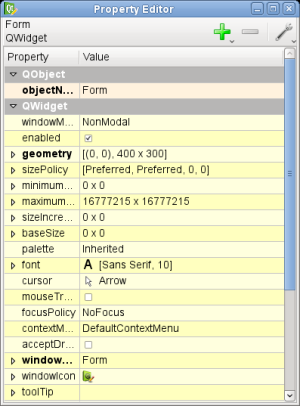
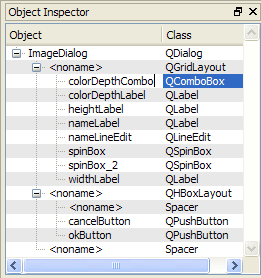
The properties that each object has, and their datatypes, can easily be inferred using the Python introspection features, as @amirgon suggested.
@rreilink Yes, that's what I was thinking.
My first thought is to use an XML internal representation. Then, we can develop converters that take the XML and generate the appropriate code for whatever language is being used. GUI projects can then be saved in the XML format and imported. This wouldn't allow for code changes to be back propagated to the GUI design however.
The GUI designer could internally use XML and a corresponding Python converter to generate the live view. Probably should only process objects that change to prevent having to regenerate the entire live view code in real time.
I'm not 100% familiar with how things like argument lists and types propagate from C to a Python binding. It seems like not all the information is being supplied to the Python binding when I inspect members of the lvgl module.
For example, to build the edit widget parameters pane in the GUI builder, we could look at all the get and set methods of an lvgl class. I would like to be able to present an appropriate control based on the type of the parameter. If it is a color, we can show a color picker. If it is a string, we can give them a text edit box, etc.
When I look at lvgl module members in Python, I don't really find any of this information. I have tried dir, and inspect so far, maybe I'm missing something?
I have seen other Python bindings that have more information, like documentation in the help pages and argument lists that have more detail than "...". @rreilink Do you know how we could have this kind of information propagate from the C code to the Python binding?
I would also like to possibly have additional metadata from specially formatted comments (similar to doxygen). For example, Glade, the GTK editor, has a nice feature where tooltips pop up over widget properties to explain what that properties is/does. This would prevent a lot of instances where you have to look at the documentation for something that isn't completely clear. See example of this in screen capture below:

See #3 for that discussion.
@rreilink I suggest opening an issue in lvgl repo to continue with the Python binding. Do you agree?
@AGlass0fMilk Let's discuss the details of tooltips and helps in #3
Having a layout design of the UI ( just a simple scratch) to see how the control elements are organized would be important already in this phase too.
@rreilink I suggest opening an issue in
lvglrepo to continue with the Python binding. Do you agree?
I just did :-)
Began work on PyQt-based GUI builder. Being somewhat blocked by the state of the pylvgl binding.
See the initial-development branch.

I have a basic lvgl simulator working with the newest release of pylvgl.
I decided to use QGraphicsView as the base class because it has a framework in place for translating between application and "scene" (LittlevGL) coordinates. It also handles drawing layers and multiple items.
Currently, the lvgl framebuffer is drawn as the background layer. This will allow us to overlay builder-related UI on the lvgl simulation (such as highlights on selected items, etc).

Got some basic introspection working with lvgl objects. I have it automatically populating the widget list from classes discovered in the lvgl module that inherit from lvgl.Obj. This way, when we add new widgets there's no extra configuration to do... although the names aren't very user friendly.
My goal is to make basic functionality work without manually creating metadata for each new widget. This way people can easily add custom types. If you want to make the widget's presentation cleaner, we can have a directory of json files where widget metadata is stored. The code can look there for prettier display information but can always fall back to the raw class name.
Also have the lvgl object tree enumerating in the treeview.
