

 luxonis
[BUG] Video window doesn't show combined/addWeight image with mask
Check if issue already exists
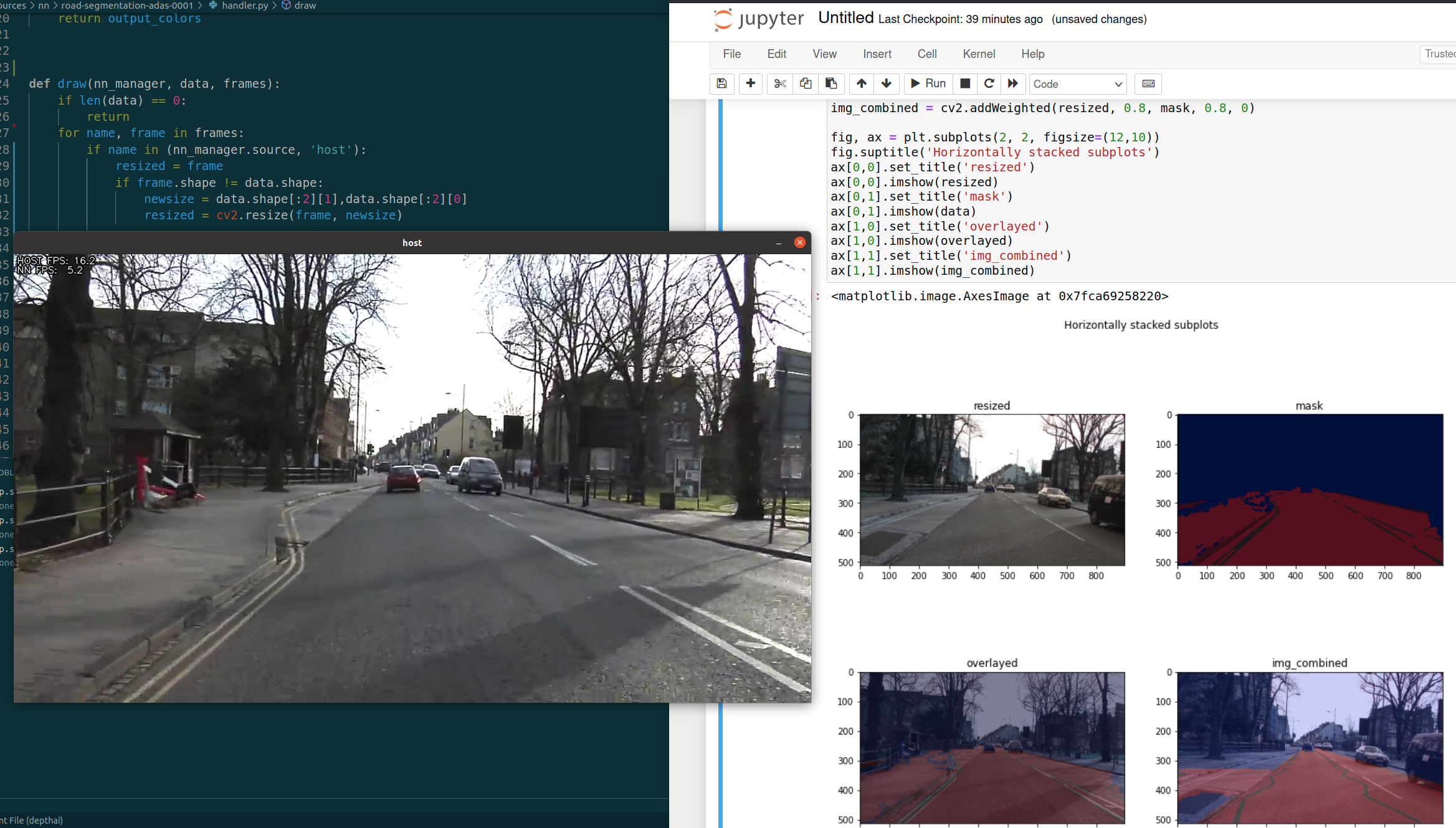
Describe the bug
The handler.py is actually working means it does return correct segmentation data, BUT the host window does not show the mask/overlay on top of the original image.
To Reproduce
handler.py
from typing import overload
from depthai_helpers.managers import Previews
from resources.nn.colormap import ColorMap
import cv2
import numpy as np

from depthai_helpers.utils import to_tensor_result


def decode(nn_manager, packet):
    # [print(f"Layer name: {l.name}, Type: {l.dataType}, Dimensions: {l.dims}") for l in packet.getAllLayers()]
    # after squeeze the data.shape is 4,512, 896
    data = np.squeeze(to_tensor_result(packet)["L0317_ReWeight_SoftMax"])
    class_colors = ColorMap.COLORS
    class_colors = np.asarray(class_colors, dtype=np.uint8)

    indices = np.argmax(data, axis=0)
    indices += 8
    output_colors = np.take(class_colors, indices, axis=0)
    return output_colors


def draw(nn_manager, data, frames):
    if len(data) == 0:
        return
    for name, frame in frames:
        if name in (nn_manager.source, 'host'):
            resized = frame
            if frame.shape != data.shape:
                # resize the data to fit frame
                newsize = frame.shape[:2][1],frame.shape[:2][0]
                resized = cv2.resize(data, newsize)

            # overlayed = cv2.addWeighted(resized, 0.5, data, 0.5, 0)
            overlayed = (frame * 0.5 + resized * 0.5).astype('uint8')

            return overlayed
            # return data

# def draw(nn_manager, data, frames):
#     if len(data) == 0:
#         return
#     for name, frame in frames:
#         if name in (Previews.color.name, Previews.nn_input.name, 'host'):
#             scale_factor = frame.shape[0] / nn_manager.input_size[1]
#             resize_w = int(nn_manager.input_size[0] * scale_factor)
#             resized = cv2.resize(data, (resize_w, frame.shape[0])).astype(data.dtype)
#             offset_w = int(frame.shape[1] - nn_manager.input_size[0] * scale_factor) // 2
#             tail_w = frame.shape[1] - offset_w - resize_w
#             stacked = np.hstack((np.zeros((frame.shape[0], offset_w, 3)).astype(resized.dtype), resized, np.zeros((frame.shape[0], tail_w, 3)).astype(resized.dtype)))
#             cv2.addWeighted(frame, 1, stacked, 0.2, 0, frame)
road-segmentation-adas-0001.json
{
    "nn_config": {
        "output_format" : "raw",
        "input_size": "896x512"
    },
    "handler": "handler.py"
}
Steps to reproduce the behavior:
python depthai_demo.py -cnn road-segmentation-adas-0001 -vid /media/Workspace/Learning/Github/depthai/videos/CamVid.mp4 -sh 8
Expected behavior A clear overlay or mask on top of the video.
What I did
I saved the numpy array data and displayed them with matplotlib, I can see the overlay/mask over there, but not on the video window which is launched by the depthai_demo.py
np.save('resized.npy', resized) np.save('data.npy', data) np.save('overlayed.npy', overlayed) np.save('frame.npy', frame)

Thanks @franva for the (awesome and fantastically thorough) bug report. Also this looks really neat. Tagging @VanDavv . I was thinking that he was already working on this, but I don't see a note in this issue that it's been resolved elsewhere.
Thanks again, Brandon

Yes, I already started to work on road segmentation here (WIP in decoding) and had to postpone it a bit due to demo fixes, but will work on this more this week and circle back with PR.
Thanks again @franva, this issue will be definitely helpful
Hi @Luxonis-Brandon and @VanDavv Thanks for the positive feedback, I appreciate your enthusiasm on bringing more new examples and features~!
Hi @VanDavv
It's great to see the demo code for road segmentation :), thanks for creating it.
I see one more thing which is very valuable for users, a tutorial of training a segmentation model. You might not be aware that the current official notebook tutorial for training a segmentation model is out of date and not working. A 3rd party service is left there for us to use and it's already broken and we need to pay for that service or trade our data for using that service.
I feel like that I paid for a product and want to use it and then I found that to use the product, I need to again pay for other services in order to use the product which I have already paid for, the issue has been created here if you'd like to know more details about it.
Hopefully there would be at least one tutorial for training a segmentation model, so many new ideas can take off without difficulties.
Yes, agreed. We want to make the training process convenient, so both updating our notebooks and resolving issues with training on Roboflow is something we'll focus on and make it better (and actually I think @Erol444 already mentioned that both of these issues are being taken care of)
Thanks @VanDavv for your timely reply and appreciate @Erol444 's effort to work on updating DepthAI Official notebooks for training segmentation models.
OAK is designed by OpenCV which starts as an open source project and still is an open source project and so is the lovely DepthAI. It will feel not that authentic of "open source" flavor if we had to use a 3rd party paid service to train custom models for an already paid product.
It's okay to have Roboflow as a platform who provides services to assist training models, but there should be at least one equally well designed (if not better) open source project from DepthAI which also allows users to train their own models, gives the power of customization to the hands of users, so heaps of unforeseeable brilliant projects could be invented.
Once again, thanks for all of you to bring these great open source projects to us and I really look forward to bring some of my ideas to life with the brilliant OAK cameras and DepthAI.
Thanks! So we had a Deeplabv3 training notebook but it stopped working with Colab. We have another that worked on bare metal, but it’s a couple years old now so we’ll have to update it a lot I’m guessing.
On the Deeplabv3 training notebook, our new junior ML dev will try to fix it in the coming days. Sorry again for the inconvenience @franva .

Hi @VanDavv, thanks for the great work! I am picking up this for a project, is there any c++ equivalent? I got started on a version and posted on the Luxonis discord. thanks https://discord.com/channels/790680891252932659/924798230879952906/1018299107334434916
