

 lukemurray
question: save query results in csv format?
Is there an easy way to save big data query results? To the clipboard? or preferably to CSV format? Thanks!

Currently not, although you can select and copy the results with ctrl+C.
From: WhiteRabbit [email protected] Sent: Friday, April 7, 2017 12:17:38 AM To: lukemurray/data-atom Cc: Subscribed Subject: [lukemurray/data-atom] question: save big query results in csv format? (#123)
Is there an easy way to save big data query results? To the clipboard? or preferably to CSV format? Thanks!
— You are receiving this because you are subscribed to this thread. Reply to this email directly, view it on GitHubhttps://github.com/lukemurray/data-atom/issues/123, or mute the threadhttps://github.com/notifications/unsubscribe-auth/AAJj0YhtpVdT9W8AXpDGxMxpb2T51yB2ks5rtPQCgaJpZM4M1qkk.

The copy-paste approach doesn't work well as it messes the order (at least in my case).

- Click the box in the upper left of the results which should highlight all the rows and columns.
- Ctrl+C to copy.
- Open a spreadsheet, click the upper left row
- Ctrl+V to paste.
That worked for me.

Not sure this is what @drorata means, but I do have some issues when copying and pasting. I can copy the whole table and it works just fine. If I attempt to copy just a few rows and columns, then when I paste into Excel, it stacks all the data into a single column. I added a screenshot of the 2 columns I tried to copy and paste and then the resulting paste from excel (all in one column). Not sure whether or not this is an Excel Problem, or a Data Atom problem.
Data-Atom Results Screen

Microsoft Excel
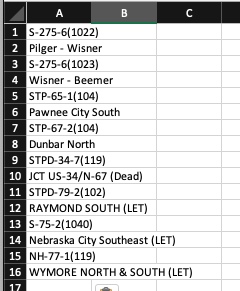

....columns I tried to copy and paste and then the resulting paste from excel (all in one column). Not sure whether or not this is an Excel Problem, or a Data Atom problem.
This is from excel, look at the data to column settings, then paste
