

 luizdepra
RMarkdown code chunk formatting does not work.
When looking at code chunks in .html files generated by .rmd such as those included in your example website under ~/contents/post, they lose any noticeable formatting. How do you format these code chunks?


Hi Luiz, Two options. The easiest is to use your example website, but change:
        [[languages.en.menu.main]]
        name = “Blog"
        weight = 2
        url = "posts/“
To
        [[languages.en.menu.main]]
        name = “Blog"
        weight = 2
        url = "post/“
If you then view the website, and the one corresponding post, you’ll see that the code chunk blends into the background, with no discernible highlighting or structure unlike what the typical R chunk looks like looks:
https://bookdown.org/yihui/blogdown/installation.html
The second option is explained in this link above, but it requires a little more work. You have to install R and Studio which is pretty easy. Then you Have to open Rstudio and within it run this code which is explained in the link below:
install.packages(“blogdown”) blogdown::instal_hugo() blogdown::new_site() blogdown::serve_site()
At which point you should be able to see this demo website which has properly displayed R code chunks as well if you want to dig deeper into all of the files associated with the website.
I really like your template much more than his, as I believe many R users would, but I think we (certainly I) would like that functionality of the code chunk looking like it usually looks to R users.
Also a simple question, in the bottom of the homepage for your example site, how do you get rid of the empty brackets, i.e. “[]”? I couldn’t figure this out.
Hopefully this is not too much information. Thank you, -Raul
On Dec 8, 2019, at 6:38 PM, Luiz F. A. de Prá <[email protected]mailto:[email protected]> wrote:
I never used RMD. Which part is not working and how can I test it?
— You are receiving this because you authored the thread. Reply to this email directly, view it on GitHubhttps://github.com/luizdepra/hugo-coder/issues/243?email_source=notifications&email_token=AJTURHRI3UMZTK7NW6IBVI3QXWHQVA5CNFSM4JYBGVP2YY3PNVWWK3TUL52HS4DFVREXG43VMVBW63LNMVXHJKTDN5WW2ZLOORPWSZGOEGHPR3Q#issuecomment-563017966, or unsubscribehttps://github.com/notifications/unsubscribe-auth/AJTURHTTMWDYM5ZOH6S72YLQXWHQVANCNFSM4JYBGVPQ.
Hmm... I think I know what is the problem.
This theme uses two kinds of archetypes: Pages and Posts. And this is happening because your posts are being rendered as a page. To get Posts to work you need to put your content inside a posts folder.
But, you really want to modify the root folder for your posts, I explain how to do it here at #186.
Hi Luiz, Didn’t work. Although the page is now being rendered under the posts archetype and so the formatting is different and Disqus comment are enabled, the code chunks are still blending into the background. If you view your .rmd file you should see the same result. I may try to post the source code of my site on GitHub soon. Any other ideas? Best, -Raul
On Dec 10, 2019, at 6:35 AM, Luiz F. A. de Prá <[email protected]mailto:[email protected]> wrote:
Hmm... I think I know what is the problem. This is happening because your posts are being rendered as pages. This theme uses two kinds of archetypes: Pages and Posts. To get Posts to work you need to put your content inside a posts folder. But, you really want to modify the root folder for your posts, I explain how to do it here at #186https://github.com/luizdepra/hugo-coder/issues/186.
— You are receiving this because you authored the thread. Reply to this email directly, view it on GitHubhttps://github.com/luizdepra/hugo-coder/issues/243?email_source=notifications&email_token=AJTURHT6XS6PWIKF5ZXEY6DQX6EJVA5CNFSM4JYBGVP2YY3PNVWWK3TUL52HS4DFVREXG43VMVBW63LNMVXHJKTDN5WW2ZLOORPWSZGOEGPCRCQ#issuecomment-564013194, or unsubscribehttps://github.com/notifications/unsubscribe-auth/AJTURHX3REWLBHNLGGVPAD3QX6EJVANCNFSM4JYBGVPQ.
I forgot to answer this:
Also a simple question, in the bottom of the homepage for your example site, how do you get rid of the empty brackets, i.e. “[]”? I couldn’t figure this out.
You just need to remove the commit parameter from your configuration. Maybe, leaving it blank will work too.
Ok, I'll try to test with RStudio. But I'll need at least your config.toml content.
Cool, I’ve attached that file. Let me know if I can help in any way. There are files in there that are called like my picture and certain docs (see raulthinks.comhttp://raulthinks.com), feel free to take those things out to test. Thanks, -Raul
On Dec 10, 2019, at 11:14 AM, Luiz F. A. de Prá <[email protected]mailto:[email protected]> wrote:
Ok, I'll try to test with RStudio. But I'll need at least your config.toml content.
— You are receiving this because you authored the thread. Reply to this email directly, view it on GitHubhttps://github.com/luizdepra/hugo-coder/issues/243?email_source=notifications&email_token=AJTURHVHP3WX6SO7JKZ5Y4DQX7E77A5CNFSM4JYBGVP2YY3PNVWWK3TUL52HS4DFVREXG43VMVBW63LNMVXHJKTDN5WW2ZLOORPWSZGOEGQAW4I#issuecomment-564136817, or unsubscribehttps://github.com/notifications/unsubscribe-auth/AJTURHUNAKSJQ5GCHDWVQ4DQX7E77ANCNFSM4JYBGVPQ.
Hi guys,
I think I have been trying to do the same thing. I can replicate the styling I want with this code
---
title: "Hello R Markdown"
author: "Frida Gomam"
date: 2015-07-23T21:13:14-05:00
categories: ["R"]
tags: ["R Markdown", "plot", "regression"]
---

<style>
  pre.r {
    color:#e5e5e5;
    background-color:#000;
  }
</style>

```{r setup, include=FALSE}
knitr::opts_chunk$set(collapse = TRUE)
```

# R Markdown

This is an R Markdown document. <http://rmarkdown.rstudio.com>.

You can embed an R code chunk like this:

<div class="highlight">
```{r cars}
summary(cars)
fit <- lm(dist ~ speed, data = cars)
fit
```
</div>
That is, declaring a separate style block for pre.r as the R code chunks get rendered with class r, and then wrapping my Rmarkdown code blocks with the div to inherit the parent style attrs.
Any idea what the proper way to do this would be?

I think this is specific to us R users who use blogdown on top of hugo, there's a rabbit hole of special considerations because by default .Rmd posts get rendered to .html and completely skip hugo's markdown generator.
One possible solution is to use .Rmarkdown as a file extension, which generates a .markdown file instead of an HTML file, where R code chunks are enclosed in regular code fences like so:
```r
library(ggplot2)
```
Here are two posts that I found particularly helpful:
- Code highlighting https://ropensci.org/technotes/2020/04/30/code-highlighting/
- Misc tips & tricks (e.g. for plot handling via figure shortcodes) https://ropensci.org/technotes/2020/04/23/rmd-learnings/
I think there's a lot of people who start using blogdown and hugo at the same time and, due to lack of experience, are not sure where to look for the answer to their problems (I've been, and somewhat still am, in that boat) – I think in this case the solution is not related to this particular theme. It might also be worth to read the blogdown book or at least bookmark it and then ctrl+f through it whenever you're particularly lost (my approach 😅)

@AkhilGNair Not quite but that's a nice fix to change the background and text color of a code chunk.
@jemus42 I'm in the same boat as well. I agree that this fix is not so much related to this theme, but is more so a way to achieve the nice style and syntax highlighting that all R chunks seem to use. For reference here's an example:
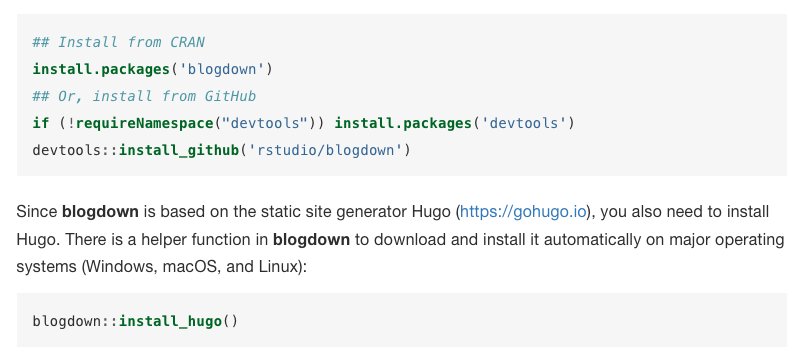
I'm putting some good content on my site (partly due to the nice template of @luizdepra ), but I personally find the code chunks far from what an R user is used to.
I've seen many similar websites with the same issue, so I think this fix would go a long way. I'll keep digging on my end.