

 luckman212
"Close Other Panes" seems to close other tabs
The "Close Other Panes" closes most but not all my other tabs for some reason. I would expect split panes to be closed, not other tabs inside the tab group of my current file.

Are you running v1.0.3? If not, please download it and test again.
Can you post screenshots of "before" and "after" showing the panes that did not close? And also your console output if there is any?

I'm running whatever's in master. I think it's v1.0.2 but manifest.json wasn't updated so I'm not 100% sure.
Before:

After:

My other tab got nuked.
Thanks for letting me know about the manifest- yes I forgot to update it. I'll fix shortly.
As for the actual behavior, that actually looks correct to me. The intention of the Close Other function is to close all other leaves, without regard for whether they are tabs or separate panes.
If you want stacked tabs within the currently active pane to remain open, I will need to make a setting for that.
Not sure why you're calling this "stacked tabs". To me those are regular tabs.
These are stacked tabs:
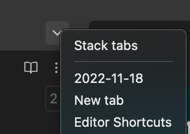
You really think the current behavior makes sense? All I want to do is create a split and the plugin kills all the other tabs. What do tabs have to do with splits? I mean, sure, create a setting—that'll work for me. But don't you think the current behavior is surprising and unhelpful to users?
I used the wrong terminology for stacked tabs. I meant "tabs that are grouped together into a single pane" (leaf). In your case, if you want to activate the side-by-side view without closing other leaves, does turning off the toggle below not do what you want?
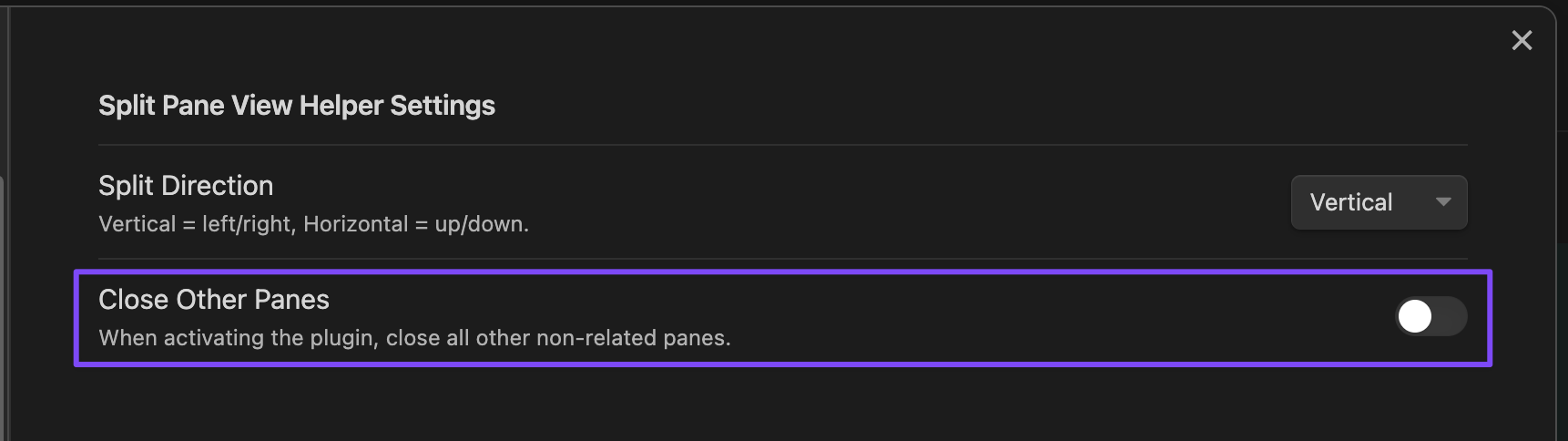
Obviously I don't think the behavior is "surprising and unhelpful" 🙀 otherwise I wouldn't have published it. But, I am open to feedback from you and others on how to better implement this or re-word the descriptions so there are no surprises. I supposed I should change the word Panes to Leaves to be more explicit.
One thing I could probably implement is, when that toggle is off, we could iterate all the leaves and only close leaves that are part of the current grouping. In that way, repeated pressing of the hotkey would not open 2,3,4...duplicate tabs—it would simply reset the current split view for the active tab without interfering with other leaves.
I just want "splits" (aka "split panes" or simply "panes") closed, not "tabs". "Leaves" is not a common term—never seen it, so I assume that must come from the Obsidian API. Maybe you mean "Close other files"?
repeated pressing of the hotkey would not open 2,3,4...duplicate tabs
Not sure what you mean here. I thought this plugin only opened a split pane. How can there be duplicate tabs.
I feel like I have a completely wrong model of what this plugin is trying to do.
Yes, leaves are what the views are called internally (API). Yes, I think maybe you are looking for a different feature entirely here. Are you saying you want a feature to close all splits (sort of a "combine all open splits/views into a single pane")? That is definitely not the purpose of this plugin. If I am misunderstanding, please manually arrange your layout "before" and "after" and paste screenshots here so it's clear.
What my friend and I miss from before Obsidian v1 is this: always having 2 splits, one for editing view and one for reading view.
The problem is that when tabs were added in v1, the "linked" reading view on the right doesn't change when one switches tabs in the left split. To me this is a UX flaw, and there are feature requests for Core to change this, but who knows if and when they'll get to it. I thought your plugin was going to provide a nice workaround: the ability for me to, once i switched to a new tab, hit a command to quickly open a split reading view; and because i only have so much horizontal real estate, I would want all existing splits on the right to be closed to make room. Does this make sense?
I keep asking you for screenshots... please post screenshots of what you are asking for. Before and After. I will see if this is something that can be done.
I think you are saying, if you have a random arrangement of tabs, panes, splits, etc, you want the plugin to collapse ALL of them to the "left" and then open a single split pane view to the right of just the active tab. Is that right?
So if I start out with:

If I use core functionality by ⌘-clicking this button:
 I get:

With your plugin and "Close other panes" set to on, I would get:

What I was expecting, and what I was asking for is:

But actually, to me this would be ideal as I would lose no tabs:

Now, if there happened to be more than two split panes to begin with, then it would be ok for the third, fourth, etc. splits to be closed, as that would free up horizontal real estate for the reading view.
In any of the above solutions, it would be ideal if when the plugin closed any split, any of the tabs in that split were shifted into the right-most split. But if that's harder to implement, then I can live without that, and losing the tabs in the closed splits would be fine for me (the reason is that I tend to have ephemeral notes in my non-main split pane; of course, other users may have different schemes).
Screenshots were helpful. I think I understand what you're after now. Basically, preserve tabs you have open no matter what, but always set up the view as a single-split with the active file on the left and right.
That's a challenge, but I will see if I can figure out a way to get it done. It will take some time, I'm open to PRs if you have any ideas on how to implement it.
Thanks for considering it. I'll try to take a look at it once I'm done looking at the Obsidian Plugin Manager.