

 lovell
Tips for improving resizing speed (on RPI 4)
Question about an existing feature
What are you trying to achieve?
Hi everybody,
I am trying to build an affordable home video surveillance system on a Raspberry Pi 4. So I bought a Coral TPU USB stick that allows me now to do person and car detection on a single image in only 20 msecs.
However the object detection model only accepts images with dimensions 300 x 300, which means I need to resize the image.
Since sharp is the fastest NodeJs package for image resizing, I wrote the code snippet below. This is working fine, except that the processing time is about 200 msecs. Which seems damn fast to me, but it still is 10 times slower as what I need to feed images to the USB stick (to use my USB stick optimal).
So I would appreciate a lot if I could get some tips about how I could achieve faster resizing. Not sure whether my code snippet below could be optimized somehow, or whether these timings are "normal" on an ARM processor like Raspberry (64 bit Raspberry OS)? Or perhaps ARM is not the best choice to run the Sharp package?
Thanks!! Bart
When you searched for similar issues, what did you find that might be related?
I did only find general benchmarks, not Raspberry specific.
Minimal standalone code sample
var startTime = process.hrtime();

var resizeOptions = {
   fit: "fill"
}
var sharpInstance = sharp(imageBuffer).resize(300, 300, resizeOptions);
 imageBuffer = await sharpInstance.toBuffer();

var stopTime = process.hrtime(startTime);
var executionTime = (stopTime[0] * 1000000000 + stopTime[1]) / 1000000;
Please provide sample image(s) that help explain this question
I have used this example image (jpeg 687 x 1031) for my test.

The Raspberry Pi 4 has a BCM2711 CPU, which means NEON SIMD intrinsics are available and should be used for JPEG de/encoding, however these will not yet be used for resizing operations.
libvips uses orc for runtime SIMD, which recently merged support for aarch64 via https://gitlab.freedesktop.org/gstreamer/orc/-/merge_requests/50 but this has not yet been released. I suspect we'll see an improvement when this is available.

Hi @lovell, Thank you for providing the detailed information! Very much appreciated!!!
To be honest I wasn't aware about the existance of ORC and SIMD. So as a result some beginner questions about this:
- Does libvps frequently update to new ORC versions?
- Libvps uses ORC, and ORC will get aarch64 support. Does that mean that features like the libvps resizing will automatically become faster once they use the new ORC version, or does this also require extra code changes in libvps?
- Do you have any idea about the (rough) amount of improvement this could result into?
- Might this perhaps also result in improvement changes for other functions of libvps? For example vips-draw-rect?
Reason of my last question is that I also need to draw rectangles in my setup:
- I need to resize my ip cam images via Sharp to dimensions 300x300 for the Tensorflow model.
- Then I do object detection on the images via Tensorflow, which results in bounding box coordinates and labels (e.g. "person", "car", ...).
- At the end I need to draw those bounding boxes on the image:
 Currently I use jimp for this, but that takes about 350 msec for a single rectangle. Would love to use also Sharp for that...
sharp provides prebuilt binaries for libvips and its dependencies (including orc), so these improvements will eventually be included in a future release.
For drawing shapes on images, the best approach is usually to create an SVG containing these then overlay using composite. https://sharp.pixelplumbing.com/api-composite
Hi @lovell,
Thank you for the svg drawing tip. Going to try that in the next days.
I tried the 'neirest neighbour' image resizing, because that seems to be the fastest algorithm. And I see that the Tensorflow object detection accuracy is the same when using this resizing algorithm. But it doesn't offer me much speed improvement unfortunately. Here is my code snippet for reference:
var sharpInstance = sharp(imageBuffer);
var resizeOptions = {
        kernel: sharp.kernel.nearest,
        fit: "fill"
}
var resizedRawImage = await sharpInstance.resize(300, 300, resizeOptions).raw().toBuffer();
var resizedImageTensor = tf.tensor4d(resizedRawImage, [1, 300, 300, 3], 'int32');
So at the end I tried the image resizing offered by tfjs (Tensorflow.js):
const tflite = require('tfjs-tflite-node');
var uint8ImageBuffer = new Uint8Array(imageBuffer);
// Decode the image and convert it to a tensor.  The tfjs image decoding supports BMP, GIF, JPEG and PNG.
var imageTensor = tf.node.decodeImage(uint8ImageBuffer);
var resizedImageTensor = tf.image.resizeNearestNeighbor(imageTensor, [300, 300]);
Decoding the jpeg via tfjs takes about 35 msec, and resizing only 5 msecs. So in total about 40 msec on my Raspberry 4. Compared to the 195 msec of Sharp, this means that tfjs does reszing about 5 times faster.
I was completely surprised by this result to be honest. So I will stick for now by using tfjs for this task. Although it is a bit pity... Because I had hoped to be able to use Sharp also for image resizing, in cases where I don't need Tensorflow.
So I am going to close this issue, and try it again via Sharp in the future when the new ORC version is included. Thank you for your kind support!! Bart
Those timings are certainly unexpected, thanks for the detailed code samples, I'll try to add tfjs-tflite-node to the benchmarks at https://sharp.pixelplumbing.com/performance to see how it compares.
I also plan to run the tests and publish the results using ARM hardware too, probably on an AWS Graviton-based machine, once those orc changes are available.
I wonder if this might relate to CPU cache size. Would you be able to try with sequentialRead to see if there is any difference?
- var sharpInstance = sharp(imageBuffer);
+ var sharpInstance = sharp(imageBuffer, { sequentialRead: true });
That sounds good!! Thanks again.
I will reopen this issue, to avoid that other people start registering duplicate issues...
The addition of the sequentialRead does not seem to change any timings.
I have now done some more tests in a sequence,:
- TfJs does decoding+resizing almost always in about 40 msecs. Seems to be a stable timing.
- While the Sharp timings are more fluctuating: most of the time it is between 85 and 95 msecs. But around 20% of the images takes between 140 and 160 msecs.
My RaspBerry PI 4 (64-bit) is not doing much other work:
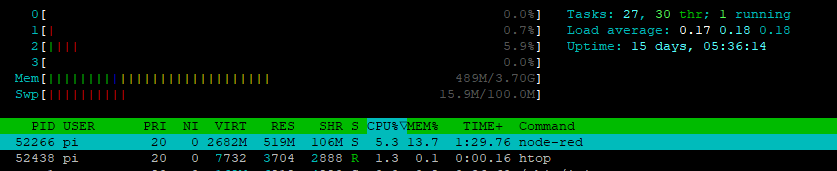
Don't hesitate to let me know if I need to test anything else, or put breakpoints in your code, or ... Otherwise it will be very difficult for you to troubleshoot if you don't have such a device.
Commit https://github.com/lovell/sharp/commit/df24b30755f6294b5355432f6ee54ffd266797fc adds tfjs to the benchmark tests, which I think uses the TensorFlow C++ library under the hood. Running these locally on x64 hardware with AVX2 support suggests tfjs is about half the speed of sharp for a JPEG decode/resize/encode roundtrip.
jpeg tfjs-node-buffer-buffer x 12.79 ops/sec ±48.53% (37 runs sampled)
jpeg sharp-buffer-buffer x 30.70 ops/sec ±4.32% (74 runs sampled)
I had to add a call to disposeVariables() otherwise there appeared to be some caching going on that was consuming all available RAM and possibly skewing results.
Next time I update the published results I'll include a test run using an ARM64 CPU also.
That is very useful! Thanks for the disposeVariables tip.
BTW TensorflowJs has multiple backends, and their native C++ is one of those. Here they pass the resize request to the backend, and I 'think' this c++ code snippet will do the job at the end. Not sure if this is any use for you, but just adding it here for completeness...
The benchmark results now include ARM64 (via AWS Graviton3), which are very close in performance to a 3rd gen AMD EPYC CPU.
https://github.com/lovell/sharp/blob/main/docs/performance.md#results