

 lovasoa
[new site support] how to download high-resolution images from digitalarchive.npm.gov.tw/
Hello! my friend
I have tried to use dezoomify, but cannot work, the URL as follows, instruct pls.
https://digitalarchive.npm.gov.tw/Painting/IIIFViewer?pid=17&Dept=P
the json file is here:
https://iiifod2.npm.gov.tw/iiif/2/K2A%2FK2A000018N000000000PAA/info.json
help me find the way please.
thank you somuch
by Kite

https://dezoomify.ophir.dev/#https://iiifod2.npm.gov.tw/iiif/2/K2A%2FK2A000018N000000000PAA/info.json
If some tiles fail to load, you can use dezoomify-rs with the --retries option
https://dezoomify-rs.ophir.dev/

Hi! thank you for reply
the picture too big, and this way cannot download,always crash when running dezoomify.
and i had tried the "dezoomify-rs",the computer same doesnot be work.
so i need you to help me find another way. thank you very much.
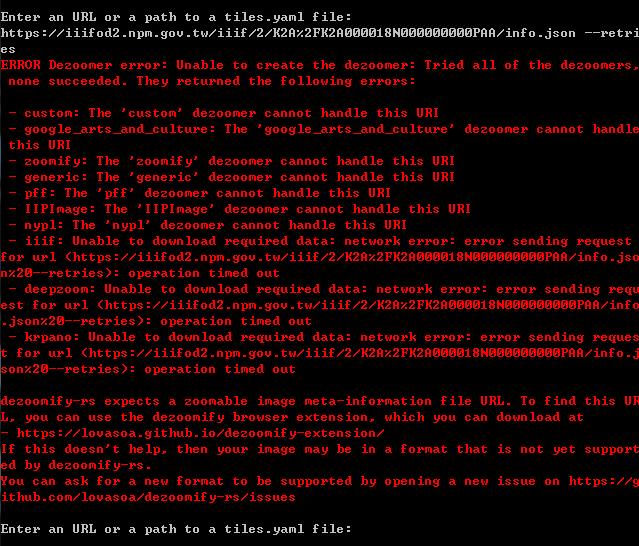
You launched the application first without arguments, and then tried to pass arguments from inside it. That's not how it works.
Don't double-click on the executable. Instead, from your console
dezoomify-rs --retries 10 https://iiifod2.npm.gov.tw/iiif/2/K2A%2FK2A000018N000000000PAA/info.json
Hi! thanks for your answer and your kindness
i tried again in your way
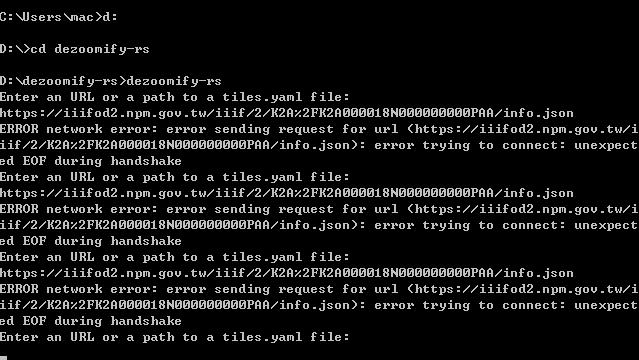
maybe it be rejected, maybe i used VPV
i give up.
thank you and your kindness