

 lovasoa
Barnes collection (collection.barnesfoundation.org)
Hello
How to deal with this image ?
https://collection.barnesfoundation.org/objects/5663/Young-Woman-Writing-(Jeune-femme-ecrivant)/
Dezoomify doesn't work :/
Thx !

The zoomable image URL is https://barnesfoundation-collection.imgix.net/tiles/5663/info.json.
However, it looks like they made several errors in the meta-information file:
- the
idshould behttps://barnesfoundation-collection.imgix.net/tiles/5663, and nothttp://localhost:8080/5663. - they only support specifying tile sizes by width and omitted this information
- they only support tile sizes of 256 and omitted this information
One possible solution is to download the info.json and manually edit it to fix the missing data :
{
  "@context": "http://iiif.io/api/image/2/context.json",
  "@id": "https://barnesfoundation-collection.imgix.net/tiles/5663",
  "@type": "iiif:Image",
  "protocol": "http://iiif.io/api/image",
  "width": 6138,
  "height": 4633,
  "profile": [{
      "formats": [ "jpg" ],
      "qualities": [ "color" ],
      "supports": [ "sizeByW" ]
  }],
  "tiles": [{ "width": 256, "scaleFactors" : [1,2,4,8,16] }]
}
Then, you can open the edited info.json with the latest build of dezoomify-rs

@Tricesimo, here are detailed instructions :
- Install the dezooomify-extension in your browser and download dezoomify-rs
- Activate the dezoomify-extension by clicking it's icon in the tab where you have your zoomable image opened. Reload the page.
- The dezoomify extension icon should now indicate it found a zoomable image. Click its icon again.
- in the page that opens, do not click Dezoomify!. Instead, copy the url in the text field, and open it in a new tab.
- Save the JSON that opened as a file on your computer (name it
info.json). - Open this file with a plain text editor (such as notepad on windows, TextEdit on MacOS, or gedit on linux)
- Replace
http://localhost:8080byhttps://barnesfoundation-collection.imgix.net/tilesand change the following properties :
  "profile": [{
      "formats": [ "jpg" ],
      "qualities": [ "color" ],
      "supports": [ "sizeByW" ]
  }],
  "tiles": [{ "width": 256, "scaleFactors" : [1,2,4,8,16] }]
- Open the info.json with dezoomify-rs; (you can open a terminal and drag and drop the dezoomify-rs executable, then the
info.jsonfile)
Hi lovasoa,
Thanks for the tips... I succeeded in most of that, but now I am getting the following error on dezoomify-rs:
ERROR Dezoomer error: Unable to create the dezoomer: Tried all of the dezoomers, none succeeded. They returned the following errors:
- deepzoom: Unable to create the dezoomer: Unable to parse the dzi file: Syntax: 1:1 Unexpected characters outside the root element: {
- krpano: Unable to create the dezoomer: Unable to parse the krpano xml file: Syntax: 1:1 Unexpected characters outside the root element: {
I am dragging the json into the dezoomify-rs window, and removing the quotes on either side of the file location (it was giving me a different error before I did that).
I even tried copying and pasting the exact json file you showed above, but I get the same issue. Here's the json I edited, as I can't upload it here...
{"@context":"http://iiif.io/api/image/2/context.json","@id":"https://barnesfoundation-collection.imgix.net/tiles/6365","@type":"iiif:Image","protocol":"http://iiif.io/api/image","width":4996,"height":6124,"profile":["http://iiif.io/api/image/2/level2.json",{"formats":["jpg","png"],"qualities":["default","color","bitonal"],"supports":["full","regionByPx","regionByPct","regionSquare","sizeByDistortedWh","sizeByWh","full","max","sizeByW","sizeByH","sizeByPct","sizeByConfinedWh","mirroring","noAutoRotate","none","rotationBy90s","rotationArbitrary","baseUriRedirect","cors","jsonldMediaType"]}]}
Thanks again for your help!

Attached is a document with screen shots that shows what I have tried. I'm sure I'm making a mistake somewhere... Thanks again for your help!
Ok, I don't see anything wrong with your screenshots. You can specify which dezoomer to use on the command-line to get an error message specific to the iiif dezoomer. Additionally, you also have to make the other changes mentioned above in this thread to your info.json. I forgot to mention them in my list of instructions. You have to add the following to your info.json :
  "profile": [{
      "formats": [ "jpg" ],
      "qualities": [ "color" ],
      "supports": [ "sizeByW" ]
  }],
  "tiles": [{ "width": 256, "scaleFactors" : [1,2,4,8,16] }]
giving
{
"@context":"http://iiif.io/api/image/2/context.json",
"@id":"https://barnesfoundation-collection.imgix.net/tiles/6365",
"@type":"iiif:Image","protocol":"http://iiif.io/api/image",
"width":4996,"height":6124,
"profile": [{
      "formats": [ "jpg" ],
      "qualities": [ "color" ],
      "supports": [ "sizeByW" ]
  }],
"tiles": [{ "width": 256, "scaleFactors" : [1,2,4,8,16] }]
}
dezoomify-rs --dezoomer iiif "C:\path\to\my\info.json"
Thanks for downloading the image. I am still stuck... would it be possible for you to send me the json file that you loaded, then I'll be able to edit it to work with others now that I know how to find the proper image directory?
I gave you the json in the message above: https://github.com/lovasoa/dezoomify/issues/417#issuecomment-695357068
It looks like they are now hosting their image tiles on a different domain. You have to find this domain in your browser's network activity monitor, and update the json file accordingly.
For instance, for https://collection.barnesfoundation.org/objects/5663/Young-Woman-Writing-(Jeune-femme-ecrivant)/ , I notice that a tile URL is
https://d2r83x5xt28klo.cloudfront.net/tiles/5663/0,0,2048,2048/256,/0/color.jpg
So I update the json meta-information accordingly, changing the @id to :
{
  "@context": "http://iiif.io/api/image/2/context.json",
  "@id": "https://d2r83x5xt28klo.cloudfront.net/tiles/5663",
  "@type": "iiif:Image",
  "protocol": "http://iiif.io/api/image",
  "width": 6138,
  "height": 4633,
  "profile": [{
      "formats": [ "jpg" ],
      "qualities": [ "color" ],
      "supports": [ "sizeByW" ]
  }],
  "tiles": [{ "width": 256, "scaleFactors" : [1,2,4,8,16] }]
}
I am still getting an error.
I got the domain from one of the tiles: https://d2r83x5xt28klo.cloudfront.net/tiles/6965/2048,6144,2048,2048/256,/0/color.jpg
I changed that in the command json file, but I still get an error (see below):
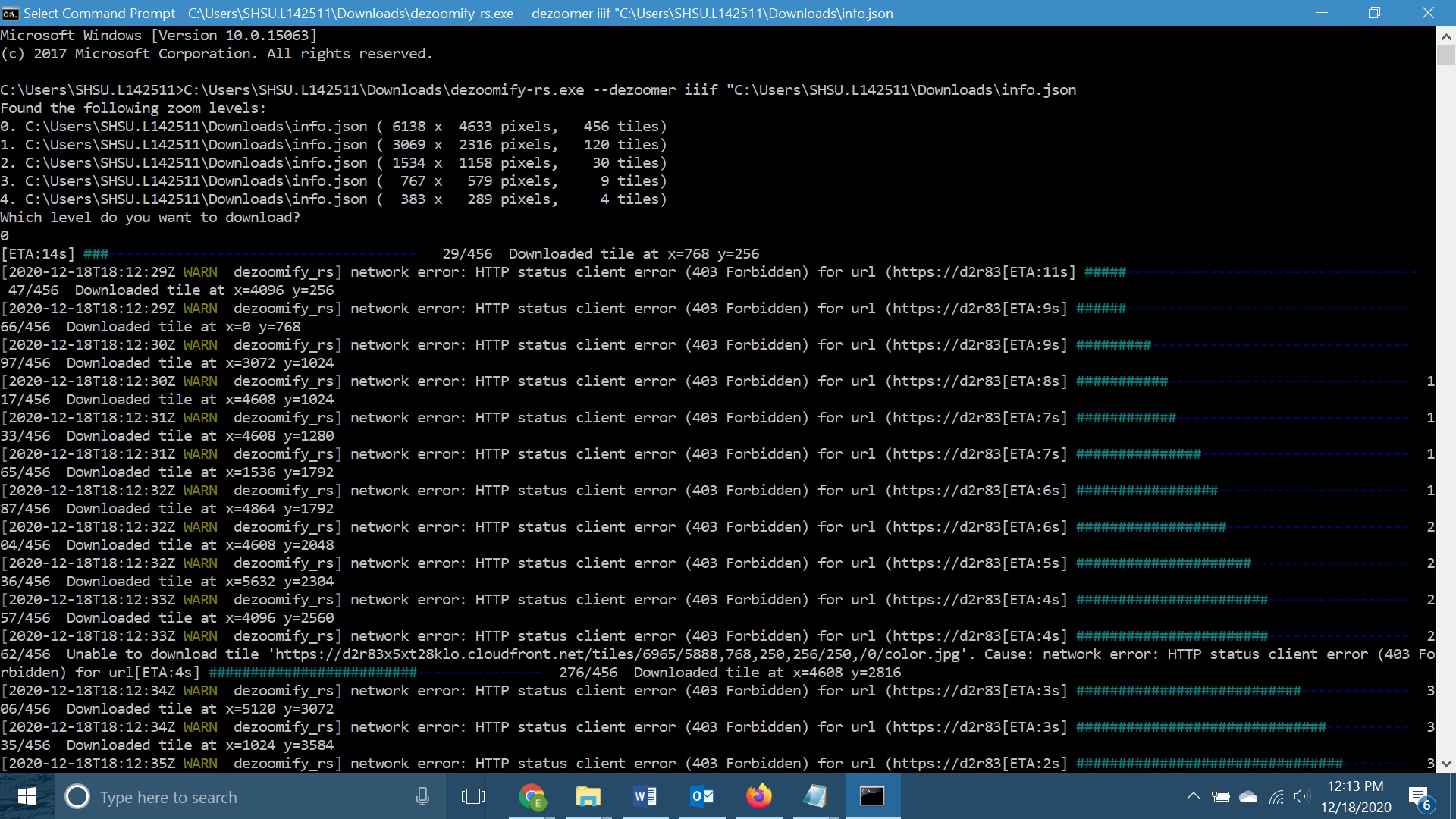

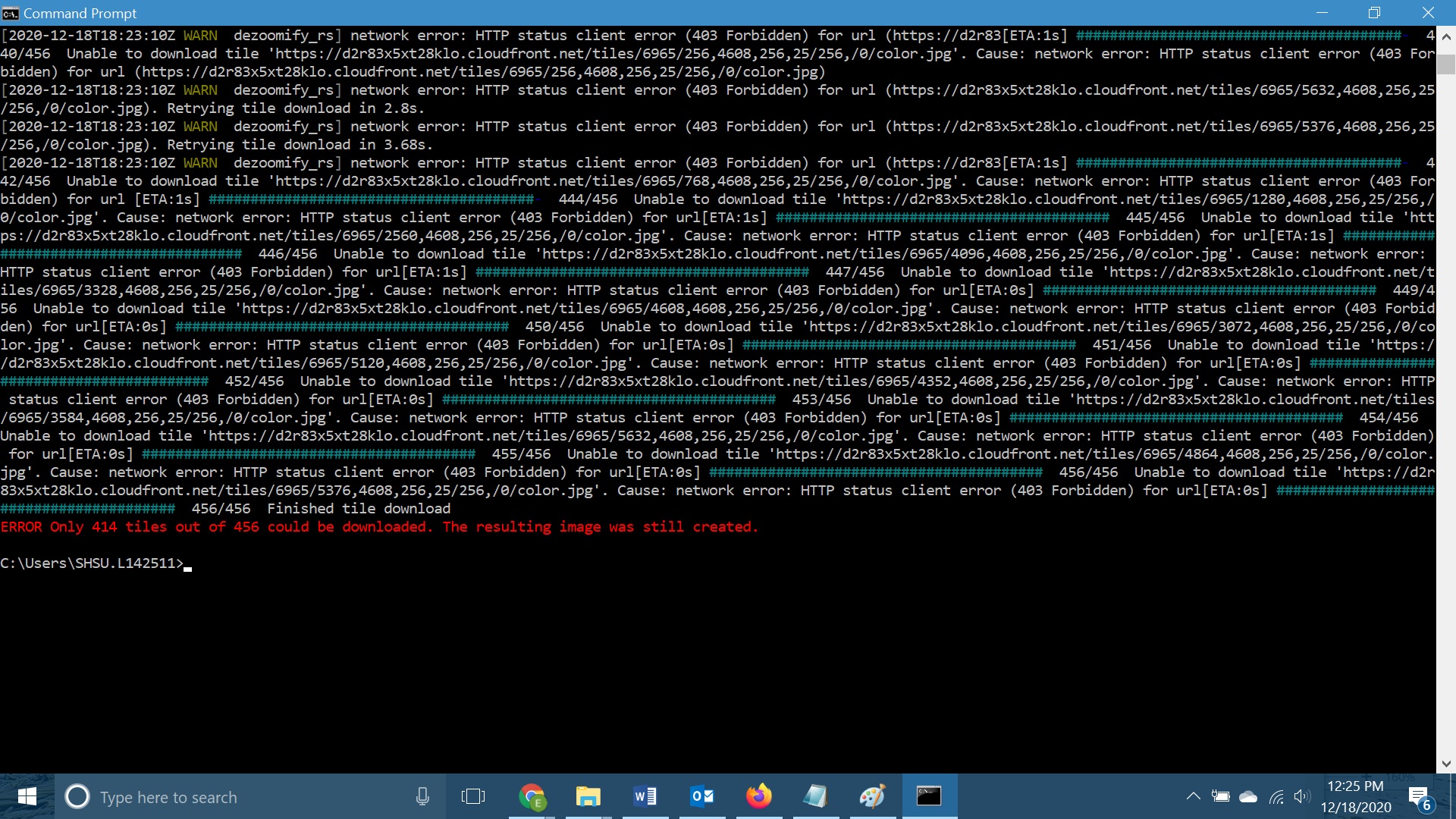
It actually downloaded some of the tiles, but not all of them. See the bottom of the error window:
It looks like they are now hosting their image tiles on a different domain. You have to find this domain in your browser's network activity monitor, and update the json file accordingly.
For instance, for https://collection.barnesfoundation.org/objects/5663/Young-Woman-Writing-(Jeune-femme-ecrivant)/ , I notice that a tile URL is
https://d2r83x5xt28klo.cloudfront.net/tiles/5663/0,0,2048,2048/256,/0/color.jpg
So I update the json meta-information to :
{
  "@context": "http://iiif.io/api/image/2/context.json",
  "@id": "https://d2r83x5xt28klo.cloudfront.net/tiles/5663",
  "@type": "iiif:Image",
  "protocol": "http://iiif.io/api/image",
  "width": 6138,
  "height": 4633,
  "profile": [{
      "formats": [ "jpg" ],
      "qualities": [ "color" ],
      "supports": [ "sizeByW" ]
  }],
  "tiles": [{ "width": 256, "scaleFactors" : [1,2,4,8,16] }]
}
To be clear, you have to use the width and height of the original info.json file for your image, not copy-and-paste the one from some other image from this thread.
Hi, thanks so much for discussing this issue. I've been trying to follow your instruction but I keep getting "ERROR Dezoomer error: Unable to create the dezoomer: Tried all of the dezoomers, none succeeded. They returned the following errors:" I'm only semi familiar with coding so I'm assuming I'm making a mistake somewhere along your instruction but would it be possible to share the actual json file you've edited in your post on december 18th, so I can see where I'm making the mistake?

Here is what I do...
Copy all the text that was noted above as "json meta-information" into a file created via Notepad, and save it with a .json suffix.
Download dezoomify-rs - latest version is 2.9.1.
When you launch it, drag the json file into that window - the filename will appear, but in quotes. Delete the quotes and hit Enter, and then you should get asked what size you want to download the file as.
For other paintings, here's how I find the correct parameters:
Have the dezoomify extension added to your web browser. Call up the image on the website. Make a note of its image number - it's the 4-digit number in the web address. Activate the dezoomify extension, then zoom in/out on the image until it's recognized by the extension. Open the extension so that the json file name appears in the dezoomify window. Copy that json file and paste it into a new window. The width and height now appears, along with the image number in the @id. Edit the json file for those 3 items and save it. Run dezoomify-rs using that updated json file and it will download that new picture.
I'm not much of a programmer either, so I hope this helps.
Thank you so much. I still have a couple of questions.
When I drag the .json file into the dezoomify-rs in terminal, the file name appears but not in quotes. See the attached screenshot.
When following the instructions you provided for the other paintings you said to edit the json file for those 3 items and save it. Which 3 items are you referring to? The dimensions and the image number? Those are already in there for me so I’m not sure what to change exactly.
This is the image I’m attempting to download: https://collection.barnesfoundation.org/objects/7199/Le-Bonheur-de-vivre-also-called-The-Joy-of-Life/
Here is the .json file: @.@.@.***":"iiif:Image","protocol":"http://iiif.io/api/image","width":5100,"height":3704,"profile":["http://iiif.io/api/image/2/level2.json",{"formats":["png","jpg"],"qualities":["default","color","bitonal"],"supports":["full","regionByPx","regionByPct","regionSquare","sizeByW","sizeByH","sizeByPct","sizeByConfinedWh","sizeByDistortedWh","sizeByWh","full","max","noAutoRotate","none","rotationBy90s","rotationArbitrary","mirroring","baseUriRedirect","cors","jsonldMediaType"]}]}
What should I be changing in there?
Thanks so much for your help. I really appreciate it!
Zac On Oct 21, 2022, 1:07 AM -0400, Tricesimo @.***>, wrote:
Here is what I do... Copy all the text that was noted above as "json meta-information" into a file created via Notepad, and save it with a .json suffix. Download dezoomify-rs - latest version is 2.9.1. When you launch it, drag the json file into that window - the filename will appear, but in quotes. Delete the quotes and hit Enter, and then you should get asked what size you want to download the file as. For other paintings, here's how I find the correct parameters: Have the dezoomify extension added to your web browser. Call up the image on the website. Make a note of its image number - it's the 4-digit number in the web address. Activate the dezoomify extension, then zoom in/out on the image until it's recognized by the extension. Open the extension so that the json file name appears in the dezoomify window. Copy that json file and paste it into a new window. The width and height now appears, along with the image number in the @id. Edit the json file for those 3 items and save it. Run dezoomify-rs using that updated json file and it will download that new picture. I'm not much of a programmer either, so I hope this helps. — Reply to this email directly, view it on GitHub, or unsubscribe. You are receiving this because you commented.Message ID: @.***>
Here’s the .json link because it didn’t copy and paste correctly.
https://d2r83x5xt28klo.cloudfront.net/tiles/7199/info.json On Oct 21, 2022, 9:03 AM -0400, Zachary Zimmerman @.***>, wrote:
Thank you so much. I still have a couple of questions.
When I drag the .json file into the dezoomify-rs in terminal, the file name appears but not in quotes. See the attached screenshot.
When following the instructions you provided for the other paintings you said to edit the json file for those 3 items and save it. Which 3 items are you referring to? The dimensions and the image number? Those are already in there for me so I’m not sure what to change exactly.
This is the image I’m attempting to download: https://collection.barnesfoundation.org/objects/7199/Le-Bonheur-de-vivre-also-called-The-Joy-of-Life/
Here is the .json file: @.@.@.***":"iiif:Image","protocol":"http://iiif.io/api/image","width":5100,"height":3704,"profile":["http://iiif.io/api/image/2/level2.json",{"formats":["png","jpg"],"qualities":["default","color","bitonal"],"supports":["full","regionByPx","regionByPct","regionSquare","sizeByW","sizeByH","sizeByPct","sizeByConfinedWh","sizeByDistortedWh","sizeByWh","full","max","noAutoRotate","none","rotationBy90s","rotationArbitrary","mirroring","baseUriRedirect","cors","jsonldMediaType"]}]}
What should I be changing in there?
Thanks so much for your help. I really appreciate it!
Zac On Oct 21, 2022, 1:07 AM -0400, Tricesimo @.***>, wrote:
Here is what I do... Copy all the text that was noted above as "json meta-information" into a file created via Notepad, and save it with a .json suffix. Download dezoomify-rs - latest version is 2.9.1. When you launch it, drag the json file into that window - the filename will appear, but in quotes. Delete the quotes and hit Enter, and then you should get asked what size you want to download the file as. For other paintings, here's how I find the correct parameters: Have the dezoomify extension added to your web browser. Call up the image on the website. Make a note of its image number - it's the 4-digit number in the web address. Activate the dezoomify extension, then zoom in/out on the image until it's recognized by the extension. Open the extension so that the json file name appears in the dezoomify window. Copy that json file and paste it into a new window. The width and height now appears, along with the image number in the @id. Edit the json file for those 3 items and save it. Run dezoomify-rs using that updated json file and it will download that new picture. I'm not much of a programmer either, so I hope this helps. — Reply to this email directly, view it on GitHub, or unsubscribe. You are receiving this because you commented.Message ID: @.***>
Attached is the json I use and edit with each picture I want to download barnes.txt I can't upload an actual json file, so I just changed it to txt. You should be able to save it and then change the extension to json.
As for what to update...
Here is what I want to download: https://collection.barnesfoundation.org/objects/5779/Portrait-of-a-Man-Holding-a-Watch/
I activate the dezoomifer extension in Firefox, zoom in on the picture until the extension recognizes a zoomable image (a red "1" appears in the extension), and then click on the extension which opens dezoomify in a new window.
Pre-loaded in the dezoomify page is: https://d2r83x5xt28klo.cloudfront.net/tiles/5779/info.json
I copy and paste that in the address bar of a new window, and the json parameters appear, like on the screen you showed above.
The three things to note are:
- The number in the picture's webpage; in this case, 5779
- The number shown as "width" in the json as shown in the window; in this case, 4865
- The number shown as "height" in the json as shown in the window; in this case, 6060
Edit the json file (I use notepad) by filling in those 3 numbers - the json I provided is already set up this way so you can find where each number goes. Make sure you save it as json.
Launch dezoomifer-rs, and drag the file into that window. For me, the filename appears in quotes, so I just delete them. When I hit enter, I get asked what size of picture I want, so I always take the largest size - the same height/width as I wrote in the json file. The file is then downloaded as a jpg in the same folder where I launched dezoomifer-rs.
For your next picture, follow the same steps, taking note of the 3 numbers, and replace them in the same json file you used before. Save it, drag it into the dezoomifer-rs window, and it will download that pic.
Hope this helps.
Thanks so much. I’m unfortunately still getting the same errors. I used the exact file you sent, saved as a .json, dragged into the dezoomifer-rs and I get the attached error. On Oct 22, 2022, 1:28 AM -0400, Tricesimo @.***>, wrote:
Attached is the json I use and edit with each picture I want to download barnes.txt I can't upload an actual json file, so I just changed it to txt. You should be able to save it and then change the extension to json. As for what to update... Here is what I want to download: https://collection.barnesfoundation.org/objects/5779/Portrait-of-a-Man-Holding-a-Watch/ I activate the dezoomifer extension in Firefox, zoom in on the picture until the extension recognizes a zoomable image (a red "1" appears in the extension), and then click on the extension which opens dezoomify in a new window. Pre-loaded in the dezoomify page is: https://d2r83x5xt28klo.cloudfront.net/tiles/5779/info.json I copy and paste that in the address bar of a new window, and the json parameters appear, like on the screen you showed above. The three things to note are:
- The number in the picture's webpage; in this case, 5779
- The number shown as "width" in the json as shown in the window; in this case, 4865
- The number shown as "height" in the json as shown in the window; in this case, 6060
Edit the json file (I use notepad) by filling in those 3 numbers - the json I provided is already set up this way so you can find where each number goes. Make sure you save it as json. Launch dezoomifer-rs, and drag the file into that window. For me, the filename appears in quotes, so I just delete them. When I hit enter, I get asked what size of picture I want, so I always take the largest size - the same height/width as I wrote in the json file. The file is then downloaded as a jpg in the same folder where I launched dezoomifer-rs. For your next picture, follow the same steps, taking note of the 3 numbers, and replace them in the same json file you used before. Save it, drag it into the dezoomifer-rs window, and it will download that pic. Hope this helps. — Reply to this email directly, view it on GitHub, or unsubscribe. You are receiving this because you commented.Message ID: @.***>
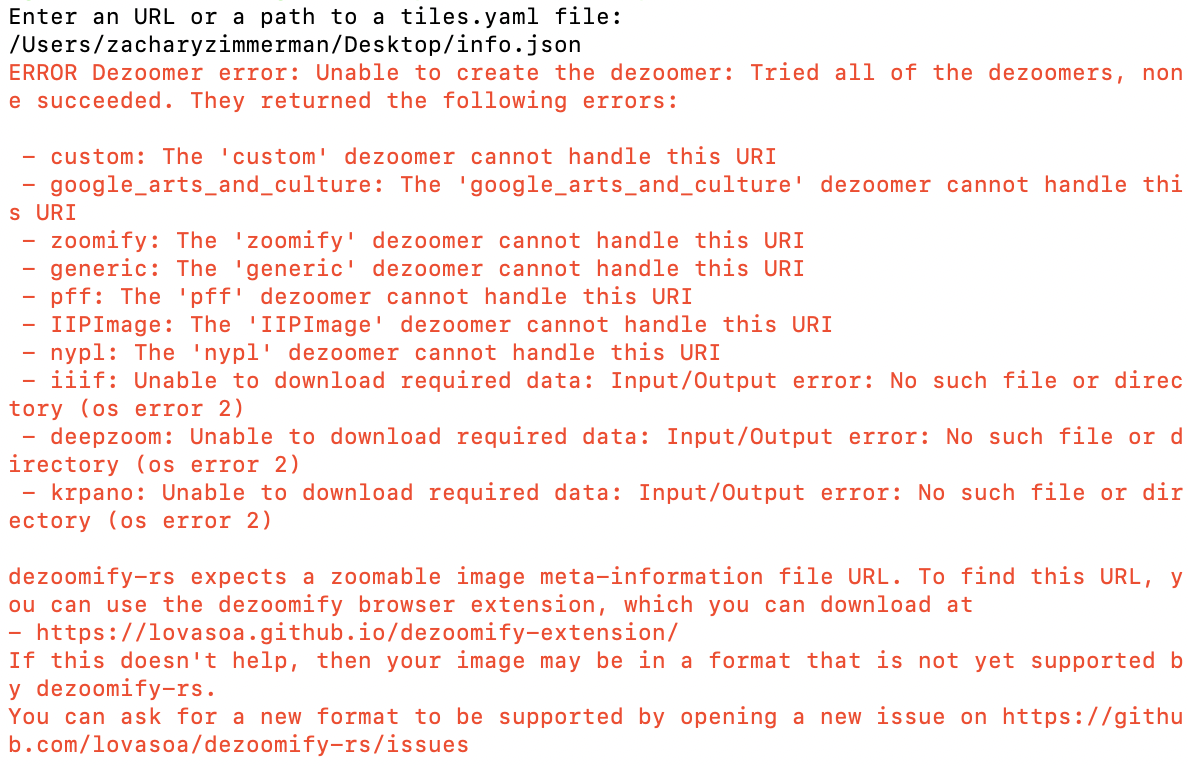 See attached
The only thing I can think of is that your json file is bad. Create a new text document using Notepad and paste the following into it:
{ "@context": "http://iiif.io/api/image/2/context.json", "@id": "https://d2r83x5xt28klo.cloudfront.net/tiles/6365", "@type": "iiif:Image", "protocol": "http://iiif.io/api/image", "width": 4996, "height": 6124, "profile": [{ "formats": [ "jpg" ], "qualities": [ "color" ], "supports": [ "sizeByW" ] }], "tiles": [{ "width": 256, "scaleFactors" : [1,2,4,8,16] }] }
When you save the file as a .txt, change the suffix to .json
This is the json use to download the Matisse painting mentioned further up this message thread.
Unfortunately I’m still getting the same error message. I even tried saving the txt document on windows and changing it to .json and it’s not working. Maybe I have to re-install dezoomify-rs.
Appreciate your help! On Oct 22, 2022, 1:02 PM -0400, Tricesimo @.***>, wrote:
The only thing I can think of is that your json file is bad. Create a new text document using Notepad and paste the following into it: { @.": "http://iiif.io/api/image/2/context.json", @.": "https://d2r83x5xt28klo.cloudfront.net/tiles/6365", @.": "iiif:Image", "protocol": "http://iiif.io/api/image", "width": 4996, "height": 6124, "profile": [{ "formats": [ "jpg" ], "qualities": [ "color" ], "supports": [ "sizeByW" ] }], "tiles": [{ "width": 256, "scaleFactors" : [1,2,4,8,16] }] } When you save the file as a .txt, change the suffix to .json This is the json use to download the Matisse painting mentioned further up this message thread. — Reply to this email directly, view it on GitHub, or unsubscribe. You are receiving this because you commented.Message ID: @.>
I now tried dezoomifer-rs on windows and am getting the attached error.
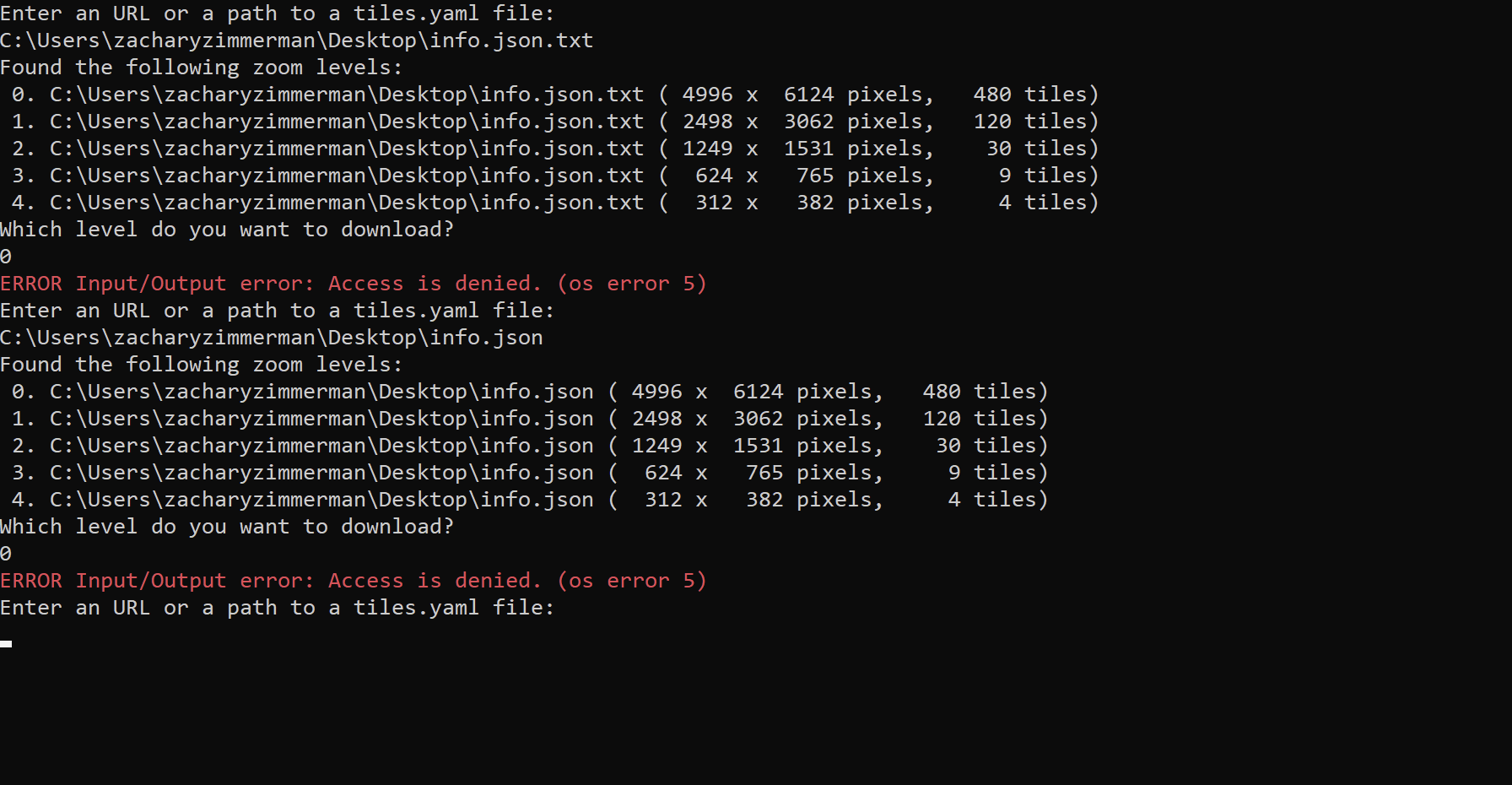
Well, you've gotten a lot further than before, but I've never come across that error before. Maybe someone else on this board has seen this and can help? I am stumped.