
longhorn
 longhorn copied to clipboard
 longhorn
[IMPROVEMENT] Dump NFS ganesha logs to pod stdout
Is your feature request related to a problem? Please describe. Currently, ganesha dumps logs to /tmp/ganesha.log file inside the share-manager container. It could be difficult to retrieve the log file if the pod goes into a crash loop.
Describe the solution you'd like
Able to see ganesha log included when using kubectl logs
Describe alternatives you've considered
none
Additional context https://github.com/longhorn/longhorn/issues/2284

This will help us to improve the support bundle enrichment w/ more helpful logs.

If I add output log with stdout in manager shutdown function to implement gracefully shutdown, am I right?
https://github.com/longhorn/longhorn-share-manager/pkg/server/share_manager.go

@weizhe0422 Remember updating the Zenhub pipeline when working on an issue, so right now, it's time to move this to ready-for-testing and provide the testing steps in the ready-for-testing checklist comment which will be created when the issue is moved to review pipeline. Go check all items in the checklist, but ignore some if they are not valid in this task.
Pre Ready-For-Testing Checklist
-
[x] Where is the reproduce steps/test steps documented? The reproduce steps/test steps are at:
- Create an
rwxvolumes and attach it to one of the nodes. - Create a PVC/PV for this volumes from Step 1.
- Deploy the POD and assign its PVC name from step 2.
- Type
kubectl get pods -n <your_namespace>and it will create share-manager POD whose name likeshare-manager-<Longhorn_volume_name> - Type
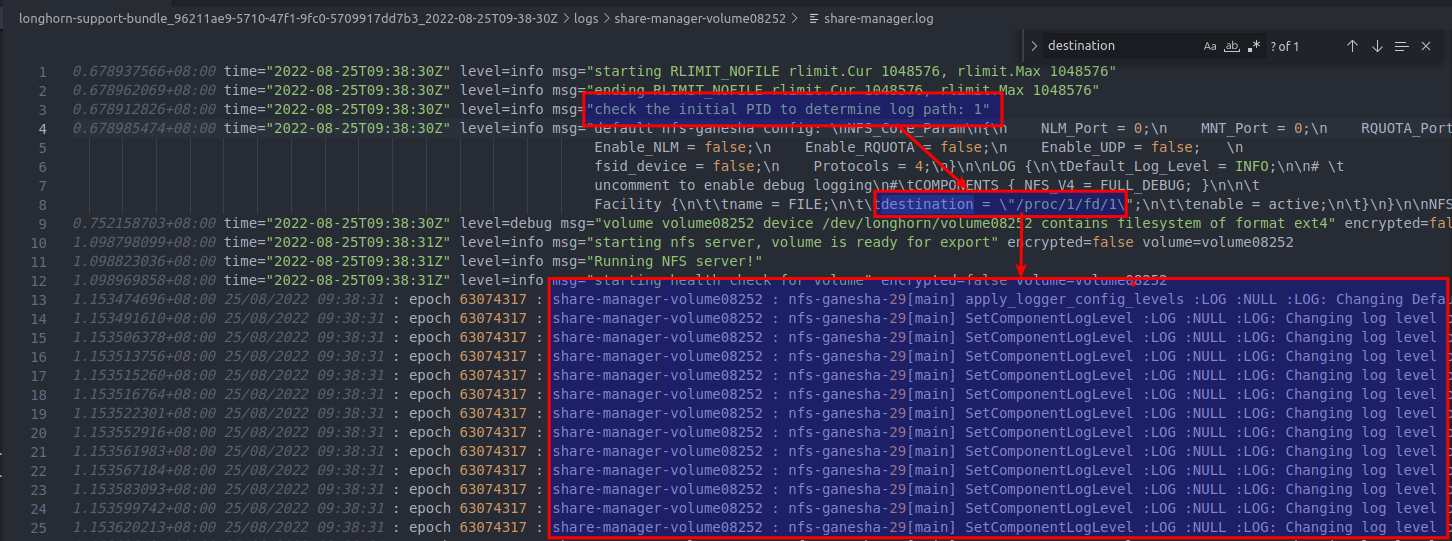
kubectl logs share-manager-<Longhorn_volume_name> -n <your_namespace> - It will show off the nfs-ganesha log in the console, and it also appear in support bundle.
- Create an
-
[x] Does the PR include the explanation for the fix or the feature? https://github.com/longhorn/longhorn-share-manager/pull/38#issue-1338698544
- Add LOG block in defaultConfig
- Remove defaultLogFile path as parameter
- Output nfs-ganesha log to Stdout if launched by longhorn-share-manager, otherwise it will record in
/tmp/ganesha.log

Verified on master-head 20220913
- longhorn master-head (8c87681)
- longhorn-share-manager v1_20220825 ( 2cba526)
The test steps
- Install Longhorn Master Ref.(install-with-kubectl)
- Create rwx volume and attach to pod. Deploy pod “mypod1”
kubectl apply -f pod_with_pvc.yaml
apiVersion: v1
kind: PersistentVolumeClaim
metadata:
  name: longhorn-volv-pvc
  namespace: default
spec:
  accessModes:
    - ReadWriteMany
  storageClassName: longhorn
  resources:
    requests:
      storage: 0.5Gi
---
apiVersion: v1
kind: Pod
metadata:
  name: volume-test
  namespace: default
spec:
  restartPolicy: Always
  containers:
  - name: volume-test
    image: nginx
    imagePullPolicy: IfNotPresent
    livenessProbe:
      exec:
        command:
          - ls
          - /data/lost+found
      initialDelaySeconds: 5
      periodSeconds: 5
    volumeMounts:
    - name: volv
      mountPath: /data
    ports:
    - containerPort: 80
  volumes:
  - name: volv
    persistentVolumeClaim:
      claimName: longhorn-volv-pvc
- Check pod
volume-testandshare-manager-pvc-9174f488-1425-421f-9017-c45afc178000status
**Result Failed longhorn-support-bundle_06960eb3-f5c9-490f-9f38-0c35e4e9ddba_2022-09-13T12-04-23Z.zip **
share-manager-pvcandvolume-testpod failed to Running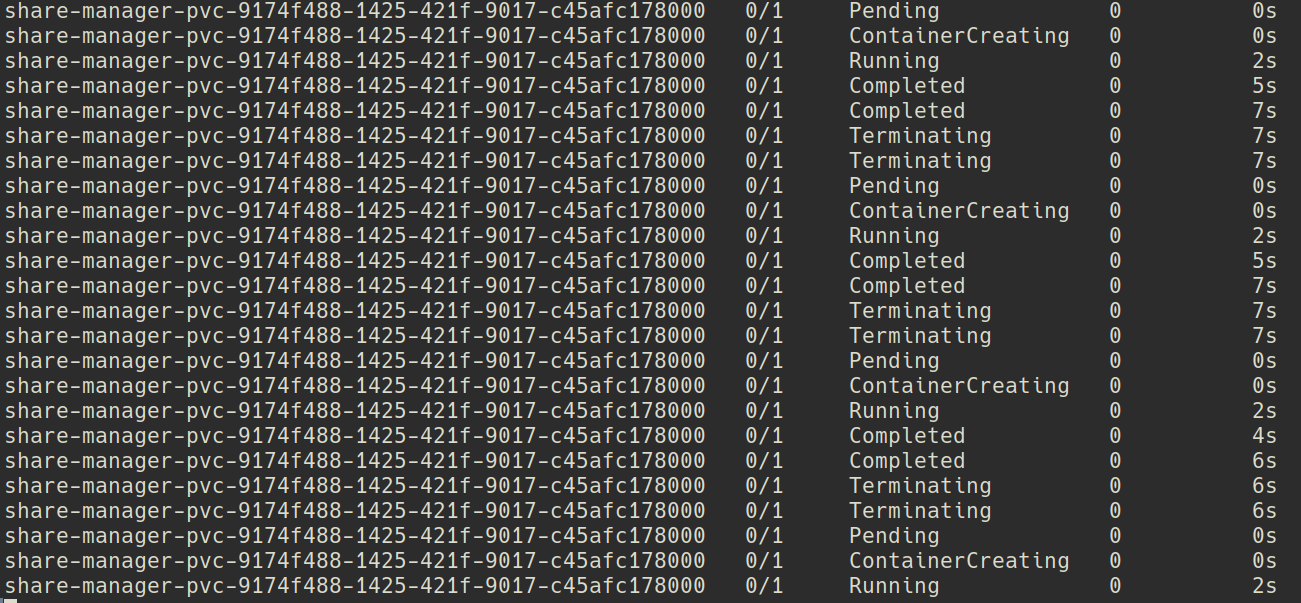
C.C @weizhe0422

I tried deploying with longhorn.yaml in the master branch and I can start share-manger without restarting.

Verified on master-head 20220914
- longhorn master-head (8c87681)
- longhorn-share-manager v1_20220825 ( 2cba526)
The test steps
- Install Longhorn Master Ref.(install-with-kubectl)
- Create rwx volume and attach to pod. Deploy pod “mypod1”
kubectl apply -f pod_with_pvc.yaml
apiVersion: v1
kind: PersistentVolumeClaim
metadata:
  name: longhorn-volv-pvc
  namespace: default
spec:
  accessModes:
    - ReadWriteMany
  storageClassName: longhorn
  resources:
    requests:
      storage: 0.5Gi
---
apiVersion: v1
kind: Pod
metadata:
  name: volume-test
  namespace: default
spec:
  restartPolicy: Always
  containers:
  - name: volume-test
    image: nginx
    imagePullPolicy: IfNotPresent
    livenessProbe:
      exec:
        command:
          - ls
          - /data/lost+found
      initialDelaySeconds: 5
      periodSeconds: 5
    volumeMounts:
    - name: volv
      mountPath: /data
    ports:
    - containerPort: 80
  volumes:
  - name: volv
    persistentVolumeClaim:
      claimName: longhorn-volv-pvc
- Check pod
volume-testandshare-manager-pvc-9c670e3f-1c35-4734-b788-84f320029ea0status
Result Failed longhorn-support-bundle_a85ccb2d-8613-45b7-8154-0e216d166f02_2022-09-14T04-39-36Z.zip
- We couldn't find out the
nfs-ganeshalog in the console and in support bundle. We still could find out NFS ganesha in the pod's /tmp/ganesha.log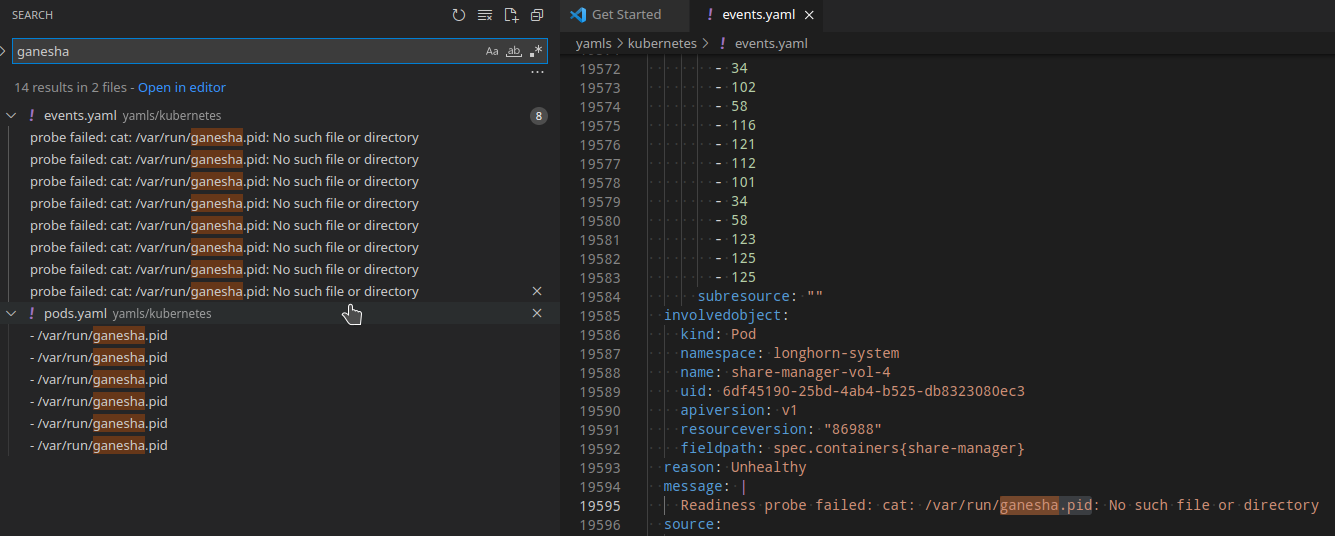

C.C @weizhe0422
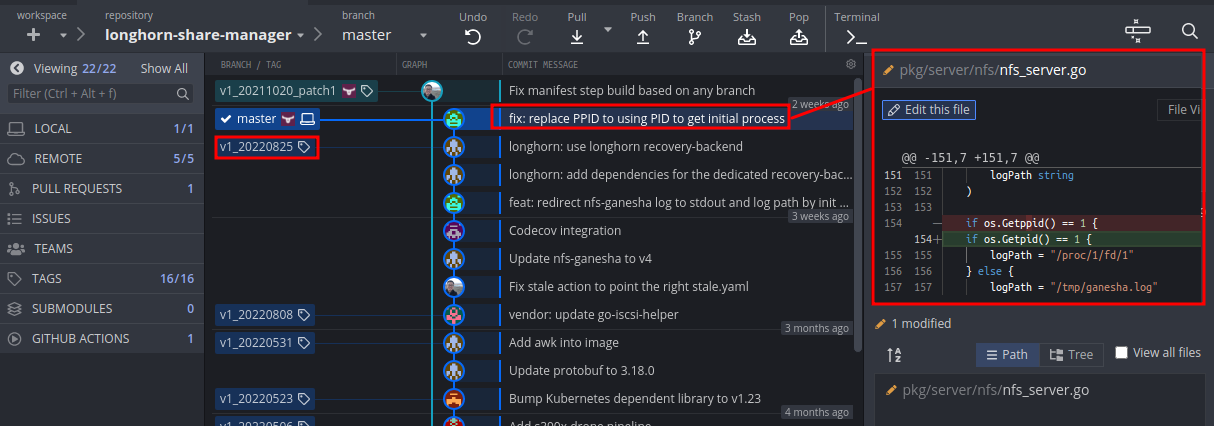
Upon closer inspection, I found that it was because I didn't fix completely in the first time, so I send the 2nd PR to fix, and I think it was not included in v1_20220825.
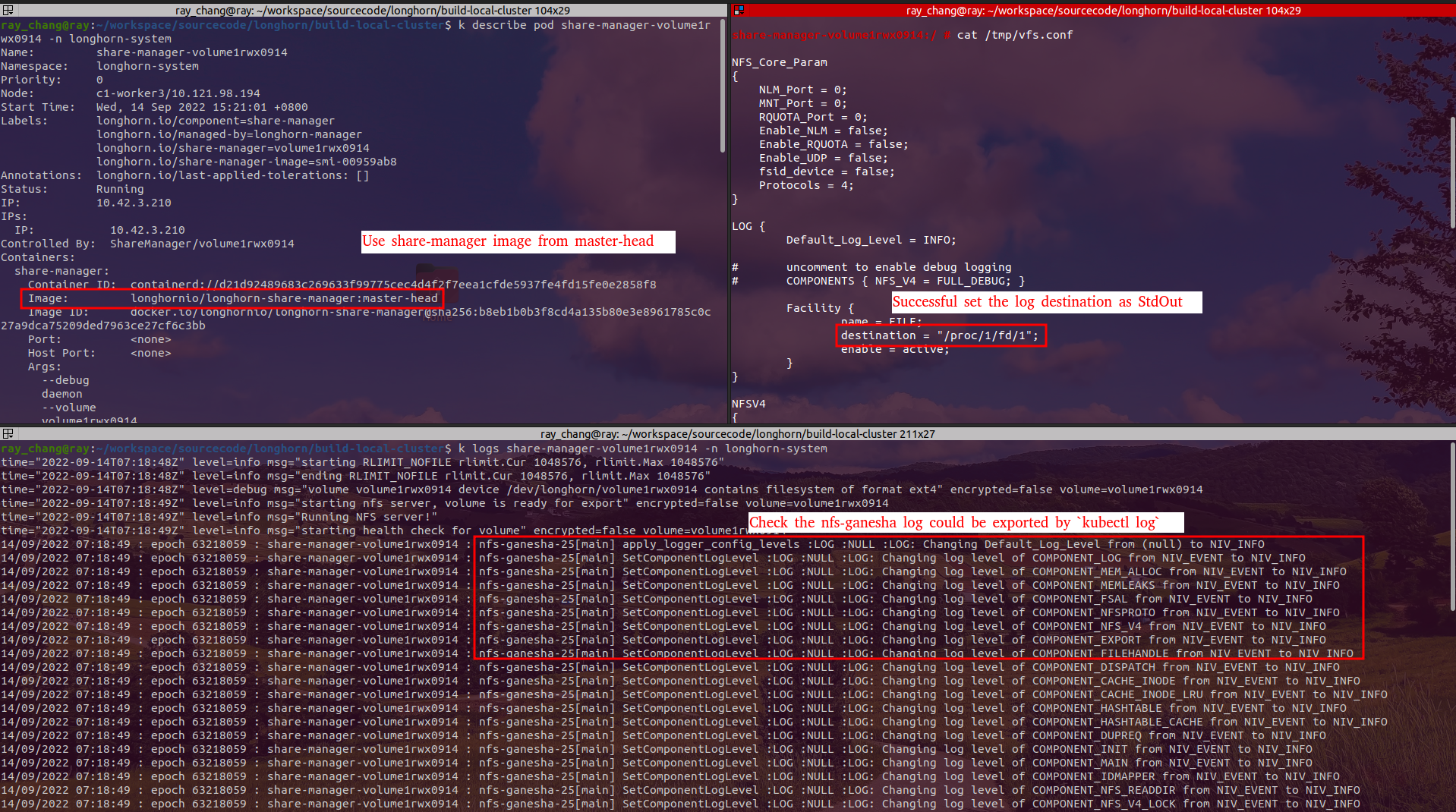
I try to deploy and verify the version of master-head, and it should be work correctly.
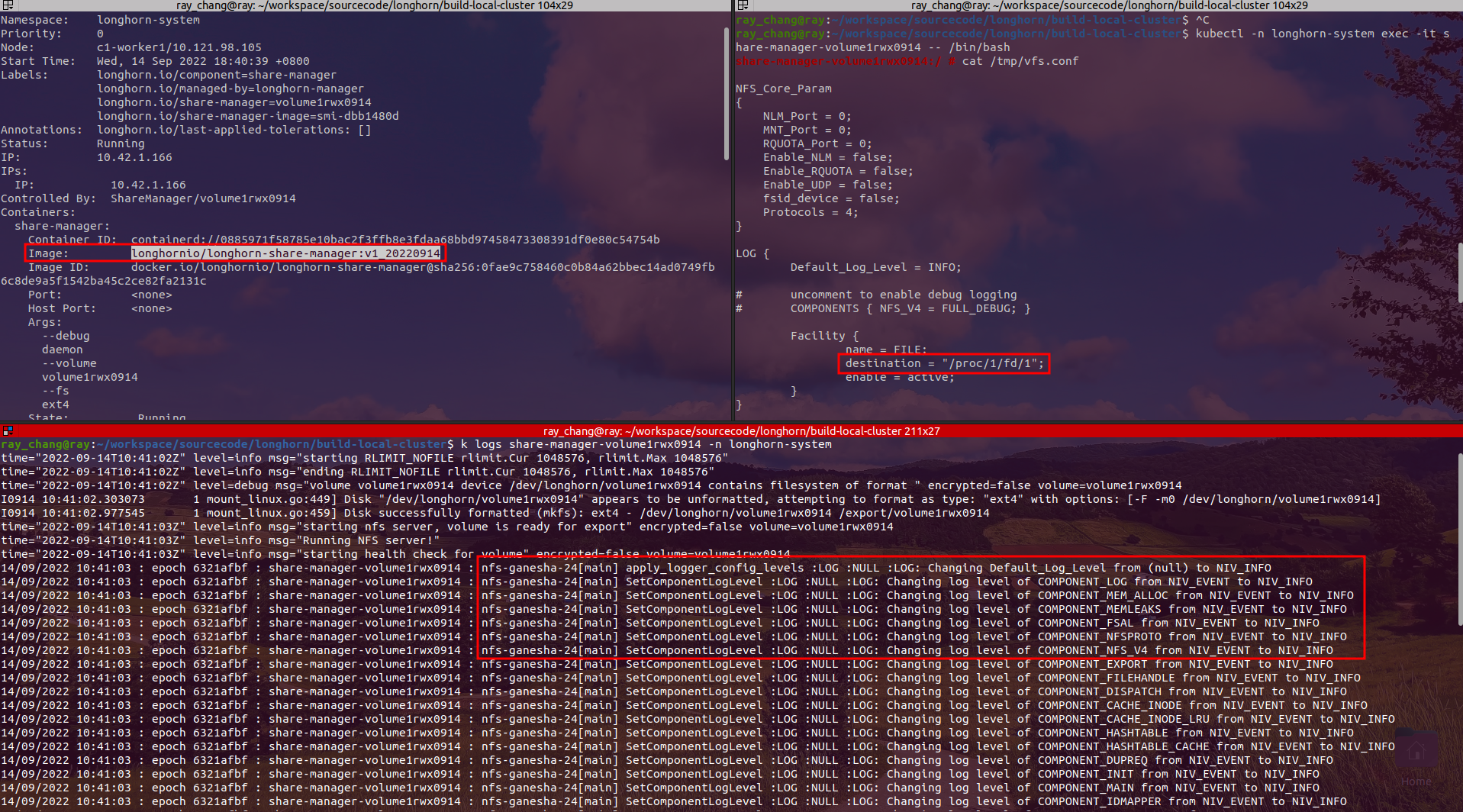
@weizhe0422 For any change to individual components like share manager, instance manager, and backing image manager, please remember asking for building a new image for that, then update related manifests in longhorn and longhorn-manager repos with the new image.
I just triggered https://github.com/longhorn/longhorn-share-manager/releases/tag/v1_20220914, so when the image is ready (you can check drone-push), please create PRs to update the manifests.
Self-test longhornio/longhorn-share-manager:v1_20220914 works in my environment.
Verified on master-head 20220915
- longhorn master-head (bfe44af)
- longhorn-share-manager v1_20220914 ( 2cba526)
The test steps
- Install Longhorn Master Ref.(install-with-kubectl)
- Create rwx volume
kubectl apply -f create_5vol_rwx.yaml
apiVersion: v1
kind: PersistentVolumeClaim
metadata:
  name: vol-0
  namespace: default
spec:
  accessModes:
    - ReadWriteMany
  storageClassName: longhorn
  resources:
    requests:
      storage: 0.5Gi
---
apiVersion: v1
kind: PersistentVolumeClaim
metadata:
  name: vol-1
  namespace: default
spec:
  accessModes:
    - ReadWriteMany
  storageClassName: longhorn
  resources:
    requests:
      storage: 0.5Gi
---
apiVersion: v1
kind: PersistentVolumeClaim
metadata:
  name: vol-2
  namespace: default
spec:
  accessModes:
    - ReadWriteMany
  storageClassName: longhorn
  resources:
    requests:
      storage: 0.5Gi
---
apiVersion: v1
kind: PersistentVolumeClaim
metadata:
  name: vol-3
  namespace: default
spec:
  accessModes:
    - ReadWriteMany
  storageClassName: longhorn
  resources:
    requests:
      storage: 0.5Gi
---
apiVersion: v1
kind: PersistentVolumeClaim
metadata:
  name: vol-4
  namespace: default
spec:
  accessModes:
    - ReadWriteMany
  storageClassName: longhorn
  resources:
    requests:
      storage: 0.5Gi
- Volume attach to the pod. Deploy pod “mypod1”
kubectl apply -f pod_mount_5vol.yaml
kind: Pod
apiVersion: v1
metadata:
  name: mypod1
  namespace: default
spec:
  containers:
    - name: testfrontend
      image: nginx
      volumeMounts:
      - mountPath: "/data0/"
        name: vol-0
      - mountPath: "/data1/"
        name: vol-1
      - mountPath: "/data2/"
        name: vol-2
      - mountPath: "/data3/"
        name: vol-3
      - mountPath: "/data4/"
        name: vol-4
  volumes:
    - name: vol-0
      persistentVolumeClaim:
        claimName: vol-0
    - name: vol-1
      persistentVolumeClaim:
        claimName: vol-1
    - name: vol-2
      persistentVolumeClaim:
        claimName: vol-2
    - name: vol-3
      persistentVolumeClaim:
        claimName: vol-3
    - name: vol-4
      persistentVolumeClaim:
        claimName: vol-4
- Check pod
mypod1andshare-manager-pvc-XXXXXstatus
Result Passed
- After executing
kubectl -n longhorn-system logs share-manager-<Longhorn_volume_name>orkubetail share-manager |grep nfs-ganesha, we would find the nfs-ganesha log in the console and in support bundle
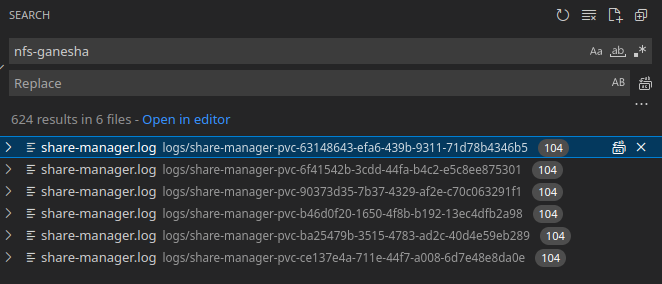

longhorn-support-bundle_ba58f018-f125-4e45-82aa-2ff2eb64b58b_2022-09-15T02-43-32Z.zip