

 logseq
Symlinks are not followed when loading a Graph/Directory
What happened?
I have a few notes that are physically outside my graph's directory, and they do not show up. This setup works fine when using emacs and org-roam.
Reproduce the Bug
mkdir -p /tmp/TestDocuments/Org/
echo "* TODO fix logseq symlinks" > /tmp/TestDocuments/Org/TODO.org

mkdir /tmp/TestDocuments/Org/Roam
echo "* Boring note" > /tmp/TestDocuments/Org/Roam/Boring.org
ln -s /tmp/TestDocuments/Org/TODO.org /tmp/TestDocuments/Org/Roam/
Now, when loading the graph /tmp/TestDocuments/Org/Roam I'd expect to find those 2 files, but I can only find the one that's not behind a symlink.
Expected Behavior
The file behind the symlink should be loaded too
Screenshots
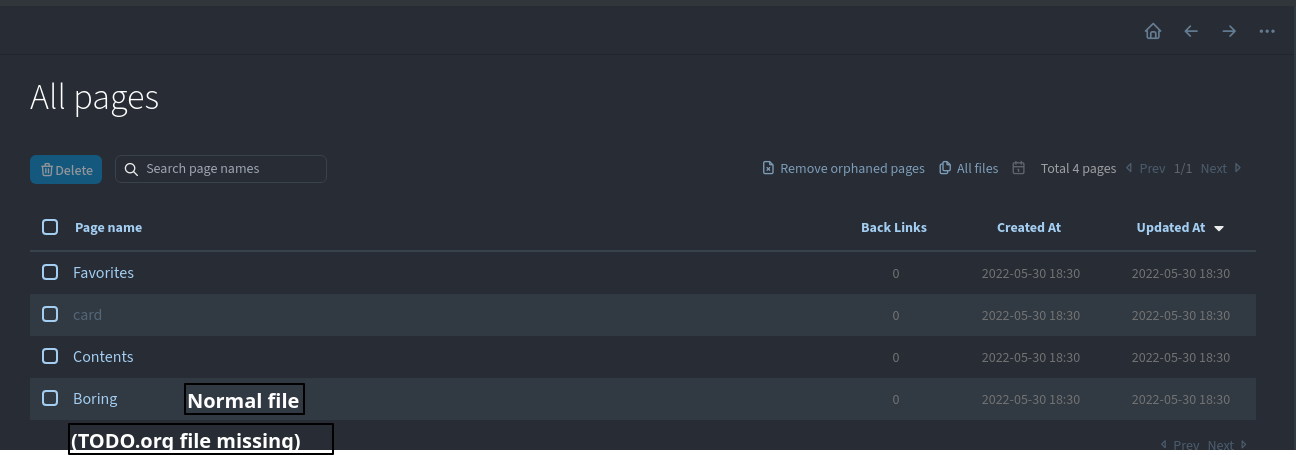
Desktop Platform Information
- OS :: Linux 5.17.9
#1-NixOS SMP PREEMPT - Logseq :: v0.6.9
Mobile Platform Information
No response
Additional Context
I sync some notes outside my Zettelkasten, so a few programs/use cases can access just a few of them (orgzly, syncthing, files that belong to a project), I can't use a symlink in the other direction as things like sync and backups would break.

Oddly enough, after creating a git directory and tracking the files logseq seems to recognize them. But it was not the case when I took the screenshot.
cd /tmp/TestDocuments/Org/   # Recall that logseq only sees /tmp/TestDocuments/Org/Roam
git init .
git add TODO.org Roam/Boring.org
git commit -m 'Init'
👋 Hello, There hasn't been any recent activity on this issue :sleeping: To keep our backlog manageable we have to clean old issues, as many of them have already been resolved with the latest updates.
Please make sure to update to the latest Logseq version and Let us know us know if that solves the issue by adding a comment 💬
This issue has been automatically marked as stale & will be closed in 20 days if no further activity occurs.
Access additional 🌐 Logseq resources:
- Forum: https://discuss.logseq.com
- Blog: https://blog.logseq.com
- Docs: https://docs.logseq.com
Feel free to inform us of any other issues you discover or feature requests that come to mind in the future. Pull Requests (PRs) are also always welcomed!
Thank you for your contributions to Logseq :heart:!
![github-actions[bot] avatar](https://avatars.githubusercontent.com/in/15368?v=4 "Published by a pub.dev verified publisher")

Hello, I'm experiencing the same issue here, any updates ? I'm using myst markdown and github actions to automatically compile a md file in pdf and latex, but would like to edit it in logseq through a symlink. However, even after I create the symlink in logseq/pages it's not detected. Best, Gabriel

The issue still persists in 0.9.4 on Linux.
For this directory structure, file.md and symlink.md (being a symlink of any file) are detected correctly:
/pages/
|- file.md
|- symlink.md
However, in this directory structure, the file.md is detected correctly but symlink.md is not:
/pages/
|- dir/
  |- file.md
  |- symlink.md
Please, reopen this issue.


Any hints on where this functionality might be burried in the code? I might try to pinpoint the issue there.
@rampaq
Other parts of the filesystem handling might be also related to this.
https://github.com/logseq/logseq/blob/8f5b1da36f29c21b0be95e726c312ca540de7e0b/deps/common/src/logseq/common/graph.cljs#L19-L39

I'm not very familiar with Clojure but as long as I understood it correctly, simply removing the removing the following line should suffice, no? https://github.com/logseq/logseq/blob/8f5b1da36f29c21b0be95e726c312ca540de7e0b/deps/common/src/logseq/common/graph.cljs#L30
Although I'm not sure why were the symlinks explicitly removed in the first case...
I have the pages directory as a symlink. Logseq does not detect any of the files inside it, so it is not searchable.

Symlinks were working for me, but they just stopped... Very mysterious...

I have the same issue on windows, symlinks/junctions dont work with the journal pages. The only solution I found is to share them over SMB driver over linux and enable symlinks resolution in Samba.


I have a possibly related issue. I am using the Zotero integration and have all my PDFs in a Nextcloud which I recently moved from my home directory to another drive. I created a symlink to it inside my home directory. I didn't change any settings in Logseq or Zotero since I assumed both should just follow the symlink. Zotero does, but Logseq shows an error when opening PDF attachments in Zotero pages that says "Error: Missing PDF "file:///correct/path/to/my/pdf". Is this the correct path?". I tested this with newly imported Zotero pages. I also tried moving this part of my Nextcloud back to my home directory which allows Logseq to find it again. So I think this issue might still persist in version 0.10.14.
