

 lmorg
lmorg
Shell script initialization stuck and failed
Problem
Due to my limited English proficiency, the following content was generated through translation software.
Shell script initialization failed due to autocomplete
Summary first
Some abnormal programs may cause initialization exceptions, such as a fake yarn.
Detail
I recently installed murex(pre-compiled version of AMD64) for the first time on a computer. After installation, I tried to run a shell by executing murex on the terminal. But after outputting the prompt Loading profile . murex_ reload, it kept getting stuck.
So I tried to use the sudo murex command to take the risk of starting, and it did indeed start successfully (although there was an issue with aspell, which was mentioned in the previous issues), indicating that what I installed could indeed start normally.
Next, I used murex -- debug to try starting under normal user mode, and the console:
Loading profile .murex_preload
2025/10/27 16:10:41 Loading profile builtin/profile_preload
Error in f ((builtin) 1,44):
  Command: f +x
  Error: no data returned
Error in f ((builtin) 1,250):
  Command: f +x
  Error: no data returned
2025/10/27 16:10:41 Loading profile builtin/profile_any
2025/10/27 16:10:41 Loading profile builtin/profile_linux
Error in expr ((builtin) 1,988):
  Command: $WSLENV
  Error: variable 'WSLENV' does not exist
Error in expr ((builtin) 1,988):
  Command: $WSL_DISTRO_NAME
  Error: variable 'WSL_DISTRO_NAME' does not exist
2025/10/27 16:10:41 Loading profile builtin/profile_posix
2025/10/27 16:10:41 Loading profile builtin/profile
2025/10/27 16:10:41 Loading profile builtin/integrations__namespaces_any
2025/10/27 16:10:41 Loading profile builtin/integrations_aspell_any
2025/10/27 16:10:41 Loading profile builtin/integrations_aws_any
2025/10/27 16:10:41 Loading profile builtin/integrations_basti_any
2025/10/27 16:10:41 Loading profile builtin/integrations_chatgpt_any
2025/10/27 16:10:41 Loading profile builtin/integrations_cheat.sh_any
2025/10/27 16:10:41 Loading profile builtin/integrations_coreutils_any
2025/10/27 16:10:41 Loading profile builtin/integrations_docker-compose_any
2025/10/27 16:10:41 Loading profile builtin/integrations_docker_any
2025/10/27 16:10:41 Loading profile builtin/integrations_find_any
2025/10/27 16:10:41 Loading profile builtin/integrations_freeze_any
2025/10/27 16:10:41 Loading profile builtin/integrations_git_any
2025/10/27 16:10:41 Loading profile builtin/integrations_go_any go - no man page exists
2025/10/27 16:10:41 Loading profile builtin/integrations_gopass_any
2025/10/27 16:10:41 Loading profile builtin/integrations_gping_any
2025/10/27 16:10:41 Loading profile builtin/integrations_microk8s_any
2025/10/27 16:10:41 Loading profile builtin/integrations_ollama_any
2025/10/27 16:10:41 Loading profile builtin/integrations_terraform-docs_any
2025/10/27 16:10:41 Loading profile builtin/integrations_terraform_any
2025/10/27 16:10:41 Loading profile builtin/integrations_yarn_any
After outputting the above content, it got stuck directly. So I suspect the problem lies in the built-in/integrations_yarn_any. I looked at the source code and found the section containing yarn (although I don't know if the problem originated from this file): murex/integrations/yarn_any.mx.
!if { which yarn } then {
    return
}
The above code shows that if yarn cannot be found, exit directly. I found that there is no real yarn in my system, but it does have a yarn (which comes from the corepack pre installed when I downloaded pnpm), just a connection to the yarn.js file (executing it would cause the installation of yarn).
#!/usr/bin/env node
process.env.COREPACK_ENABLE_DOWNLOAD_PROMPT??='1'
require('module').enableCompileCache?.();
require('./lib/corepack.cjs').runMain(['yarn', ...process.argv.slice(2)]);
After deleting corepack, executing murex succeeded.
Therefore, I speculate that the problem may lie in some incomplete executable files with the special name in the system (which could be programs or links), causing the program to freeze while executing these (because they are not the real program we want, for example, it is just a fake yarn mentioned above).
How to elegantly output Unicode
This question is not particularly important because there are indeed other ways to achieve it.
In bash, we can use utf-16 code to output special characters using code similar to the following.
echo $'\uE0BE'
But I couldn't find it in murex, and after executing the following code, I feel a bit strange:
~ » escape "abc
2 » defg"
"abc\ndefg"
~ » escape "NERD FONT E0BE: "
"NERD FONT E0BE: \ue0be"
~ » !escape "abc\ndefg"
abc
defg
~ » !escape "NERD FONT E0BE: \ue0be"
NERD FONT E0BE: ue0be

How to elegantly output Unicode
Unicode doesn't need to be escaped in Murex. eg
» echo "Hello world in Chinese might be loosely translated as: 你们好."
Hello world in Chinese might be loosely translated as: 你们好.
For that reason, there isn't a way to specify Unicode characters via escape sequences. This is definitely something I can add, if needed?
Shell script initialization failed due to autocomplete
Thanks for the bug report and investigation. Do you know if the original yarn was expecting user input?
There's a good amount of detail there, so I think I should be able to construct some tests 🙏

I've been able to recreate the yarn issue. Looks like it does hang waiting for input on some installs -- even if stdout isn't a TTY.
Thanks for the reply.
- It is not necessary to support the escape of
utfformat, but it may conform to the encoding habits of some people (such as maybe OCD patients who only want English letters and numbers in the file)? - The part where initialization gets stuck doesn't feel very common, but it has a certain degree of destructiveness, and the fake executable files installed like
corepackare not limited toyarn.
emmmm...still about unicode:
on
KittyorAlacrittyterminal, with fontLilex Nerd Fontor0xProto Nerd Font.
I'm trying to set up my murex prompt (migrating from elvish) like this:
config set shell prompt {
("{RESET}{CSI}38;2;123;117;157m{CSI}48;2;123;117;157;38;2;238;225;218m ${whoami}{RESET}{CSI}38;2;123;117;157m{RESET}")
("{RESET}{CSI}38;2;220;167;107m{CSI}48;2;220;167;107;38;2;89;87;67m ${hostname}{RESET}{CSI}38;2;220;167;107m{RESET}")
("{RESET}{CSI}38;2;115;129;102m{CSI}48;2;115;129;102;38;2;238;225;218m ${pwd_short}{RESET}{CSI}38;2;115;129;102m{RESET}")
}
I noticed that as I add more Nerd-Font glyphs to the prompt, extra spaces and visual artifacts start appearing. I haven't been able to pinpoint the exact cause yet.
More notably, these artifacts sometimes mirror the beginning of my current input. For example, when I type cd Downloads, the terminal visually shows something like:
cd Downlocd Downloads
where the leading cd Downlo is a "ghost" display—it’s not actually part of the command input (the command still executes correctly as cd Downloads), but it appears on screen and can be confusing.
I can confirm that the issue is specifically related to the handling of these Nerd-Fonts—after removing all Nerd-Font glyphs from my prompt, the problem disappears and everything works as expected.
prompts in
elvish:styled "\ue0be" '#7b759d' styled "\uef63 "(whoami) 'bg-#7b759d' '#eee1da' styled "\ue0b8" '#7b759d' styled "\ue0be" '#dca76b' styled "\ueb30 "(hostname) 'bg-#dca76b' '#595743' styled "\ue0b8" '#dca76b' styled "\ue0be" '#738166' styled "\uefaf "(tilde-abbr $pwd) 'bg-#738166' '#eee1da' styled "\ue0b8\n" '#738166' styled "\ue0ba" '#e27a85' styled "\uf020 Alacritty" 'bg-#e27a85' '#595743' styled "\ue0bc" '#e27a85'
Which version of Murex are you running? You can run version to return it.
There was an issue parsing RGB values in the prompt but that was fixed with the latest release (released at the weekend). (https://github.com/lmorg/murex/issues/929)
>> murex --version
murex v7.1.4143 (unknown)
GPL v2
2018-2025 Laurence Morgan
But this problem does not occur with RGB, but rather with nerd-font because:
- Delete all
nerd-fontbut keepRGB: no errors - Delete all
RGBbut keepnerd font: the above error occurs
Is it related to character width? After all, these nerd-font characters are usually utf-16
Yeah, it does sound like it's not calculating the character width correctly.
There's two places this could fail:
- terminal cell size: eg Some unicode, like Chinese characters and most emoji, are 2 cells wide in the terminal, while others might be 1 or even 0 cells wide.
- encoding byte size: eg utf-8 can be 1, 2, 3 or 4 bytes long.
I don't think this is an encoding issue because I do break the terminal prompts down to unicode glyphs. However I've found unicode cell width detection to be extremely unreliable.
But this should all be easy enough to for me to test
@priscira do you get this same bug if you set the nerd-font as your hint text instead of prompt?
https://murex.rocks/user-guide/hint-text.html
@priscira do you get this same bug if you set the nerd-font as your hint text instead of prompt?
https://murex.rocks/user-guide/hint-text.html
It appears to be normal, but I cannot see the cursor in the hint.
The cursor would be in the line above, to the right of the prompt. The idea of the hint is it's ostensibly a status bar below the prompt. So it doesn't clutter the prompt nor your terminal / scrollback with old statuses (such as powerline and starship). It's not a feature I've seen available in any other shell, so it might seem a little alien at first.
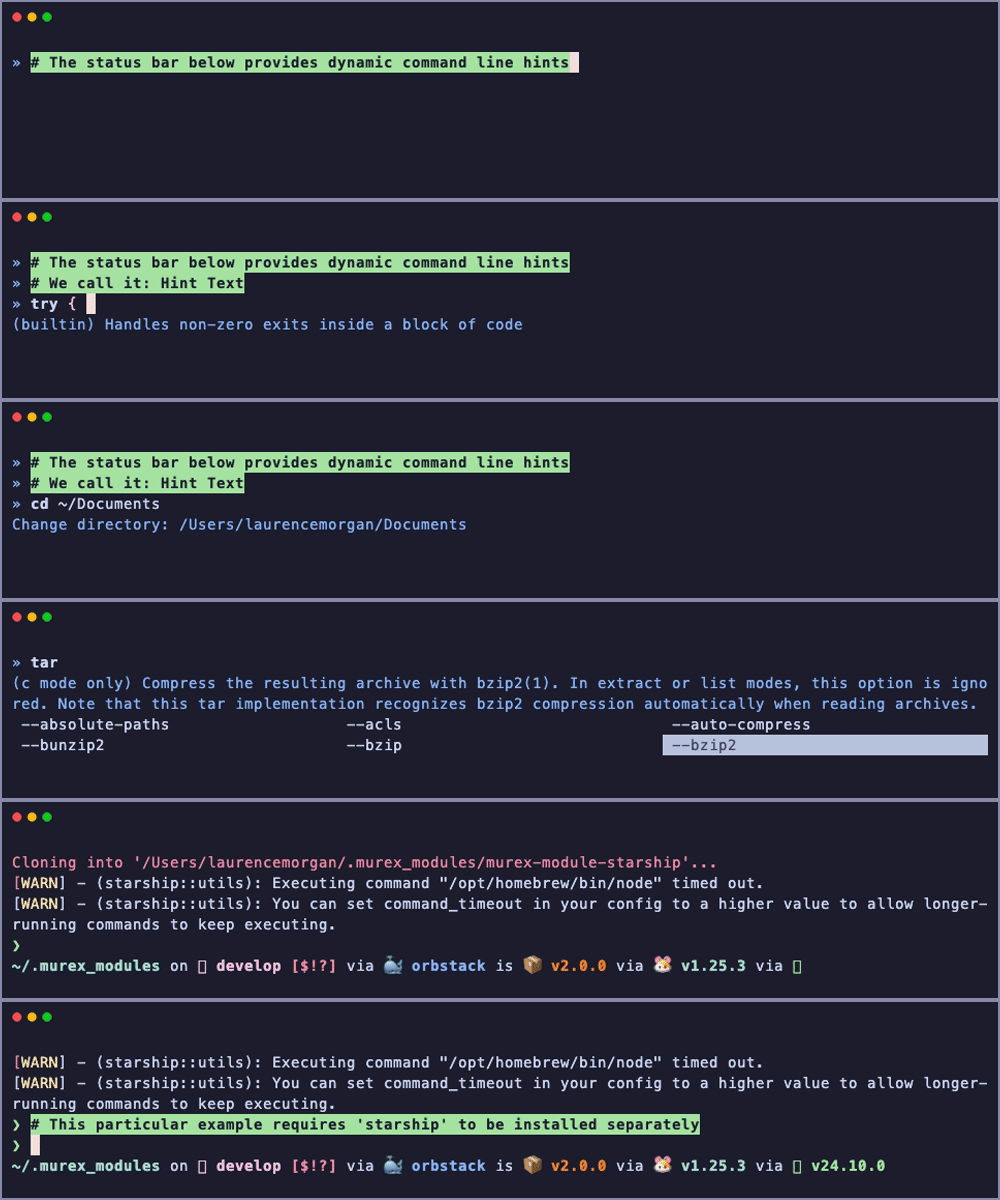
The last couple of examples in that GIF above show how it will work with starship. So the same kind of thing is achievable with powerline.
I don't use nerd fonts personally, but you can see the same sort of thing with my own custom prompt below too
Issue Regarding Nerd Fonts Rendering
I recently spent some time investigating the root cause of Nerd Fonts display issues and have traced it to the mattn/go-runewidth library.
murex depends on readline, and rendering of the prompt relies on runewidth.StringWidth(s).
In mattn/go-runewidth, character width calculation is implemented as follows:
switch {
case inTables(r, nonprint, combining):
    return 0
case inTable(r, narrow):
    return 1
case inTables(r, ambiguous, doublewidth):
    return 2
case !c.StrictEmojiNeutral && inTables(r, ambiguous, emoji, narrow):
    return 2
default:
    return 1
}
Notably, the ambiguous table includes Unicode ranges such as {0xE000, 0xF8FF} and {0xF0000, 0xFFFFD}, which overlap with the Private Use Areas (PUA) used by Nerd Fonts.
When I modify the above logic as follows:
switch {
case inTables(r, nonprint, combining):
    return 0
case inTables(r, narrow, ambiguous):
    return 1
case inTable(r, doublewidth):
    return 2
case !c.StrictEmojiNeutral && inTables(r, ambiguous, emoji, narrow):
    return 2
default:
    return 1
}
the rendering issue is resolved.
The table ambiguous here refers to characters whose display width cannot be definitively determined as 1 or 2 in general—according to ChatGPT: “These characters are used across various contexts, especially in typography, symbol rendering, and graphic design, and exhibit ‘ambiguous width’: they may occupy 1 character width in some environments and 2 in others, depending on the rendering context and layout.”
However, Nerd Fonts glyphs are typically designed as single-width characters by default. I recall that, in some terminal (forgot....) configuration (e.g., for certain terminals), to force a Nerd Font glyph to render as double-width, an explicit trailing space must be added. For instance:
echo "\udb82\udfa1 "(note the trailing space) renders the GOG.com symbol in double width,- whereas
echo "\udb82\udfa1"(no space) renders it in single width (appearing much smaller).
Thus, in practice, the trailing space—commonly used alongside Nerd Fonts glyphs—would be correctly accounted for in width calculation under the proposed patch.
That said, I’m uncertain whether treating all characters in the ambiguous category as width-1 is universally safe, nor whether this change might introduce regressions elsewhere.
Therefore, this issue should likely be escalated upstream to go-runewidth for a proper fix — or alternatively, we could consider maintaining a fork or patch ourselves.
Regarding murex Hints
This is a brilliant feature! Hints significantly enhance shell interactivity, usability, and customizability.
I’m actively exploring extending hints to display contextual information — for example, Python virtual environment status, Git repository state (branch, dirty status, etc.), and more.
Thank you :)
Regarding the nerd fonts issue, I think we can fix this without having to break anything else.
I can have readline treat PUA unicode points as 1 cell wide in a wrapper function. Basically just check if the code points are in the PUA range, and if they are, then assume 1 cell wide, otherwise call runewidth like usual.
This would mean I can also but a toggle into readline to define the cell width for PUA, and expose that toggle in Murex too. So if anyone else finds they need PUA to be 2 cells wide, then they can override the default via config set shell pua-width (name to be defined). This would solve the problem of whether PUA-width introduces regressions elsewhere.
Nice debugging on this too, by the way 👍