

 lloiser
Debugging shows some variables as nil when they are not
I opened this stackoverflow question.
At first, I thought that I was missing something in my code but it seems that the go-debug extension just doesn't show the variables correctly.
Does anyone knows how to fix this? Thanks in advance guys!

Unfortunately this is a limitation of delve itself...
I have just tried your code in the terminal using dlv debug
$ dlv debug
Type 'help' for list of commands.

(dlv) b main.go:34
Breakpoint 1 set at 0x48d4ac for main.CreateHashes() D:/Development/src/github.com/lloiser/go-tests/fixtures/issue105/main.go:34

(dlv) c
> main.CreateHashes() D:/Development/src/github.com/lloiser/go-tests/fixtures/issue105/main.go:34 (hits goroutine(1):1 total:1) (PC: 0x48d4ac)
    29:
    30:         blockHashes := BlockHashes{
    31:                 hashes: hashes,
    32:         }
    33:
=>  34:         return blockHashes
    35: }
    36:
    37: func main() {
    38:         bh := CreateHashes([][]byte{
    39:                 []byte{1, 2, 3},

(dlv) locals -v
oneHash = hash.Hash(*crypto/sha256.digest) *{
        h: [8]uint32 [1779033703,3144134277,1013904242,2773480762,1359893119,2600822924,528734635,1541459225],
        x: [64]uint8 [7,8,9,0,0,0,0,0,0,0,0,0,0,0,0,0,0,0,0,0,0,0,0,0,0,0,0,0,0,0,0,0,0,0,0,0,0,0,0,0,0,0,0,0,0,0,0,0,0,0,0,0,0,0,0,0,0,0,0,0,0,0,0,0],
        nx: 3,
        len: 3,
        is224: false,}
oneData = []uint8 len: 3, cap: 3, [7,8,9]
hashes = []hash.Hash len: 4, cap: 4, [
        *crypto/sha256.digest {
                h: [8]uint32 [1779033703,3144134277,1013904242,2773480762,1359893119,2600822924,528734635,1541459225],
                x: [64]uint8 [1,2,3,0,0,0,0,0,0,0,0,0,0,0,0,0,0,0,0,0,0,0,0,0,0,0,0,0,0,0,0,0,0,0,0,0,0,0,0,0,0,0,0,0,0,0,0,0,0,0,0,0,0,0,0,0,0,0,0,0,0,0,0,0],
                nx: 3,
                len: 3,
                is224: false,},
        *crypto/sha256.digest {
                h: [8]uint32 [1779033703,3144134277,1013904242,2773480762,1359893119,2600822924,528734635,1541459225],
                x: [64]uint8 [4,5,6,0,0,0,0,0,0,0,0,0,0,0,0,0,0,0,0,0,0,0,0,0,0,0,0,0,0,0,0,0,0,0,0,0,0,0,0,0,0,0,0,0,0,0,0,0,0,0,0,0,0,0,0,0,0,0,0,0,0,0,0,0],
                nx: 3,
                len: 3,
                is224: false,},
        *crypto/sha256.digest {
                h: [8]uint32 [1779033703,3144134277,1013904242,2773480762,1359893119,2600822924,528734635,1541459225],
                x: [64]uint8 [7,8,9,0,0,0,0,0,0,0,0,0,0,0,0,0,0,0,0,0,0,0,0,0,0,0,0,0,0,0,0,0,0,0,0,0,0,0,0,0,0,0,0,0,0,0,0,0,0,0,0,0,0,0,0,0,0,0,0,0,0,0,0,0],
                nx: 3,
                len: 3,
                is224: false,},
        nil,
]
blockHashes = main.BlockHashes {
        hashes: []hash.Hash len: 4, cap: 4, [
                ...,
                ...,
                ...,
                nil,
        ],}
(dlv)
As you can see the blockHashes variables are truncated.
There are 2 workarounds for these cases:
- the REPL in the
Debugtab in the bottom panel
You can simple execute arbitrary code in the Debug tab in the bottom panel that pops up when starting the debugger.
e.g.:
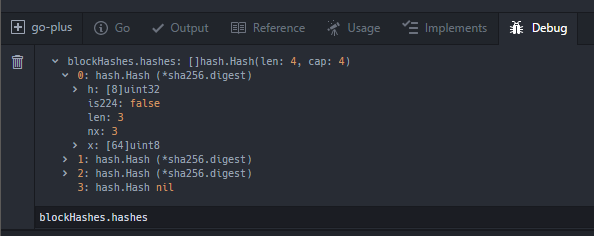
- Watch variables
Or you can add a watch variable in the left Debugger panel. e.g.:
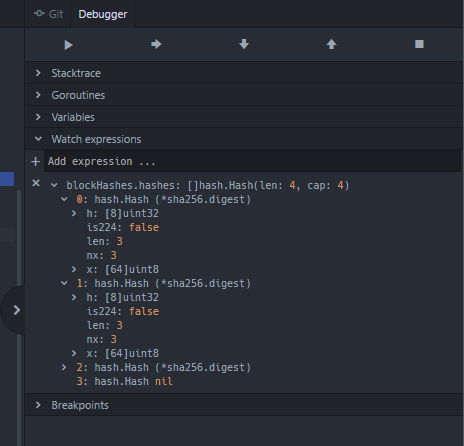
FYI: in the terminal you have to write print blockHashes.hashes to get the values
(dlv) print blockHashes.hashes
[]hash.Hash len: 4, cap: 4, [
        *crypto/sha256.digest {
                h: [8]uint32 [1779033703,3144134277,1013904242,2773480762,1359893119,2600822924,528734635,1541459225],
                x: [64]uint8 [1,2,3,0,0,0,0,0,0,0,0,0,0,0,0,0,0,0,0,0,0,0,0,0,0,0,0,0,0,0,0,0,0,0,0,0,0,0,0,0,0,0,0,0,0,0,0,0,0,0,0,0,0,0,0,0,0,0,0,0,0,0,0,0],
                nx: 3,
                len: 3,
                is224: false,},
        *crypto/sha256.digest {
                h: [8]uint32 [1779033703,3144134277,1013904242,2773480762,1359893119,2600822924,528734635,1541459225],
                x: [64]uint8 [4,5,6,0,0,0,0,0,0,0,0,0,0,0,0,0,0,0,0,0,0,0,0,0,0,0,0,0,0,0,0,0,0,0,0,0,0,0,0,0,0,0,0,0,0,0,0,0,0,0,0,0,0,0,0,0,0,0,0,0,0,0,0,0],
                nx: 3,
                len: 3,
                is224: false,},
        *crypto/sha256.digest {
                h: [8]uint32 [1779033703,3144134277,1013904242,2773480762,1359893119,2600822924,528734635,1541459225],
                x: [64]uint8 [7,8,9,0,0,0,0,0,0,0,0,0,0,0,0,0,0,0,0,0,0,0,0,0,0,0,0,0,0,0,0,0,0,0,0,0,0,0,0,0,0,0,0,0,0,0,0,0,0,0,0,0,0,0,0,0,0,0,0,0,0,0,0,0],
                nx: 3,
                len: 3,
                is224: false,},
        nil,
]
