
lscache_wp
 lscache_wp copied to clipboard
 litespeedtech
UCSS setting changes styling & CCSS lowers speed scores
https://copierdoctor.com.au/ had UCSS disabled, so I enabled it, purged the cache and looked at it again. Styles were different.
Specifically, #primary-nav-select was not hidden, and .flex-control-nav was styled as a list.
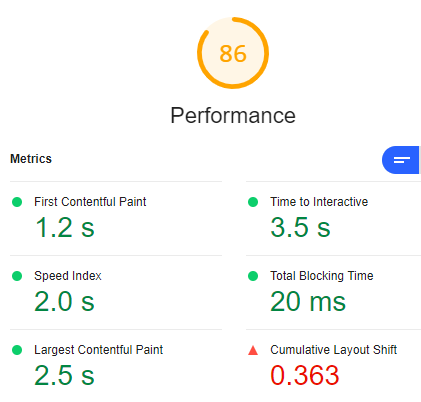
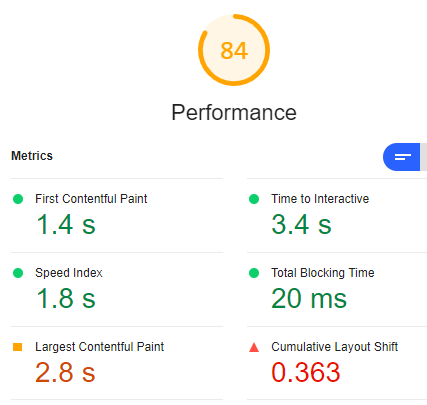
I then compared the page with CCSS and without, and CCSS gets lower scores from Lighthouse.
Without CCSS:
With CCSS:

Since posting this issue, I've tested UCSS on other sites, and it gives incorrect results 😞
Is there anything I should be aware of when setting this up?
Hello I compare with the following links:
- https://copierdoctor.com.au/
- https://copierdoctor.com.au/?LSCWP_CTRL=before_optm
but it is still the same. Could you share some screenshots and error messages with me ? and mark the incorrect results.

As you might expect, UCSS is not turned on for this site, so comparison won't help.
There are no error messages, and I've already given you 2 elements to look at. Since this is based on the QUIC service, can you not run the page through the service and check the result?
I've just tested UCSS on another site (where it's now turned off), and it didn't work properly either. Either I'm not doing something right, or UCSS still needs some work.
Is there an issue using the following combination of settings?
CSS Minify: ON CSS Combine: ON Generate UCSS: ON UCSS Inline: OFF (switching to ON didn't make a difference) CSS Combine External and Inline: ON Load CSS Asynchronously: ON CCSS Per URL: OFF Inline CSS Async Lib: ON
hello I have written a little tool to detect the incomplete UCSS https://www.wadetest.club/ucss_diff.php? The missing selector will be on the red box
Copy the missing selector and paste it into the UCSS Whitelist box https://docs.litespeedtech.com/lscache/lscwp/ts-optimize/#incomplete-ucss
navigate to wordpress admin dash litespeed cache -> page Optimization -> tuning -> UCSS Whitelist
@wadedang Thank you for doing this.
I've tested on another site, which is delivered via Cloudflare, and got a "status:not 200" response without any CSS output, so I'd say your tool is being blocked by Cloudflare. Using your exclusion tip, I was able to work out one issue, but not the other (mobile menu) one, so disabled UCSS again for now.
On the Copier Doctor site, I got a count of 0 in the red frame 😞
So I decided to use one of my test sites. Unfortunately, it gets the message "Warning: Trying to access array offset on value of type bool in /home/www.wadetest.club/public_html/ucss_diff.php on line 14", followed by "status:not 200".
In cases your program uses some strange user agent or other bot identifiers, you might want to change those, and fix the PHP issue. I'll be happy to use this program again as soon as it can be confirmed on a site I know.
Just to make sure I test properly, can you please list the steps and need to take to ensure that a page is indeed using UCSS? Please include any wait times involved.
Hello @galbaras On the Copier Doctor site, I got a count of 0 in the red frame it means the UCSS selectors have no difference between
- https://yourdomain
- https://yourdomain/?LSCWP_CTRL=before_optm
I have tested your test sites: but I don't know why. I can't get to header from your test URL. curl -I https://dev.get-business-online.com/ronitbaras/ curl: (7) Failed to connect to dev.get-business-online.com port 443: Connection timed out
https://docs.litespeedtech.com/lscache/lscwp/ts-optimize/#incomplete-ucss https://blog.litespeedtech.com/2021/12/13/fix-incomplete-ucss/ I use file_get_contents($url); to get the html body from your URL. parse all selectors and find the difference between
- https://yourdomain
- https://yourdomain/?LSCWP_CTRL=before_optm
if we add the missing UCSS selectors in the litespeed cache -> page Optimization -> tuning -> UCSS Whitelist it can resolve the UCSS incomplete issue.
if your want to know if your domain has generated UCSS files or not, you could go to https://my.quic.cloud/ -> your domain -> Page Optimization
Hello @wadedang
Like I said, Copier Doctor has UCSS disabled.
As for my test site, there's no reason to get the page header. My hosting provider is very tight on security, so likely blocks this without notice. I have tried getting the full page using this online tester and the page isn't blocked as a whole.
Getting the whole page my seem wasteful, but some pages have stylesheets and inline style blocks in the body, and those should be accommodated.
Can you please adjust your program? It will help a great deal, and it's likely going to resolve the Cloudflare issue too.
--
I've connected the test domain to the QUIC cloud. I see some strange errors that I'll chase up. This should help.
However, that's not what I meant. I'm not going to check the QUIC cloud dashboard every time I clear UCSS on a site. I'm already on the relevant admin page, and I'm not sure what's happening. If I wait a few minutes, I sometimes see a queue, which I can run manually, but I'm not sure how long I need to wait.
There used to be an option to generate CCSS in the foreground, but that's now gone, and I'd like to know what's happening behind the scenes, rather than repeatedly reloading pages and check for changes.
Thanks again, Gal
One more thing. The UCSS documentation states that the LiteSpeed program doesn't scroll down the page or perform any engagement. By definition, this is like to ignore elements, like the page footer, which requires scrolling all the way down, and popups, which appear after a delay. In my testing, I've seen issues with accessible sitelinks and sliders.
Hello Sorry for reply late My Server IP is 159.65.182.53. and my Server can't visit https://dev.get-business-online.com
mtr dev.get-business-online.com

 Host                                                                                                     Loss%   Snt   Last   Avg  Best  Wrst StDev
 1. (waiting for reply)
 2. 10.74.196.77                                                                                           0.0%    18    0.6   0.5   0.3   0.9   0.1
 3. 138.197.251.0                                                                                          0.0%    18    9.6   1.4   0.8   9.6   2.1
 4. 138.197.248.58                                                                                         0.0%    18    0.6   1.0   0.4   7.4   1.6
 5. 138.197.244.36                                                                                         0.0%    18    0.8   0.9   0.8   1.1   0.1
 6. 162.243.191.247                                                                                        0.0%    18    0.9   2.9   0.8  33.7   7.7
 7. ae18.cs1.lga5.us.zip.zayo.com                                                                         22.2%    18   61.9  67.0  61.9  76.8   6.2
 8. ae3.cs3.ord2.us.eth.zayo.com                                                                          82.4%    18   62.7  62.6  62.2  62.8   0.3
 9. ae5.cs1.den5.us.eth.zayo.com                                                                          82.4%    18   62.5  62.1  61.8  62.5   0.3
10. ae11.mpr2.slc2.us.zip.zayo.com                                                                         0.0%    18   48.8  48.7  48.0  56.0   1.9
11. ae4.mpr1.slc2.us.zip.zayo.com                                                                          0.0%    18   48.1  48.7  48.0  57.3   2.2
12. (waiting for reply)
13. ae11.er3.lax112.us.zip.zayo.com                                                                        0.0%    18   61.9  63.2  61.8  72.2   2.7
14. 64.124.204.202.IPYX-145412-001-ZYO.zip.zayo.com                                                        0.0%    18   61.7  61.6  61.3  62.6   0.3
15. (waiting for reply)
16. (waiting for reply)
17. 203.153.18.21                                                                                          0.0%    18  218.7 215.2 214.3 218.7   1.3
18. 10ge-agg01.syd01.as45638.net.au                                                                        0.0%    18  211.4 213.2 210.7 221.4   2.9
19. (waiting for reply)
Thank you to feedback. I will test it. but my English is not good enough. I try to reproduce the issue and I really want to improve the UCSS tools.
The site is not at the top directory, so you won't be able to visit that. https://dev.get-business-online.com/ronitbaras/ should be no problem, though (full page, not head).
Hello @galbaras On the Copier Doctor site, I got a count of 0 in the red frame it means the UCSS selectors have no difference between
- https://yourdomain
- https://yourdomain/?LSCWP_CTRL=before_optm
I have tested your test sites: but I don't know why. I can't get to header from your test URL. curl -I https://dev.get-business-online.com/ronitbaras/ curl: (7) Failed to connect to dev.get-business-online.com port 443: Connection timed out
https://docs.litespeedtech.com/lscache/lscwp/ts-optimize/#incomplete-ucss https://blog.litespeedtech.com/2021/12/13/fix-incomplete-ucss/ I use file_get_contents($url); to get the html body from your URL. parse all selectors and find the difference between
- https://yourdomain
- https://yourdomain/?LSCWP_CTRL=before_optm
if we add the missing UCSS selectors in the litespeed cache -> page Optimization -> tuning -> UCSS Whitelist it can resolve the UCSS incomplete issue.
if your want to know if your domain has generated UCSS files or not, you could go to https://my.quic.cloud/ -> your domain -> Page Optimization
We're facing the same problem.
In our case, the Critical CSS seems to strip off the values/parameters of the CSS Selectors.
For example, if a CSS selector has the following values,
.header-font {
font-size: 30px;
}
The Critical CSS has
.header-font {
}
Using UCSS Whitelist option doesn't work either.
We've tried to use what you've provided and it doesn't work either.
