

 linkerd
Linkerd Namespace stuck in Deletion
Hi Folks,
k8 v1.17.3 (experienced since 1.14 I think)
This is more of a call to add something to the docs (because it turns out to be a somewhat odd issue that you might not easily find) than it is a problem with linkerd.
So when deleting linkerd2 it automagically attempts to delete the namespace. The namespace will be stuck in the terminating state and never deleted. Here's the replication steps:
- Install Linkerd
- Install prometheus adapter (this is for HPA metrics)
- Uninstall linkerd (attempts to delete the namespace)
- Run
kubectl get ns linkerd -o yamlto see that it's stuck in the terminating phase with "kubernetes" as a finalizer
Conventional (a.k.a. blog posting or stack overflow) wisdom dictates that you should do a little hack to remove the kubernetes finalizer allowing the namespace to be deleted. However I think this is not the correct way to resolve this issue. Here's why:
If you go ahead and run kubectl api-resources you might see a cheeky little error down the bottom:

Which promptly produces in 99% of k8 admins a WTF response. Upon further investigation you find that if you run kubectl get apiservice we see something quite interesting:
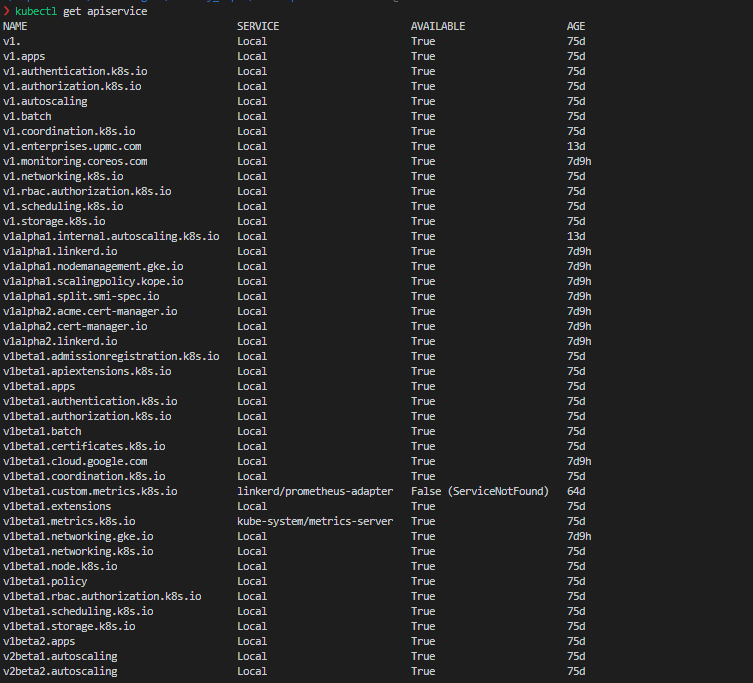
The custom metrics services are failing because the prometheus adapter no longer exists. You wouldn't think this because in all likelihood you've run some sort of k8 foo to check if there are any resources left in the linkerd namespace and found it empty.
So once you go ahead and run kubectl delete apiservice v1beta1.custom.metrics.k8s.io then you'd assume things were all good. They're not, because you have to be patient for about 5 minutes or so and then the namespace will finally be deleted (and perhaps longer if there's some sort of exponential timeout on the finaliser, smarter k8 folks than I can answer that question). There's also a chance that you don't wanna delete the apiservice if there are other services that declare it, but it's not something I've come across yet so I can't speak to it.
So what's the solution needed here?
I'm not entirely sure, but I know that lots of people use linkerd with the prometheus-operator as I assume that's a pretty common use pattern. I think someone with better k8 experience needs to talk about what happens when an apiservice (v1beta1.custom.metrics.k8s.io) is associated with multiple services like linkerd/prometheus-adapter. Then adding some sort of discussion to "uninstalling linkerd" should be added to make sure any custom piece installed into the linkerd namespace is uninstalled first.

Technically, there's no reason the prometheus adapter should go into the linkerd namespace. Maybe we should remind folks that if they decide to put other components into that namespace it is up to them to figure out how to uninstall everything?
IMHO this is a major issue that k8s needs to fix upstream as we run into it on a semi-regular basis because of the tap API.

I have the same problem where the namespace is stuck in termination with the kubernetes finalizer after running the upgrade command:
linkerd upgrade | kubectl apply --prune -l linkerd.io/control-plane-ns=linkerd -f -
But I dont have the prometheus-adapter service missing but linkerd-smi-metrics and linkerd-tap
kubectl get apiservice
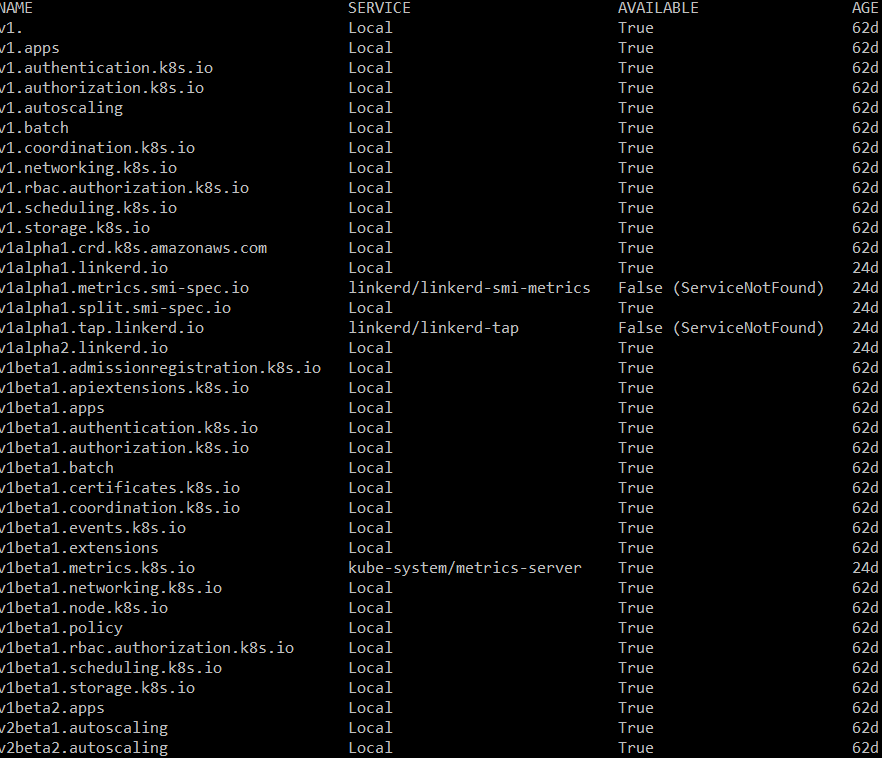
Not sure why those services are missing or what I have done wrong :P

@caleno which version of Linkerd are you upgrading from?
Can you also share the output from linkerd check?

@caleno You can follow my guide above to remove those services to fix things... In saying that I think you might have tried the wrong command to uninstall linkerd because at least in the current version of the docs... it says to run this:
linkerd install --ignore-cluster | kubectl delete -f -
So perhaps because you've not done a supported uninstall method you've landed yourself in this hot water.
@grampelberg I have two thoughts about that...
- I've felt for awhile that if we're going to include prometheus in the linkerd install we should include the prometheus adapter... It seems like the most common use-case for linkerd and with things like the helm charts, we can just turn it off in the helm values.
- I definitely think a warning with a "how to fix things if you've shot yourself in the foot" article is a good idea. I can even write it up, just need permissions to do so haha.
I've felt for awhile that if we're going to include prometheus in the linkerd install we should include the prometheus adapter... It seems like the most common use-case for linkerd and with things like the helm charts, we can just turn it off in the helm values.
Now that addons are a thing, I would absolutely love a prometheus adapter! Getting some docs written up on HPA would be a blast. @Pothulapati can help out there too =)
I definitely think a warning with a "how to fix things if you've shot yourself in the foot" article is a good idea. I can even write it up, just need permissions to do so haha.
Go for it! We've got the uninstall instructions and explain why you want to do it there. I'm not sure where to put "namespace is stuck in deletion" so that it is easily discoverable.
After I deleting the apiservices, linkerd was left in a fault state (since the upgrade command failed) but some resources where still in affect (e.g. confimaps) so running install or upgrade didn't work. However, when trying to install linkerd again it outputs a command for making a clean install. I took that command and flipped the "delete" with "apply" and I ran that which seems to have been working, so far.
So first I delete apiservices
kubectl delete apiservice v1alpha1.metrics.smi-spec.io
kubectl delete apiservice v1alpha1.tap.linkerd.io
Then install linkerd, "again"
linkerd install --ignore-cluster | kubectl apply -f -
(apply instead of delete)
Then you might need to update the data plane by running a deployement rollout restart.
You can check that by running
linkerd check --proxy
Then for example
kubectl -n traefik rollout restart deploy
For the record, I did also run the linkerd upgrade command but I dont think it did anything
linkerd upgrade | kubectl apply --prune -l linkerd.io/control-plane-ns=linkerd -f -
(but it didn't fail, this time)
Sorry, I didnt see your new comments before posting my own.
@cpretzer Not 100% sure which version it was, but I think I had the CLI verison 2.7.0 but edge-20.4.1 installed on the server (for some reason).
@jaitaiwan I'm not trying to uninstall, I'm trying to upgrade. (Or have I misunderstood something? :P)
Ref. https://linkerd.io/2/tasks/upgrade/#with-linkerd-cli
I definitely think a warning with a "how to fix things if you've shot yourself in the foot" article is a good idea. I can even write it up, just need permissions to do so haha.
Go for it! We've got the uninstall instructions and explain why you want to do it there. I'm not sure where to put "namespace is stuck in deletion" so that it is easily discoverable.
@jaitaiwan are you still interested in writing this article?
@caleno thanks for your reply. I see how the behaviors are related, and since you're not running the prometheus-adapter, I think the underlying cause for what you're seeing is probably different.
I'd like to try to set up a test to reproduce, and I'll start with edge-20.4.1.
@caleno looking at the versions, 2.7.0 was released before edge-20.4.1, so this wouldn't have been an upgrade.
I just ran a test upgrading edge-20.4.1 to 2.7.1 and there were no errors with the API services
I have deleted namespaces linkerd and linkerd-viz by simly deleting the namespaces & all crds:
for i in $(k get crds | grep linkerd | awk '{print $1}'); do k delete crd $i ; done
k delete crd grpcroutes.gateway.networking.k8s.io
k delete crd httproutes.gateway.networking.k8s.io
I have also manually deleted the:
k delete apiservices.apiregistration.k8s.io v1alpha1.tap.linkerd.io
but Im not sure if that was realy needed, because I did it before deleting the crds *.networking.k8s.io

Sorry @cpretzer I never received a notification for these messages 😮 I've moved on to using cilium as a service mesh these days.