

 limbo018
I meet error:
Whether I am using Docker or not, after I execute this command
python dreamplace/Placer.py test/ispd2005/adaptec1.json
I always encounter the error below.
Traceback (most recent call last): File "/home/xxx/test/DREAMPlace/dreamplace/Placer.py", line 21, in <module> import PlaceDB File "/home/xxx/test/DREAMPlace/dreamplace/PlaceDB.py", line 18, in <module> import dreamplace.ops.place_io.place_io as place_io File "/home/xxx/test/DREAMPlace/dreamplace/ops/place_io/place_io.py", line 9, in <module> import dreamplace.ops.place_io.place_io_cpp as place_io_cpp ModuleNotFoundError: No module named 'dreamplace.ops.place_io.place_io_cpp'
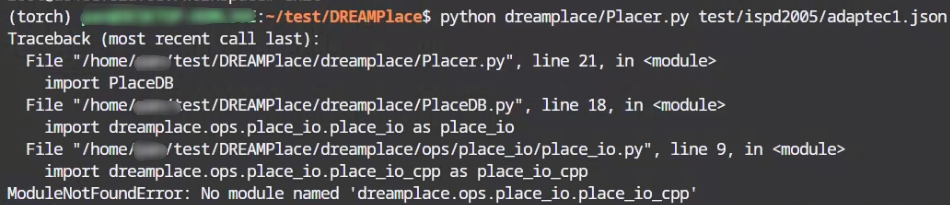
I don't know what's wrong with me, and I tried for a long time without solving this problem.

You need to execute from the install path, not from the root path of the repo. Please refer to the README carefully: "Go to the install directory and run with JSON configuration file for full placement."

Thanks,
But I encountered another problem on another computer.(But there was no error). After I executed this statement,
cmake .. -DCMAKE_INSTALL_PREFIX=your_install_path -DPYTHON_EXECUTABLE=$(which python)
it looked like this.

I saw related problems in other issues, but did not provide corresponding solutions. I could not even search for related problems.
This is just a warning. COIN is just an optional dependency from a thirdparty package and not required in DREAMPlace. The error should come from earlier lines.
Excuse me, I use your docker container by executing docker pull limbo018/dreamplace:cuda, but when I run python dreamplace/Placer.py test/ispd2005/adaptec1.json, It will also report ModuleNotFoundError: No module named 'dreamplace.configure'. would you mind tell me where is the install directory in your container? @limbo018

Excuse me, I use your docker container by executing
docker pull limbo018/dreamplace:cuda, but when I runpython dreamplace/Placer.py test/ispd2005/adaptec1.json, It will also reportModuleNotFoundError: No module named 'dreamplace.configure'. would you mind tell me where is the install directory in your container? @limbo018
I suppose the problem is that you have not completed the compilation process.
Notice that the provided Docker container just provides a running environment, and you ought to compile the program in the container. After running docker pull limbo018/dreamplace:cuda, the next step is to launch and enter the docker with the command (for example, to run with GPU on Linux):
docker run --gpus 1 -it -v $(pwd):/DREAMPlace limbo018/dreamplace:cuda bash
This command mounts the current directory at the host machine, which should contain the cloned source code, to /DREAMPlace in the docker. Under the /DREAMPlace directory in Docker, you can follow the subsequent steps to complete building under the Docker environment.
I hope this answer can help solve your problem.

@b224hisl Did you resolve this issue? What does "install directory" refer to?
