
lima
 lima copied to clipboard
 lima-vm
Deploying the kubernetes dashboard
Description
I want to make it easy to install and access the kubernetes dashboard, for k8s:
https://kubernetes.io/docs/tasks/access-application-cluster/web-ui-dashboard/
Currently the installation instructions are almost as complex as kubeadm itself.
What could be a good way, to provide a "kubectl" script along with the example ?

As was mentioned in:
- https://github.com/kubernetes/minikube/issues/14228
The installation itself is straight-forward (including both "kubernetes-dashboard" and "metrics-server"):
$ kubectl apply -f https://raw.githubusercontent.com/kubernetes/dashboard/v2.6.1/aio/deploy/recommended.yaml
namespace/kubernetes-dashboard created
serviceaccount/kubernetes-dashboard created
service/kubernetes-dashboard created
secret/kubernetes-dashboard-certs created
secret/kubernetes-dashboard-csrf created
secret/kubernetes-dashboard-key-holder created
configmap/kubernetes-dashboard-settings created
role.rbac.authorization.k8s.io/kubernetes-dashboard created
clusterrole.rbac.authorization.k8s.io/kubernetes-dashboard created
rolebinding.rbac.authorization.k8s.io/kubernetes-dashboard created
clusterrolebinding.rbac.authorization.k8s.io/kubernetes-dashboard created
deployment.apps/kubernetes-dashboard created
service/dashboard-metrics-scraper created
deployment.apps/dashboard-metrics-scraper created
$ kubectl apply -f https://github.com/kubernetes-sigs/metrics-server/releases/download/v0.6.1/components.yaml
serviceaccount/metrics-server created
clusterrole.rbac.authorization.k8s.io/system:aggregated-metrics-reader created
clusterrole.rbac.authorization.k8s.io/system:metrics-server created
rolebinding.rbac.authorization.k8s.io/metrics-server-auth-reader created
clusterrolebinding.rbac.authorization.k8s.io/metrics-server:system:auth-delegator created
clusterrolebinding.rbac.authorization.k8s.io/system:metrics-server created
service/metrics-server created
deployment.apps/metrics-server created
apiservice.apiregistration.k8s.io/v1beta1.metrics.k8s.io created
$ kubectl proxy
Starting to serve on 127.0.0.1:8001
http://localhost:8001/api/v1/namespaces/kubernetes-dashboard/services/https:kubernetes-dashboard:/proxy/#/login
The main issue is creating the user and accessing the token, but it is also described in full detail in the docs...
- https://github.com/kubernetes/dashboard/blob/master/docs/user/access-control/creating-sample-user.md
$ kubectl apply -f dashboard-adminuser.yaml
serviceaccount/admin-user created
clusterrolebinding.rbac.authorization.k8s.io/admin-user created
$ kubectl -n kubernetes-dashboard create token admin-user
You will still get the "Kubelet certificate needs to be signed by cluster Certificate Authority" from metrics-server.
- https://github.com/kubernetes-sigs/metrics-server#configuration
$ KUBE_EDITOR="sed -i '/args:/ a\ \ \ \ \ \ \ \ - --kubelet-insecure-tls'" kubectl edit deployment -n kube-system metrics-server
deployment.apps/metrics-server edited
But with these five manual steps, it should be possible to view the Kubernetes Dashboard with lima...
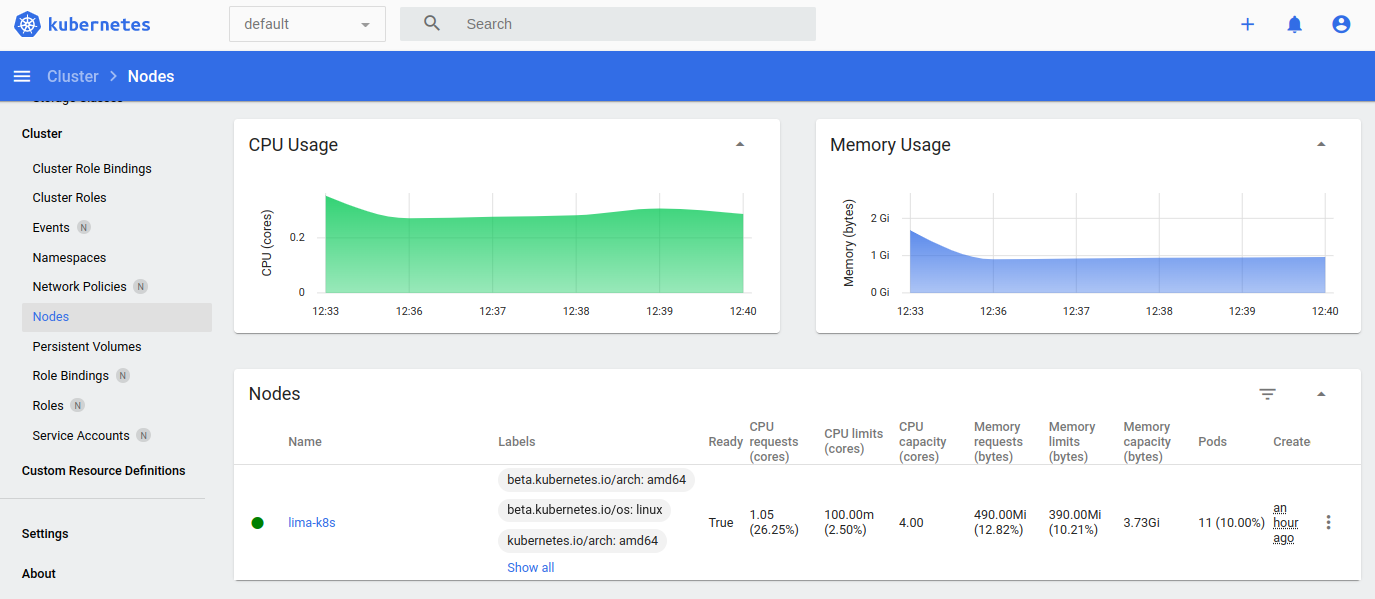
IMAGE                                                      TAG                 IMAGE ID            SIZE
docker.io/kubernetesui/dashboard                           v2.6.1              783e2b6d87ed9       75.8MB
docker.io/kubernetesui/metrics-scraper                     v1.0.8              115053965e86b       19.7MB
k8s.gcr.io/metrics-server/metrics-server                   v0.6.1              e57a417f15d36       28.1MB
I don't have a better way to include this with lima, and it is probably an issue for upstream or a third-party helper ?
Unfortunately kubeadm doesn't have a simple switch to include the dashboard, the way it works with e.g. nomad
Adding it to the https://github.com/afbjorklund/kubernetes-installer project, with the rest of the k8s "packages"
Ultimately it could use a simple install step for k8s, like k3s.yaml has: curl -sfL https://get.k3s.io | sh -
Here is my current attempt, at lima-dashboard.sh:
#!/bin/sh

# This will deploy the kubernetes-dashboard, listening on <https://127.0.0.1:30000/>
# Accept the self-signed certificate, and use the token to log in as "admin-user".

DASHBOARD_PORT=30000
DASHBOARD_VERSION=2.7.0
METRICS_SCRAPER_VERSION=1.0.8
METRICS_SERVER_VERSION=0.6.4

# https://kubernetes.io/docs/tasks/access-application-cluster/web-ui-dashboard/
# https://github.com/kubernetes/dashboard | https://github.com/kubernetes-sigs/metrics-server

kubectl.lima apply -f https://raw.githubusercontent.com/kubernetes/dashboard/v${DASHBOARD_VERSION}/aio/deploy/recommended.yaml
kubectl.lima apply -f https://github.com/kubernetes-sigs/metrics-server/releases/download/v${METRICS_SERVER_VERSION}/components.yaml

kubectl.lima get serviceaccount -o name -n kubernetes-dashboard admin-user || kubectl.lima create serviceaccount -n kubernetes-dashboard admin-user
kubectl.lima get clusterrolebinding -o name admin-user || kubectl.lima create clusterrolebinding admin-user --clusterrole=cluster-admin --serviceacc
ount=kubernetes-dashboard:admin-user

KUBE_EDITOR="sed -i '/type:/ s/ClusterIP/NodePort/'" kubectl.lima edit service -n kubernetes-dashboard kubernetes-dashboard
KUBE_EDITOR="sed -i '/nodePort:/ s/[0-9]\{1,\}/${DASHBOARD_PORT}/'" kubectl.lima edit service -n kubernetes-dashboard kubernetes-dashboard
KUBE_EDITOR="sed -i '/args:/ a\ \ \ \ \ \ \ \ - --kubelet-insecure-tls'" kubectl.lima edit deployment -n kube-system metrics-server

echo "Token: <https://127.0.0.1:30000/>"; kubectl.lima create token -n kubernetes-dashboard admin-user
But I don't really want to maintain all versions, in Lima...
-
https://github.com/kubernetes/dashboard
-
https://github.com/kubernetes-sigs/metrics-server