
lima
 lima copied to clipboard
 lima-vm
Add support for VNC, in addition to the current QEMU displays
Description
The qemu display might slow down the host, and the window be in the way...
But it is also possible to connect to the qemu virtual machine desktop using vnc
The parameters can be somewhat tricky, so give it a separate configuration.
This also clearly separates a display window with a network connection.
The recommended configuration only binds to localhost, not to the network.
It is also possible to add a password (8 char, clear text) to the VNC connection.
In addition, it is also possible to run the whole interface in a web browser with novnc.
It uses a websocket connection to port 5700+d, instead of the regular port 5900+d.

In order to provide a limactl viewer, one would have to embed a web server and some js (684K).
Like so: http://localhost/vnc_lite.html?host=localhost&port=5700&path=#password=secret
More information about it at https://github.com/novnc/noVNC/blob/master/docs/LIBRARY.md
Then it would be possible to see the graphical lima window, without using a local VNC client app.
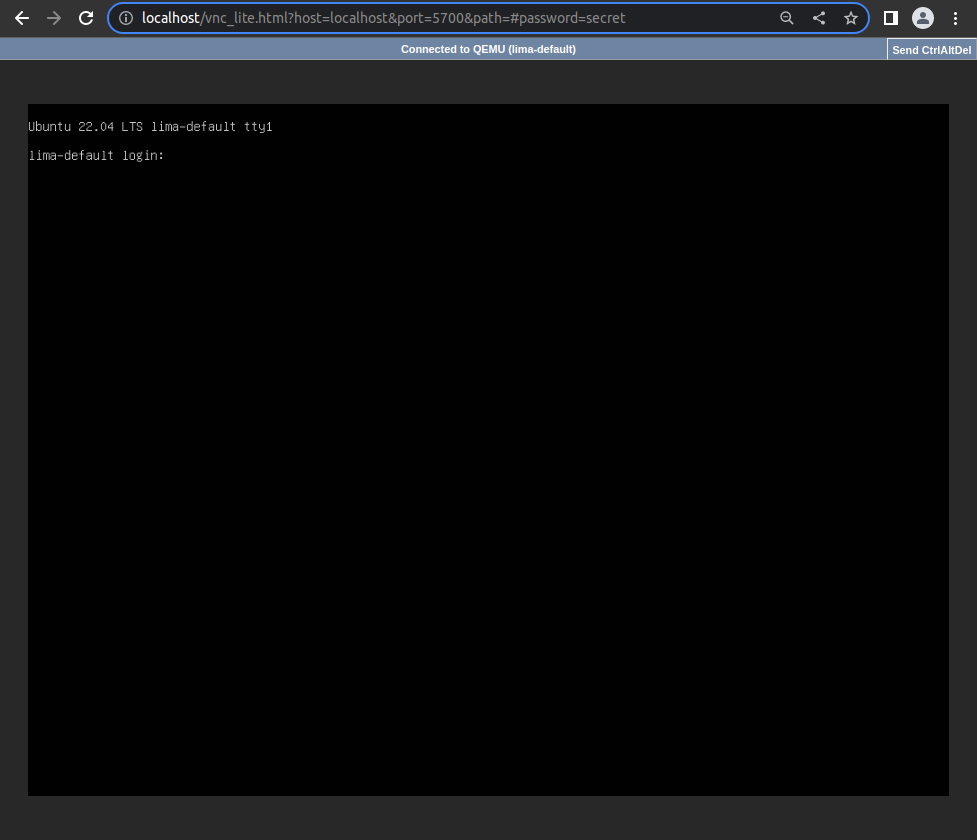
Note: historically, port 5800 was used for the browser interface
Something like this, when using a basic go:embed.
func viewerAction(cmd *cobra.Command, args []string) error {
	http.Handle("/", http.FileServer(http.FS(novnc.Content)))
	browser.OpenURL("http://localhost:5800/vnc_lite.html?host=localhost&port=5700&path=")
	logrus.Fatal(http.ListenAndServe(":5800", nil))
	return nil
}
4.0K	./pkg/novnc/LICENSE.txt
4.0K	./pkg/novnc/AUTHORS
40K	./pkg/novnc/docs
4.0K	./pkg/novnc/content.go
396K	./pkg/novnc/core
228K	./pkg/novnc/vendor
8.0K	./pkg/novnc/vnc_lite.html
https://github.com/novnc/noVNC/blob/v1.3.0/LICENSE.txt
I think I got a bit carried away with the web viewer (?), so will leave that and websockets as a separate add-on.
You can still run the novnc wrapper, and it will start up a local websockets proxy (novnc_proxy) for you...
As per review comments, the password will be mandatory.
Maybe we will just display it on the console, or something ?
Now it is shown on the console, and saved to a file.
INFO[0000] [hostagent] VNC Password for 127.0.0.1:0 <vnc://127.0.0.1:5900> is:
INFO[0000] [hostagent]     "46479782" | `/home/anders/.lima/default/vncpassword`
In order to provide a
limactl viewer, one would have to embed a web server and some js (684K).
I don't think this is necessary; you can just install a viewer using your local package manager if you don't already have one.
On macOS you can use the builtin Screen Sharing.app: Just run open vnc://127.0.0.1:5900 from your shell.
When you use iTerm you can also just ⌘-Click on it.

Just noticed that at least with Screen Sharing.app I can put the password into the URL to avoid the prompt:
open vnc://:[email protected]:5901
I don't think this is necessary;
Not necessary, but a feature ?
Will go with the URL for now, and if there is a demand to have something to open a GUI window we can add it later...
Similar to running limactl shell, instead of limactl ssh and executing it. I guess limactl viewer could open the url.
Just noticed that at least with Screen Sharing.app I can put the password into the URL
Looks like Remmina isn't as happy, about putting the password in the URL
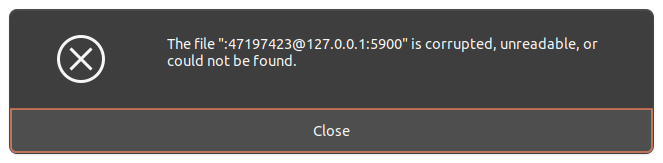
But it should be fixed in later versions (this version hated everything that was not a unix socket):
- https://gitlab.com/Remmina/Remmina/-/issues/2235
I don't think this is necessary;
Not necessary, but a feature ?
Maybe, but you will have noticed that I usually argue against adding complexity for features that are easily constructed using already existing tools, especially if the use-case is not widely shared.
Will go with the URL for now, and if there is a demand to have something to open a GUI window we can add it later...
Similar to running
limactl shell, instead oflimactl sshand executing it. I guesslimactl viewercould open the url.
I can see the point for opening the URL in your default VNC viewer (is there a way to do this generically on Linux?), but I object to bundling a vnc viewer itself with Lima.
VNC is only really needed/useful when ssh doesn't work, e.g. because cloud-init failed in a new OS image you want to make work with Lima. So there is quite a limited audience for this, and these people should all be able to install their VNC viewer of choice.
VNC is only really needed/useful when ssh doesn't work, e.g. because cloud-init failed in a new OS image you want to make work with Lima. So there is quite a limited audience for this, and these people should all be able to install their VNC viewer of choice.
Actually it was more used when using Lima as a replacement for VirtualBox or Vagrant, as in a generic virtualization platform. For the regular "headless" deployment, there is probably less need for it - although that xterm.js web console did look rather nice... 😀
But I did back out that integrated noVNC viewer feature, and now it is just -display vnc left in the PR (with the password). If we want a console or a display based on WebSockets in the future, I would consider the proof-of-concept done (without any security).
The proxy clients are still there, for connecting to the regular VNC protocol or SSH protocol.
So if you just want to try it, you can install novnc_proxy or go-ssh-web-client yourself ?
Should put vnc next to the other displays, that would make it more obvious and also allow for a better default display...
video:
  # QEMU display, e.g., "none", "cocoa", "sdl", "gtk", "vnc", "default".
  # Choosing "none" will hide the video output, and not show any window.
  # Choosing "vnc" will use a network server, and not show any window.
  # Choosing "default" will pick the first available of: gtk, sdl, cocoa.
  # As of QEMU v6.2, enabling anything but none or vnc is known to have negative impact
  # on performance on macOS hosts: https://gitlab.com/qemu-project/qemu/-/issues/334
  # 🟢 Builtin default: "none"
  display: null
  # VNC (Virtual Network Computing) is a platform-independent graphical
  # desktop-sharing system that uses the Remote Frame Buffer protocol (RFB)
  vnc:
    # VNC display, e.g.,"to=L", "host:d", "unix:path", "none"
    # By convention the TCP port is 5900+d, connections from any host.
    # 🟢 Builtin default: "127.0.0.1:0,to=9"
    display: null
https://www.qemu.org/docs/master/system/invocation.html#hxtool-3
Opening a VNC viewer works almost the same in Linux as on Mac, you can xdg-open the URL - or click it in the Terminal.