

 ligi
ligi
timezone not taken into account
I noticed that time till event is not localized although time on ticket is shown correctly

For me it works correctly. Time of event is 5pm and now at 10am local time it says in 7 hours. However at 10:01am it says 6 hours, so minutes are just left out.

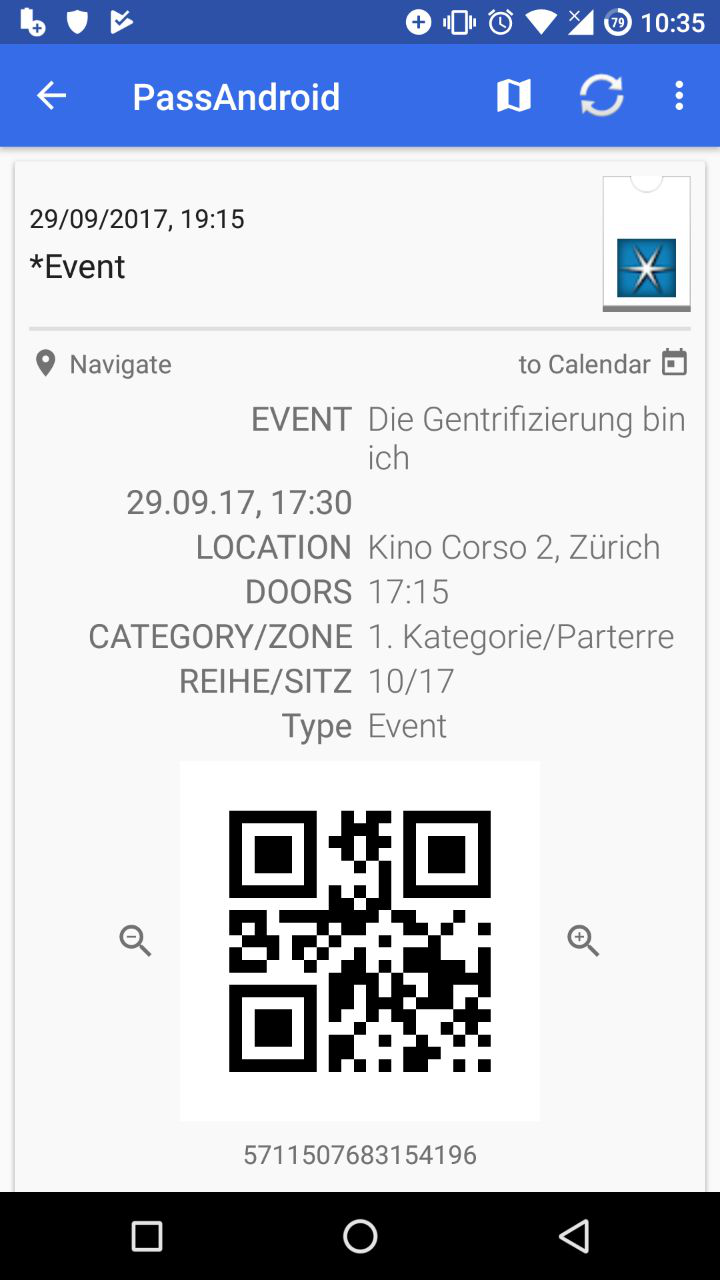
I think the difference is not in the source of the app but the pass in question. Often when analyzing passes for problems like this the time was written in plain text in the app - then PassAndroid cannot know what TimeZone was used. To make this feature work - the time needs to be e.g. the relevantTime field of the pass and be formatted as a TimeStamp. If you can send me a pass that is not working then I can have a deeper look. The json from inside is also enough - there you can also redact the information you do not want to disclose. I only really need the part with the time in question.

thanks - exactly the mentioned problem the time is just plain text - no context:
[{"key":"hdate","label":"29.09.17, 17:30","value":"","textAlignment":"PKTextAlignmentNatural","relative":false}]
if you are keen to fix this - please contact the supplier of this pass - I have no idea how I could fix this on the edge - ideas welcome - but I think this is not really possible ..
I opened share.zip and relevantDate property is '2017-09-29T17:15+00:00'. So if you're in UTC+2, you will see 19:15.
I think share.zip is not the original pass but exported from PassAndroid - I guess 53557bdb-6e87-43f6-b50b-b4fd7ff1be2f.zip is the original and the root of the problem. @PackElend - correct me when I am wrong.
ah - @simontb yea now I see the relevantDate is also in the original - so the pass does not really look good
"relevantDate":"2017-09-29T17:15+00:00"
and
{"key":"hdate","label":"29.09.17, 17:30","value":"","textAlignment":"PKTextAlignmentNatural","relative":false}
So I think the bug is in relevantDate - don't think 00:00 is correct ..-)
@PackElend when did the movie actually start?-)
share.zip is exported from PassAndroid 53557bdb-6e87-43f6-b50b-b4fd7ff1be2f.zip is the original @ligi movie started Fr 29.09.2017 17:30 h, doors opened 17:15 h
But the content of pass.json is identical in share.zip. Since Zürich is in MEZ, it makes sense (and in my opinion is correct behaviour by PassAndroid) that 2 hours are added.
Hallo, Have you made any progress? As far as I understand the pass isn't of good quality is it?
I had this issue too. (From a pass from Empire Cinemas in the UK). Time of the pass was for 8:10pm but was logged in PassAndroid as 21:10. I'm not quite sure what's happening with the timezone as we're on British Summertime at the moment (so BST 20:10 = GMT 19:10, not 21:10).
Could PassAndroid just respect the local timezone that the device is in as an option?

@bmrussell could you also share your pass here? If it contains sensitive information, the JSON is also enough and you can delete sensitive parts.
Yeah sure, how do I export the JSON? I couldn't see an option (apologies if I'm being thick)
Again this is an issue with the pass. From the pass: "relevantDate" : "2018-04-27T20:10+00:00" this means 20:10 UTC, and since you are in BST, which is an hour ahead of UTC, PassAndroid correctly interprets this timestamp as 21:10. The solution would be that the cinema provides correct passes either with BST offset "relevantDate" : "2018-04-27T20:10+01:00" or as calculated UTC timestamp "relevantDate" : "2018-04-27T19:10+00:00". I suggest you get in touch with the cinema to fix the problem.
Hallo, I'm afraid that there will be more apps coming up with the same issue. Why not allowing a per pass offset?
Sent from a fair mobile
On Fri, 4 May 2018, 19:19 Simon Tenbeitel, [email protected] wrote:
Again this is an issue with the pass. From the pass: "relevantDate" : "2018-04-27T20:10+00:00" this means 20:10 UTC, and since you are in BST, which is an hour ahead of UTC, PassAndroid correctly interprets this timestamp as 21:10. The solution would be that the cinema provides correct passes either with BST offset "relevantDate" : "2018-04-27T20:10+01:00" or as calculated UTC timestamp "relevantDate" : "2018-04-27T19:10+00:00". I suggest you get in touch with the cinema to fix the problem.
— You are receiving this because you were mentioned. Reply to this email directly, view it on GitHub https://github.com/ligi/PassAndroid/issues/178#issuecomment-386668765, or mute the thread https://github.com/notifications/unsubscribe-auth/ADYMDw2iaXfYVZCK0LTnrT5K7KAF9sjCks5tvI2sgaJpZM4QDAjo .
I don't see how PassAndroid can detect which passes provide the timestamp correctly and which don't. But you can always change the time per pass manually if you click on the edit button in the top bar and then click 'edit time' below the pass's icon.
Didn't know that trick :) How about lowering necessary action to change by allowing to change setting when tabbing long on an entry?
Sent from a fair mobile
On Fri, 4 May 2018, 19:30 Simon Tenbeitel, [email protected] wrote:
I don't see how PassAndroid can detect which passes provide the timestamp correctly and which don't. But you can always change the time per pass manually if you click on the edit button in the top bar and then click 'edit time' below the pass's icon.
— You are receiving this because you were mentioned. Reply to this email directly, view it on GitHub https://github.com/ligi/PassAndroid/issues/178#issuecomment-386672046, or mute the thread https://github.com/notifications/unsubscribe-auth/ADYMDwL2GjIOLp41sLW82nrT_kKt2fFCks5tvJBOgaJpZM4QDAjo .
I would refrain from doing so. If I got you correctly, you want an option like "don't calculate time according to current timezone". Because this is your problem. Although the issue title says "timezone not taken into account", the opposite is the case here. But in my opinion this would add unnecessary complexity to PassAndroid, because it would need to store how to handle time for each pass, and also not guarantee showing the correct time, as the pass might store it in many different ways that lead to a wrong displaying of the time.
So I suggest not fixing this on PassAndroid, but you can manually correct time for the passes that do not have the right offset, or get in touch with the pass provider to fix the issue there. Are many passes affected? So far I didn't get a single one that had a wrong time offset.