

 lightdash
Add the number style `k`, `B`, `M` to the dimension + metric config
Description: What is it?
in the metric or dimension configuration, you can add a style option to make the numeric field into units of thousands, millions, billions.
You can do this either using compact = true or unit = k, m, b
Problem: What problem does this solve?
Sometimes, I want my values to be formatted in different units to the raw data
What: Roughly, what does this look like in the product?
name: revenue
  meta:
    dimension:
      compact: true
    metrics:
      total_revenue:
        type: sum
        unit: k
If I had the revenue values of 1,000,000 and 150,000, then they would appear as 1m and 150k in Lightdash
If I had the total revenue values of 1,000,000 and 150,000, then they would appear as 1,000k and 150k in Lightdash.
Unit options are: 'k' or 'thousands' for thousands, 'm' or 'millions' for millions, 'b' or 'billions' for billions

What happens if a number is not big enough ? eg:
1,000 M -> 1,000 (no changes) or 0.001M ?

I think the styling the user wants will depend on the query results.
Instead of a fixed unit format, should it be a more flexible flag ?
useCompactNumber: true / false
If false, we show the number from results.
If true, we convert the number to the closest unit (K,M,B).
E.g 1000 -> 1K

Instead of a fixed unit format, should it be a more flexible flag ? useCompactNumber: true / false
That works with a single value. But what happens if I have a series of values. e.g. I have a line chart with revenue values of:
1,000,000 150,000 1,500
^What would we convert these numbers to if they're all different orders of magnitude?
Excel does this well already, review and implement and improve on what Excel does. The main competition in the long run is Excel. Most business users will pull CSVs and format in Excel and the data will be old and stale.
Ideally you would want to be able to format dates using a string, to compress or expand numbers and add strings to the front and end to allow for localization. (Other countries don't use commas in currencies the way we do in the US.)
1234.56
0 -> 1235
0.0 -> 1234.6
0.00 -> 1234.56
$0 -> $1235
commas divide by 1000 123456789 0, -> 123457 0,, -> 123
$0.0,,"MM" - > $123.4MM

@JohnRomanski we actually had a long discussion about this!
Looker takes a similar approach to Excel (they actually literally just copied the Excel formatting and use that in their tool).
This isn't particularly user-friendly. There are about 7 types of formatting changes you want to make to your values. So being able to adjust each of them isn't actually wild to implement for users (instead of forcing them to use unintuitive code).
I quite like Tableau's take on this:
- They split out each of the formatting options. So it's intuitive to the user "how do I change currency?" or "how do I round my numbers?"
- They also give the option to override these click-and-apply formats with a "custom format" field (which just takes in Excel formatting). So sort of a "power user" feature.
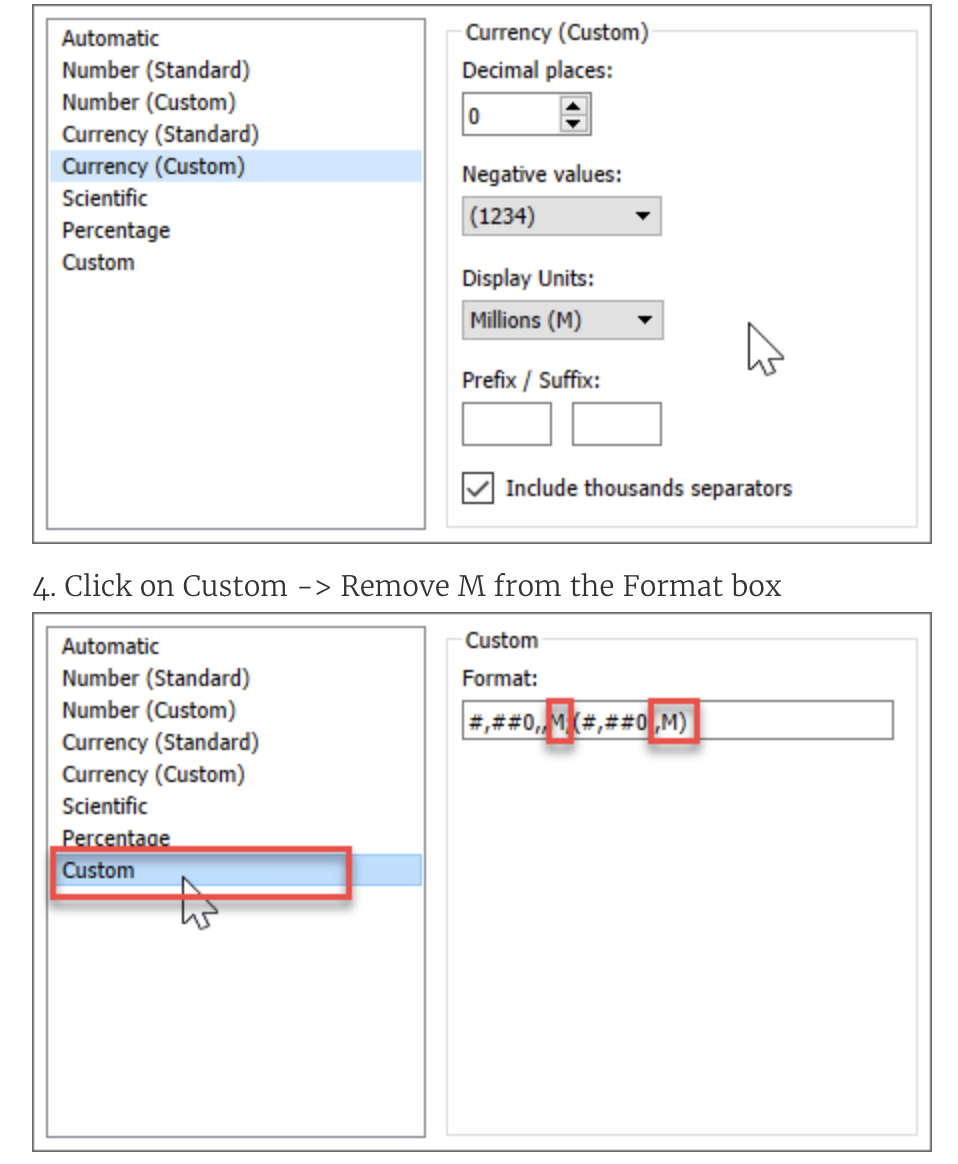
I agree that Tableau has the best of both worlds. Also remember to include date formatting options:
3 Jun 03 Jun Jun 3 June 3rd 06/03 6/3 6.3 2022-06-03 etc
This has just been requested by a user, specifically with the example of a currency like Brazilian Real, which are typically large numbers. e.g., R$ 12.187.283.201.97 would ideally show as R$ 12.2B in the viz.
So, I think it should be an additional requirement to support currency AND rounding with this k/M/B unit contraction.

I think that there should be a default solution configurable in dbt (especially useful for dates, currency formats, etc), but also the ability to overwrite this in the UI depending on the analyst and the use case.
For example, it could be monthly reporting is in the thousands, but year-to-date reporting is in the millions. It could be that Finance would want full figures reported. UI-wise, I'll add a vote to the Tableau-like solution.

:tada: This issue has been resolved in version 0.313.0 :tada:
The release is available on:
0.313.0- GitHub release
Your semantic-release bot :package::rocket:
![github-actions[bot] avatar](https://avatars.githubusercontent.com/in/15368?v=4 "Published by a pub.dev verified publisher")