
browsermob-proxy
 browsermob-proxy copied to clipboard
 lightbody
BrowserMobProxy Not working inside selenium Grid on docker
I can able to run and get Response Header Using browsermob and selenium using following code
DesiredCapabilities capabilities = new DesiredCapabilities();
        BrowserMobProxy proxy = getProxyServer(); //getting browsermob proxy
        Proxy seleniumProxy = getSeleniumProxy(proxy);
        capabilities.setCapability(CapabilityType.PROXY, seleniumProxy);
        capabilities.setCapability(CapabilityType.ACCEPT_SSL_CERTS, true);
        WebDriver driver = new ChromeDriver(capabilities);
        proxy.setHarCaptureTypes(CaptureType.REQUEST_HEADERS,CaptureType.RESPONSE_HEADERS);
        proxy.newHar(); // creating new HAR
        driver.get("https://www.google.com");
         List<HarEntry> entries = proxy.getHar().getLog().getEntries();
        for (HarEntry entry : entries) {
            System.out.println(entry.getRequest().getUrl());
        }
        proxy.stop();
        driver.close();
    }
    public Proxy getSeleniumProxy(BrowserMobProxy proxyServer) {
        Proxy seleniumProxy = ClientUtil.createSeleniumProxy(proxyServer);
        try {
            String hostIp = Inet4Address.getLocalHost().getHostAddress();
            seleniumProxy.setHttpProxy(hostIp + ":" + proxyServer.getPort());
            seleniumProxy.setSslProxy(hostIp + ":" + proxyServer.getPort());
        } catch (UnknownHostException e) {
            e.printStackTrace();
            Assert.fail("invalid Host Address");
        }
        return seleniumProxy;
    }
    public BrowserMobProxy getProxyServer() {
        BrowserMobProxy proxy = new BrowserMobProxyServer();
        proxy.setTrustAllServers(true);
        proxy.start();
        return proxy;
    }
But I am getting problem when i am running it to the selenium docker container
By using this code i can able to open chromebrowser
DesiredCapabilities capabilities =new DesiredCapabilities();
        capabilities.setBrowserName("chrome");
        capabilities.setPlatform(Platform.getCurrent());
        BrowserMobProxy proxy = getProxyServer(); //getting browsermob proxy
        Proxy seleniumProxy = getSeleniumProxy(proxy);
        capabilities.setCapability(CapabilityType.PROXY, seleniumProxy);
        driver = new RemoteWebDriver(new URL("http://172.17.0.3:5555/wd/hub"), capabilities);
        proxy.setHarCaptureTypes(CaptureType.REQUEST_HEADERS, CaptureType.RESPONSE_HEADERS);
        proxy.newHar();

        driver.get("https://www.google.com");
But its shows
No internet There is something wrong with the proxy server, or the address is incorrect.
Can anyone know how to run this inside selenium docker container.Thanks advance for your help.


Browsermobproxy is from a time before docker containers. If you run your browser in the container, and the proxy outside it, you will need to make a small change to your code, using either host.docker.internal or gateway.docker.internal
String proxyHost = "host.docker.internal";
String proxyString = proxyHost + ":" + browserMobProxy.getPort();
proxy = new Proxy();
proxy.setHttpProxy(proxyString);
proxy.setSslProxy(proxyString);

Hi all, I have the same problem. Can someone help me to understand how can I solve

Hey Karen, If you're new to docker, you have to consider localhost inside docker is different to localhost on your host PC. If you want the browser running in your docker container to talk to your BMP instance being run from outside your docker container, you'll want to use host.docker.internal instead of localhost. I'm assuming you're using Docker Desktop for windows or Mac.
If that hasn't helped, could you share some code / more info?
I tried with host.docker.internal in my python code ..But it's not working. Can you please explain how to implement the browsermobproxy in python with selenium grid. The code to start browsermobproxy server and client is running on my chrome node. is this the correct way?

@hazmeister : Thanks for the code . It works perfectly in local docker . But When I tried to run in Jenkins it fails . What would be the proxyHost for Jenkins? In Jenkins we are running a docker in pod.

@afrazmuhsin -I suspect you’re running Jenkins on a Linux agent? Docker runs natively on Linux, and doesn’t offer host.docker.internal. How you get round this depends entirely on how you run your code.
Do you run your test code from a docker container and are you using your Jenkins master or an agent?
Yes . The job is running docker inside Jenkins to spin up selenium and allure .
I have to check with CI team who manages the Jenkins . If you can tell the approaches for both. That would be great.
Thanks , Muhsin
On Tue, Apr 11, 2023 at 1:10 AM Harry @.***> wrote:
@afrazmuhsin https://github.com/afrazmuhsin -I suspect you’re running Jenkins on a Linux agent? Docker runs natively on Linux, and doesn’t offer host.docker.internal. How you get round this depends entirely on how you run your code.
Do you run your test code from a docker container and are you using your Jenkins master or an agent?
— Reply to this email directly, view it on GitHub https://github.com/lightbody/browsermob-proxy/issues/805#issuecomment-1502738334, or unsubscribe https://github.com/notifications/unsubscribe-auth/AF5SL5EUEGIPUJFD4ZSO47LXATYUXANCNFSM4GSDKCSA . You are receiving this because you were mentioned.Message ID: @.***>
Few more error details .
Attaching error details here . Please let me know if you can help
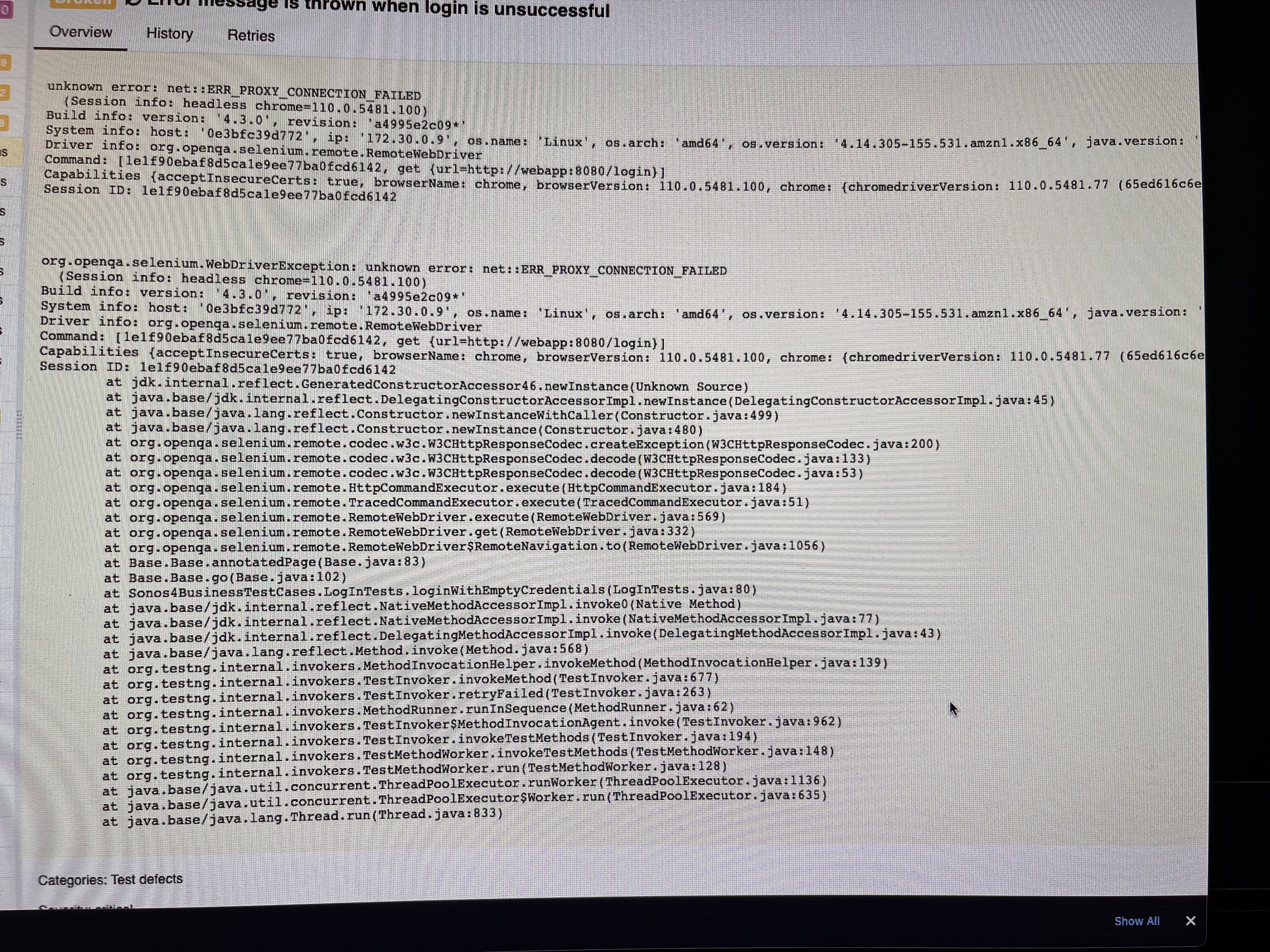
I have tried the below but didn’t help .
- I have added —proxy-server=web app:browsermobProxy.getPort() to chrome options arguements
- I have set SeleniumProxy.setHttpProxy(webapp: browsermobProxy.getPort()) seleniumProxy.setsslProxy(webapp: browsermobProxy.getPort())
Environment : Linux Note : this tests runs during the pr . So once developers create a branch and raise pr this job build webapp from developer’s branch and run tests against that branch .please revert in case if my question or details are not clear .
@afrazmuhsin how many containers are in use during the test? Does the browser and proxy run in the same container? Or is the proxy (running from your test code) running outside of a container?
If they're in the same container, localhost should work as the proxy host.
If they're different containers, you might need to expose the proxy port (deliberately set it to a predictable value) so that it's available to the other container if they're not part of the same docker network. If they are separate containers, you'll need to find a hostname that the browser can see the proxy from.
I use docker-compose, which allows cross container communication based on a service's name. Another option might be to use the hostname/IP for either the jenkins master or agent (depending on where your tests run). This would require browsermob to launch using the same port, and expose this port through docker.
docker inspect and curl will be your friends debugging this.