
side-waffle
 side-waffle copied to clipboard
 ligershark
The future of SideWaffle and TemplateBuilder
Hi everyone. Back in 2013 we created TemplateBuilder/SideWaffle as a way to simplify creating and maintaining templates. After kicking the tires on that I realized it wasn't good enough. I finally got the opportunity to solve this problem in the right way and we have created the Template Engine. We've taken learnings from here and from other side projects and developed a really great story for creating, maintaining and sharing templates. The Template Engine is now being used in dotnet new, more info on that at https://aka.ms/dotnetnew-intro. We haven't created any support in Visual Studio yet, but we are working on it.
With the Template Engine the primary way to widely distribute templates today is to use NuGet packages. One of the main ideas of the Template Engine was to enable creating templates for different entry points such as:
- Command line with
dotnet new - Visual Studio
- Visual Studio for Mac
- Visual Studio Code
- yeoman
- etc
Now, in this new world where does TemplateBuilder/SideWaffle fit in? TemplateBuilder is no longer needed and is essentially irrelevant now. With SideWaffle the real value was in:
- Having a single place to find high quality templates
- Having a place where template authors can work together to solve their problems and ask questions
For the future of SideWaffle I'm proposing the following:
- Keep the existing templates as they are. Continue shipping those in the .vsix that we already have. We can update that to work on VS2017 but we won't add any new templates to that distribution.
- All new templates are created with the Template Engine, and shipped in NuGet packages. I'm not sure if we want 1 NuGet package per template or to have a package per category (i.e. Web, Mobile, etc). We can decide on that later.
- We work with @mlorbetske (who works on the Template Engine at Microsoft) to create a Visual Studio wizard that can be used to surface templates in Visual Studio. Ideally VS users can also find and install templates.
Since the VS story is a work in progress with the new templates we can start with creating templates that can be used by dotnet new.

Cool stuff, is there any guide/readings about how i create a template with the new tooling?

I'm working on a detailed blog post on how to create templates, in the meantime see https://aka.ms/dotnetnew-create-templates. I'll update that link later on when I post the new blog.
What needs to be done to load the existing Sidewaffle in VS2017?
EDIT: It's not letting me thumb-up or reply directly on mobile, so thanks to everyone who responded.

Hi @ryanwebjackson we are working on a new version of SideWaffle for Visual Studio 2017 that will take advantage of the new TemplateEngine @sayedihashimi mentioned above. However, It'll probably be another few months before this is released because the TemplateEngine is still under development by Microsoft.

@ryanwebjackson You can try my quick fix for VS 2017 here
Ignore the warning VS gives you since I could not get it to compile with the latest VSSDK. You should be fine though after that.

Instead of just updating the current SideWaffle to 2017 I'd like to propose a shift in direction
As mentioned we have created a new Template Engine which is powering dotnet new. In the near future ASP.NET Core projects in Visual Studio will also be using this template engine during New Project. As a part of that work we are going to be creating a Visual Studio VSTemplate Wizard which can:
- Shows installed templates
- Create project(s) from templates, and prompt for parameters
- Create project(s) with no UI for parameters
Then we can release SideWaffle for VS2017 which creates File->New Project->Community Templates. This will be a .vstemplate which invokes the wizard and shows a WPF dialog. The installed templates will be shown. After a template is selected, if that template has parameters the user will be prompted for those.
We can create an options page so that user can enter template sources (nuget package name, folder path, git url, etc).
We can also do the same for Visual Studio for Mac I believe.
I'd like to do is to identify the templates that exist in SideWaffle today which users want in 2017 and then create templates for those using the Template Engine. If you're using a template that you'd like to use in 2017 please let us know what templates you're interested in using.
In the mean time if @hamzaahmedzia1 solution is working for you then go with that for now. I think that will give us some time to get all of this put together.
This all reads nice and fine but the actual tools (I should say tool actually because currently there's only dotnet new for now) are clumsy and hard to use. The story with SideWaffle was nice and it worked fine when it worked (for some reason it never worked in Community edition). It is beyond me that MS just decided to throw everything out the window and start from scratch especially because dotnet new doesn't seem to be in any way better. For legacy projects, updating SideWaffle to VS 2017 should be a matter of a weeks work and we'd be able to continue working as usual.
The TemplateEngine is as vague as the whole .net core thing is and the speed at which we keep getting the bits is terrible. Individuals/teams that need a working scaffolding solution with clear development roadmap/support should better invest their time in Yeoman and skip TemplateEngine entirely (just compare your one time blog post on authoring templates with dotnet new to the Yeoman guide http://yeoman.io/authoring/)
Not to mention 6 months down the line you guys could show up with a blog post saying "TemplateEngine is now dead/deprecated in favor of ..."

This all reads nice and fine but the actual tools (I should say tool actually because currently there's only dotnet new for now) are clumsy and hard to use.
@sayedihashimi can correct me if I'm wrong, but I believe the goal with the next version of SideWaffle is to make it where you're not working with the dotnet new tools directly. You'll be working through a user interface that we create.
The story with SideWaffle was nice and it worked fine when it worked (for some reason it never worked in Community edition).
I've been using SideWaffle with Visual Studio 2015 Community Edition since it's release with no problem. If you're having issues with it I'd love to hear about them. Can you create a separate GitHub issue for this with your experience so we can look into it?
@brgrz
This all reads nice and fine but the actual tools (I should say tool actually because currently there's only dotnet new for now) are clumsy and hard to use.
What problems are you having developing templates for dotnet new? Besides not having enough docs, which I'm working on, I have only heard good things.
It is beyond me that MS just decided to throw everything out the window and start from scratch especially because dotnet new doesn't seem to be in any way better.
What do you mean by "throw everything out the window"? The template system used by Visual Studio (.vstemplate) is really old and makes it difficult to maintain templates. The One ASP.NET dialog box used to build on top of .vstemplate and it was a big time drain for us. We needed something easier to maintain. We investigated using other template systems, like yeoman, but none meet our needs. We needed a template system with at least the following.
- Easy to create and maintain templates
- Easy to plug into CLI/VS/VS4Mac in a first class way
Using yeoman you cannot plug into VS/VS4Mac in a first class way. The story for maintaining yo templates is not ideal either. With yeoman you still have your source project + transformed template project which makes maintaining templates harder.
I shared my thoughts on this a while back at https://github.com/dotnet/cli/issues/2052#issuecomment-207031714. In that comment I specifically address yeoman, and why it's not the right tool for this.
The TemplateEngine is as vague as the whole .net core thing is and the speed at which we keep getting the bits is terrible.
I think this is a doc issue. I'm working on that but it will take some time. In the mean time we are trying to help by responding to issues here. For speed of getting bits, you can always build dotnet new from source and use that.
Not to mention 6 months down the line you guys could show up with a blog post saying "TemplateEngine is now dead/deprecated in favor of ..."
The same can happen with yeoman or any other tool. We are investing heavily in plugging the Template Engine into dotnet new/VS/VS4Mac so I'm hoping this won't happen but it's possible with every software package.
If yeoman is meeting your needs today, then by all means use yeoman. Yeoman is a great tool, and I'm working on a story to integrate Template Engine templates into yeoman. For the reasons I mentioned here it wouldn't work for us.
It's on me now to create the updated version of SideWaffle to get us started. I think I have all the components that we need, I just have to get some time to work on it. I'm taking a few days off next week, and I'm hoping to get to it then. Ideally we can have a similar experience to what we have in SideWaffle today.
@tylerbhughes there's an issue already open for more than a year https://github.com/ligershark/side-waffle/issues/330
@sayedihashimi most problems are docs related, in fact I'm reluctant to dive deep into the new template system due to lack of docs, so that's the first thing.
Given the fact that docs are missing how could I agree on both of the two points you mentioned. I simply can't.
- Easy to create and maintain templates
- Easy to plug into CLI/VS/VS4Mac in a first class way
It'd be great if I was able to create a template for a custom controller I have with the new templates and reuse it the same way the out of box scaffolding work but I have no clue how to do that either in VS 2015 or 2017.
@brgrz that issue pertains specifically to T4 templates. Beyond that SideWaffle should work for Community Edition.
@sayedihashimi From my point of view after reading your comments here I'd say you focus too much on two things:
- distributing templates (first we need a good local development story so we can create templates for ourselves and most developers I'd say will be fine with that),
- scaffolding entire projects (in my experience, most of the time advanced devs will scaffold standalone files or directory trees but rarely whole apps).
SideWaffle was great for that one could easily override the default MVC/Web API scaffolding templates.
@tylerbhughes T4 templates are pretty much everything there is regarding templates for MVC/Web API scaffolding < v6
FYI I'm working on the update to SideWaffle now. I should have something to share in a few days. Creating templates is going to be so easy it's not even gonna be funny.
The future is here. Checkout my 10 min video of SideWaffleV2 https://youtu.be/g6az_N95dVM. I forgot to mention in my video, you will need to install the VS Extensibility Tools.
We've also been working on docs for the Template Engine. Some resources below.
@brgrz can you expand on
It'd be great if I was able to create a template for a custom controller I have with the new templates and reuse it the same way the out of box scaffolding work but I have no clue how to do that either in VS 2015 or 2017.
@sayedihashimi I watched the YouTube video and checked the docs you posted. This seems promising but it mostly (I may have missed something) covers the creation of project templates. However for me personally it doesn't address the need for a mechanism to scaffold custom views/controllers.
Let me expand on that. What I'd want is simply to be able to create a custom controller template (similar to what we have for default controllers with EF actions) but my template would be completely custom, using some other ORM and custom actions. So preferrably the solution I'm looking for would plugin into the scaffolding window of Visual Studio. (see the attached image as to where exactly; this is the image of the controller scaffolding but it applies to view scaffolding too)
It's essentially something we had with T4 templates. Are these now on the way out?
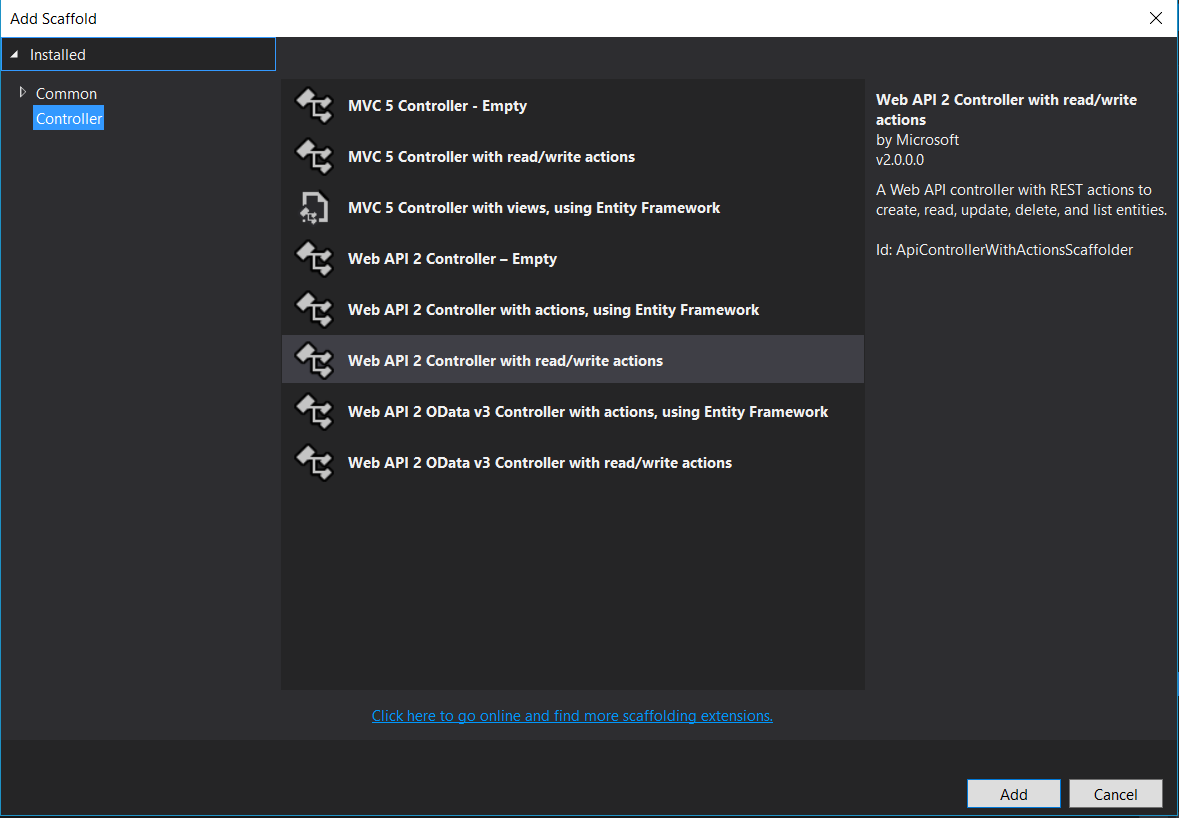
@brgrz I need this too.
This seems promising but it mostly (I may have missed something) covers the creation of project templates. However for me personally it doesn't address the need for a mechanism to scaffold custom views/controllers.

@sayedihashimi Hello sir, Saw the article: https://devblogs.microsoft.com/dotnet/how-to-create-your-own-templates-for-dotnet-new/ If possible please also provide a printer-friendly version of this and the other upcoming related articles.

What about code snippets? This scenario isn't covered by the dotnet new templating engine...

@sayedihashimi I watched the YouTube video and checked the docs you posted. This seems promising but it mostly (I may have missed something) covers the creation of project templates. However for me personally it doesn't address the need for a mechanism to scaffold custom views/controllers.
Let me expand on that. What I'd want is simply to be able to create a custom controller template (similar to what we have for default controllers with EF actions) but my template would be completely custom, using some other ORM and custom actions. So preferrably the solution I'm looking for would plugin into the scaffolding window of Visual Studio. (see the attached image as to where exactly; this is the image of the controller scaffolding but it applies to view scaffolding too)
It's essentially something we had with T4 templates. Are these now on the way out?
@sayedihashimi been searching for this functionality in VS2019. Same functionality as the original side waffle basic scaffold template with T4 templates. Can you point me in the right direction?

@bjthompson44 @brgrz @artchess what you are looking for is called Scaffolding. I know when we initially built that it was extensible, but I'm not sure if it still is. @vijayrkn is scaffolding extensible by 3rd parties?
Scaffolding should be extensible though I am not sure if we have any samples for it. @deepchoudhery is primary dev for this feature and the content generation logic is available in this open-source repo - https://github.com/dotnet/Scaffolding/
