
pyvips
 pyvips copied to clipboard
 libvips
Different resize issues
This is an attempt to spot all geometry issues in VIPS resizing at once.
Pillow 7.0 has been released today (no SIMD version yet) and I've implemented a new resizing method called reduce(). It allows very fast reducing an image by integer times in both dimensions and could be used as a first step before true-convolution resampling. I know VIPS also works the same way. So, I borrowed this idea and come to share some ideas, test cases, and bugs in VIPS resizing. I hope this will be useful.
At first, let's learn the tools we have.
In Pillow
im.reduce()— fast image shrinking by integer times. Each result pixel is just an average value of particular source pixels.im.resize()— convolution-based resampling with adaptive kernel size.im.resize(reducing_gap=2.0)— 2-step resizing where the first step isim.reduce()and second step is convolution-based resampling. The intermediate size is not less than two times bigger than the requested size.
In VIPS
im.shrink()— fast image shrinking by integer times and unknown algorithm for fractional scales.im.reduce()— convolution-based resampling with adaptive kernel size. The documentation says "This will not work well for shrink factors greater than three", it is not clear for me why.im.resize()— 2-step resizing where the first step isim.shrink()and second step is convolution-based resampling withim.reduce(). The documentation says "How much is done by vips_shrink() vs. vips_reduce() varies with the kernel setting" but I pretty sure for this is equivalent of Pillow'sreducing_gap=2.0at least for current cases.
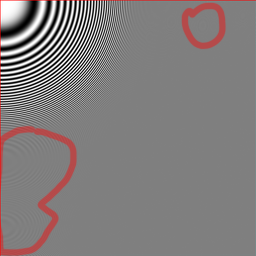
The test image
It has the following features:
- Quite large, could be used for massive downscaling.
- Has very contrast lines with variable widths and different angles.
- Average color on large scale is uniform gray. The closer implementation to true convolution resampling, the flatter will be resized image.
- Size of the image is 2049 × 2047, which allows test different rounding behavior.
- It has a pixel-width red border which allows test edges handling correctness.

The test code
import sys
import timeit
import pyvips
from PIL import Image

image = sys.argv[1]
number, repeat = 10, 3

pyvips.cache_set_max_mem(0)
im = pyvips.Image.new_from_file(image)
print(f'\nSize: {im.width}x{im.height}')
for scale in [8, 9.4, 16]:
    for method, call in [
        ('shrink', lambda im, scale: im.shrink(scale, scale)),
        ('reduce', lambda im, scale: im.reduce(scale, scale, centre=True)),
        ('resize', lambda im, scale: im.resize(1/scale, vscale=1/scale)),
    ]:
        fname = f'{scale}x_vips_{method}.png'
        call(im, scale).write_to_file(fname)

        time = min(timeit.repeat(
            lambda: call(im, scale).write_to_memory(),
            repeat=repeat, number=number)) / number
        print(f'{fname}: {time:2.6f}s')


im = Image.open(image)
print(f'\nSize: {im.width}x{im.height}')
for scale in [8, 9.4, 16]:
    for method, call in [
        ('reduce', lambda im, scale: im.reduce((scale, scale))),
        ('resize', lambda im, scale:
            im.resize((round(im.width / scale), round(im.height / scale)), Image.LANCZOS)),
        ('resize_gap', lambda im, scale:
            im.resize((round(im.width / scale), round(im.height / scale)),
                      Image.LANCZOS, reducing_gap=2.0)),
    ]:
        try:
            fname = f'{scale}x_pillow_{method}.png'
            call(im, scale).save(fname)

            time = min(timeit.repeat(
                lambda: call(im, scale),
                repeat=repeat, number=number)) / number
            print(f'{fname}: {time:2.6f}s')
        except TypeError:
            # reduce doesn't work with float scales
            pass
Pillow reduce() vs VIPS shrink()
I will use only 8x versions. It is better to compare Images by opening in adjacent browsers tabs and fast switch.


The results are really close. The only noticeable difference is the last column. Indeed, we are scaling by a factor of 8 and 2049 / 8 is 256.125 pixels. So VIPS strips the last column, while Pillow expands the last column of red pixels to the whole last column of the resulting image. At first glance VIPS's behavior looks more correct since the last pixel should be 0.125 pixels width in the resulting image and this is close to 0 than to 1. But in practice, we lost the information from the last column completely for further processing. While in Pillow's version we still can take into account the impact of the last column in further processing.
The same behavior as Pillow shows libjpeg when you are using DCT scaling. If you are opening a 2049 × 2047 jpeg image with scale = 8, you get 257×256 image where the last source column is expanded on the whole column of the resulting image.
Pillow resize() vs VIPS reduce()


There are some problems with VIPS version. The whole image is shifted by about 0.5 pixels to the bottom right. As a result, top and left red lines are too bold while the bottom and right one are completely lost. This looks like a rounding error at some stage. Very likely this is the same issue as in https://github.com/libvips/libvips/issues/703. The Pillow result, as the original image, has tiny rose border which looks equally on different sides.
Another Issue is some additional moire where it shouldn't be. This looks like a precision error.
Pillow resize(reducing_gap=2.0) vs VIPS resize()


Surprisingly, all of these issues don't affect resizing too much. Both images have moire due to precision loss on the first step which is ok. The locations of rings are different which is also probably is ok. But VIPS losts the right red line completely.
How this works in Pillow
The main invention in Pillow is box argument for resizing. box is an additional bunch of coordinates in the source image which are used as pixels source instead of the whole image. At first glance, this looks like crop + resize sequence, but the main advantage what box is not used for size calculation, it only used for resizing coefficient calculations and this is why coordinates could be floats.
https://github.com/python-pillow/Pillow/blob/1cecf08d16509c20473766b4cdb7a65169844819/src/PIL/Image.py#L1860-L1873
So, what happens when we need to resize 2049×2047 image to 256×256 size with reducing_gap=2?
- We need to calculate how much we can reduce the image. Since we have
reducing_gap, it will be 2049 / 256 / 2 = 4.001953125 times for width and 2047 / 256 * 2 = 3.998046875 times for height. The real reduction will be in (4, 3) times (4 for width, 3 for height). - As a result, we have a reduced image with size 2049 / 4 = 512.25 by 2047 / 3 = 682.333 which both rounded up to 513 by 683 pixels image. But also we have the box! It is coordinates of the source image in the reduced image coordinate system and this box is (0, 0, 512.25, 682.333).
- All we need is to resize the reduced 513×683 pixels image to 256×256 using (0, 0, 512.25, 682.333) box.
Performance issues
Also, I see some unexpected results for the performance of resizing.
$ VIPS_CONCURRENCY=1 python ./shrink.py ../imgs/radial.rgb.png

Size: 2049x2047
8x_vips_shrink.png: 0.014493s
8x_vips_reduce.png: 0.016885s
8x_vips_resize.png: 0.028791s
9.4x_vips_shrink.png: 0.016348s
9.4x_vips_reduce.png: 0.050876s
9.4x_vips_resize.png: 0.028615s
16x_vips_shrink.png: 0.009454s
16x_vips_reduce.png: 0.065079s
16x_vips_resize.png: 0.014835s

Size: 2049x2047
8x_pillow_reduce.png: 0.002971s
8x_pillow_resize.png: 0.045327s
8x_pillow_resize_gap.png: 0.010557s
9.4x_pillow_resize.png: 0.046137s
9.4x_pillow_resize_gap.png: 0.006636s
16x_pillow_reduce.png: 0.002880s
16x_pillow_resize.png: 0.043109s
16x_pillow_resize_gap.png: 0.004624s
Shrink has comparable time fox 8x and 16x which is ok. But if you look at reduce, it performs almost 4 times faster for 8x reducing than for 16x. This shouldn't happen, I think. Despite this fact, resize itself works 2 times slower for 8x resizing which is also very strange. It works even slower than true-convolution reduce.

Hi @homm, this looks very interesting. As you say, a two-step resize with a box filter first is an easy way to a nice speedup, especially for large reduce factors.
The documentation says "This will not work well for shrink factors greater than three", it is not clear for me why.
I think that's related to the previous implementation, I should remove it. The reducev vector path won't work for very large reductions (it'll fall back to C), that might be an issue still. Though sadly the vector path is broken at the moment due to a bug in orc. I think 0.4.31 has a fix and it'll start working again soon.
The libvips resize operations do round-to-nearest for image dimensions, so as you say shrink(8, 8) makes a 256.125 pixel across image, and discards the final red column. I agree, perhaps there should be an option to do round up instead, for use when shrink is part of a larger resize pipeline.
I'll have a look at the reduce behaviour, I agree it looks like there are some problems there.
I'll check the speed too, it does look odd.

I had a look at the moire from reduce. It's caused by the fixed-point arithmetic reduce is using for uint8 images, plus the fixed set of masks that libvips precomputes. There's a slower high-quality mode (cast the input to double) which fixes this.
I'll have a look at the performance strangeness.
Here's the output before and after applying this patch (from issue https://github.com/libvips/libvips/issues/703).
Pillow reduce() vs VIPS shrink()
| Pillow | VIPS before | VIPS after |
|---|---|---|
 |
 |
 |
| Identical to the previous one |
Pillow resize() vs VIPS reduce()
| Pillow | VIPS before | VIPS after |
|---|---|---|
 |
 |
 |
| 0.5 pixel shift gone |
Pillow resize() vs VIPS resize()
| Pillow | VIPS before | VIPS after |
|---|---|---|
|
 |
 |
| Identical to the previous one |

That's very nice Kleis. I'm sorry your patch hasn't been merged, I've been so distracted :(
Do you think we should merge for 8.9?
Ah, now I check on a bigger screen I can see the extra moire you were talking about more clearly. It seems you have the vector path enabled, so it's the lower precision there.
If I do this:
$ vips reduce big-zone.png x.png 8 8 --vips-info --vips-novector
VIPS-INFO: 13:29:32.225: reducev: 49 point mask
VIPS-INFO: 13:29:32.226: reducev sequential line cache
VIPS-INFO: 13:29:32.226: reduceh: 49 point mask
$ vips reduce big-zone.png xv.png 8 8 --vips-info
VIPS-INFO: 13:29:38.609: reducev: 49 point mask
VIPS-INFO: 13:29:38.613: reducev: using vector path
VIPS-INFO: 13:29:38.613: reducev sequential line cache
VIPS-INFO: 13:29:38.613: reduceh: 49 point mask
I see:

So that's the C path on the left (20.12 bit fixed point) and the vector path on the right (2.6 bits for the coefficients, 10.6 for the accumulator).
It would be nice if it were merged/fixed in 8.9. Maybe it's wiser to fix it in 8.10 (or a patch release), it allows us to test it more and notify some people (for e.g. https://github.com/libvips/libvips/issues/659).
Regarding the patch, it still produces a small pixel shift (within reducev and perhaps also in reduceh) that I can't quite figure out (it might be a rounding error). See this testcase:
reducev testcase
vips reducev input/Landscape_1.jpg output-patch/lanczos3/Landscape_1.jpg[strip,Q=85] 5.624992969 --kernel lanczos3 --centre

vips reducev input/Landscape_2.jpg temp.v 5.624992969 --kernel lanczos3 --centre
vips flip temp.v output-patch/lanczos3/Landscape_2.jpg[strip,Q=85] horizontal

vips reducev input/Landscape_3.jpg temp.v 5.624992969 --kernel lanczos3 --centre
vips rot temp.v output-patch/lanczos3/Landscape_3.jpg[strip,Q=85] d180

vips reducev input/Landscape_4.jpg temp.v 5.624992969 --kernel lanczos3 --centre
vips rot temp.v temp2.v d180
vips flip temp2.v output-patch/lanczos3/Landscape_4.jpg[strip,Q=85] horizontal

vips rot input/Landscape_5.jpg temp.v d270
vips reducev temp.v temp2.v 5.624992969 --kernel lanczos3 --centre
vips flip temp2.v output-patch/lanczos3/Landscape_5.jpg[strip,Q=85] vertical

vips rot input/Landscape_6.jpg temp.v d90
vips reducev temp.v output-patch/lanczos3/Landscape_6.jpg[strip,Q=85] 5.624992969 --kernel lanczos3 --centre

vips rot input/Landscape_7.jpg temp.v d90
vips reducev temp.v temp2.v 5.624992969 --kernel lanczos3 --centre
vips flip temp2.v output-patch/lanczos3/Landscape_7.jpg[strip,Q=85] vertical

vips rot input/Landscape_8.jpg temp.v d270
vips reducev temp.v output-patch/lanczos3/Landscape_8.jpg[strip,Q=85] 5.624992969 --kernel lanczos3 --centre

rm {temp,temp2}.v
Output: https://raw.githubusercontent.com/kleisauke/vips-issue-703/master/output-patch/Landscape-vertical.webp
That's the reason I described as a partial patch and didn't open a PR yet. If you want, I can open a draft PR for easier reviewing.
I wonder if it could be related to the extra vector path in reducev? Anyway, let's defer this to 8.10 and perhaps try to improve shrink round-to-nearest as well.
I got confused, so here are those timings in a table to make comparisons a little easier.
I converted times to milliseconds, and called the three operations box (for a simple box filter) convolution (for the convolution-style adaptive filter) and combined (box then convolution).
| test | box | convolution | combined |
|---|---|---|---|
| vips 8x | 14 | 17 | 29 |
| vips 9.4x | 16 | 50 | 29 |
| vips 16x | 9 | 65 | 14 |
| pil 8x | 3 | 45 | 11 |
| pil 9.4x | 46 | 7 | |
| pil 16x | 3 | 43 | 5 |
So the puzzling one is 9.4x reduce being three times slower than 8x reduce. I'll have a look.
For fun, I tried your benchmark on this machine with threading enabled.
| test | box | convolution | combined |
|---|---|---|---|
| vips 8x | 4 | 9 | 10 |
| vips 9.4x | 6 | 24 | 11 |
| vips 16x | 6 | 24 | 11 |
| pil 8x | 3 | 33 | 10 |
| pil 9.4x | 32 | 6 | |
| pil 16x | 3 | 30 | 4 |
Oh, found it, 8x reductions will hit the vector path, 9.4x is a little too large and it falls back to C.
Pillow resize() vs VIPS reduce() 0.5 pixel shift gone
It hasn't gone completely. If you look close, the red border is more intensive than on the Pillow version. This could be due to different edges handling and probably ok (Pillow is considering pixels outside of the image as not exist, while another approach is expanding the edge pixels outside of the image so they get more weight). But if you look at the right edge, it is far more narrow. And such a difference shouldn't happen.
Do you think we should merge for 8.9?
I'm sorry for involving, but in my opinion, this is too huge for a minor release.
So that's the C path on the left (20.12 bit fixed point) and the vector path on the right (2.6 bits for the coefficients, 10.6 for the accumulator).
In Pillow-SIMD accumulator consists of 1 bit for sign, 1 bit for overflow under 255 value, 8 bits for the value (9 bits in total) and up to 22 bits for precision. Coefficients are 16 bits and always under 1.0, so 1 bit is for a sign, all other bits are for precision. Exact precision is calculated dynamically and based on max coefficient value and data types limits (max coefficient shouldn't overflow INT16, accumulator shouldn't overflow INT32). You can find this in normalize_coeffs_8bpc function. With such an approach there is no need in separate non-vectorized version, the accumulator is large enough to handle very largely reduce. I hope it helps.
For fun, I tried your benchmark on this machine with threading enabled.
Just keep in mind this is not SIMD version :D
By the way, for me is not clear how .shrink() handles fractional scales. It doesn't look like convolution with BOX filter in Pillow because in this case shrinking would just include the last column in the last result column and shift all previously columns respectively. So it should be more like im.reduce() in Pillow but how it works with fractional scales?
Yes, libvips copies edge pixels outwards, so you would expect the red to be a little stronger.
Thank you for the notes on pillow precision. Orc only has 16 x 16 -> 32, there's no 32 x 32 -> top of 64 (I don't think) so we are forced to use a 16-bit accumulator.
libvip uses major version to mean API, so it changes very rarely. The minor version number changes for each six-monthly release, so 8.9.0 would be a good point to revise the resamplers.
The only issue is that we've had 8.9 on the edge of going out for weeks and it's painful to consider a further delay, especially since we don't have a complete and tested patch. We'll leave it for 8.10 in the summer.
8.9 adds true streaming, you might be interested:
https://libvips.github.io/libvips/2019/12/11/What's-new-in-8.9.html
libvips shrink used to have a half-baked fractional scaling mode, but it wasn't very good. It's replaced now by the reduce system, which is much better. For compatibility with old code, it still allows fractional scaling, but all it does is apply a residual reduce after the shrink.
https://libvips.github.io/libvips/API/current/libvips-resample.html#vips-shrink
Yes, I know you plan to work your SIMD magic as well! I'm sure there will be a further impressive speed-up. libvips currently spends ~70% of CPU during resize in one line of C in reduceh :(
libvip uses major version to mean API, so it changes very rarely. The minor version number changes for each six-monthly release, so 8.9.0 would be a good point to revise the resamplers.
Sorry, I thought 8.9 is already released.
Upcoming release:
| lib | test | box | convolution | combined |
|---|---|---|---|---|
| VIPS | 8x | 14.61ms | 17.12ms | 28.69ms |
| 9.4x | 16.11ms | 50.29ms | 28.16ms | |
| 16x | 9.14ms | 65.31ms | 14.21ms | |
| VIPS 4c | 8x | 6.47ms | 8.96ms | 12.24ms |
| 9.4x | 7.71ms | 21.53ms | 12.73ms | |
| 16x | 9.24ms | 30.13ms | 14.48ms | |
| Pillow-SIMD | 8x | 1.87ms | 4.67ms | 4.05ms |
| 9.4x | 4.57ms | 3.17ms | ||
| 16x | 2.15ms | 4.12ms | 2.22ms |
Oh that's very nice, you've done pillow-7 SIMD already?
To defend libvips a little, its implementations of box filter and kernel filter downsample have extra complexity (and hence lower speed) because they need to be able to thread, and because they need to be able to work on image streams. They add extra caches and locks, and they work in lines.
This test is timing a single operation in isolation (of course, that's the focus of your work) and so it measures the downside of this extra complexity, but does not measure the upside.
If you time libvips and pillow-simd end-to-end, then libvips will often be faster and use less memory, for example:
#!/usr/bin/env python3

import sys
from PIL import Image

input_filename = sys.argv[1]
output_filename = sys.argv[2]
scale = float(sys.argv[3])

im = Image.open(input_filename)
im = im.resize((round(im.width / scale), round(im.height / scale)),
               Image.LANCZOS, reducing_gap=2.0)
im.save(output_filename)
I see:
john@yingna ~/try $ /usr/bin/time -f %M:%e vips resize ~/pics/big-zone.png x.png 0.370
45552:0.23
john@yingna ~/try $ /usr/bin/time -f %M:%e ./pillow-resize.py ~/pics/big-zone.png x.png 2.7
seen error
65576:0.34
(I'm not sure why pillow-7 prints "seen error" here)
I think pillow and libvips are complementary in many ways. Most libvips development work has gone into the streaming and threading system, whereas pillow seem to focus more on the implementation of each operation. If we put your SIMD resize code inside libvips, it'd go even faster.
(I'm not sure why pillow-7 prints "seen error" here)
I haven't found such string in Pillow sources nor in google in conjunction with Python, time or libpng. Really weird thing )
If you time libvips and pillow-simd end-to-end, then libvips will often be faster and use less memory, for example:
PNG compression has unpredictable complexity which depends on default settings. This is not a good choice for benchmarking.
Huh weird, I see it on two ubuntu 19.10 systems. You're right, it's not pillow7. I tried running in gdb and butting a break on printf, but the string didn't appear, oddly. It's clearly unimportant.
It hasn't gone completely. If you look close, the red border is more intensive than on the Pillow version. This could be due to different edges handling and probably ok (Pillow is considering pixels outside of the image as not exist, while another approach is expanding the edge pixels outside of the image so they get more weight). But if you look at the right edge, it is far more narrow. And such a difference shouldn't happen.
Indeed, the red border is more intensive. I tried a different way of edge handling (by considering pixels outside the image as black) and saw a small difference in the intensity of the border(s). See:
Details
Pillow reduce() vs VIPS shrink()
| Pillow | VIPS_EXTEND_COPY | VIPS_EXTEND_BLACK |
|---|---|---|
|
|
 |
| Bottom red border is less intensive |
Pillow resize() vs VIPS reduce()
| Pillow | VIPS_EXTEND_COPY | VIPS_EXTEND_BLACK |
|---|---|---|
|
|
 |
| All red borders are less intensive |
Pillow resize() vs VIPS resize()
| Pillow | VIPS_EXTEND_COPY | VIPS_EXTEND_BLACK |
|---|---|---|
|
|
 |
| All red borders are less intensive |
The border narrowness issue is due to https://github.com/libvips/libvips/issues/1512 (I think, since only the right and bottom border are too narrow).
I wonder if it could be related to the extra vector path in reducev?
That was my first thought too. Disabling the vector path with the VIPS_NOVECTOR=1 env variable did not help, unfortunately. :(
I also tried to rollback the round-to-nearest behavior within the mask index:
		const int py = (int) Y;
-		const int sy = Y * VIPS_TRANSFORM_SCALE * 2;
-		const int siy = sy & (VIPS_TRANSFORM_SCALE * 2 - 1);
-		const int ty = (siy + 1) >> 1;
		const int py = (int) Y;
+		const int sy = Y * VIPS_TRANSFORM_SCALE;
+		const int ty = sy & (VIPS_TRANSFORM_SCALE - 1);
 		const int *cyo = reducev->matrixo[ty];
(commit https://github.com/libvips/libvips/commit/7fd672f5952f591153cea5d5ee4c1014b01af961 might be relevant)
but that didn't work either (didn't saw any visual difference).
I tried a different way of edge handling (by considering pixels outside the image as black)
This just mixes black color to the edge pixels, which is not correct. If you are curious about how this works in Pillow, we need to deep in how resizing works. Resizing is a convolution of the source pixels with some coefficients distribution. The sum of coefficients should always be 1.0. For the edge pixels, some coefficients lay outside of the image. We have some options, including:
- count outside coefficients as if their appropriate pixels are the first or the last pixels (libvips approach).
- just ignore outside coefficients and normalize other so the sum will be 1.0 again (Pillow approach).
- Mirror coefficients. For example, the coefficient for -1st pixel will be added to the 0's pixel, the coefficient for -2 pixel will be added to 1st pixel.
This just mixes black color to the edge pixels, which is not correct.
Ah OK, thanks for the info! Calculating resizing coefficients is quite new to me.
Oh, found it, 8x reductions will hit the vector path, 9.4x is a little too large and it falls back to C.
Perhaps we could increase the MAX_PASS in reducev (untested)?
https://github.com/libvips/libvips/blob/b1e1d4b4f6d7df7cb853f70567db6f84e3c3cbd3/libvips/resample/reducev.cpp#L75
I noticed that this constant in convi is 20:
https://github.com/libvips/libvips/blob/834acad825d6c963f4a6a92a90420a6a8876c3c0/libvips/convolution/convi.c#L132
The pixel shift should be fixed in 8.10 and I just submitted a draft PR for the round-up option in shrink (see https://github.com/libvips/libvips/pull/1769). Analysis of this PR with the above test image can be found in the kleisauke/pyvips-issue-148 repository.
Hi. It's been some time since @homm has posted this issue and his performance numbers. I've reran his script with most recent versions of Pillow and PyVIPS and found some unexpected performance issues with PyVIPS. I've reformatted the script's output to better showcase them:
---------------------------------------------------------------------
|   8x fast       | vips   2.82ms ( 100%) | pillow   2.85ms ( 101%) |
|   8x adaptive   | vips  27.97ms ( 323%) | pillow   8.65ms ( 100%) |
|   8x slow       | vips   7.90ms ( 100%) | pillow  39.36ms ( 498%) |
---------------------------------------------------------------------
| 9.4x fast       | vips  30.91ms ( 100%) | pillow   ----ms         |
| 9.4x adaptive   | vips  39.74ms ( 648%) | pillow   6.14ms ( 100%) |
| 9.4x slow       | vips   7.53ms ( 100%) | pillow  38.54ms ( 512%) |
---------------------------------------------------------------------
|  16x fast       | vips   7.98ms ( 299%) | pillow   2.67ms ( 100%) |
|  16x adaptive   | vips  70.75ms (1810%) | pillow   3.91ms ( 100%) |
|  16x slow       | vips  11.38ms ( 100%) | pillow  36.63ms ( 322%) |
---------------------------------------------------------------------


-------------------------------------------------------------------------------------------
| vips     8x | fast   2.79ms ( 100%) | adaptive  27.96ms (1004%) | slow   7.90ms ( 283%) |
| vips   9.4x | fast  31.06ms ( 414%) | adaptive  39.64ms ( 528%) | slow   7.51ms ( 100%) |
| vips    16x | fast   7.95ms ( 100%) | adaptive  70.93ms ( 892%) | slow  11.42ms ( 144%) |
-------------------------------------------------------------------------------------------
| pillow   8x | fast   2.85ms ( 100%) | adaptive   8.60ms ( 302%) | slow  39.48ms (1385%) |
| pillow 9.4x | fast   ----ms         | adaptive   6.18ms ( 100%) | slow  38.50ms ( 623%) |
| pillow  16x | fast   2.66ms ( 100%) | adaptive   3.92ms ( 147%) | slow  36.54ms (1373%) |
-------------------------------------------------------------------------------------------
What is odd about those times:
- VIPS "adaptive" approach (gap=2) is always slower than the "slow" approach that uses Lanczos
- for the 9.4x scale even the "fast" box approach is slower than Lanczos
Those numbers are from M2 MacBook Pro if it matters.
Here is the configuration I've used:
algorithms = dict(
    vips=dict(
        fast=lambda im, scale: im.shrink(scale, scale),
        adaptive=lambda im, scale: im.resize(1/scale, vscale=1/scale, gap=2.0, kernel='lanczos3'),
        slow=lambda im, scale: im.resize(1/scale, vscale=1/scale, gap=0, kernel='lanczos3'),
    ),
    pillow=dict(
        fast=lambda im, scale: im.reduce((scale, scale)),
        adaptive=lambda im, scale: im.resize(
            (round(im.width / scale), round(im.height / scale)),
            Image.LANCZOS,
            reducing_gap=2.0,
        ),
        slow=lambda im, scale: im.resize(
            (round(im.width / scale), round(im.height / scale)),
            Image.LANCZOS,
        ),
    )
)
Here is the updated script.

Thanks for testing @amw -- it might be worth rechecking with https://github.com/libvips/libvips/pull/3618
This is the new highway-backed SIMD code we're hoping to get into 8.15. There are some accuracy and speed improvements.
With PR https://github.com/libvips/libvips/pull/3618 and this test image: https://github.com/kleisauke/vips-microbench/blob/master/images/x.jpg
I see this on my AMD Ryzen 9 7900 workstation:
$ python pillow-vs-vips.py ../vips-microbench/images/x.jpg

Size: 10000x10000


---------------------------------------------------------------------
|   8x fast       | vips 137.48ms ( 947%) | pillow  14.51ms ( 100%) |
|   8x adaptive   | vips 133.44ms ( 347%) | pillow  38.44ms ( 100%) |
|   8x slow       | vips  26.29ms ( 100%) | pillow  63.46ms ( 241%) |
---------------------------------------------------------------------
| 9.4x fast       | vips 167.61ms ( 100%) | pillow   ----ms         |
| 9.4x adaptive   | vips 103.63ms ( 275%) | pillow  37.68ms ( 100%) |
| 9.4x slow       | vips  26.47ms ( 100%) | pillow  62.05ms ( 234%) |
---------------------------------------------------------------------
|  16x fast       | vips  69.94ms ( 511%) | pillow  13.68ms ( 100%) |
|  16x adaptive   | vips  66.75ms ( 410%) | pillow  16.30ms ( 100%) |
|  16x slow       | vips  40.28ms ( 100%) | pillow  44.02ms ( 109%) |
---------------------------------------------------------------------


-------------------------------------------------------------------------------------------
| vips     8x | fast 137.41ms ( 555%) | adaptive 130.59ms ( 528%) | slow  24.76ms ( 100%) |
| vips   9.4x | fast 168.84ms ( 625%) | adaptive 102.79ms ( 380%) | slow  27.02ms ( 100%) |
| vips    16x | fast  69.85ms ( 169%) | adaptive  67.31ms ( 163%) | slow  41.38ms ( 100%) |
-------------------------------------------------------------------------------------------
| pillow   8x | fast  14.88ms ( 100%) | adaptive  25.91ms ( 174%) | slow  47.56ms ( 320%) |
| pillow 9.4x | fast   ----ms         | adaptive  25.53ms ( 100%) | slow  47.10ms ( 184%) |
| pillow  16x | fast  13.19ms ( 100%) | adaptive  15.81ms ( 120%) | slow  42.58ms ( 323%) |
-------------------------------------------------------------------------------------------
(that's with Pillow-SIMD installed following the instructions at https://github.com/uploadcare/pillow-simd#installation)
So, it seems that shrink{h,v} + reduce{h,v} is actually slower than reduce{h,v} alone as @amw noticed.
@jcupitt Perhaps it might be worth investigating if we could optimize shrink{h,v} too? We could also default to gap = 0.0 in vips_resize, for example:
Details
--- a/libvips/resample/resize.c
+++ b/libvips/resample/resize.c
@@ -351,7 +351,7 @@ vips_resize_class_init(VipsResizeClass *class)
 		_("Reducing gap"),
 		VIPS_ARGUMENT_OPTIONAL_INPUT,
 		G_STRUCT_OFFSET(VipsResize, gap),
-		0.0, 1000000.0, 2.0);
+		0.0, 1000000.0, 0.0);

 	/* We used to let people set the input offset so you could pick centre
 	 * or corner interpolation, but it's not clear this was useful.
@@ -391,7 +391,7 @@ vips_resize_class_init(VipsResizeClass *class)
 static void
 vips_resize_init(VipsResize *resize)
 {
-	resize->gap = 2.0;
+	resize->gap = 0.0;
 	resize->kernel = VIPS_KERNEL_LANCZOS3;
 }

@@ -406,15 +406,14 @@ vips_resize_init(VipsResize *resize)
  *
  * * @vscale: %gdouble vertical scale factor
  * * @kernel: #VipsKernel to reduce with
- * * @gap: reducing gap to use (default: 2.0)
+ * * @gap: reducing gap to use (default: 0.0)
  *
  * Resize an image.
  *
  * Set @gap to speed up downsizing by having vips_shrink() to shrink
  * with a box filter first. The bigger @gap, the closer the result
  * to the fair resampling. The smaller @gap, the faster resizing.
- * The default value is 2.0 (very close to fair resampling
- * while still being faster in many cases).
+ * The default value is 0.0 (no optimization).
  *
  * vips_resize() normally uses #VIPS_KERNEL_LANCZOS3 for the final reduce, you
  * can change this with @kernel. Downsizing is done with centre convention.