

 libretro
Screen Timeout
Description
While using a controller to play games, the screen will dim and eventually turn off, following the rules in power settings. I get this using an NES-004 controller with a USB adapter. It also happened with a DS4 controller. To prevent it, I have to press a keyboard key or move the mouse.
This was not an issue using the Ubuntu 18.04 PPA version. This is an issue in the Ubuntu 18.10 PPA version. This is also an issue for the latest git version.
It happened on both Kubuntu 18.04 and Kubuntu 18.10 on any version I have tried later than the Ubuntu 18.04 PPA version.
Expected behavior
RetroArch should prevent the screen from powering off.
Actual behavior
The screen powers off as if the computer is idle.
Steps to reproduce the bug
Play using a controller and wait for screen timeout.
Bisect Results
After the current Ubuntu 18.04 PPA version. Any version I've seen with the latency option has had this issue.
Version/Commit
RetroArch: Frontend for libretro -- v1.7.5 -- 0abb93228e -- Compiler: GCC (8.2.0) 64-bitBuilt: Oct 20 2018
- RetroArch: v1.7.5-252-g0abb93228e
Environment information
- OS: Kubuntu 18.10 amd64 (same issue on Kubuntu 18.04)
- Compiler: CC (8.2.0) 64-bitBuilt: Oct 20 2018 (same issue from PPA builds)


This was not an issue using the Ubuntu 18.04 PPA version. This is an issue in the Ubuntu 18.10 PPA version. This is also an issue for the latest git version.
Could be that something changed inbetween versions so that our suspend screensaver code for Linux (using xdg-screensaver I think) no longer works.
Can you try the suspend screensaver option?
I have tried that in other versions. I'm using the git release now and don't seem to have anything under the power options. How can I enable / add it when self-compiled?
I've seen this happen, and had to re-size the window to have the video refresh. Difficult to debug and reproduce reliably...
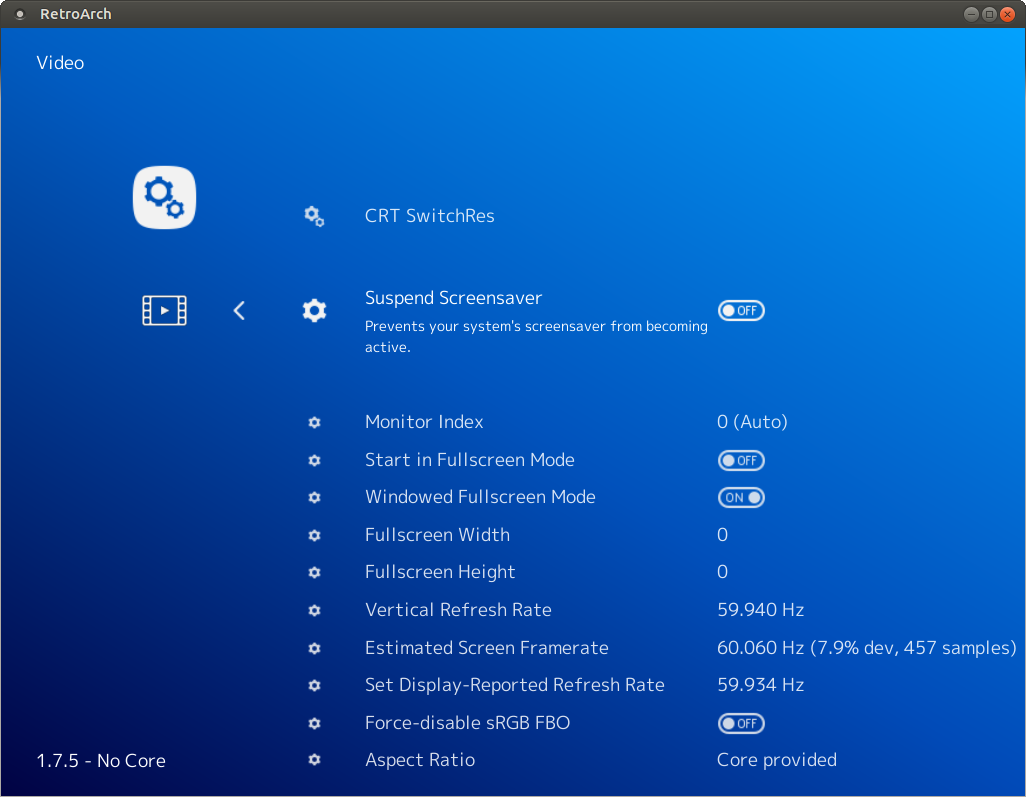

Oops! I was looking under power management, but yeah, suspend screensaver was turned on.
I've seen this happen, and had to re-size the window to have the video refresh. Difficult to debug and reproduce reliably...
My video doesn't have any issues with refreshing, but my screen will dim and turn off. Screensaver will also come.
The suspend screensaver still works here, can you explain your environment better? What DE or WM are you using? Is this with xorg or wayland?
In the past I have seen people experience issues like this with missing dependencies. Also note that the Suspend Screensaver requires a restart to work and changes will not take effect until you do so.

I'm on Kubuntu 18.10 running Plasmashell 5.13.5 and using X11. I did have several restarts, and suspend screensaver was on each time.
Do you have xprop installed? I'm not sure what other dependencies could be missing that could cause problems. I don't suppose retroarch --verbose has any clues?
$ xprop -version xprop 1.2.3
I can't test it with verbose output until I get off work, but I will do that later today.
I tried with verbose and the only error I saw was that it couldn't connect to Wayland server.
[ERROR] [Wayland]: Failed to connect to Wayland server.
I'm on X11 though.
$ loginctl show-session 3 -p Type Type=x11
I suppose its compiled against wayland as well and your system has libraries for both. I'm not sure if that could cause issues or not either... You could confirm by compiling it yourself with --disable-wayland.
git clone https://github.com/libretro/RetroArch/
cd RetroArch
./configure --disable-wayland && make
./retroarch
You could also try --enable-dbus, but screen suspension with dbus is certainly broken for some people and I'm not sure anyone is around that wants to fix it in those cases.
Could you also post your full verbose log here for reference?
Sadly, that didn't solve the problem. It did get rid of the errors though. I've attached a log of my run after making the changes you mentioned in the previous reply.
I tried running while true; do xdg-screensaver reset; sleep 30; done while I had the game open, and that didn't help either. Is it possible that xdg-screensaver is unable to prevent the power saving settings in KDE? Older versions of RetroArch kept it alive though. Did it use a different method?
The relevant lines of the log sadly show no indication of failure.
[INFO] [X11]: Suspending screensaver (X11, xdg-screensaver).
[INFO] [Video]: Found display server: x11
Its very possible that there was a change in KDE that triggered this, but I don't have any knowledge or experience on how to debug this in KDE.
You could likely confirm if KDE is related or not by using only a minimal window manager with xscreensaver. At the very least this should work.
while :; do
  xscreensaver-command -deactivate
  sleep 100
done
So, KDE doesn't really have a screensaver exactly. It has power options that allow you to dim after so long of being inactive, as well as shutting off the screen and whatnot. I installed xscreensaver and disabled the KDE power options and xscreensaver does appear to be kept alive properly.
xscreensaver is a really ugly alternative, but I guess it can work for now. Is there any hope that we'll get back support for KDE's power options? There was a change in RetroArch that stopped working with it, because the version in Ubuntu 18.04's PPA works perfectly on Kubuntu 18.04, while the newer versions of RetroArch do not suspend the screensaver.
Here's the version that was working: retroarch (1.4.1+dfsg1-1)
Of course, I'm currently using 1.7.5.
Here is a loop that is actually working to prevent the KDE screensaver.
while :; do qdbus org.freedesktop.ScreenSaver /ScreenSaver org.freedesktop.ScreenSaver.SimulateUserActivity; sleep 30; done
Does it work if you build older releases? You can checkout older tags pretty easily.
git checkout v1.4.1
I would suggest using this to make sure you have a clean clone between builds.
git clean -xdf
git reset --hard
If it still doesn't work, then the change is not in RetroArch and its the newer power management in KDE that needs better handling. If it does work, then we could hopefully bisect and find where in RetroArch the issue first started.
I just did a single branch clone into a new directory to avoid any problems. I disabled wayland and had to disable ffmpeg to avoid errors. Version 1.4.1 is keeping my screen alive.
I did make sure to test without either running that it blanked, then with 1.7.5 and it did blank, then 1.4.1 did not blank.
Just to make sure, did you try building v1.7.5 with ./configure --enable-dbus? In v1.4.1 it should of been enabled by default, but now in v1.7.5 it needs to be explicitly enabled at build time.
Assuming yes and that the issue persists the next step is to bisect RetroArch with git. This is not really hard, but does take a little time to complete.
I would first try newer tags until you find between which tags it broke. You can see all the git tags with.
git tag
You could bisect between v1.4.1 and v1.7.5, but it will probably go better if the commit range is smaller.
To start.
git bisect start
git bisect good v1.4.1
git bisect bad v1.7.5
Now git will tell checkout a commit between the good and bad commits/tags and you should build and test it.
If the build is good and the screen suspends correctly.
git bisect good
The the build is bad and the screen never suspends.
git bisect bad
If the build fails due to unrelated reasons which can't be easily resolved with something like --disable-ffmpeg then you can skip it.
git bisect skip
Eventually it will lead to the first bad commit where the the screen suspension stopped working for you.
If there is anything you don't understand and need a better explanation I can try to help.
--enable-dbus solved the problem for me on v1.7.5! Should I use that as the solution then, or is there more information that could help?
So it seems the current situation is that xdg-screensaver works for some people and not others while the inverse is true for suspending the screen with dbus instead.
So I think the current solutions would be one of the following.
- You build retroarch yourself with
--enable-dbus. - The package maintainer for the ubuntu ppa does this instead.
- dbus is enabled by default again despite that it causes errors in the log for some people and that no one wants to look at this.
- Someone figures out why
xdg-screensaverdoesn't work in KDE, this might just be a KDE bug or maybe configuration issue.
I'm not sure which is really the best course of action.
-
I've done this, so as far as I'm personally concerned, this is no longer an issue. Self-compiled works better for me for some reason, which may have been issues from changing versions.
-
I don't know how to go about suggesting this, and I don't know if they would care. Ubuntu has gnome-screensaver I believe, and it probably works with xdg-screensaver. Kubuntu on the other hand just uses the Ubuntu repositories.
-
If it's simply just log errors that nobody wants to look at, they could potentially be suppressed? This option sounds like it's probably the easiest for people, though building yourself takes very little effort since you can install build-dep. People will just have to probably find this thread with the answer of enabling dbus.
-
I found nothing useful on this topic, so my best guess is that the energy saver settings in Kubuntu don't really "count" as a screensaver. Using xscreensaver does fix the issue, but seeing that over ssdm is a bit of a let down when logging back in. It also fades out poorly, but it does work.
@twinaphex What is your preferred way to proceed here? As @Xaotique said, its probably easiest to revert the commit disabling dbus by default.

I'm experiencing this problem with the Retroarch snap package on Ubuntu 18.04. RetroArch git version: 7ffeebf. "Suspend screensaver" is turned on.
To be clear, the problem here isn't the screensaver, it's Ubuntu's "blank screen" option, accessible in the ubuntu settings under Power > Power Saving.

I have this same problem on a minimal server install. So far I have been unable to figure out a way to stop the laptop from going to sleep.
Does anyone have a fix?
I followed the directions here to setup my system: https://retropie.org.uk/forum/topic/18810/retropie-installation-on-ubuntu-server-x64-18-04-1

Can you explain what you mean by a minimal server install? I do not have this issue with KMS or the vulkan equivalent.
Sure,
Minimal server install=
- Boot off of Ubuntu server 18.04.2
- Press F4 and select “minimal installation”
- Install Ubuntu server
I'm sorry, I am not sure what that does. I have never used ubuntu before. What kind of environment does that give you? Is xorg or wayland running? Are any window managers or desktop environments running? Is it only tty?
Thank you for your help.
This install does not include xorg or wayland. I manually installed xorg when I followed the guide at the link I posted.
I used the following command from the guide: sudo apt-get install xorg openbox pulseaudio alsa-utils menu libglib2.0-bin python-xdg at-spi2-core libglib2.0-bin dbus-x11 git dialog unzip xmlstarlet --no-install-recommends -y