

 libretro
Change default folder locations on Android build of RetroArch (Non Root location)
Description
Several config folders are in a location that requires root access on Android. These should be moved out of the data/data/com.retroarch/ directory and instead located in /storage/emulated/0/RetroArch/ by default. This will allow easy customization for the end user, and no need for root access to modify these files/folders. It will also help to standardize file configurations across platforms.
Definite's to move IMO: //data/data/com.retroarch/autoconfig //data/data/com.retroarch/overlays //data/data/com.retroarch/shaders //data/data/com.retroarch/filters/ //data/data/com.retroarch/database/ //data/data/com.retroarch/cores
Maybe's: //data/data/com.retroarch/info
- the remaining others if deemed nessesary
Benefits:
- More easy customization / access / and ease of user backups / restores.
- If you make a wrong move in retroarch, a config can lock you out resulting in having to clear data/cache and start again. If files are located in an accessible location, backups can be easily restored.
- If cores are moved, it would allow unwanted cores previously downloaded, to be deleted easily to free up storage space.
- To easily maintain the files and remove unneeded files, not required on the Retroarch Android platform or not needed by the user, reducing the install footprint (Database files, cfg files etc)
- Standardization between platforms - Certain files/configs can then be transferred easily from Android to Windows for example if they follow a similar file structure.
[Description of the bug]
Expected behavior
Difficulty in accessing root folder located files making it not very user friendly.
Steps to reproduce the bug
//data/data/com.retroarch/ can only be accessed if you have root.
Version/Commit
Build Date: 8th May 2018 GIT version: 5314017
Environment information
- OS: Android

The cores can't be moved though, this is an intentional security measure of the Android system. Also see #5165 (possibly duplicate?)
Not sure if all other folders would work, but I think you can set their location yourself to wherever you like by changing it in the config file. In my case, I do have the overlays in /emulated/0/RetroArch/, I don't remember if maybe it's because I might have changed it myself.

Retroarch in linux has the same 'issue' about the cores. Keeping cores in the system dir is the right move, but for both linux and android (as well as other posix ports) there probably should be core override folder for the online core updater ).
The priority when two same name cores are on that directory is probably controversial. I prefer to always have the 'system' core win ( not even download too ) because there are certain expectations with system installs, namely they'll always work with the current system RA, a system update that updates a core 'updates' it, and uninstall actually uninstalls. Other people probably want the reverse, core replacement always wins if it exists...
But i don't have strong opinions, i'll accept whatever.

It's not the same as in Linux. In Android you simply can't load native libraries from /emulated/0/ even if you wanted to use it as an override, the OS won't allow it. Cores are dynamic libraries so they can only be loaded if placed in /data
Not moving the cores is not a major problem as the only gain would be to easily delete unwanted cores in a non-root file explorer.
A simple function in the RetroArch GUI to delete cores could fix the deleting issue?
For the rest of the folders, having them moved to storage/emulated/0/ would be great
There is already an option to delete the core, although it's kind of a hidden feature.
You have to load the core, and then, from the main menu, enter on "Information > Core Information" and choose the last option "Delete core".

This is truly awful.
Couldn't Android RetroArch just make a copy of the core in /data/ before running each one, then delete it after?
It's really nasty that shaders are in there especially.

Agree with OP. /storage/emulated/0/RetroArch/ should be the default place to store things and should be readable/writeable by RetroArch.
Not moving cores shouldn't be a problem since those can be managed from within the app.
Right now I'm running into nasty configuration issues. I'm trying to load custom configurations from /storage/emulated/0/RetroArch/ but none of them are loading properly--they get overwritten. The in-app customization is no help. When I do manage to get them to load in /storage/emulated/0/Android/data/com.retroarch/files/config.cfg they are not reloaded on app close, very frustrating.

Is that expected behavior? I load /storage/emulated/0/Android/data/com.retroarch/files/config.cfg, close out of RetroArch, reenter the app and it goes back to the default config.
Yes, alternate configs are for cli usage. You could name your config pepe.cfg, RA can't guess that's what you want to load.
How would you expect it to know which config to load without loading the default config?

That makes more sense. I figured since I set the config and saved it, I didn't expect RetroArch to load the default config every time I open the app. From a UI/UX perspective I would expect my last saved config to load.
Still though, I agree with OP. As many settings as possible should be moved to /emulated/0/RetroArch/
Thanks for your help here @fr500. Hopefully these settings can be moved in a future release.

Many have already moved. Cores can't move, overlays shouldn't move (that is, we need to keep a root-only set of overlays to prevent people from losing access to their controls).

Is it possible to have an advanced option for "Specify RetroArch folder" on the first run? Before extracting the assets from the APK. It would be nice using SyncThing and storing on my SDCard (external storage) on my pitiful old KitKat phone in a hassle-free way.

Yea this is a problem in retroarch android. I can't add dynamic wallpapers because that's where you have to store then for retroarch to load them. I've tried changing the directory where I can access it without root but it won't load it.

This doesn't seem to be going anywhere. I just got a new Google 4a 5G and its carrier locked. This means I cannot see, edit or access my retroarch.cfg file which is in data/com/retroarch/files/retorarch.cfg but due to non root access (which cannot be done on most carrier locked phones) the folder permissions cannot be changed from D- to DWR which is what I wanted. The last option is to move the configuration file, but setting the path from Settings-Directories doesn't save or change the retroarch.cfg location.

Are you sure you're looking in the right place? The default location should be in your user path, not the root-owned path.
Are you sure you're looking in the right place? The default location should be in your user path, not the root-owned path.
Yes I know that is correct because even though I can't see the directory, I'm unable to create one with the same name because it already exists (tricky). Android/data/com.retroarch/files/retroarch.cfg But, I think your reasoning would be the /RetroArch directory which is totally usable right?
Also I tried, just came to me to view the permissions of the /Android/data path, guess what D-
Knock on wood I never change a RA setting that crashes at launch, or RA would be bricked.
Are you sure you're looking in the right place? The default location should be in your user path, not the root-owned path.
Yes I know that is correct because even though I can't see the directory, I'm unable to create one with the same name because it already exists (tricky). Android/data/com.retroarch/files/retroarch.cfg But, I think your reasoning would be the /RetroArch directory which is totally usable right?
Also I tried, just came to me to view the permissions of the /Android/data path, guess what D-
Knock on wood I never change a RA setting that crashes at launch, or RA would be bricked.
I'm starting to feel a little sneaky here. What if before installing I created the directory /Android/data/com.retroarch/files/retroarch.cfg and put the settings in there I wanted? On a new install Retroarch apk never overwrites a config file, right? or does it?
For that matter why not pre-create the entire directory structure before install?
Someone else is going to have to try this because after uninstall that /Android/data/com.retroarch directory still exists and its invisible. BRICK HAPPENS (SH*T HAPPENS TOO) just wait.
I made a APK mod that puts stuff by default to /storage/emulated/0/RetroArch (except for cores since android security system doesn't allow you to load *.so files from here).
It just requires only a few changes to "MainMenuActivity.java".
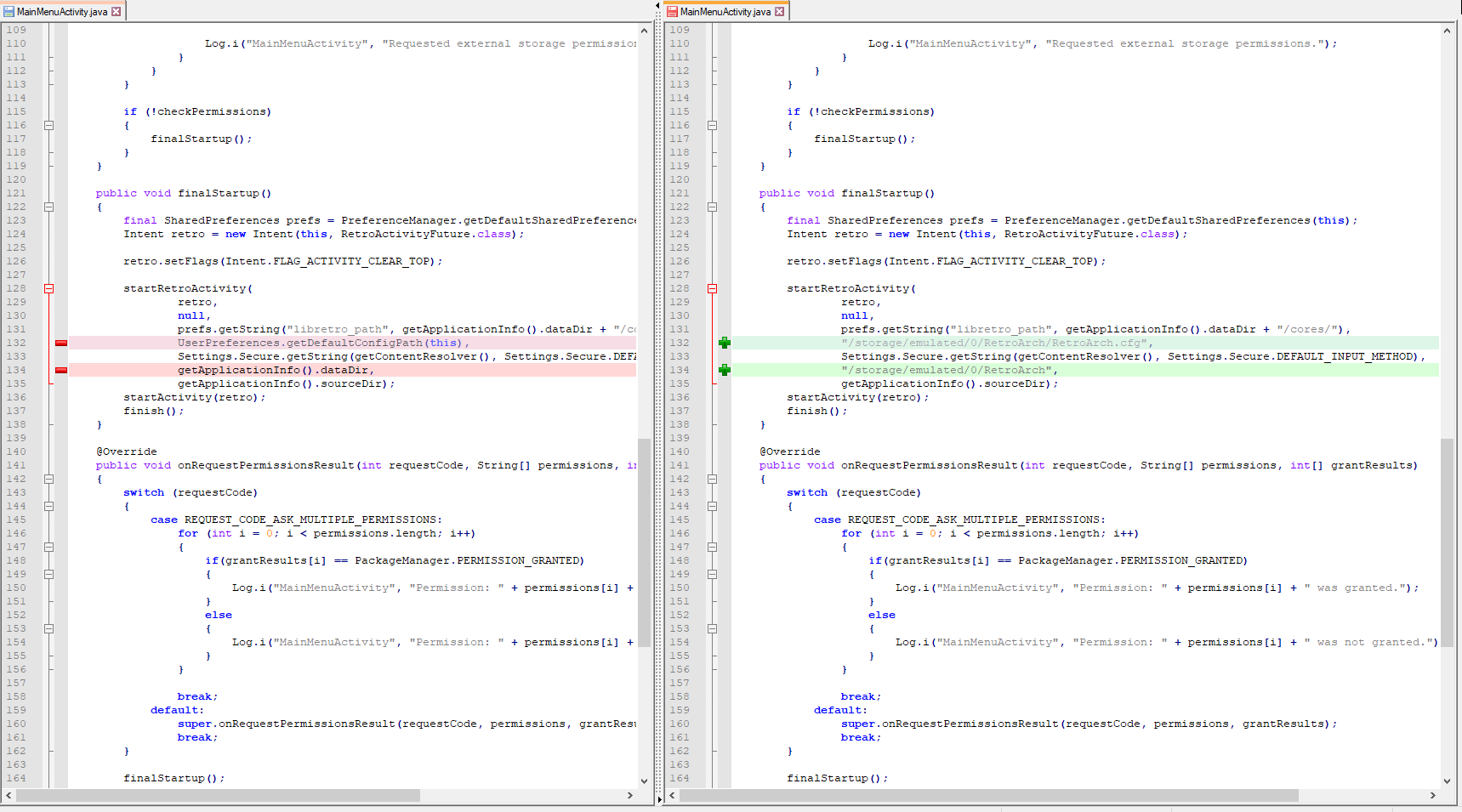
Also same variant with smali code of apktool if you don't want to download and configure SDK to work properly with a source code of retroarch

It just a quick solution with hardcoded links, so it can't be merged with main branch

You can load cores from any location, just copy it from sdcard to internal data folder
You can change overlays , just have to move up and up until you get to your card folders

Google introduced new storage restrictions with Android 11. With that change, apps can not read data folders of other apps. Therefore the configuration file (retroarch.cfg) can not be read by other apps, which leads to a few problematic situations, e.g. Kodi integration with IAGL is not working any longer.
The issue gets more pressing as Nvidia is rolling out Android 11 to their Shield devices and more & more devices come with newer Android versions.
Source: https://developer.android.com/about/versions/11/privacy/storage#other-apps-data

RetroArch needs to request storage permission for userspace storage and should just put everything there.
Since this doesn't seem to have been mentioned here, those directories are now accessible without root. You need a file explorer that's at least marginally decent (some android devices come with terrible replacement ones, I personally use FX), but if you open the file explorer, you should be able to find an option to connect to storage, access a storage provider, or similar. RetroArch will be listed in there. That treats the protected directory a bit like a flash drive or SD card and lets you access the files easily.

It is now 2022, and there is still no easy way to edit the default retroarch.cfg that is created by RetroArch for Android, or add new overlays to the default directory, or access the default location of saves and save states, because despite what was said by one comment in 2020, those still all seem to default to /data/user/0/com.retroarch..../, which is not easily accessible to users. It may be POSSIBLE to access them, but it is not EASY. Or if it is, I can't figure out how.
My own workaround, for now, is that when I do a fresh install of retroarch (as I did recently) I immediately go in and first tweak the UI to something I can use (much smaller text) and then change all of the directories I care about having access to (configs, saves, save states, roms of course) to the correct folder with my backups, then I click save. ANY OTHER CONFIG changes I am interested in have to get set in core-level and/or game-level overrides, so that they go into my config folder and don't get lost forever if I decide to buy a new phone. This is not an ideal situation. Please consider making the default put AT LEAST retroarch.cfg, /saves, /states, and /configs to /storage/emulated/0/retroarch so that they can be easily edited and backed up by users - those should be the minimum things that any user, no matter how much of a power user, should be able to easily find, and that should be kept the same between uninstalls, "Clear Data" commands, reinstalls, etc.

I recommend Material Files as the best FOSS file manager for Android I know of. https://f-droid.org/en/packages/me.zhanghai.android.files/
There are three locations in question. You seem to be misinterpreting what they are:
-
Things like overlays and cores are stored in the root location and must be accessed via the storage provider. Perhaps this isn't what you consider easy, but it's there for a reason.
-
Configs, saves, states, etc. are already in a user accessible location, in the main storage under RetroArch.
-
The retroarch.cfg file is unfortunately in a location that -used- to be user accessible, but Google has locked it down over the last few android versions. That one is in main storage/Android/data. You can use the configuration file menu to save a copy to your RetroArch directory in your main storage, edit that, then use the same menu to load the edited one. Perhaps not convenient for rapid changes, but still quite functional.
Hello from the future. I just found this issue by searching for my problem of not being able to adjust autoconfig files on RetroArch Android. I browsed the filesystem looking for the autoconfig files but I could not find them (RetroArch/config, Android\data\com.retroarch, etc).
Am I understanding correctly that the only way I can modify autoconfig settings on RetroArch Android is by rooting the device? My goal is to edit just a single button map entry in this config file
EDIT: For anyone reading this in the future that is having a similar problem... Go to Settings > Directory and set a custom directory for the particular config you need to be saved in a different (non root) path. If moving the controller autoconfig path you will likely lose the ability to control the UI after this happens so be sure to put the autoconfig files in place in the new dir.

From the post immediately before yours:
You can use the configuration file menu to save a copy to your RetroArch directory in your main storage, edit that, then use the same menu to load the edited one. Perhaps not convenient for rapid changes, but still quite functional.
That's a real pain but at least it's possible to get it done that way without rooting.