

 libgit2
FileHistory return empty enumerable for deleted files
Reproduction steps
- Create a file and commit
- Delete the file and commit
- Query the log for that specific file:
IEnumerable<LogEntry> logs = repo.Commits.QueryBy(fileName);
Expected behavior
The logs enumerable contains 2 entries (initial commit and delete commit)
Actual behavior
The logs enumerable is empty
Version of LibGit2Sharp (release number or SHA1)
v0.25.2
Operating system(s) tested; .NET runtime tested
Windows 7 .Net Framework 4.7.1
Note that git log will also (by default) not return any results when specifying the file name only:

However, when telling git explicitly if a revision or a file is specified, git log will show the expected results:
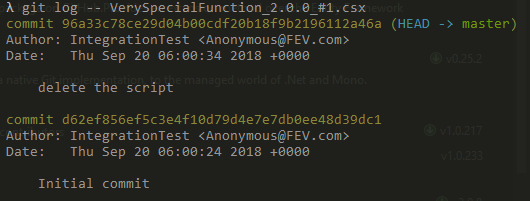


Unfortunately not. We only circumvented the issue, as in our case we use a git repository within an application to handle versions of scripts. However, once a script is deleted, the user will not see it anyway - so no need to show the history 😉 Still I would be very interested in a solution to this problem as there are other scenarios where this is definitely required.
I ran into the same issue today. A crude workaround would be to ...
- query the history without a filter for the path
- for each Commit do a Diff.Compare against the Commit's Parent
- Check if there is any TreeEntryChanges in the TreeChanges of the Diff pointing to the file in question and then add the Commit to your history output.
Very crude and probably also very slow with bigger repositories.
