

 letsar
How to Offset or Center Main axis items
Hi community:)
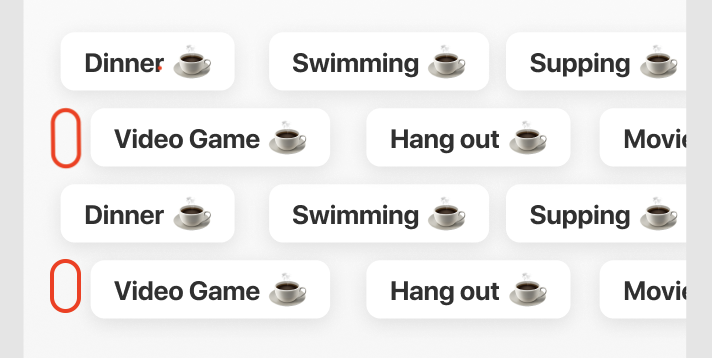
I am trying to implement the above design however my items start from left, all aligned. It looks very robotic:/ Basically I am trying to be able to have gaps as in the above picture in red rectangles. Below are my current result and the implementation code;
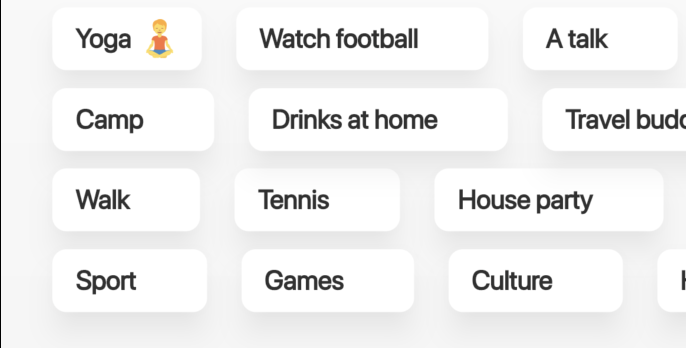
        MasonryGridView.count(
          padding: const EdgeInsets.symmetric(vertical: 25, horizontal: 29),
          itemCount: categories.length,
          scrollDirection: Axis.horizontal,
          crossAxisCount: 4,
          mainAxisSpacing: 19.5,
          crossAxisSpacing: 10,
          itemBuilder: (context, index) {
            return _CategoryItemWidget(
              category: categories[index],
              isSelected: false,
              onPressed: (cat) {
                debugPrint(cat.name);
              },
            );
          },
        ),
I have 2 questions/suggestions.
- Is there a way to set
Alignment.centerfor all the 4 rows (in my case scroll direction isAxis.horizontal). This would help the rows starting from different places and would work perfect. - If the above is not possible maybe we can expose an optional
bool isFirstIteminside theitemBuilder. If the package tells me that it is rendering "Yoga", "Camp", "Walk" and "Sport" as the first elements of a row, I can give them extra random paddings on the left.
Thank you.

You can add a padding for items with index 1 and 3 to achieve this I think:
        MasonryGridView.count(
          padding: const EdgeInsets.symmetric(vertical: 25, horizontal: 29),
          itemCount: categories.length,
          scrollDirection: Axis.horizontal,
          crossAxisCount: 4,
          mainAxisSpacing: 19.5,
          crossAxisSpacing: 10,
          itemBuilder: (context, index) {
            return Padding(
              padding: EdgeInsets.only(left: index == 1 || index == 3 ? 8 : 0),
              _CategoryItemWidget(
                category: categories[index],
                isSelected: false,
                onPressed: (cat) {
                  debugPrint(cat.name);
                },
              ),
            );
          },
        ),

@letsar Thanks for the response.
How will I know the indexes 1 and 3 are corresponding to the first items in each row? The data I am populating comes from the server. My UI requirements are always having 4 rows. So the first items of each row will have different indexes acording to the total item count and to the item content widths. I don't think there is any way I could calculate which ones will be the first row items.
Do the inner mechanics of the package have this info? Maybe you can expose it to the itemBuilder(context, index, isFirstItemOfRow)
If your MasonryGrid scrolls horizontally, then the left column are the first indices. It starts in the top with the index 0.