

 lepoco
ComboBox items don't update properly on ItemsSource binding source collection changes
Describe the bug
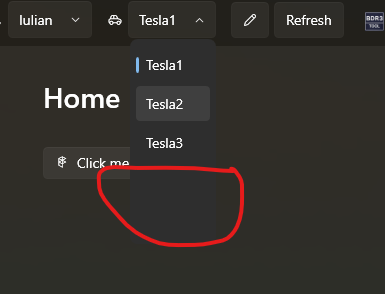
When the item source of the combobox is changing and the number of the elements of the observable collection is different from the previous , the drop down menu size is not updating correctly.
To Reproduce
Start the test app. Open the ComboBox drop down and close it (e.g. by selecting any item or just clicking somewhere outside the control). The source collection items are displayed properly. Change the item source ObservableCollection with a different size. Open the ComboBox drop down again: the item doesn't appear in the drop down and the size is not corrent.
Expected behavior
When changing the item source the items and the drop down menu needs to remain consistent with the one of the observable collection.
Screenshots

OS version
7.0
.NET version
6.0.1
WPF-UI NuGet version
2.0.3
Additional context
No response

If you don't mind duplicating the combobox template, a fix I've found works is to replace the DynamicScrollViewer here with a VirtualizingItemsControl.
You'll have to remove the ScrollBarVisibility bindings and copy the MinWidth binding to the child StackPanel as well.
The stock WPF ScrollViewer doesn't work here too, I'm guessing there's some underlying platform issue when refreshing off an ObservableCollection.

It is also problematic to call the add function again after the binding attribute is emptied

I am seeing this same problem in our application and am hoping someone has a workaround or fix to offer.
Sadly, I was unsuccessful when trying the workaround offered by @Difegue
My repro case is pretty simple. Make a window with this content:
        <ComboBox x:Name="mCombo" SelectedIndex="0" Margin="5">
            <ComboBoxItem>A</ComboBoxItem>
            <ComboBoxItem>B</ComboBoxItem>
            <ComboBoxItem>C</ComboBoxItem>
        </ComboBox>
and in code behind for a button refill the list. Run the app and open the combo. Then click the button to rebuild the list and when the combo is opened again, the "ZZZZZ" item is not visible in the dropdown. You can see that the stackpanel has grown but the popup has not.
        {
            mCombo.Items.Clear();
            mCombo.Items.Add("A");
            mCombo.Items.Add("B");
            mCombo.Items.Add("C");
            mCombo.Items.Add("ZZZZZ");
        }
This may be the Add situation @ms1094392787 is referring to?

Through a lot of trial and error, I've discovered that the MinSize binding on the Popup element in the ComboBox template is preventing the Popup from growing along with the items host StackPanel. I moved this onto the DropDownBorder and the combo responds to the size changes in my tests.
   <Popup
      x:Name="Popup"
      MinWidth="{TemplateBinding ActualWidth}"   <<<<<<
      . . .
I can reproduce @calincorcotoi's scenario in 2.0.3 (as specified), but not in 4.0.0.
I cannot reproduce @jschroedl's scenario in either version.
Code for first scenario (these are with 2.0.3, but 4.0.0 only differs in that UiWindow is now FluentWindow):
<wpfui:UiWindow
    x:Class="WpfUi599.MainWindow"
    xmlns="http://schemas.microsoft.com/winfx/2006/xaml/presentation"
    xmlns:x="http://schemas.microsoft.com/winfx/2006/xaml"
    xmlns:d="http://schemas.microsoft.com/expression/blend/2008"
    xmlns:local="clr-namespace:WpfUi599"
    xmlns:mc="http://schemas.openxmlformats.org/markup-compatibility/2006"
    xmlns:wpfui="http://schemas.lepo.co/wpfui/2022/xaml"
    Title="MainWindow"
    Width="800"
    Height="450"
    d:DataContext="{d:DesignInstance Type=local:MainWindowViewModel}"
    mc:Ignorable="d">
    <StackPanel HorizontalAlignment="Left">
        <ComboBox
            Width="100"
            HorizontalAlignment="Left"
            ItemsSource="{Binding Items}" />
        <Button Command="{Binding AddItemCommand}">Add Item</Button>
    </StackPanel>
</wpfui:UiWindow>
using Wpf.Ui.Controls;

namespace WpfUi599
{
    /// <summary>
    /// Interaction logic for MainWindow.xaml
    /// </summary>
    public partial class MainWindow : UiWindow
    {
        public MainWindow()
        {
            InitializeComponent();

            DataContext = new MainWindowViewModel();
        }
    }
}
using CommunityToolkit.Mvvm.ComponentModel;

using CommunityToolkit.Mvvm.Input;

using System.Collections.ObjectModel;

namespace WpfUi599;

public partial class MainWindowViewModel : ObservableObject
{
    public MainWindowViewModel()
    {
        for (int i = 0; i < 5; i++)
        {
            AddItemInternal();
        }
    }

    private void AddItemInternal()
    {
        Items.Add(Guid.NewGuid().ToString());
    }

    public ObservableCollection<string> Items { get; private set; } = [];

    [RelayCommand]
    public void AddItem()
    {
        Items = new();

        for (int i = 0; i < 6; i++)
        {
            AddItemInternal();
        }
    }
}
Code for second scenario:
<wpfui:UiWindow
    x:Class="WpfUi599.MainWindow"
    xmlns="http://schemas.microsoft.com/winfx/2006/xaml/presentation"
    xmlns:x="http://schemas.microsoft.com/winfx/2006/xaml"
    xmlns:d="http://schemas.microsoft.com/expression/blend/2008"
    xmlns:local="clr-namespace:WpfUi599"
    xmlns:mc="http://schemas.openxmlformats.org/markup-compatibility/2006"
    xmlns:wpfui="http://schemas.lepo.co/wpfui/2022/xaml"
    Title="MainWindow"
    Width="800"
    Height="450"
    d:DataContext="{d:DesignInstance Type=local:MainWindowViewModel}"
    mc:Ignorable="d">
    <StackPanel HorizontalAlignment="Left">
        <ComboBox x:Name="mCombo" SelectedIndex="0" Margin="5">
            <ComboBoxItem>A</ComboBoxItem>
            <ComboBoxItem>B</ComboBoxItem>
            <ComboBoxItem>C</ComboBoxItem>
        </ComboBox>
        <Button Click="Button_Click">Add Item</Button>
    </StackPanel>
</wpfui:UiWindow>
using Wpf.Ui.Controls;

namespace WpfUi599
{
    /// <summary>
    /// Interaction logic for MainWindow.xaml
    /// </summary>
    public partial class MainWindow : UiWindow
    {
        public MainWindow()
        {
            InitializeComponent();
        }

        private void Button_Click(object sender, System.Windows.RoutedEventArgs e)
        {
            mCombo.Items.Clear();
            mCombo.Items.Add("A");
            mCombo.Items.Add("B");
            mCombo.Items.Add("C");
            mCombo.Items.Add("ZZZZZ");
        }
    }
}

The difference between your test and mine is that my window derives from WPF Window
namespace WpfUiTest
{
    /// <summary>
    /// Interaction logic for MainWindow.xaml
    /// </summary>
    public partial class MainWindow : Window
    {
        public MainWindow()
        {
            InitializeComponent();
        }

        private void mAddButton_Click(object sender, RoutedEventArgs e)
        {
            mCombo.Items.Clear();
            mCombo.Items.Add("A");
            mCombo.Items.Add("B");
            mCombo.Items.Add("C");
            mCombo.Items.Add("ZZZZZ");
        }
    }
}
<Window x:Class="WpfUiTest.MainWindow"
        xmlns="http://schemas.microsoft.com/winfx/2006/xaml/presentation"
        xmlns:x="http://schemas.microsoft.com/winfx/2006/xaml"
        xmlns:d="http://schemas.microsoft.com/expression/blend/2008"
        xmlns:mc="http://schemas.openxmlformats.org/markup-compatibility/2006"
        xmlns:ui="http://schemas.lepo.co/wpfui/2022/xaml"
        xmlns:local="clr-namespace:WpfUiTest"
        mc:Ignorable="d"
        Title="MainWindow" Height="450" Width="800">
    <DockPanel>
        <ComboBox x:Name="mCombo" SelectedIndex="0" Margin="5">
            <ComboBoxItem>A</ComboBoxItem>
            <ComboBoxItem>B</ComboBoxItem>
            <ComboBoxItem>C</ComboBoxItem>
        </ComboBox>
        <Button x:Name="mAddButton" Click="mAddButton_Click">Add Combo Item</Button>
    </DockPanel>
</Window>
When Add Combo Item is clicked, the combo will become malformed.
I tried WPFUI 3.0 as well as 4.0 with no change in behavior.
Note that it is critical that you first dropdown the combo to see the popup once and then press the Add button.
The difference between your test and mine is that my window derives from WPF Window
It looks like the horizontal orientation is the issue. If I use DockPanel like in your case, or StackPanel Orientation="Horizontal", it breaks. Whereas, with a vertical orientation, it works.
Through a lot of trial and error, I've discovered that the
MinSizebinding on thePopupelement in theComboBoxtemplate is preventing thePopupfrom growing along with the items hostStackPanel. I moved this onto theDropDownBorderand the combo responds to the size changes in my tests.<Popup x:Name="Popup" MinWidth="{TemplateBinding ActualWidth}" <<<<<< . . .
Thanks! I've made a PR https://github.com/lepoco/wpfui/pull/1349.