

 lepoco
TabItem custom Width truncated
Describe the bug
If I specify a custom width for a TabItem it will be shown truncated.
To Reproduce
Create a TabControl, then create a TabItem and try to specify a custom width, for example 75.
Expected behavior
That TabItem will resize without be truncated.
Screenshots
 Original width, not truncated
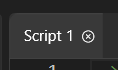 Changed width (75), truncated
OS version
Windows 11
.NET version
7.0
WPF-UI NuGet version
2.0.3
Additional context
No response

I've been working on a fix waiting for your official fix. Please take this as a starting point. I simply overwrote the TabItem template based on yours with a custom style.
<Style BasedOn="{StaticResource {x:Type TabItem}}" TargetType="{x:Type TabItem}">
    <Setter Property="Template">
        <Setter.Value>
            <ControlTemplate>
                <Border Height="36" Background="{ui:ThemeResource ControlFillColorDefaultBrush}" BorderBrush="#FF3C3C3C" BorderThickness="1,1,1,0" CornerRadius="5,5,0,0">
                    <StackPanel x:Name="TabHeaderStackPanel" Margin="8,0,8,0" Orientation="Horizontal">
                        <TextBlock Height="15" HorizontalAlignment="Stretch" Text="{Binding RelativeSource={RelativeSource FindAncestor, AncestorType={x:Type TabItem}}, Path=Header}"/>
                    </StackPanel>
                </Border>
            </ControlTemplate>
        </Setter.Value>
    </Setter>
</Style>

This is still no solution but the problem seems to be that by reducing the width of the entire TabItem, this doesn't trickle down to a border that is set for the TabItem and draws its graphics.
If you go here: ... /TabControl/TabControl.xaml
You'll find this part in the TabItem template:
<Border
    x:Name="Border"
    MinWidth="180"    // Here's our problem!
    MinHeight="36"
    Margin="0"
    Padding="6"
    ...
</Border>
As far as I know, a template can't be partially used in XAML, so it's an all or nothing thing. What you can do is to copy & paste the entire thing starting with <Style TargetType="{x:Type TabItem}"> and ending with </Style> into a <Window.Resources> section or similar, overwriting the entire TabItem template, much like @Marko97IT commented above. The difference is now you're using the latest template code for WPFUI and know where to find it if there are updates.
The "real" fix should be to make MinWidth here a bindable property.
