

 lepoco
Please provide a demo for DropDownButton element.
Is your feature request related to a problem? Please describe
I am trying to implement dropdown button in my WPF application, I am new in WPF development and it is hard for me to figure out how to use this component.
Describe the solution you'd like
It should be great if you can add this component demo in sample application.
Describe alternatives you've considered
No response
Additional context
No response

I actually think that control isn't finished. There's no visible chevron, for example. How it should look:
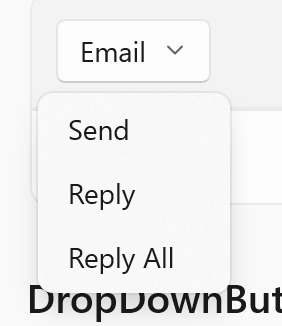
But we can get somewhat close:

This is with the following markup:
<ui:DropDownButton Content="Email" x:Name="EmailButton">
    <ui:DropDownButton.ContextMenu>
        <ContextMenu>
            <ui:MenuItem Header="Send" />
            <ui:MenuItem Header="Reply" />
            <ui:MenuItem Header="Reply All" />
        </ContextMenu>
    </ui:DropDownButton.ContextMenu>
</ui:DropDownButton>
However, that doesn't allow showing the menu on left-click. For that, we install the NuGet package Microsoft.Xaml.Behaviors.Wpf, add the namespace xmlns:i="http://schemas.microsoft.com/xaml/behaviors", and expand our button markup to:
<ui:DropDownButton Content="Email" x:Name="EmailButton">
    <ui:DropDownButton.ContextMenu>
        <ContextMenu>
            <ui:MenuItem Header="Send" />
            <ui:MenuItem Header="Reply" />
            <ui:MenuItem Header="Reply All" />
        </ContextMenu>
    </ui:DropDownButton.ContextMenu>

    <i:Interaction.Triggers>
        <i:EventTrigger EventName="Click">
            <i:ChangePropertyAction TargetObject="{Binding ContextMenu, ElementName=EmailButton}" PropertyName="PlacementTarget" Value="{Binding ElementName=addButton, Mode=OneWay}"/>
            <i:ChangePropertyAction TargetObject="{Binding ContextMenu, ElementName=EmailButton}" PropertyName="IsOpen" Value="True"/>
        </i:EventTrigger>
    </i:Interaction.Triggers>
</ui:DropDownButton>
Finally, to get something close to the chevron, change the start to:
<ui:DropDownButton x:Name="EmailButton">
    <ui:DropDownButton.Content>
        <StackPanel Orientation="Horizontal">
            <TextBlock>Hello</TextBlock>
            <ui:SymbolIcon Symbol="ChevronDown16" FontSize="12" Margin="5,0,0,0" />
        </StackPanel>
    </ui:DropDownButton.Content>

    <!-- leave remainder as is -->
</ui:DropDownButton>

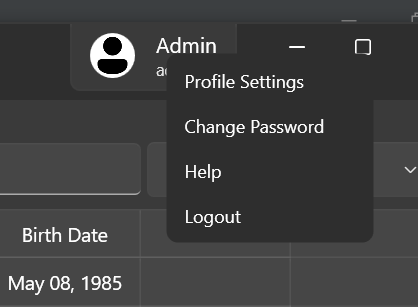
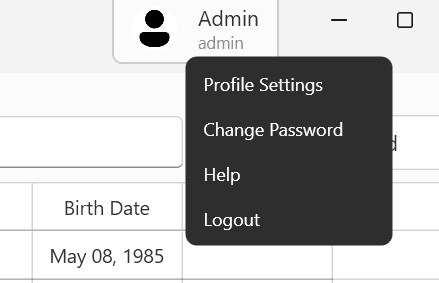
I need a DropDownMenuButton too, so I try to make a simple implement my self by inherit class Wpf.Ui.Controls.Button, I leave it here for anyone want it.
here is what it looks like.
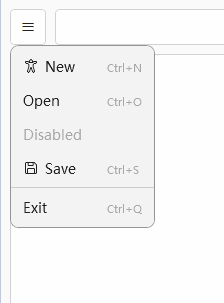
here is the code.
  <local:DropDownMenuButton Height="36" Width="36" Icon="LineHorizontal320" Margin="0,0,9,0">
      <local:DropDownMenuButton.Menu>
          <ContextMenu>
              <ui:MenuItem
      Header="New"
      InputGestureText="Ctrl+N"
      SymbolIcon="Accessibility24" />
              <MenuItem Header="Open" InputGestureText="Ctrl+O" />
              <MenuItem Header="Disabled" IsEnabled="False" />
              <ui:MenuItem
      Header="Save"
      InputGestureText="Ctrl+S"
      SymbolIcon="Save24" />
              <Separator />
              <MenuItem Header="Exit" InputGestureText="Ctrl+Q" />
          </ContextMenu>
      </local:DropDownMenuButton.Menu>
  </local:DropDownMenuButton>
public class DropDownMenuButton : Wpf.Ui.Controls.Button
{
    public DropDownMenuButton()
        :base()
    {
        Binding binding = new Binding("Menu.IsOpen");
        binding.Source = this;
        this.SetBinding(IsOpenProperty, binding);
        DataContextChanged += (sender, args) =>
        {
            if (Menu != null)
                Menu.DataContext = DataContext;
        };
        ResourceDictionary resource = new()
        {
            Source = new Uri("pack://application:,,,/Wpf.Ui;component/Styles/Wpf.Ui.xaml")
        };
        Style = resource["DefaultUiButtonStyle"] as Style;
    }

    public static readonly DependencyProperty IsOpenProperty = DependencyProperty.Register("IsOpen",
        typeof(bool), typeof(DropDownMenuButton), new UIPropertyMetadata(null));

    public bool IsOpen
    {
        get { return (bool)GetValue(IsOpenProperty); }
        set { SetValue(IsOpenProperty, value); }
    }

    public ContextMenu Menu
    {
        get { return (ContextMenu)GetValue(MenuProperty); }
        set { SetValue(MenuProperty, value); }
    }
    public static readonly DependencyProperty MenuProperty = DependencyProperty.Register("Menu",
        typeof(ContextMenu), typeof(DropDownMenuButton), new UIPropertyMetadata(null, OnMenuChanged));

    private static void OnMenuChanged(DependencyObject d, DependencyPropertyChangedEventArgs e)
    {
        var dropDownButton = (DropDownMenuButton)d;
        var contextMenu = (ContextMenu)e.NewValue;
        contextMenu.DataContext = dropDownButton.DataContext;
    }

    protected override void OnClick()
    {
        if (Menu != null)
        {
            Menu.PlacementTarget = this;
            Menu.Placement = PlacementMode.Bottom;
            Menu.IsOpen = true;
        }
    }
}

My project was using the code from @KaivnD. It worked up until upgrading to WPF UI v3 which broke a few modules. Among a lot of things to change in my code, I had to modify this part:
        ResourceDictionary resource = new()
        {
            Source = new Uri("pack://application:,,,/Wpf.Ui;component/Styles/Wpf.Ui.xaml")
        };
to this:
        ResourceDictionary resource = new()
        {
            Source = new Uri("pack://application:,,,/Wpf.Ui;component/Resources/Wpf.Ui.xaml"")
        };
The rest of the code in the DropDownMenuButton class remains the same.
I also had to change the all the Icon properties from Icon="ArrowExit20" to Icon="{ui:SymbolIcon ArrowExit20}" in my xaml.
Hopefully it helps someone down the line.
