
wpfui
 wpfui copied to clipboard
 lepoco
DataGridRow not highlighted when selected and hovered on
Describe the bug
DataGridRow not highlighted when selected and hovered on.
To Reproduce
- Build the sample app.
- Go to the Data tab, scroll down until you see the "WPF UI DataGrid" sample.
Expected behavior
- The rows should be highlighed on hover and on click.
Screenshots
https://user-images.githubusercontent.com/57174311/192426848-f4edae99-8354-4d44-a42d-a625fa8f2720.mp4
OS version
Windows 11 22H2
.NET version
.NET 6.0.401
WPF-UI NuGet version
Built from source, development branch commit 299a90e966c9eba4cb45a9044039d694b4053c41.
Additional context
This is due to the VisualStates for the WPFUI default DataGridRow style are not implemented:
https://github.com/lepoco/wpfui/blob/299a90e966c9eba4cb45a9044039d694b4053c41/src/Wpf.Ui/Styles/Controls/DataGrid.xaml#L226-L371
I have a sample implementation based on the WindowsCommunityToolkit's DataGrid for UWP:
which gives this result:
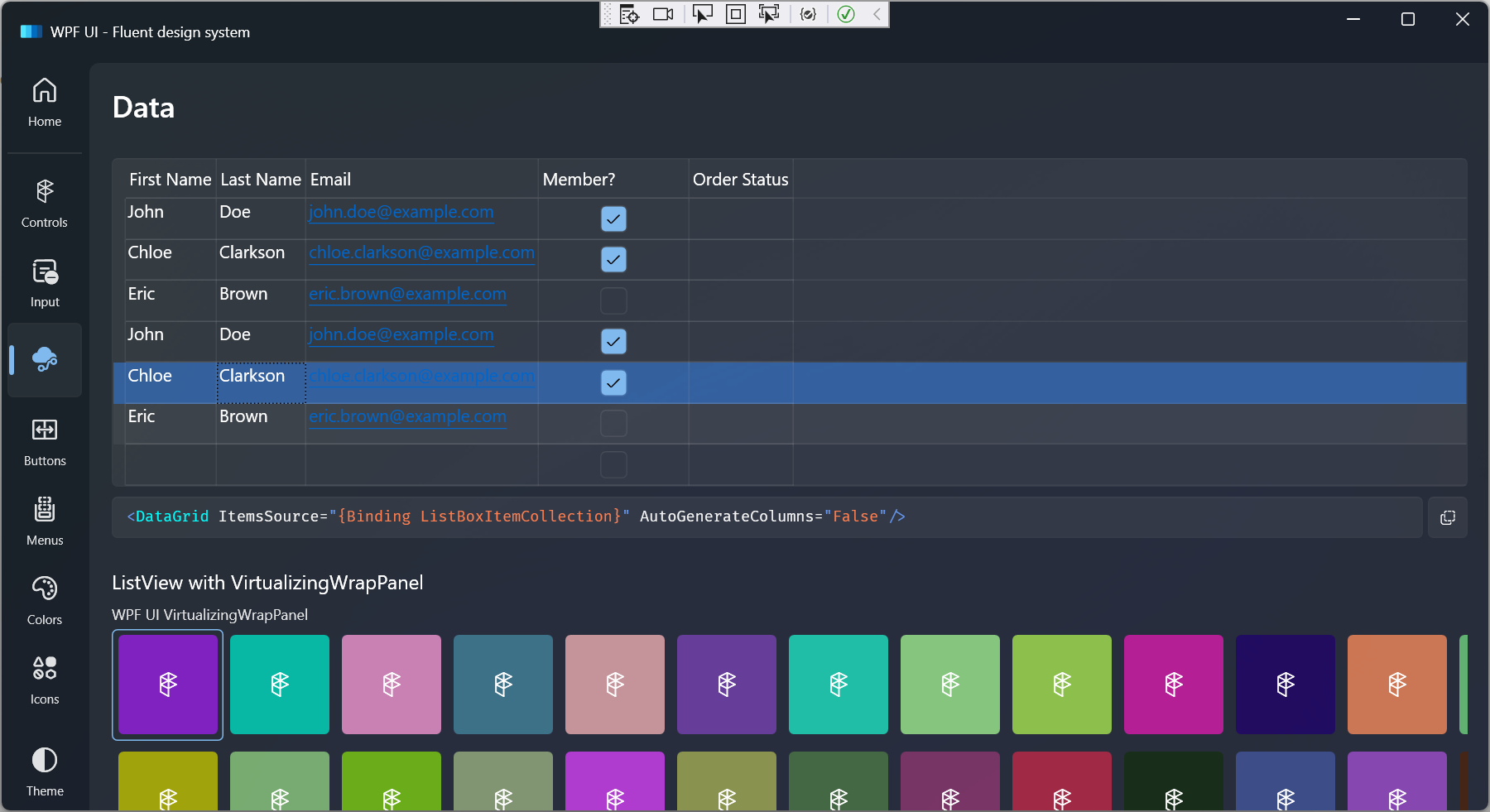
The Windows Community Toolkit implementation basically:
- Sets the opacity to 0.8 on mouse hover, 0.6 on selected, and 0 otherwise.
- Sets the color to the system accent color on selected.
Note that unlike other WPFUI controls such as TreeViewItem, the sample DataGridRow implementation does not have a 0:0:0.16 animation duration. Everything happens instantly similar to the WCT DataGrid.
If the code and screenshot above seem appropriate please let me know so I can open a pull request with it.

When i apply this fix the selected color seems too dark when the theme is on light and if you change it back and forth from dark/theme then its normal.
Dark doesn't seems to have this issue.
The grid text seems to to be aligned on top. How can this be streched over the whole cell, so that its 'centered'?

When i apply this fix the selected color seems too dark when the theme is on light and if you change it back and forth from dark/theme then its normal.
You can try to change the opacity in the VisualStateGroup and make it lighter.
The grid text seems to be aligned on top. How can this be streched over the whole cell, so that its 'centered'?
Try editing the style, find any ContentPresenter you can see, and set the HorizontalContentAlignment and VerticalContentAlignment to Stretch.

Will this style issue be resolved soon? Without this selected style, the datagrid is incomplete.

@pomianowski is there a chance for this to get some attention please, or are you now fully focused on transferring WPF-UI to WPF?
I (and I guess many other devs) am using DataGrid a lot and having no selection highlight for me is a major obstacle, so I would really appreciate it if this got properly implemented.

A fix has been implemented here, but someone will need to clean it up and open an actual PR.
Feel free to use that code in your own fork long as you put my name as a co-author in the commit.