

 lenmus
Add a highlight effect for highlighting the beat with a rectangle
Question in issue #163: "Is it possible to highlight the position in such a fancy way like Smart Pianist app does?"
At present, lomse includes two highlight effects:
- To change the colour of the noteheads as they are played back, or
- To draw a vertical line that advances to the note being played back.
It is requested a third highlight effect: a rectangle that highlights all the notes in current beat. When this new effect is used, the highlight must advance by beats.

I came back a long time. Thank you all the time. I have a question.
- To draw a vertical line that advances to the note being played back.
Please let me know how this works. I am currently using only method 1.
Is it possible to draw a vertical line that is currently in progress on the score sheet?

I think I did a great mistake. I remember having programmed and tested the "tempo line" highlight effect but for my application I did not use it. So I have never paid much attention to it and thought it was available.
But to answer your question, I looked in the API documentation and realized that this is not documented. So I looked in my documentation but did not find information. Finally, I've been looking in the git history and have found that I programmed and tested this by mid 2013. Then, by October 2013 all highlight effects where integrated in a VisualEffect class, but the tempo line visual effect was not, and there is not an option for selecting this effect. The code is there, I've been doing a test and the code is still operational. But needs some refactoring to integrate it in the VisualEffect class and it is necessary to add an interface method for selecting it.
I have created issue #169 and hope to make this option available as soon as possible. Now I feel like an idiot. My sincere apologies!
@juuk100 Latest PR fixes this. To draw a vertical line that advances to the note being played back you will just select the tempo line visual tracking effect:
	//select desired visual tracking effect
        pInteractor->set_visual_tracking_mode(k_tracking_tempo_line);

        //start playback
        pPlayer->play(fVisualTracking, nMM, pInteractor);
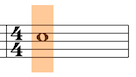
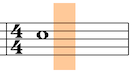
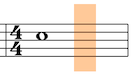
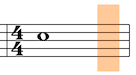
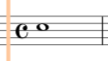
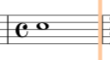
An example on how Smart Pianist shows beat position. This is in particular interesting for notes longer than one beat.
Smart Pianist
Lomse
(with k_beat_bottom_ts)
Observations
-
Tempo line in Lomse shows the next note to be played. Since there is no notes starting on beats 2,3,4 Lomse moves the tempo line to the end of the measure.
-
Smart Pianist treats the measure as time line and shows playback position as fragment of the time line. It divides the measure into four parts and highlights them sequentially.
-
in Smart Pianist highlight movements are more smooth because they are independent of note lengths. In Lomse when playing second beat the tempo line jumps to the end of measure and remains there for three beats.
