lecho
lecho
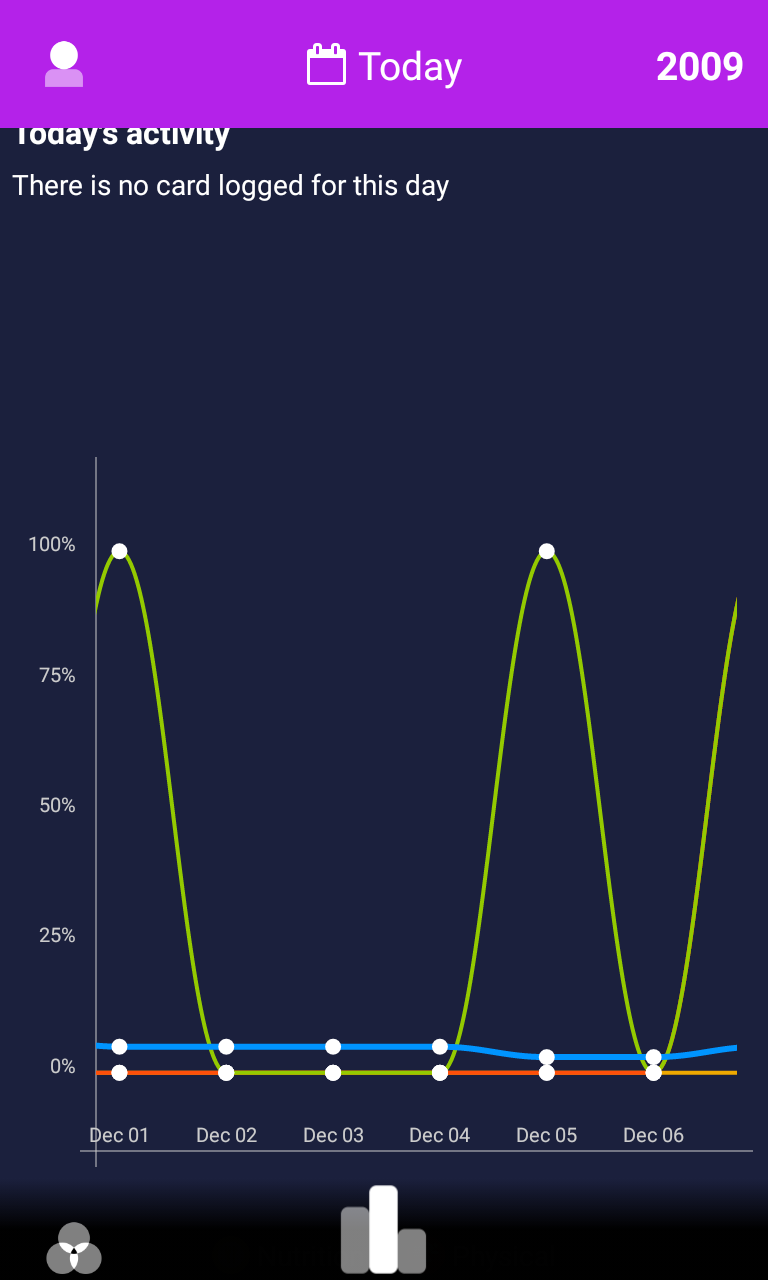
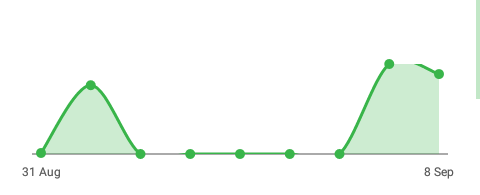
The cubic line gets cut
How can I eliminate this problem?
I've tried all the margins and paddings, but nothing helps.

I've got this problem too. Particularly on the X axis when the value goes from 0 to > 0 or from > 0 to 0 (as shown in your image). I've also tried playing with the adding and margin with no luck.
The only way I can get it looking OK is to set cubic to false and lose the curvy goodness.

if you look in the sample app, specifically in the LineChartActivity.toggleCubic() method, the author makes a reference to what you're talking about in lines 326 to 330. Hope that helps you fix your issue.

I dont know if u still need this. But im fixed the issue now. Use this lib as module (so you can edit the source code) Replace LineChartRender.drawSmoothPath(Canvas canvas, final Line line) method with this code (modify from source) Also change LINE_SMOOTHNESS to 0.2f (smoother)
private void drawSmoothPath(Canvas canvas, final Line line) {
    prepareLinePaint(line);
    final int lineSize = line.getValues().size();
    float prePreviousPointX = Float.NaN;
    float previousPointX = Float.NaN;
    float previousPointY = Float.NaN;
    float currentPointX = Float.NaN;
    float currentPointY = Float.NaN;
    float nextPointX = Float.NaN;
    float nextPointY = Float.NaN;

    for (int valueIndex = 0; valueIndex < lineSize; ++valueIndex) {
        if (Float.isNaN(currentPointX)) {
            PointValue linePoint = line.getValues().get(valueIndex);
            currentPointX = computator.computeRawX(linePoint.getX());
            currentPointY = computator.computeRawY(linePoint.getY());
        }
        if (Float.isNaN(previousPointX)) {
            if (valueIndex > 0) {
                PointValue linePoint = line.getValues().get(valueIndex - 1);
                previousPointX = computator.computeRawX(linePoint.getX());
                previousPointY = computator.computeRawY(linePoint.getY());
            } else {
                previousPointX = currentPointX;
                previousPointY = currentPointY;
            }
        }

        if (Float.isNaN(prePreviousPointX)) {
            if (valueIndex > 1) {
                PointValue linePoint = line.getValues().get(valueIndex - 2);
                prePreviousPointX = computator.computeRawX(linePoint.getX());
            } else {
                prePreviousPointX = previousPointX;
            }
        }

        // nextPoint is always new one or it is equal currentPoint.
        if (valueIndex < lineSize - 1) {
            PointValue linePoint = line.getValues().get(valueIndex + 1);
            nextPointX = computator.computeRawX(linePoint.getX());
            nextPointY = computator.computeRawY(linePoint.getY());
        } else {
            nextPointX = currentPointX;
            nextPointY = currentPointY;
        }

        if (valueIndex == 0) {
            // Move to start point.
            path.moveTo(currentPointX, currentPointY);
        } else {
            // Calculate control points.
            final float firstDiffX = (currentPointX - prePreviousPointX);
            final float secondDiffX = (nextPointX - previousPointX);

            final float firstControlPointX = previousPointX + (LINE_SMOOTHNESS * firstDiffX);
            final float secondControlPointX = currentPointX - (LINE_SMOOTHNESS * secondDiffX);

                path.cubicTo(firstControlPointX, previousPointY, secondControlPointX, currentPointY,
                        currentPointX, currentPointY);
        }

        // Shift values by one back to prevent recalculation of values that have
        // been already calculated.
        prePreviousPointX = previousPointX;
        previousPointX = currentPointX;
        previousPointY = currentPointY;
        currentPointX = nextPointX;
        currentPointY = nextPointY;
    }

    canvas.drawPath(path, linePaint);
    if (line.isFilled()) {
        drawArea(canvas, line);
    }
    path.reset();
}