

 leanflutter
Window Effects Bug
When I use window effects from flutter_acrylic, the effects will be rendered out of the window's boundary.
Tested with commit 5520f43053f053dccc65c809bea50fdca6713701, fluent_ui example, on Windows 20H2 and 21390.2025. This will not appear on Windows 11.
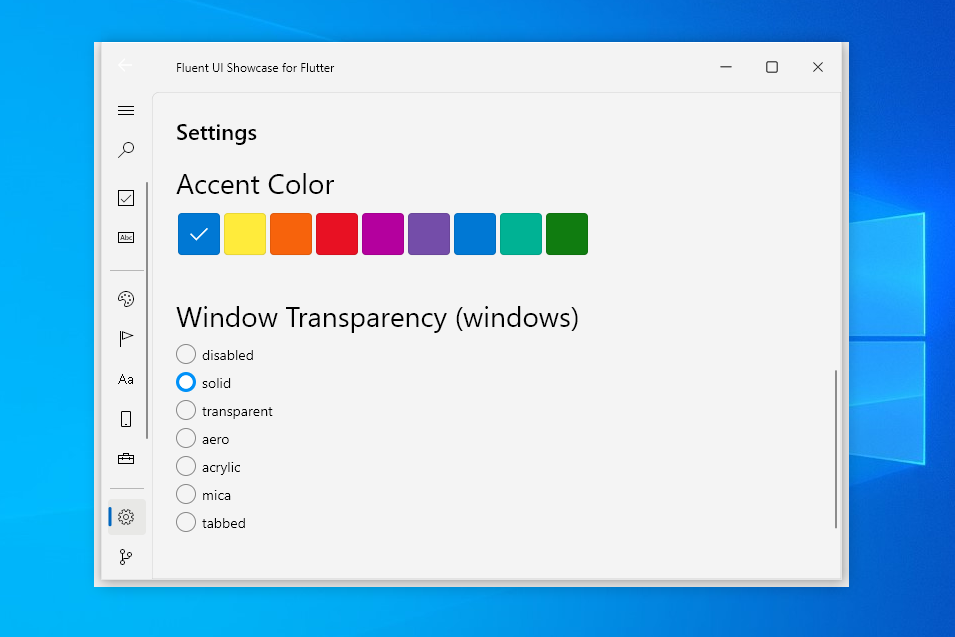
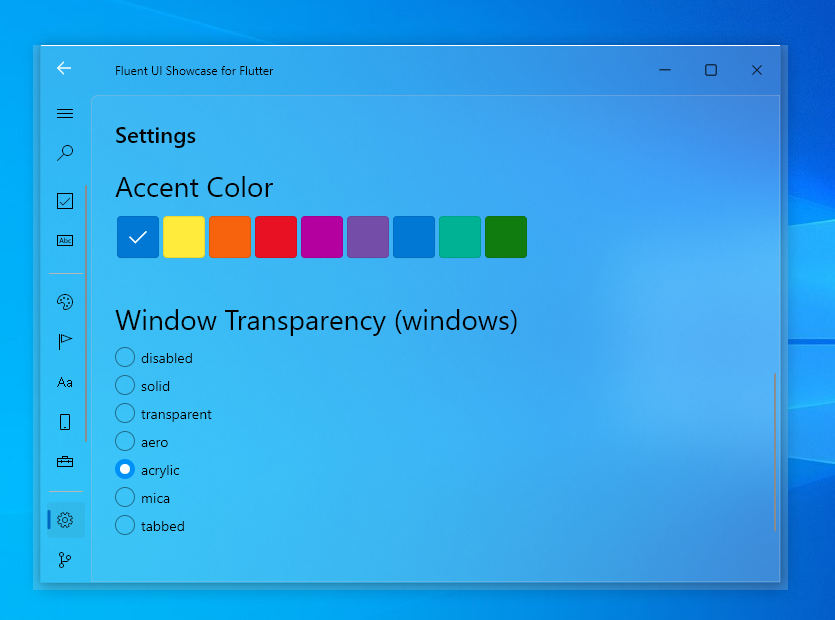


I think flutter_acrylic was made specifically to work with bitsdojo_window, which is basically window_manager's SetAsFrameless().
Maybe this is caused by flutter_acrylic. I tried not to use any window managers, this also appear.
I just saw the description in the doc, but there are too many bugs with bitsdojo_window. Is there any ways to use it with other window managers/no managers?
The "window effects" present in flutter_acrylic are not officially supported (by Microsoft) on Windows 10. However, Microsoft fixed this "leak" & another "laggy drag" issue silently in Windows 11.
There is nothing that one can do about it because it's not documented by Microsoft & nor recommended to use. So, one cannot complain about unsaid changes made by Microsoft to the behaviour of the API. In other words, it's unsafe on Windows 10 & it's behaviour can change in any Windows version without any notice/official-announcement.
The Flutter apps are Win32 & acrylic effect has been something always exclusive to UWP. So, it's a compromise (should you really use it in production?).
From newer Windows 11 versions (yet to release), Microsoft has given a dedicated & documented new API to apply acrylic/mica host backdrops to Win32 windows which works well in the flutter_acrylic plugin (and I've handled it). I have done my best effort in the plugin's implementation to support all possible Windows builds. flutter_acrylic is STABLE on Windows 11.
I have already documented the "leaking blur" issue here.
So, the acrylic does not leak out of the window in bitsdojo_window, but it does in window_manager. Why?
It depends how WM_CALCSIZE is handled in the plugin implementation. Without speaking further in detail, window_manager is doing it correctly.
If you try to resize the window spawned by bitsdojo_window, you'll notice the resize area actually lies inside the window frame (see, my fix: https://github.com/bitsdojo/bitsdojo_window/pull/139, issues: https://github.com/bitsdojo/bitsdojo_window/issues/109 & https://github.com/bitsdojo/bitsdojo_window/issues/110).
It means that client area of the window is larger than it should be & covers the "leak" area.
However, window_manager reduces the client area (how it's meant to be done, see Google Chrome) to keep the resize hitbox outside the window client area.
TL;DR
This issue is a "wontfix" & not a bug in window_manager.
Thanks.

P.S. You can try to download the flutter_acrylic_example: https://github.com/alexmercerind/flutter_acrylic/releases/download/v1.0.0/flutter_acrylic_example_windows_x64.7z & confirm that blur is not leaking outside the window (even in Windows 10).
P.S. You can try to download the : https://github.com/alexmercerind/flutter_acrylic/releases/download/v1.0.0/flutter_acrylic_example_windows_x64.7z & confirm that blur is not leaking outside the window (even in Windows 10).
flutter_acrylic_example
Thank you. I have tested this before, it works will. I have noticed that the window is larger than the border in the flutter_acrylic example before, and this made me wondering. Thank you for your answer. I'm writing on Windows 11 so I didn't noticed these bugs until I tested it on Windows 10. I will try to deal with this. Thank you very much! (I don't know if I have behaved impolitely since I'm not good at English)
Just adding a point.
To use flutter_acrylic effects without leaking to the border with window_manager, use setAsFrameless() instead of setTitleBarStyle(TitleBarStyle.hidden) and add DragToResizeArea that wraps the child of MaterialApp to make it resizable from the border.
@damywise This solution does not work for me. When maximized using acrylic or aero effects with flutter_acrylic, the window bleeds on to my second monitor by about 7 pixels. However, interestingly on win11 and using the mica effect, there is no issue.

Might be related
When maximized, the size of the main window's frame is intentionally set to be larger than the monitor by Windows. The problem is, the size and position can't be changed with WM_NCCALCSIZE or SetWindowPos().
I have yet to find a solution for this.
For me bitsdojo_window, also has the bleeding issue. I tested the flutter_acrylic example application in win11 (build 22000.593)
Then I'm afraid we have no immediate solution right now. Even this happens on normal window.
For me
bitsdojo_window, also has the bleeding issue. I tested theflutter_acrylicexample application in win11 (build 22000.593)
Atleast see the screenshots in the README of flutter_acrylic before commenting.
It is possible to fake the monitor size itself, but I haven't found a way to do it. (Virtual Display Manager does it).
Notes: handling WM_WINDOWPOSCHANGING and WM_GETMINMAXINFO doesn't do anything in my case. However, I've found that if you add WS_MAXIMIZE to the window, it won't automatically maximize itself. This might be useful for a workaround later.
@damywise , I seems to meet a similar issue, could you help me? My initial code is like this:
void main() async {
  WidgetsFlutterBinding.ensureInitialized();
  await windowManager.ensureInitialized();

  const minWindowSize = Size(600, 400);
  const maxWindowSize = Size(800, 600);
  WindowOptions windowOptions = WindowOptions(
    minimumSize: minWindowSize,
    maximumSize: maxWindowSize,
    size: minWindowSize,
    center: true,
    backgroundColor: Colors.transparent,
    skipTaskbar: false,
    titleBarStyle: TitleBarStyle.hidden,
  );

  windowManager.waitUntilReadyToShow(windowOptions, () async {
    await windowManager.setResizable(true);
    await windowManager.show();
    await windowManager.focus();
  });
...
}
But I can still freely resize windows without bound by hovering mouse on the edge.
