

 layoutBox
Improve Views Concatenation Methods
Description
This PR aims to improve to improve the behaviour of methods like below(of ... or above(of ... allowing to pin the view to the top/bottom of its superview.
Motivation and Context
Using PinLayout frequently to chain views with the following APIs below(of ..., above(of ..., or after(of ... combined with visible( ... ) method, it's easy and fast but we often find ourself facing the same problem: the view on top must always be visible. In some cases, however, it would be useful and convenient to overcome this trivial limitation by anchoring the first visible view to the superview’s edge.
The solution adopted by me and also my colleagues is to use an if else statement inside the layout method that check the visibility of the previous/next relative view:
func performLayout() {
    firstView.pin
      .top()
      .size(100)
      .hCenter()
      .marginTop(10)

    if firstView.isHidden {
      secondView.pin
        .top()
    } else {
      secondView.pin
        .below(of: firstView)
    }
    ...
}
With this pull request I would like to discuss a possible solution implemented as a set of methods that after checking the visibility state of his relative views, instead of causing the layout to fail, pin the view to the edge of the superview (top/bottom/left/right depending on the method used).
/// Example of a view that is attached below of the last visible `relativeViews`
/// or to `top()` if all relative views are hidden.
@discardableResult
public func topIfNotBelow(of relativeViews: [PinView], aligned: HorizontalAlign = .none) -> PinLayout {
  func context() -> String { return relativeContext("below", relativeViews, aligned) }
  return topIfNotBelow(of: relativeViews, aligned: aligned, context: context)
}

fileprivate func topIfNotBelow(of relativeViews: [PinView], aligned: HorizontalAlign, context: Context ) -> PinLayout {
  guard layoutSuperview(context) != nil else { return self }
  guard relativeViews.count > 0 else {
    setTop(0, context)
    return self
  }

  let anchors: [Anchor]
  switch aligned {
  case .left:   anchors = relativeViews.map({ $0.anchor.bottomLeft })
  case .center: anchors = relativeViews.map({ $0.anchor.bottomCenter })
  case .right:  anchors = relativeViews.map({ $0.anchor.bottomRight })
  case .start:  anchors = isLTR() ? relativeViews.map({ $0.anchor.bottomLeft }) : relativeViews.map({ $0.anchor.bottomRight })
  case .end:    anchors = isLTR() ? relativeViews.map({ $0.anchor.bottomRight }) : relativeViews.map({ $0.anchor.bottomLeft })
  case .none:   anchors = relativeViews.map({ $0.anchor.bottomLeft })
  }

  if let coordinates = computeCoordinates(forAnchors: anchors, context) {
    setTop(getBottomMostCoordinate(list: coordinates), context)
    applyHorizontalAlignment(aligned, coordinates: coordinates, context: context)
  }
  return self
}
Using this method as follow:
func performLayout() {
  redView.pin
    .top()
    .size(100)
    .hCenter()
    .marginTop(10)

  blueView.pin
    .topIfNotBelow(of: visible([redView]))
    .size(100)
    .hCenter()
    .marginTop(12)

  greenView.pin
    .topIfNotBelow(of: visible([redView, blueView]))
    .size(100)
    .hCenter()
    .marginTop(12)

  ...
}
I’ll leave here a short video to show animations as well.
https://user-images.githubusercontent.com/16403933/196270311-1e2a0587-b916-4f21-9967-539953ae2c00.mp4
More Thoughts
It could also be thought of a version of this proposal that improves the names of the methods added by me.
Existing functions (such as below(of ...)) could be improved by adding a parameter that describes where the view should be pin in case there are no relative views visible (as default it will maintain the default behaviour):
enum ParentVerticaAnchor {
  case none

  case top

  case bottom

  case center
}

fileprivate func below(of relativeViews: [PinView], aligned: HorizontalAlign, ifNeeded anchor: ParentVerticaAnchor = .none, context: Context) -> PinLayout {
  guard layoutSuperview(context) != nil else { return self }

  switch anchor {
  case .none:
    guard relativeViews.count > 0 else {
      warnWontBeApplied("At least one view must be visible (i.e. UIView.isHidden != true) ", context)
      return self
    }

  case .top:
    guard relativeViews.count > 0 else {
      setTop(0, context)
      return self
    }

  case .bottom:
    guard relativeViews.count > 0 else {
      setBottom(0, context)
      return self
    }

  case .center:
    guard relativeViews.count > 0 else {
      setVerticalCenter(0, context)
      return self
    }
  }

  let anchors: [Anchor]
  switch aligned {
    case .left:   anchors = relativeViews.map({ $0.anchor.bottomLeft })
    case .center: anchors = relativeViews.map({ $0.anchor.bottomCenter })
    case .right:  anchors = relativeViews.map({ $0.anchor.bottomRight })
    case .start:  anchors = isLTR() ? relativeViews.map({ $0.anchor.bottomLeft }) : relativeViews.map({ $0.anchor.bottomRight })
    case .end:    anchors = isLTR() ? relativeViews.map({ $0.anchor.bottomRight }) : relativeViews.map({ $0.anchor.bottomLeft })
    case .none:   anchors = relativeViews.map({ $0.anchor.bottomLeft })
  }

  if let coordinates = computeCoordinates(forAnchors: anchors, context) {
    setTop(getBottomMostCoordinate(list: coordinates), context)
    applyHorizontalAlignment(aligned, coordinates: coordinates, context: context)
  }
  return self
}

Hi @pasp94, thanks for this proposition. I understand your requirement, but I need a day or 2 to think about it, i.e. if its the best way to support that by still keeping a clean interface.

Hi @pasp94,
After more thinking, your proposition is a little bit too specific to the case you want to handle.
Here are my explanations:
-
Your proposition
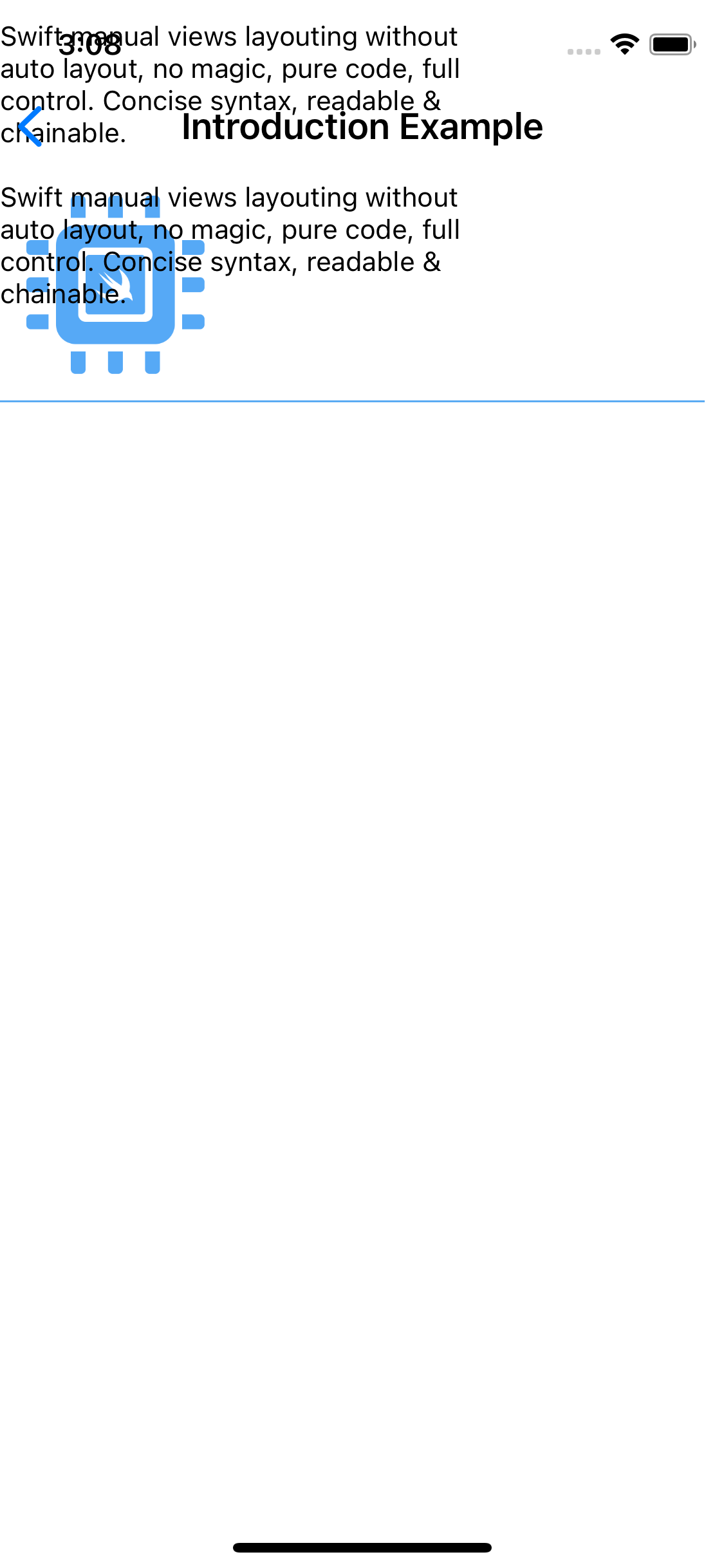
topIfNotBelow(...)works only for the specific case where you want to layout the view at the top of its superview when all relative views are hidden. Its not always the case. Suppose that in the "Introduction Example", theUISegmentedControlcould be hidden, the layout of thetextLabelfollowing it wich is layouted usingtextLabel.pin.below(of: segmented, aligned: .left)....wouldn't work withtopIfNotBelow(of: visible([segmented]), aligned: .left)because thetextLabelwould be wrongly layouted (see attached screenshot) -
Your proposition also only works if you want to apply all commands following
topIfNotBelow(...), in your example.size(100).hCenter().marginTop(12). But in many cases we would want to apply a different set of commands when all relative views are hidden. Note that in your example if theredViewis visible the padding of the first view will be 10 pixels, but if theredViewis hidden the padding will be 12 pixels.
To be accepted, it would need to be more generic. So for this reason your proposition cannot be integrated into PinLayout. Sorry, but if you come up with a more generic solution, I would be really interrested, I agree that something like your proposition is missing.
One possible solution for you case would be to use a variable that keeps the top position.
func performLayout() {
  var top = 0.0

  redView.pin.top(top).size(100).hCenter().marginTop(10)
  top = redView.isHidden ? top : redView.frame.maxY

  blueView.pin.top(top).size(100).hCenter().marginTop(12)
  top = blueView.isHidden ? top : blueView.frame.maxY

  greenView.pin.top(top).size(100).hCenter().marginTop(12)
  top = greenView.isHidden ? top : greenView.frame.maxY
  ...
}
Or you could even do something like this:
func performLayout() {
  var top = 0.0
  var marginTop = 10

  [redView, blueView, greenView].forEach {
  	$0.pin.top(top).size(100).hCenter().marginTop(marginTop)
  	top = $0.isHidden ? top : $0.frame.maxY
  	marginTop = 12
  }
}
Thanks again and sorry
Hi @lucdion, I'm so sorry for the delay in my answer. Thank you so much for your answer and your analysis. I understood the issues and limits of my proposal and will try to make it more generic and improve the approach. 😊