

 laurent22
I lost all my information
Hello! Today I open Joplin for the second time that day and I find that the notebook where I had more than 1500 notes has disappeared. I don't know why, but the last relevant thing I did was switch to a new webdav server. I used to use Pcloud before, but a few months ago they stopped providing webdav service, so I moved to Yandex. It took me a while to get it to sync, but after a few tries it seemed to work fine. However, when I open Joplin I see that in the sync status it says "remote items deleted", so I'm also losing the backup I had in the cloud. I don't know what happened to Joplin, but it's deleting EVERYTHING I had saved. I have a backup, but it is somewhat outdated. Any suggestion of what could have happened? Joplin has worked very well for me...so far.
Joplin 2.8.8 (prod, win32) Version Sincronization: 3 perfil version: 41 Llavero Soportado: No Revision: c2a6a13

Have you deleted the files on Pcloud? If not, maybe you can recover your notes from it.

This might helps. https://joplinapp.org/faq/#i-deleted-some-notes-by-accident-and-don-t-have-a-backup
For info, we have a FAQ entry about this problem: https://joplinapp.org/faq/#all-my-notes-got-deleted-after-changing-the-webdav-url

Maybe there should be a link from the settings screen to this page? Or Joplin can show a warning when WebDAV user changes.

Below the field we already have a warning, and we have the failsafe too, plus this FAQ entry. I don't think we need more because if someone is going to ignore all this, they'll probably also ignore any additional link we could add.
Thank you very much for the feedback. I think the closest answer is this: https://joplinapp.org/faq/#all-my-notes-got-deleted-after-changing-the-webdav-url I was doing tests. I had a json backup from about a month ago. There I was able to recover everything. I turned off sync, but was left with the desire to have my information in the cloud (which was one of the requirements I needed when choosing Joplin). Well, I'll keep testing. Thanks again!.
@laurent22 maybe a dialog can be added when Joplin detects a new WebDAV URL: "Warning: you seem to have changed the WebDAV URL. Have you copied the contents of Joplin over from your previous server?"
Two buttons: "Yes" or "No, copy the files for me." Clicking on the latter makes Joplin upload the local contents and then start syncing. Would that be possible?

Below the field we already have a warning, and we have the failsafe too
I think we have seen either unexpected or incorrect behaviour of the failsafe before though. When I first started using Joplin I made this exact mistake but the failsafe kicked in immediately and stopped me deleting anything. However other people on the forums have reported similar symptoms where it seems the failsafe is kicking in too late and the local notes have already been deleted or replaced with a bunch of conflicts.

Below the field we already have a warning, and we have the failsafe too
I think we have seen either unexpected or incorrect behaviour of the failsafe before though. When I first started using Joplin I made this exact mistake but the failsafe kicked in immediately and stopped me deleting anything. However other people on the forums have reported similar symptoms where it seems the failsafe is kicking in too late and the local notes have already been deleted or replaced with a bunch of conflicts.
I think we'd need to see an actual example. A few times this was reported for OneDrive or Dropbox but the failsafe doesn't apply to these, it's only for filesystem and WebDAV.
I've been testing to sync in both directions, either uploading or downloading content. I used the advanced sync options. If I click on the option "Re-upload local data to sync target" I see that it exceeds the amount of notes that my notebook has, it gets very slow and the upload seems to have no end. So I guess there will be duplicate content? Should I wait for the Yandex cache to clear the deleted?. Screenshot: https://i.postimg.cc/ZqP96fn3/screenshot-9.jpg
When trying the second option "Delete local data and re-download from sync target" the synchronization is correct and very fast... but I lose all the labels. So I keep testing. Thanks for the support here.
I see that it exceeds the amount of notes that my notebook has
The attachments(image, file, ...) and the notebook history are also "items", so the item count might be bigger than note count.
I see that it exceeds the amount of notes that my notebook has
The attachments(image, file, ...) and the notebook history are also "items", so the item count might be bigger than note count.
Cleared up. Thank you!
I keep doing tests. I see that the synchronization is always missing something to complete 100%. Every time I open Joplin or hit the sync button I get new items to upload. Once 4, another 2, another 7... but it never ends 100%. And if it says "Complete Synchronization" I have the upper window open where it says "Some of the elements could not be synchronized". Is this a server problem? I don't know how stable Yandex is. Any idea?. Thank you! :-)
And if it says "Complete Synchronization" I have the upper window open where it says "Some of the elements could not be synchronized".
You can click "View them now" to know why they are not synchronized. Posting the error info there will be helpful.

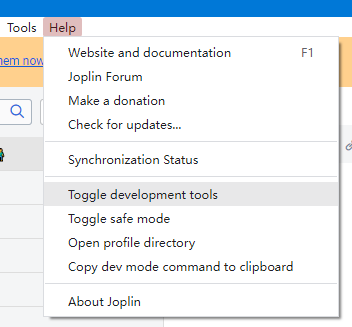
You can also use the development tool to get the details of the error.


Sure:
Advanced tools Items that cannot be synchronized These items will remain on the device but will not be uploaded to the sync target. In order to find these items, either search for the title or the ID (which is displayed in brackets above). google-serp-link-building-servic_483f0b3bd13f4a3a8e945c80b061573a.png (10617d2b81604aa49f83106585729909) could not be uploaded: network timeout at: https://webdav.yandex.com/.resource/10617d2b81604aa49f83106585729909[Retry] google-takes-serp-real-estate_62050a725c0d43e68c252f0c71746144.png (98472de60ea6413ebc0ad41174c90056) could not be uploaded: network timeout at: https://webdav.yandex.com/.resource/98472de60ea6413ebc0ad41174c90056[Retry] google-featured-snippet_6d024dc7432748b890612f016fb6becb.png (f1834a622eef4ca99186b7ef7a69f04c) could not be uploaded: network timeout at: https://webdav.yandex.com/.resource/f1834a622eef4ca99186b7ef7a69f04c[Retry] uber-authority-sites-in-SERP_c19e65fcf653472793d1d6821ef30ad0.png (6a506e068619446aa3f7db579edb2d00) could not be uploaded: network timeout at: https://webdav.yandex.com/.resource/6a506e068619446aa3f7db579edb2d00[Retry] Attachments Not downloaded: 0 Downloading: 0 Downloaded and decrypted: 2266 Downloaded and encrypted: 0 Created locally: 2219 Error: 0 Sync status (synced items / total items) Note: 1247/1246 Folder: 3/3 Resource: 4482/4485 Tag: 141/136 NoteTag: 3029/2632 MasterKey: 0/1 Revision: 205/321 Total: 9107/8824
Conflicted: 0 To delete: 0 Folders Welcome! (Mobile): 4 notes Welcome! (Desktop): 4 notes Libreta Muá 01: 1236 notes
So the problem is the performance of Yandex. I keep researching. Thank you!
Hey there, it looks like there has been no activity on this issue recently. Has the issue been fixed, or does it still require the community's attention? If you require support or are requesting an enhancement or feature then please create a topic on the Joplin forum. This issue may be closed if no further activity occurs. You may comment on the issue and I will leave it open. Thank you for your contributions.
![github-actions[bot] avatar](https://avatars.githubusercontent.com/in/15368?v=4 "Published by a pub.dev verified publisher")
Closing this issue after a prolonged period of inactivity. If this issue is still present in the latest release, feel free to create a new issue with up-to-date information.