

 laurent22
Sync to file system fails (Android 12, Galaxy Tab S8)
Environment
Joplin version: 2.8.1 Platform: Android on Galaxy Tab S8 (SM-X700) OS specifics: Android 12
Steps to reproduce
- In Android settings, allow access to storage
- In Joplin, open configuration menu
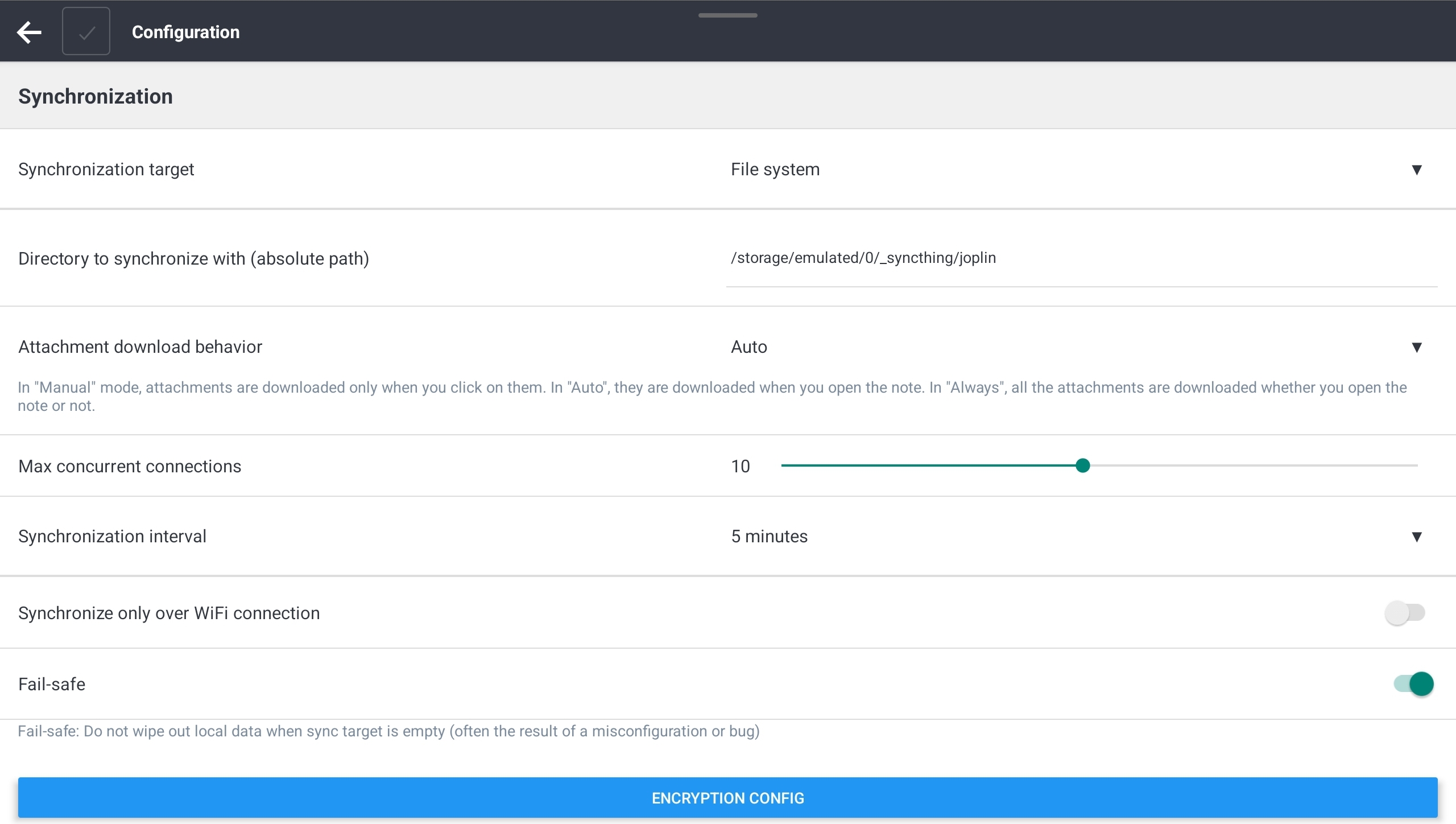
- Select "File System" for "Synchronisation Target"
- Enter directory path in "Directory to synchronise with..."
- Exit configuration menu, click on "Synchronize"

Describe what you expected to happen
I expect notes to be synchronised from/to local directory.
Logfile
Date,Level,Message
08-19T11:57:18,30,"""ResourceService::deleteOrphanResources:", "[]""
08-19T11:57:18,30,"RevisionService: ""maintenance: Done in 129ms""
08-19T11:57:18,30,"""ResourceService::indexNoteResources: Completed""
08-19T11:57:18,30,"RevisionService: ""collectRevisions: Created revisions for 0 notes""
08-19T11:57:18,30,"RevisionService: ""maintenance: Starting...""
08-19T11:57:18,30,"RevisionService: ""maintenance: Service is enabled""
08-19T11:57:18,30,"""ResourceService::indexNoteResources: Start""
08-19T11:56:19,30,"""SearchEngine: Updated FTS table in 14ms. Inserted: 0. Deleted: 0""
08-19T11:56:18,30,"""SearchEngine: Updating FTS table...""
08-19T11:56:13,30,"RevisionService: ""maintenance: Done in 230ms""
08-19T11:56:13,30,"RevisionService: ""collectRevisions: Created revisions for 0 notes""
08-19T11:56:12,30,"RevisionService: ""maintenance: Service is enabled""
08-19T11:56:12,30,"RevisionService: ""maintenance: Starting...""
08-19T11:56:12,30,"""DecryptionWorker: completed decryption.""
08-19T11:56:12,30,"""DecryptionWorker: starting decryption...""
08-19T11:56:11,30,"Synchronizer: ""Total folders: 0""
08-19T11:56:11,30,"Synchronizer: ""Total notes: 0""
08-19T11:56:11,30,"Synchronizer: ""Total resources: 3""
08-19T11:56:11,20,"Synchronizer: ""There was some errors:""
08-19T11:56:11,20,"Synchronizer: ""Error: Error: Operation not permitted. Path: /storage/emulated/0/_syncthing/joplin/locks/2_2_04e09f8dd084466bad67d3f0e4dcc967.json
Code: EUNSPECIFIED
[email protected]:1108:275
index.android.bundle:1108:4056
[email protected]:83:588
index.android.bundle:83:1893
[email protected]:83:588
[email protected]:83:1069
index.android.bundle:83:1241
[email protected]:77:157
index.android.bundle:77:866
index.android.bundle:85:1672
[email protected]:85:500
[email protected]:85:898
[email protected]:85:3054
[email protected]:38:2868
index.android.bundle:38:960
[email protected]:38:2504
[email protected]:38:919
value@[native code]
value@[native code]""
08-19T11:56:11,30,"Synchronizer: ""Operations completed: ""
08-19T11:56:11,30,"Synchronizer: ""Sync: finished: Synchronisation finished [1660902971505]""
08-19T11:56:11,10,"Synchronizer: ""Error: Error: Operation not permitted. Path: /storage/emulated/0/_syncthing/joplin/locks/2_2_04e09f8dd084466bad67d3f0e4dcc967.json
Code: EUNSPECIFIED
[email protected]:1108:275
index.android.bundle:1108:4056
[email protected]:83:588
index.android.bundle:83:1893
[email protected]:83:588
[email protected]:83:1069
index.android.bundle:83:1241
[email protected]:77:157
index.android.bundle:77:866
index.android.bundle:85:1672
[email protected]:85:500
[email protected]:85:898
[email protected]:85:3054
[email protected]:38:2868
index.android.bundle:38:960
[email protected]:38:2504
[email protected]:38:919
value@[native code]
value@[native code]""
08-19T11:56:11,30,"""MigrationHandler: Acquiring exclusive lock""
08-19T11:56:11,30,"""MigrationHandler: Sync target version is 0 or 1 - creating "locks" and "temp" directory:", "{"version":0}""
08-19T11:56:11,30,"Synchronizer: ""Sync target remote info:", "{"version_":0,"masterKeys_":[],"e2ee_":{"value":false,"updatedTime":0},"activeMasterKeyId_":{"value":"","updatedTime":0},"ppk_":{"value":null,"updatedTime":0}}""
08-19T11:56:11,30,"Synchronizer: ""Sync target is new - setting it up...""
08-19T11:56:11,30,"""ResourceService::indexNoteResources: Completed""
08-19T11:56:11,30,"Synchronizer: ""Indexing resources...""
08-19T11:56:11,30,"""ResourceService::indexNoteResources: Start""
08-19T11:56:11,30,"Synchronizer: ""Sync: starting: Starting synchronisation to target 2... supportsAccurateTimestamp = false; supportsMultiPut = false [1660902971505]""
08-19T11:56:11,30,"""Preparing scheduled sync""
08-19T11:56:11,30,"""Starting scheduled sync""
08-19T11:56:11,30,"""DecryptionWorker: completed decryption.""
08-19T11:56:11,30,"""DecryptionWorker: starting decryption...""
08-19T11:56:10,30,"""Updating all notifications...""
08-19T11:56:10,30,"""Garbage collecting alarms...""
08-19T11:56:10,30,"Synchronizer: ""Total resources: 3""
08-19T11:56:10,20,"Synchronizer: ""There was some errors:""
08-19T11:56:10,20,"Synchronizer: ""Error: Error: Operation not permitted. Path: /storage/emulated/0/_syncthing/joplin/locks/2_2_04e09f8dd084466bad67d3f0e4dcc967.json

Probably a duplicate of https://github.com/laurent22/joplin/issues/5779. You need to wait for the next stable release (or apply the command line ADB fix suggested in that issue).

You can change the syncthing path to /storage/emulated/0/Android/data/net.cozic.joplin/files/_sync And then no permission problem.
thanks for syncthing(thinking about everything)

Except that Syncthing cannot access anything inside the .../Android/data folder, so changing the folder like that isn't very useful in this case :wink:.
Except that Syncthing cannot access anything inside the
.../Android/datafolder, so changing the folder like that isn't very useful in this case 😉.
I had find it, so maybe you can try. (l 'm not test it)
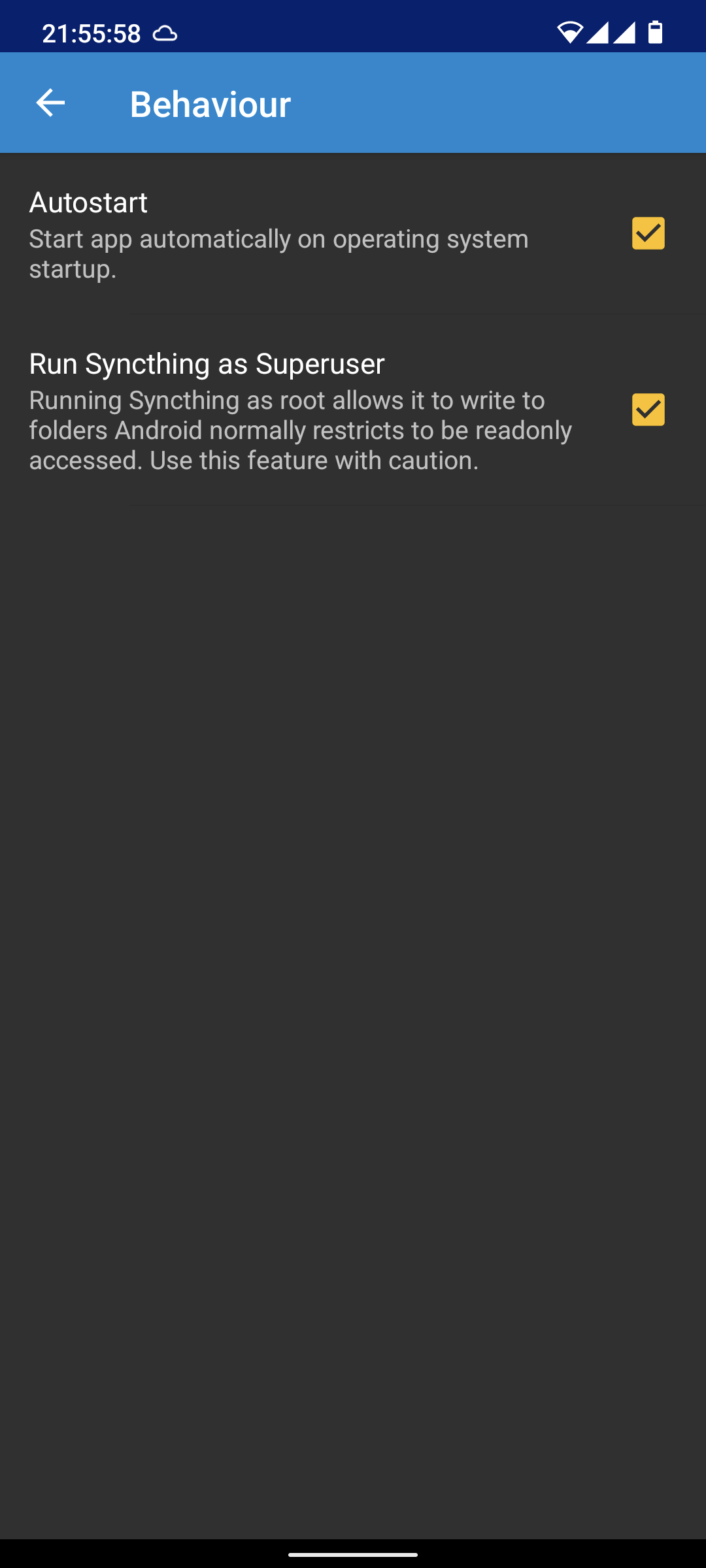
Obviously, with root you can access anything. The same would be true for Joplin if it had an option to run as root.
This also happens in my household with different phones/tablets, unusable at the moment unfortunately

Hey there, it looks like there has been no activity on this issue recently. Has the issue been fixed, or does it still require the community's attention? If you require support or are requesting an enhancement or feature then please create a topic on the Joplin forum. This issue may be closed if no further activity occurs. You may comment on the issue and I will leave it open. Thank you for your contributions.
![github-actions[bot] avatar](https://avatars.githubusercontent.com/in/15368?v=4 "Published by a pub.dev verified publisher")
Closing this issue after a prolonged period of inactivity. If this issue is still present in the latest release, feel free to create a new issue with up-to-date information.