
fontspec
 fontspec copied to clipboard
 latex3
Use only one Scale when setting families via Scale=MatchXcase
Description
When a user requests Scale=MatchLowercase or Scale=MatchUppercase, fontspec will compute the scale factor for each of the many font faces/instances separately. This is inappropriate for mono-spaced font families as it may destroy alignment.
Check/indicate
- [x] Relevant for XeTeX
- [x] Relevant for LuaTeX
- [x] Issue tracker has been searched for similar issues?
Minimal example demonstrating the issue
\documentclass{article}
\usepackage{fontspec}
\setmainfont{texgyretermes}[
  Extension=.otf,
  UprightFont=*-regular,
  BoldFont   =*-bold
]
\setmonofont{FiraMono}[
  Extension=.otf,
  UprightFont=*-Regular,
  BoldFont   =*-Bold,
  Scale=MatchLowercase
]
\setlength\parindent{0pt}
\newcommand*\test{%
  \rule[-2pt]{0.4pt}{10pt}%
  01234567890123456789%
  \rule[-2pt]{0.4pt}{10pt}%
}
\begin{document}
\ttfamily\test\par
\bfseries\test
\end{document}
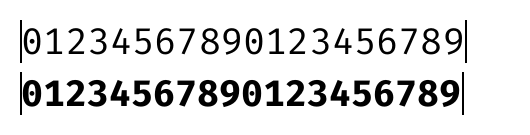
Further details
Perhaps fontspec can provide a new key, so that users can “pass the calculated scale for ‘regular’ to all other faces”, instead of using possibly different scales for different faces. This key should be enabled by default for setting up the mono-spaced family.

The Scale=MatchXcase calculations seemed to be implemented incorrectly as well.
| Family | Regular x-height | Bold x-height |
|---|---|---|
| TeX Gyre Termes | 450 | 461 |
| Fira Mono | 527 | 531 |
The log file reads:
Package fontspec Info: FiraMono-Regular scale = 0.8538892508143322.

Package fontspec Info: FiraMono-Bold scale = 0.8474580167588133.
which suggests that 450/527 is used for FiraMono-Regular and 450/531 (?!) is used for FiraMono-Bold. However, I expect 461/531 to be used for FiraMono-Bold (inappropriate perhaps, but at least consistent).
On second thought, is it really necessary to use different scales for different faces? Even if we matched Regular with Regular, Bold with Bold, Italic with Italic, etc., there would be other combinations (Regular with Italic, Italic with Bold).
The point is, a particular scale, which works for one combination, doesn’t necessarily work for others. So, there is nothing wrong to apply the Regular+Regular scale to all other faces, which also fixes this issue…
Thanks for catching this — I had never thought about the fact that these rescale all fonts within a family uniquely. This could be quite bad if an italic face is accidentally shrunk against the designers wishes! I agree the best fix is to calculate the scale only once and then apply that fixed value to all faces within the family.
This will require a bit of extra code logic to make work, so I’ll have to put this on the todo list...
