

 l29ah
l29ah
mpv-lastfm error scrobbling: "The system cannot find the path specified"
I am using mpv on my Windows 10 device and am facing an issue while running the mpv-lastfm.lua script. I will include all the necessary details for quick resolving.
- Installed mpv using Chocolatey
- Since using Windows, the lua script is here:
C:/Users/Username/AppData/Roaming/mpv/scripts/mpv-lastfm.lua - Installed scrobbler with no issues there and even tried manually entering details and scrobbling a track which worked just fine
- I have put the lastfm.conf here:
C:/Users/arafat_ar13/AppData/Roaming/mpv/script-opts/lastfm.confwhich contains a single lineusername="my_username_lastfm_in_double_quotes"
Now, when I am playing a song, when the song is 50% done, the script tries to run and scrobble the song and then an error occurs which prevents any data being sent to Last.fm. I will include a screenshot for further clarification.
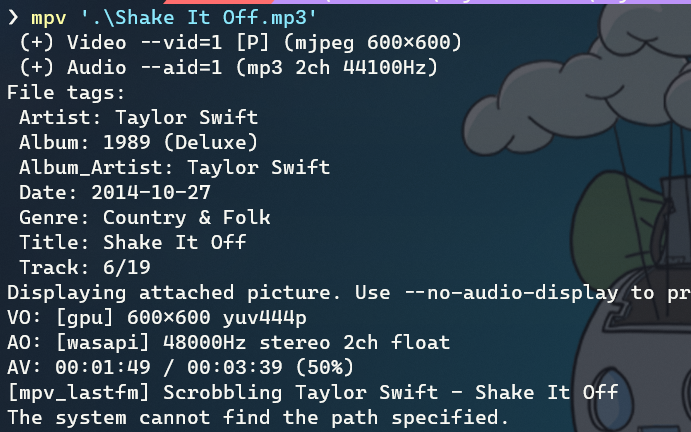
As shown the error says that the path specified cannot be found. I am not really familiar with Lua scripting as I am a Python guy myself, so it would be really helpful if someone can point me in the right direction as to how to fix this.


I had cloned the repo and used the setup.py file to install the package to my system. From any directory typing scrobbler using the Terminal works just fine, which I guess is the same as adding it to the $PATH. Also, usually we add programs ending in .exe to the $PATH on Windows so that they can be accessed easily using the Terminal. But when using general Python packages, we just install it using pip or the setup.py file if the repo is cloned and it works.
But still I gave it a shot and I added my cloned repo to the Windows $PATH environment variable. Unfortunately, the problem is still there and the same error message is shown.