

 kzahel
support multiple localhosts
Hi many of times we need to test something in other projects and quickly back to our project so we need to have more than one localhost which they can be separate with different IPs or different Ports is any way to I can have more than one localhost simply thanks in advance

I'd love to add this feature. However the UI seems a little difficult. Currently the app is pretty easy to use and get started, but I'm not sure how the interface should look for selecting multiple folders and ports. Do you have any ideas?

thanks for your answer.
you think it's so hard to choose?
just need a list and a + button to add a new directory
I did some thinking on this.
Usually a web server can serve multiple different websites by looking at the "Host:" header. However web server really only reliably has 127.0.0.1 as the host header. (At least on a chromebook, where you can't edit the /etc/hosts file).
-
Option 1: I could simply have each directory served require a separate listening port. UI gets more complicated, and seems a little annoying...
-
Option 2: (online-only) If the user is online, I could supply a list of domains that resolve to 127.0.0.1 such as webapp1.webserverchrome.com webapp2.webserverchrome.com or similar and have each one go to a different directory. Unfortunately this will not work when the user is offline
-
Option 3: The best (and most complicated) option would be to have the app act as a SOCKS5 proxy server and use a proxy autoconfiguration to only have it apply to the configured domains and have the proxy server resolve the configured domains to the local server. That could all be done offline and on a chromebook.
I was thinking on the first option.
I don't think it be so complicated? handling of it is so simple, just need an empty panel list with + , - , edit buttons like this 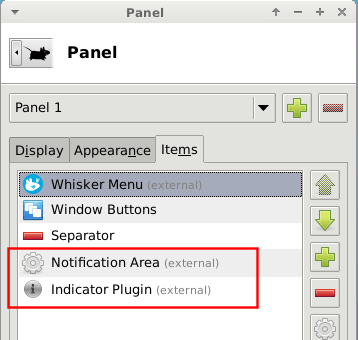 which on plus and edit mode of any field we can show current app window
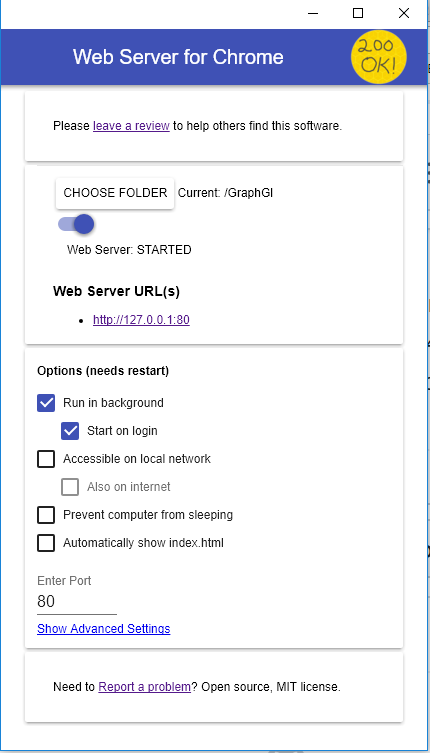
I would love to have this feature too The UI does need to be complex, something like this enough
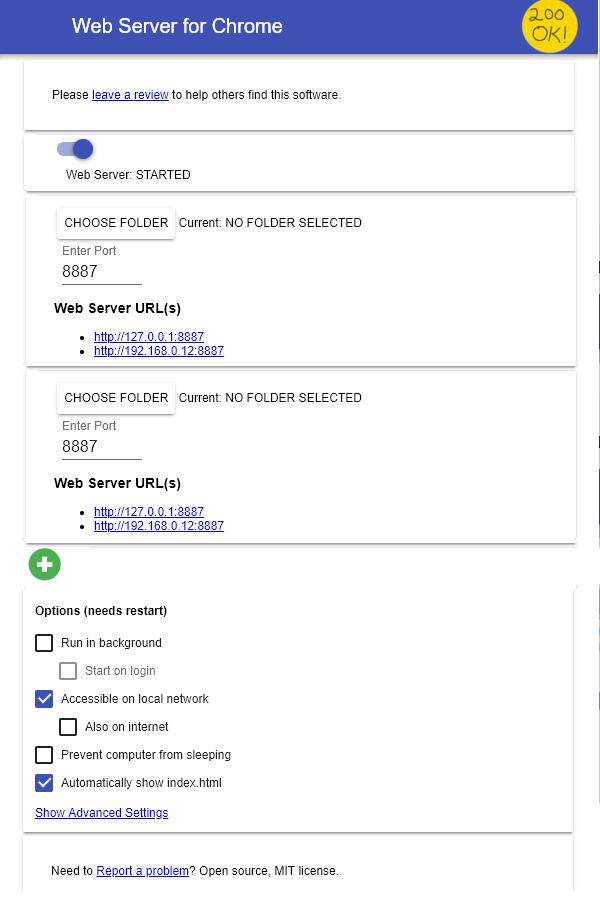

Oh. That does look really reasonable. I may get around to this soon and that would be the best way to do the UI I think Thanks!
On Sat, Aug 3, 2019, 4:24 AM FlorentMasson [email protected] wrote:
I would love to have this feature too The UI does need to be complex, something like this enough
[image: chrome web server] https://user-images.githubusercontent.com/9975455/62411373-04dfce00-b5f2-11e9-9434-dcb06715eb06.png
— You are receiving this because you were mentioned. Reply to this email directly, view it on GitHub https://github.com/kzahel/web-server-chrome/issues/111?email_source=notifications&email_token=AABGVECNHM3WUOBN2KHFRYDQCVTIFA5CNFSM4D7WZPTKYY3PNVWWK3TUL52HS4DFVREXG43VMVBW63LNMVXHJKTDN5WW2ZLOORPWSZGOD3PMVTI#issuecomment-517917389, or mute the thread https://github.com/notifications/unsubscribe-auth/AABGVEH4GNDBLFROA3554ETQCVTIFANCNFSM4D7WZPTA .
I looked into doing this and I am about 90% certain when I say this that this will not happen. It would require to duplicate TONS of code or do some extremely advanced stuff with javascript.
