

 kyamagu
Layer based stacked rendering
Is your feature request related to a problem? Please describe. I am new to skia and I haven't explored much of it's code base thus I have no clue whether the feature I'm asking is already implemented or not. When I say Layer based rendering, that means you execute and store your drawing instructions in some form and draw it later when required. For example:
drawRect...
drawCircle...
drawRect...
The above rendering commands will produce an image where circle is drawn in between two rectangles.
Describe the solution you'd like I'm looking for a solution something like this:
drawRect...
layer = createNewLayer()
layer.begin() # start/store drawing list
drawCircle...
layer.end() # stop storing drawing
drawRect.... # back to normal
drawLayer(layer) # draw what's been stored in  layer.(circle or what ever is drawn)
The above code should produce an image where circle is drawn on top of everything.
Describe alternatives you've considered At present in my open gl based app(not using skia), I'm using a image/texture based hack to to draw in layers.
drawRect...
tex = createNewTexture()
draw circle on this texture
drawRect...
drawTexture(tex)
Additional context None


Hello, As you have suggested using skia.Picture for layer-based rendering, Here is what I understood so far:
import contextlib, glfw, skia
from OpenGL import GL

WIDTH, HEIGHT = 640, 480

@contextlib.contextmanager
def glfw_window():
    if not glfw.init():
        raise RuntimeError('glfw.init() failed')
    glfw.window_hint(glfw.SAMPLES, 4)
    glfw.window_hint(glfw.STENCIL_BITS, 8)
    window = glfw.create_window(WIDTH, HEIGHT, '', None, None)
    glfw.make_context_current(window)
    yield window
    glfw.terminate()

@contextlib.contextmanager
def skia_surface(window):
    context = skia.GrDirectContext.MakeGL()
    backend_render_target = skia.GrBackendRenderTarget(
        WIDTH,
        HEIGHT,
        0,  # sampleCnt
        0,  # stencilBits
        skia.GrGLFramebufferInfo(0, GL.GL_RGBA8))
    surface = skia.Surface.MakeFromBackendRenderTarget(
        context, backend_render_target, skia.kBottomLeft_GrSurfaceOrigin,
        skia.kRGBA_8888_ColorType, skia.ColorSpace.MakeSRGB())
    assert surface is not None
    yield surface
    context.abandonContext()

with glfw_window() as window:
    GL.glClear(GL.GL_COLOR_BUFFER_BIT)
    fillPaint = skia.Paint(
        Style=skia.Paint.kFill_Style,
        Color=skia.ColorBLUE
    )

    rect1 = skia.Rect.MakeXYWH(10,10,100,100)
    rect2 = skia.Rect.MakeXYWH(20,20,200,200)

    with skia_surface(window) as surface:
        with surface as canvas:
            # Begin Record big RED rect
            fillPaint.setColor(skia.ColorRED)
            recorder = skia.PictureRecorder()
            canvas1 = recorder.beginRecording(skia.Rect(25, 25))
            canvas1.drawRect(rect2, fillPaint)
            picture = recorder.finishRecordingAsPicture()
            # END Record big RED rect
            fillPaint.setColor(skia.ColorBLUE)
            # draw blue rect
            canvas.drawRect(rect1, fillPaint)
            # draw red rect
            canvas.drawPicture(picture)
        surface.flushAndSubmit()
        glfw.swap_buffers(window)

        while (glfw.get_key(window, glfw.KEY_ESCAPE) != glfw.PRESS
            and not glfw.window_should_close(window)):
            glfw.wait_events()
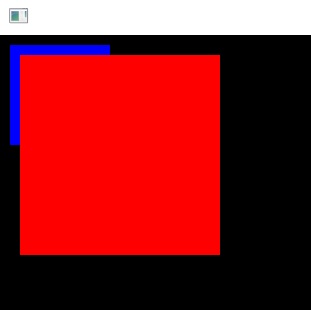 Although I'm getting correct results but I need to clarify two things.
canvas1 = recorder.beginRecording(skia.Rect(25, 25))
I'm using a very small canvas area but drawing a much bigger rectangle in it and it's getting drawn perfectly. Why is it so? Doc says about PictureRecorder.beginRecording method's ambiguous behavior:
the cull rect used when recording this picture. Any drawing the falls outside of this rect is undefined, and may be drawn or it may not.
What if the user doesn't know the exact size initially? specifying a much bigger rect based on assumption would do? I checked by changing rect size to 300,300, no complaints. 2. The RED rect's x and y coordinates (20,20) are with respect to window coordinates and it's getting drawn correctly. Earlier I was under the impression that we have to specify coordinates locally based on canvas1 and later we have to do some offsetting when drawing on the main canvas but I think I was wrong. One way it's easier and hassle-free but I need to make sure that I have correctly understood the concept.
Cheers
Think of a picture as a separate surface (like a normal image/screen). Anything you draw with canvas1 will use its very own coordinate system. Then think of it as a compact single picture. Now canvas.drawPicture will draw it with canvas's transformations.
If you don't know the required size, you can at least know the drawing area (on-screen). You can use that to
- figure out the screen's dimensions
- make a picture of that size
- set
canvas1.concat(canvas.getTotalMatrix()) - draw on the picture in
canvas's coordinate - draw the picture on canvas without any transformations
canvas.save()
canvas.resetMatrix()
canvas.drawPicture(picture)
canvas.restore()
Some of this will land in m117 - I have got some C code from skia itself which I am translating to python, it goes something like this:
recorder = PictureRecorder()

infiniteRect = Rect.MakeLTRB(ScalarNegativeInfinity, ScalarNegativeInfinity,
                                 ScalarInfinity, ScalarInfinity)
bboxh = RTreeFactory()()

recordingCanvas = recorder.beginRecording(infiniteRect, bboxh)

...

picture = recorder.finishRecordingAsPicture()
bounds = picture.cullRect()
bounds is your picture size. Then you set up a canvas of the right size and draw the picture on to it:canvas.drawPicture( picture ) .
This requires a new beingRecording prototypes, a new class bindingRTreeFactory, and some new constants ScalarNegativeInfinity, ScalarNegativeInfinity.

This is what will work in 117b3 (have a look at the m117 pull). If you pass a infinite rect in for beginningRecording, at the end of recording the cullRect will be updated to be the actual bound box:
diff --git a/examples/issue-167.py b/examples/issue-167.py
index 58702b96..1162464d 100644
--- a/examples/issue-167.py
+++ b/examples/issue-167.py
@@ -45,9 +45,13 @@ with glfw_window() as window:
             # Begin Record big RED rect
             fillPaint.setColor(skia.ColorRED)
             recorder = skia.PictureRecorder()
-            canvas1 = recorder.beginRecording(skia.Rect(25, 25))
-            canvas1.drawRect(rect2, fillPaint)
+            infiniteRect = skia.Rect.MakeLTRB(skia.ScalarNegativeInfinity, skia.ScalarNegativeInfinity,
+                                              skia.ScalarInfinity, skia.ScalarInfinity)
+            bboxh = skia.RTreeFactory()()
+            recordingCanvas = recorder.beginRecording(infiniteRect, bboxh)
+            recordingCanvas.drawRect(rect2, fillPaint)
             picture = recorder.finishRecordingAsPicture()
+            print(picture.cullRect())
             # END Record big RED rect
             fillPaint.setColor(skia.ColorBLUE)
             # draw blue rect
out put:
Rect(20, 20, 220, 220)
Without doing this, cullRect() returns what you passes in. ie. Rect(0, 0, 25, 25). I read the doc, it says the Rect you passed in is a hint. So I suppose if you pass something in, you get it back. If you say you don't know, (with an infinite rect), it is updated to an actual rect. Anyway, I think I borrowed the C version of this stuff from somewhere inside skia itself.
Your 2nd question is easy - you did not specify any offset of canvas1 against canvas. So they are taken to be starting from the same point. If you actually want a offset, you do a canvas.translate() before canvas.drawPicture(picture)
diff --git a/examples/issue-167.py b/examples/issue-167.py
index 1162464d..3197c1e9 100644
--- a/examples/issue-167.py
+++ b/examples/issue-167.py
@@ -57,6 +57,7 @@ with glfw_window() as window:
             # draw blue rect
             canvas.drawRect(rect1, fillPaint)
             # draw red rect
+            canvas.translate(200, 0)
             canvas.drawPicture(picture)
         surface.flushAndSubmit()
         glfw.swap_buffers(window)